

When a Shopping campaign underperforms, the product data is often the first place to look. A missing GTIN, a variant without a size or a sale price that never reached Merchant Center can hold back a product before bidding has any say.
Two changes in Google’s product data specification make this a good month to check. Product images need to be at least 500 x 500 pixels, with enforcement starting on 31 January 2027. And titles written with generative AI should be sent in the structured title attribute, flagged as AI-generated.
Both affect anyone using a feed tool that rewrites images or titles automatically. This guide helps you audit your feed first, then decide whether you need a tool and which kind.
You will get:
- A 45-minute product feed audit you can run in Merchant Center today
- 8 product feed management tools compared on pricing basis, entry price, trial and limits, checked on 27 November 2026
- A 6-question scorecard and a worked cost example for a store with 800 products in 3 sizes
- The first 4 rules worth building in any feed tool
1. What Product Feed Management Tools Do
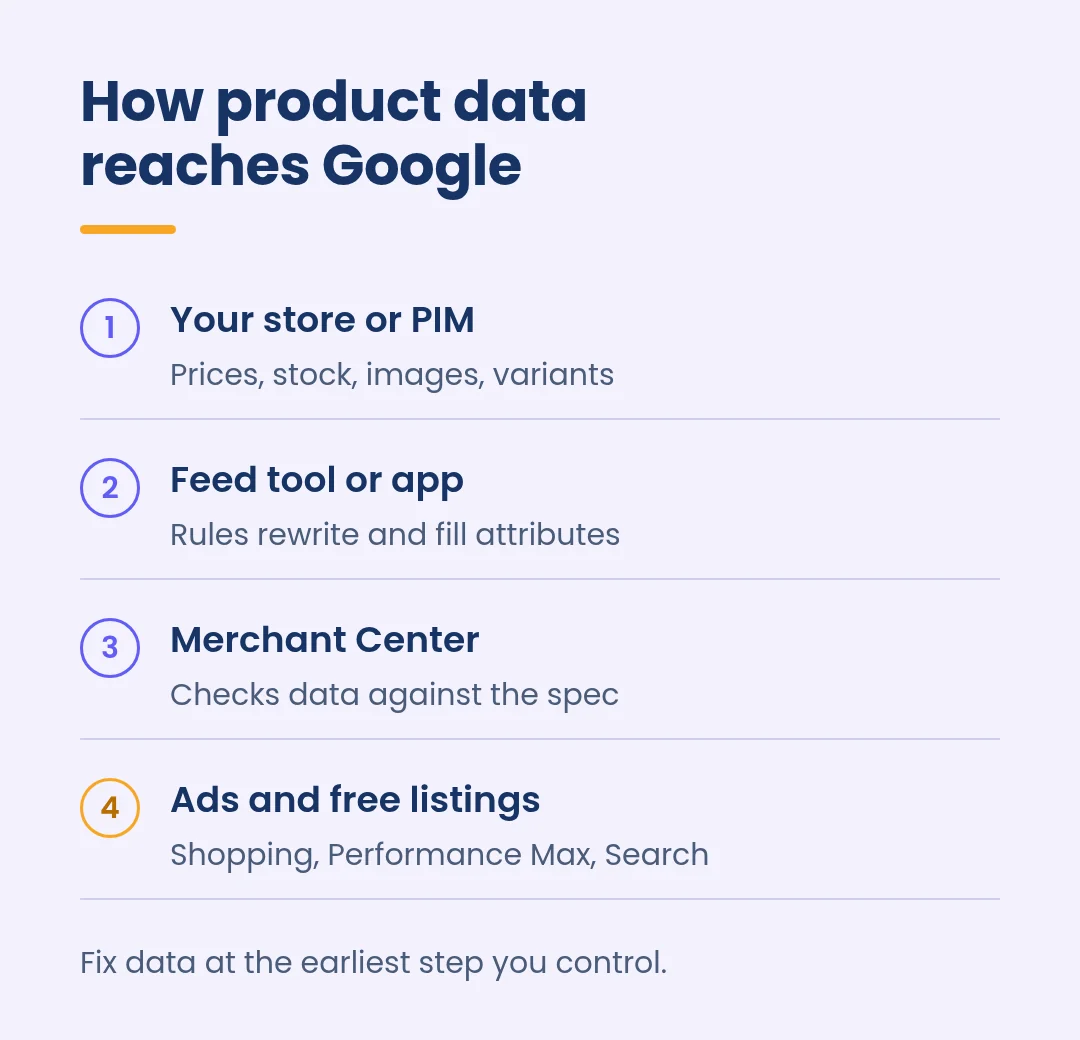
A product feed management tool takes product data from your store, PIM or spreadsheet, changes it with rules and sends a version to each channel in the format that channel expects. Google Merchant Center, Meta, Microsoft Advertising, TikTok and marketplaces all want slightly different fields.
The rules are the useful part. A rule can add the brand and colour to every title, map your categories to Google’s taxonomy or drop out-of-stock items from one channel only.
What Merchant Center already does
Google says creating a Merchant Center account and showing products on Google is free. Many stores never switch on its built-in editing tools, which come with an add-on called Advanced data source management.
Once the add-on is on, you get attribute rules (formerly feed rules) and supplemental data sources. Rules can set, extract or combine values, and you can test draft rules before applying them.
A supplemental source, for example a Google Sheet keyed on product ID, can add or override attributes such as custom labels. It cannot add or remove products on its own.
Signs you have outgrown Merchant Center alone
- You advertise the same catalogue on Meta, Microsoft Ads, TikTok or Pinterest and keep fixing the same error in several places.
- You need custom labels from data your store does not hold, such as margin bands or return rates.
- You sell in several countries or languages and maintain a separate feed for each.
- Your platform’s default export drops variant attributes or images, and nobody on the team can edit the export.
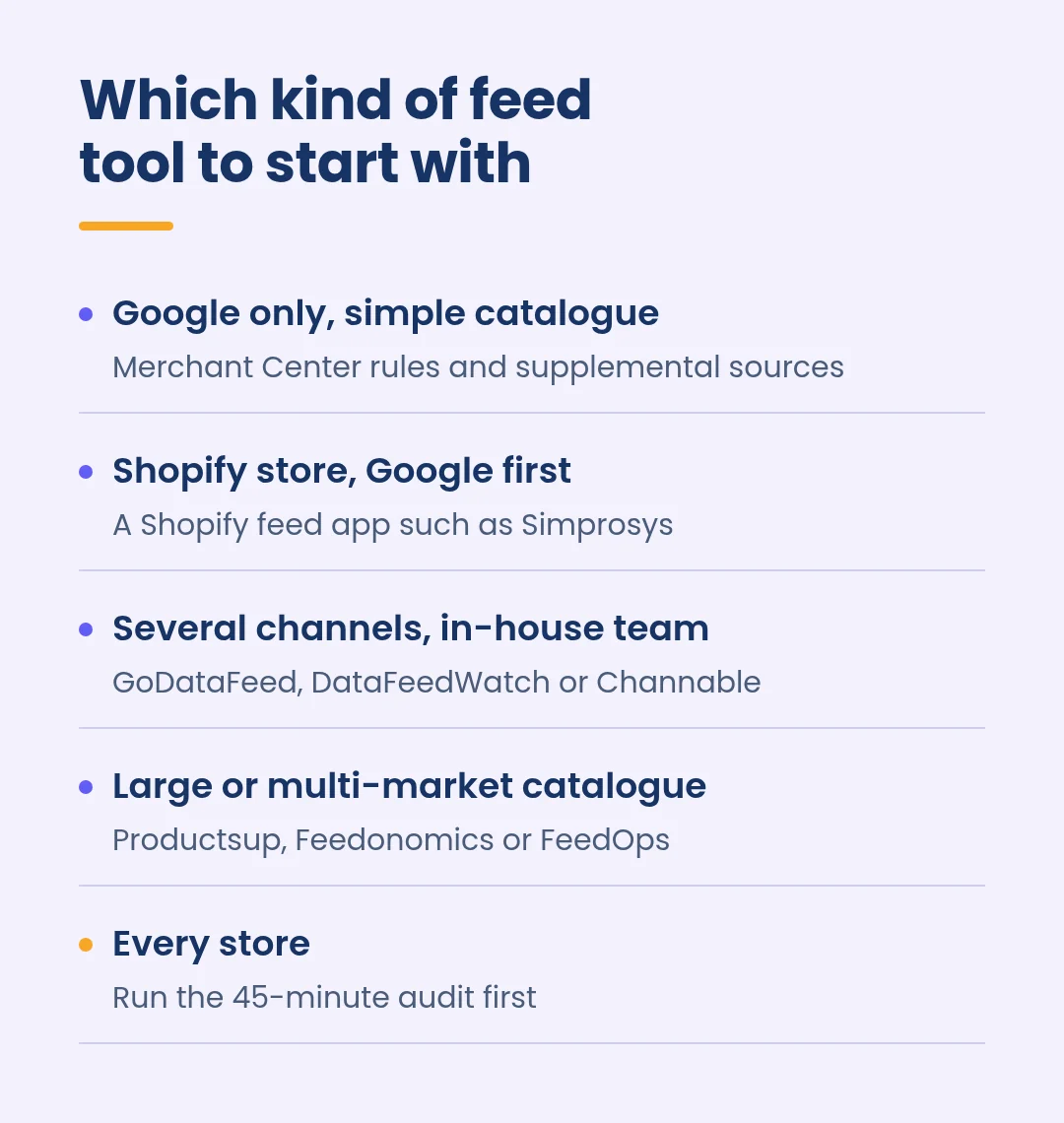
If none of these apply, start with Merchant Center rules. A paid tool adds speed and channel coverage, not better data on its own.
2. The 45-Minute Product Feed Audit
Run this before you speak to any vendor. It tells you which problems are in the source data, which a rule can fix and which need a developer.
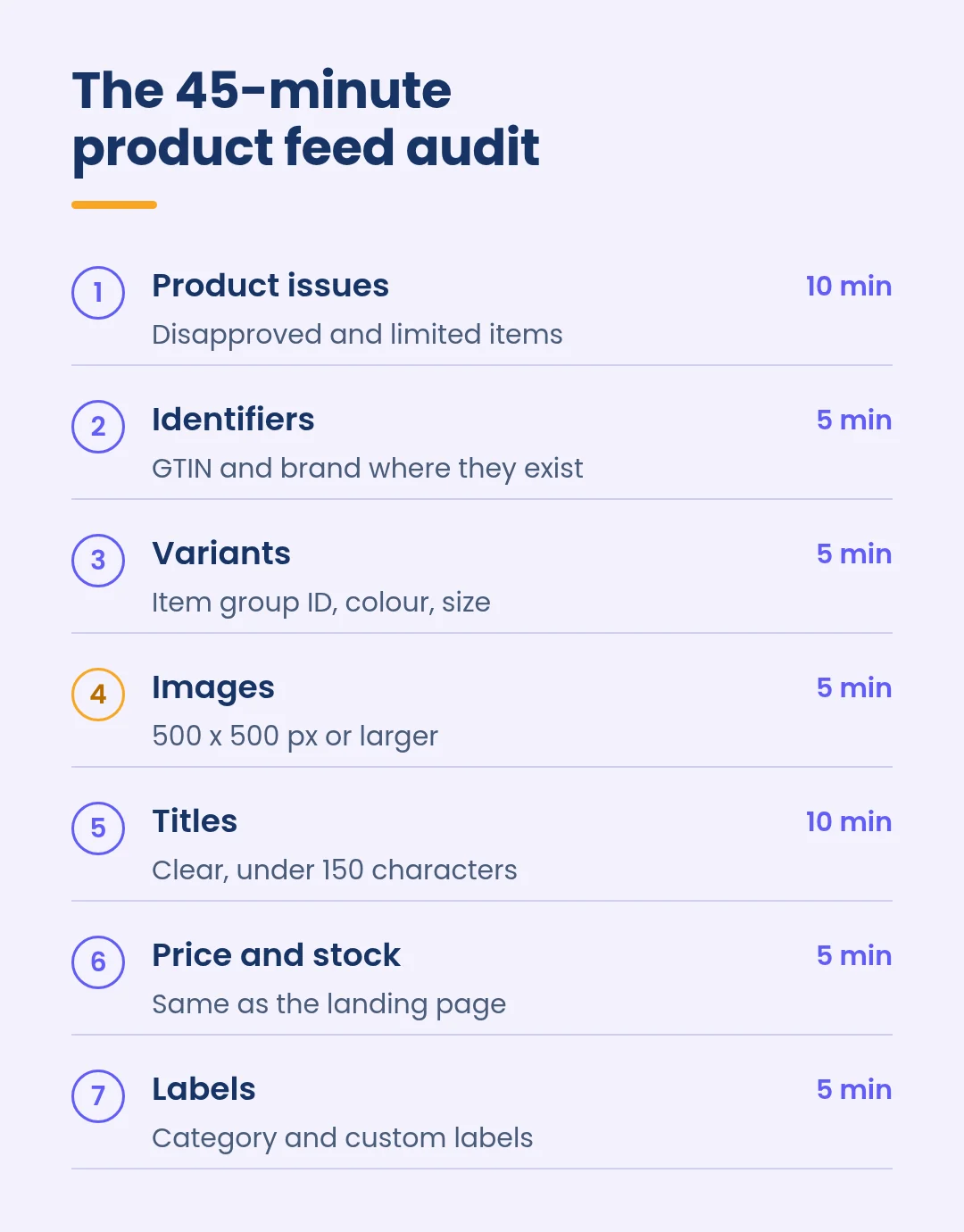
| Check | Where to look | What good looks like | Time |
|---|---|---|---|
| 1. Product issues | Merchant Center product issues and diagnostics | Disapproved and limited items listed by cause, top causes noted | 10 min |
| 2. Identifiers | Products missing GTIN or brand | GTIN and brand sent wherever the manufacturer assigns them | 5 min |
| 3. Variants | Products that come in sizes or colours | Item group ID plus colour and size on every variant | 5 min |
| 4. Images | Main image size on a sample of 20 products | At least 500 x 500 px before 31 January 2027 | 5 min |
| 5. Titles | Your 20 best sellers by revenue | Under 150 characters, product type and key attribute near the start | 10 min |
| 6. Price and stock | 10 products checked against the landing page | Same price, sale price and availability in feed and on site | 5 min |
| 7. Labels | Google product category and custom labels | 1 category per product, labels you use in bidding | 5 min |
Checks 1 to 3: errors and identifiers
Google’s specification lists the common causes of product problems: incorrect Google product category or GTIN values, and missing or incorrect variant attributes such as item group ID, colour or size.
It adds low-quality images and conflicting data between your data source and website. That list is a good order to work in.
Item group ID is required for variants in the UK, France, Germany, Brazil, Japan and the US, and for all variants in free listings. If your clothing or shoe store groups sizes badly, fix the export before writing rules on top of it.
Checks 4 and 5: images and titles
Pull the main image for 20 products and check the size. Anything under 500 x 500 px needs replacing before the January 2027 enforcement date, and a feed tool cannot invent a sharper photo.
For titles, the limit is 150 characters. If a tool or app writes titles with AI, Google asks you to send them as structured title with the digital source type set to trained algorithmic media, and the same option exists for descriptions.
Ask any vendor how their AI titles are submitted. If the answer is the plain title field, you will need a rule or a setting to change it.
Checks 6 and 7: price, stock and labels
Open 10 product pages and compare price, sale price and stock with what Merchant Center holds. Google names conflicting data between feed and website as a common cause of products not showing, and a mismatch also sends shoppers to a page that differs from the ad.
Custom labels 0 to 4 are free text, up to 100 characters each, and shoppers never see them. They are where a feed becomes a bidding tool, for example a margin band or a bestseller flag you can split in Target ROAS campaigns.
3. 8 Product Feed Management Tools Compared
The table below is based on each vendor’s own pricing and documentation pages, checked on 27 November 2026. We have not tested these products. Prices are as shown on each vendor’s page, may exclude VAT and change often.
| Tool | Best for | Pricing basis | Entry price (published) | Trial | Main limitation |
|---|---|---|---|---|---|
| Google Merchant Center | Google-only stores | Free | Free | n/a | Google channels only; rules need the add-on |
| Simprosys Google Shopping Feed | Shopify stores | Published products (not variants) | $4.99/month up to 500 products | 21 days | Listing covered here is the Shopify app; extras such as XML feeds cost more |
| GoDataFeed | SMBs on a few ad channels | SKUs and channels | Lite $39/month, 1,000 SKUs, 1 PPC feed | 14 days | Marketplace feeds need Pro ($199) |
| DataFeedWatch | In-house teams and agencies | SKUs, feeds and shops | Shop from $53/month billed yearly, 1,000 SKUs | 15 days | 1 sync a day on the entry plan; card needed for trial |
| Channable | Feeds plus marketplaces and PPC in one tool | Items, projects and channels, plus modules | Core Standard €59/month for 5,000 items | No time limit | Every variant and language counts as an item |
| Productsup | Large, multi-market catalogues | Custom | Quote only | Not published | No public price |
| Feedonomics | Brands wanting a managed service | Custom by SKUs, channels and service level | Quote only | Free feed audit offer | No public price |
| FeedOps | Teams wanting platform plus specialists | Fixed monthly fee, scoped | Quote only | Pilot on request | Larger engagements start on 12-month terms |
Google Merchant Center
Use it as your baseline, whatever else you buy. Attribute rules, supplemental sources and the product issues view cover most single-channel stores, and the data comes straight from Google.
The limits are reach and convenience. It only feeds Google surfaces, and rules are built product attribute by attribute, which gets slow across many countries.
Simprosys Google Shopping Feed
Simprosys is a Shopify app that sends feeds to Google, Microsoft, Meta and Pinterest. The Shopify App Store listing starts at $4.99 a month for up to 500 products, with a 21-day free trial and 10% off annual billing.
Its billing FAQ says it charges by published Shopify products, not variants. AI feed optimisation is a one-time $1 per 25 products, and an XML feed URL adds 35% to the base charge. The listing also includes Consent Mode v2 tag setup, so check how that works alongside your consent management platform.
GoDataFeed
GoDataFeed’s pricing page lists Lite at $39 a month for 1,000 SKUs, 1 PPC feed and 1 daily sync, and Plus at $99 for 5,000 SKUs, 4 PPC feeds and 4 daily syncs. All plans include unlimited rules, AI titles and descriptions, and error monitoring.
Each extra PPC channel is $29 a month, and marketplaces such as Amazon need the Pro plan at $199. It suits a store advertising on Google, Meta and Microsoft without marketplace plans.
DataFeedWatch
DataFeedWatch’s plans start at $53 a month billed yearly for the Shop plan: 1,000 SKUs, 3 feeds, 1 shop and 1 sync a day. Merchant is $70 for 5,000 SKUs and 2 syncs a day, and Agency is $198 for 30,000 SKUs and unlimited shops.
AI titles, descriptions and categorisation are on every plan, in English and 10 more languages, and you can A/B test AI titles against your own. The trial is 15 days and asks for a card. Managed services start at $750 a month if you would rather hand the work over.
Channable
Channable’s pricing page is a configurator in euros. For 5,000 items, 2 projects and 6 channels, Core Standard is €59 a month, Core Plus €79 and Core Pro €89. Marketplaces, PPC campaign building, creatives and a Google CSS are separate modules.
The free trial has no time limit, but channels only go live on a paid plan. Each size, colour and language counts as an item, and going over the package triggers an automatic upgrade, so count variants before choosing.
Productsup
Productsup prices each contract around SKU count, number of feeds, platform modules, sync frequency and seats. It lists 2,500+ channels and 170+ markets, and is aimed at brands and retailers with large catalogues.
There is no public price. Expect a sales process, and ask for the cost of extra seats and hourly syncs in writing.
Feedonomics
Feedonomics combines its platform with full-service support and a dedicated feed manager. It quotes by SKU count, channel type, number of channels and service level, and says it never takes a percentage of revenue.
It suits teams that want feeds handled for them across 2,000+ destinations. The trade-off is less day-to-day control and no published price to compare.
FeedOps
FeedOps is the least-known name in this list. It sells its platform and a specialist team as one fixed monthly fee. It says it does not ordinarily charge by revenue, GMV or user count, and standard onboarding is ordinarily included.
Larger managed engagements usually start on a 12-month agreement. A pilot can be agreed, so ask for one with clear success measures before signing.
4. How to Choose a Feed Tool: a 6-Question Scorecard
Score each shortlisted tool 0 for no, 1 for partly and 2 for yes. Anything under 8 out of 12 is a weak match for your store.
| Question | Score 2 if | Where to check |
|---|---|---|
| Does it connect to your platform natively? | Direct connector for your store or PIM, no CSV workaround | Integrations page |
| Does it cover your channels? | Every channel you plan to use in the next 12 months | Channel list and plan limits |
| How does it count your catalogue? | You know the price at your variant count | Pricing FAQ |
| How often does it sync? | Price and stock update at least as often as they change | Plan comparison |
| How are AI titles submitted? | Structured title with the AI flag, or AI turned off | Help centre or sales answer in writing |
| Can you leave cleanly? | Monthly terms or a clear exit, rules exportable | Terms and cancellation page |
Worked example: 800 products in 3 sizes
Take a Shopify clothing store with 800 products, each in 3 sizes, so 2,400 variants. On published prices, Simprosys charges by products, so it falls in the 501 to 1,000 band at $8.99 a month.
Channable counts variants, so 2,400 items needs the 5,000-item package at €59 for Core Standard. If GoDataFeed and DataFeedWatch count each variant as a SKU, the store needs GoDataFeed Plus at $99 or DataFeedWatch Merchant at $70 billed yearly.
Add 2 languages and the Channable count doubles to 4,800 items. Confirm how each vendor counts variants and languages in writing before you compare quotes.
The first 4 rules to build in any tool
- Title formula by category. For apparel, brand + product type + gender + colour + size; for electronics, brand + model + key spec.
- Margin custom label. Bands such as high, mid and low from your cost data, so bidding can treat them differently.
- Stock exclusion. Use the excluded destination attribute to keep low-stock items out of Shopping ads while leaving them in free listings.
- Category mapping. 1 Google product category per product, using the numerical ID.
Then check the landing pages your ads send people to. Our landing page fixes guide covers speed and clarity, and the ecommerce analytics tools guide helps you measure what changed.
Google also asks site owners to keep Merchant Center information up to date in its guidance on AI features and your website. Clean feed data serves Shopping ads and Google’s AI surfaces at once; our guide to AI Mode vs AI Overviews explains the difference.
5. Submit a Product for Editorial Consideration
We update this comparison as tools and prices change. If your company builds product feed software that helps small and mid-sized online stores, you can submit it for editorial consideration through our contact page.
Inclusion depends only on relevance to this audience and on evidence we can verify, such as public pricing and documentation. No backlink, payment or sponsorship is required, and none is accepted in exchange for a listing.
FAQs
Do I need a product feed management tool for Google Shopping?
Not always. A store selling only on Google with a clean platform export can manage with Merchant Center’s attribute rules and supplemental sources. A tool earns its cost when you feed several channels, countries or languages.
What is the cheapest way to optimise a Shopify product feed?
Start with Merchant Center’s attribute rules and fix errors at source in Shopify. If you need more, a Shopify feed app such as Simprosys starts at $4.99 a month for up to 500 products, based on its App Store listing.
How often should a product feed sync?
As often as your prices and stock change. A store with daily price changes needs at least 1 sync a day, and one running flash sales needs several, so check sync limits on the plan you would buy.
Conclusion: Audit First, Then Buy
Spend 45 minutes in Merchant Center before you spend money on software. Source data is fixed in your store, many rules can start in Merchant Center, and channel coverage is where a feed tool earns its fee.
If you would like a second pair of eyes on your feed and Shopping campaigns, our paid media team can review the audit with you. You can book a call to talk it through.