


Want to increase revenue while keeping your ad spend efficient? Target ROAS (Return on Ad Spend) bidding uses Google’s AI to focus on high-value conversions, not just conversion volume. Here’s the short version:
- What it does: Automatically adjusts bids in real time to meet your revenue goals.
- How it works: You set a target percentage (e.g., 400% for $4 revenue per $1 spent), and Google optimizes bids to achieve it.
- Why it’s useful: Helps scale campaigns without sacrificing profit margins by prioritizing revenue over sheer conversion numbers.
To use Target ROAS effectively, you need accurate conversion tracking, historical data (e.g., 15+ conversions in 30 days for Search/Shopping campaigns), and realistic targets based on past performance. Start with a manageable ROAS goal, monitor metrics like Conversion Value and ROAS, and make small, gradual adjustments every 14 days to allow the algorithm to stabilize. Avoid setting your target too high initially, as it can limit traffic and stall campaigns.
For scaling, lower your target to increase reach or raise it for better efficiency. Tailor strategies for different campaign types (Search, Shopping, Performance Max), and use tools like segmentation, audience rules, and portfolio bid strategies to improve performance. Regular testing and data accuracy are key to long-term success.
Bottom line: Target ROAS turns your ad spend into a revenue-driven investment, but it requires patience, proper setup, and ongoing optimization.
How To Scale Using Target ROAS Bidding on Google Ads
How to Set Up Target ROAS Bidding
Google Ads Target ROAS Requirements by Campaign Type
Requirements Before You Start
To activate Target ROAS, you’ll need to meet specific technical and data requirements. First, make sure conversion tracking is active, with assigned values for each action. These values can be static or dynamic, but for e-commerce businesses, dynamic revenue tracking is highly recommended. This ensures optimization focuses on actual profit rather than arbitrary figures .
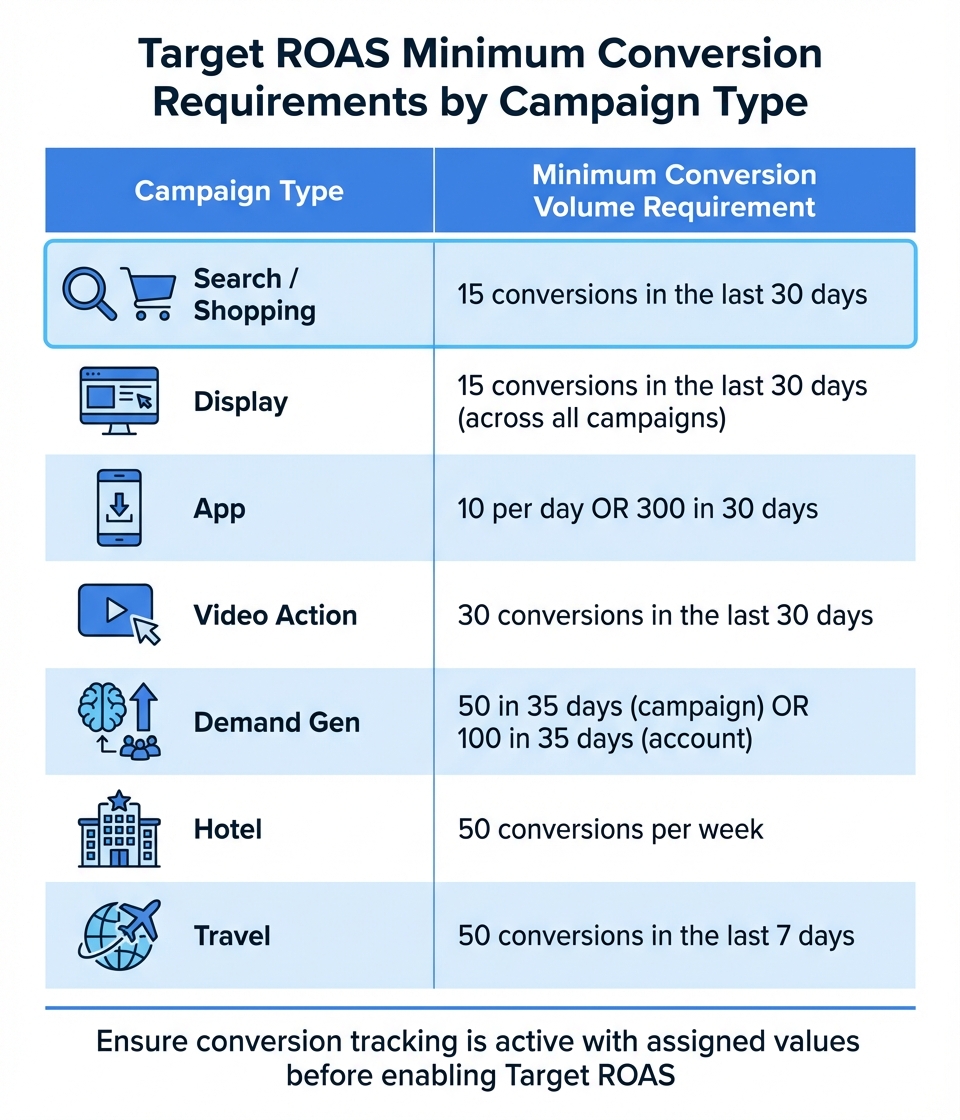
You’ll also need historical conversion data. Most campaigns require at least 15 conversions with valid values in the last 30 days. However, the requirements differ by campaign type:
| Campaign Type | Minimum Conversion Volume Requirement |
|---|---|
| Search / Shopping | 15 conversions in the last 30 days |
| Display | 15 conversions in the last 30 days (across all campaigns) |
| App | 10 per day OR 300 in 30 days |
| Video Action | 30 conversions in the last 30 days |
| Demand Gen | 50 in 35 days (campaign) OR 100 in 35 days (account) |
| Hotel | 50 conversions per week |
| Travel | 50 conversions in the last 7 days |
Before enabling Target ROAS, verify that your Google Ads conversion values align closely with actual revenue – ideally within a 5%–10% margin. For new or low-data campaigns, it’s a good idea to run "Maximize Conversion Value" for 4–6 weeks to establish a baseline ROAS .
Be prepared for daily spending fluctuations of up to 200%. To avoid unprofitable bidding, calculate your break-even ROAS by dividing 1 by your gross profit margin (expressed as a decimal). Lastly, ensure only high-value actions are marked as "Primary" conversions in the "Include in Conversions" setting. This helps the algorithm focus on optimizing for the outcomes that matter most .
Once these prerequisites are in place, you’re ready to configure Target ROAS.
Configuration Steps
Setting up Target ROAS is simple once the groundwork is done. For a single campaign:
- Log in to Google Ads and go to the Campaigns section.
- Select your campaign and open the Settings tab.
- In the Bidding section, click "Change bid strategy."
- Choose "Maximize conversion value" from the dropdown menu.
- Check the box to "Set a target return on ad spend (optional)" and enter your desired ROAS as a percentage (e.g., 400% for a 4:1 return).
- Click Save to apply the changes.
For managing multiple campaigns, you can create a portfolio strategy:
- Go to Tools & Settings > Budgets and bidding > Bid strategies.
- Click the plus (+) button and select "Target ROAS."
- Name your strategy and input your target percentage.
- Choose the campaigns to include in the portfolio.
- Avoid setting bid limits, as they can restrict the algorithm from bidding effectively in high-value auctions .
When setting your initial target, use your historical ROAS from the past four weeks as a reference. Starting too high can lead to reduced traffic and warnings like "Limited by Budget", as the algorithm may disqualify too many auctions .
What Happens During the Learning Period
After activation, your campaign enters a learning phase where performance metrics can fluctuate. During this time, Google’s AI adjusts bids to find the best-performing auctions . For high-volume campaigns (30+ conversions per week), this phase typically lasts 7–14 days. Lower-volume campaigns may take 3–4 weeks.
Expect temporary shifts, including a 20–40% increase in CPCs and a short-term dip in conversion volume. This is normal as the system tests different strategies to optimize returns.
"Advertisers who panic and change their target every few days create a perpetual learning loop. The algorithm never stabilises." – Alexander Perelman, Head of Product, groas
To avoid resetting the learning phase, refrain from making changes to budgets, targets, or campaign structures for at least 14 days. Instead of reacting to daily fluctuations, evaluate performance weekly to account for conversion delays. Always exclude the most recent days from your evaluation window to allow time for clicks to convert .
How to Optimize Target ROAS Performance
How to Calculate and Adjust Your Target ROAS
To calculate your break-even ROAS, divide 1 by your gross profit margin (expressed as a decimal). For instance, if your margin is 40%, your break-even ROAS would be 250% (1 ÷ 0.40). Want to aim for a specific profit goal? Use this formula: 1 ÷ (Gross Margin – Desired Profit Margin). For example, with a 40% gross margin and a 15% desired profit margin, your target ROAS would be 400% (1 ÷ 0.25 = 4.0).
When defining your gross margin, make sure to include costs like shipping, packaging, and payment fees, but leave out fixed overhead expenses like rent or salaries. This ensures your ROAS calculations reflect actual profitability.
| Gross Margin | Desired Profit % (of Revenue) | Recommended Target ROAS | Break-Even ROAS |
|---|---|---|---|
| 40% | 10% | 333% | 250% |
| 40% | 15% | 400% | 250% |
| 45% | 15% | 333% | 222% |
| 50% | 10% | 250% | 200% |
| 50% | 20% | 333% | 200% |
| 50% | 25% | 400% | 200% |
Start by using your historical ROAS from the last four weeks as a baseline. Setting it too high can backfire. One advertiser experienced this firsthand: raising their target from 489% to 900% completely stalled their campaign spending. Instead, make incremental adjustments of 10–20%, giving the algorithm at least 14 days to adapt before making further changes.
"One of the most common mistakes I see is setting the target too high right from the beginning… It’s much more effective to start with a number that’s just slightly above your average ROAS, let the algorithm learn, and then increase it gradually." – Stephen Do, Founder, UpPromote
Once your target is set, fine-tune performance by adjusting budgets and managing bid limits.
Budget Distribution and Bid Limits
To avoid limiting the algorithm’s ability to bid aggressively, set your daily budget 50% higher than your average daily spend. If you’re scaling up, increase budgets gradually – about 10–20% every 7–10 days – rather than doubling them overnight. Sudden changes can disrupt the learning phase and cause inconsistent performance.
Bid limits, like max CPC caps, are generally not recommended as they can hinder the algorithm’s ability to optimize bids. If you need to control individual click costs, use Portfolio Bid Strategies instead of campaign-level limits. Keep in mind that lowering your ROAS target encourages more aggressive bidding, while raising it results in a more conservative approach that prioritizes efficiency over volume.
Audience Segmentation for Better ROAS
Using conversion value rules, you can assign multipliers to specific audience segments. For instance, you might value VIP customers 4x higher or first-time buyers 3x higher to reflect their long-term potential.
In 2025, KitchenLab, a Swedish kitchenware retailer, collaborated with Keybroker to segment campaigns by product margins. By using custom labels in DataFeedWatch, they assigned unique Target ROAS goals to different segments. This approach boosted their ROAS by 46% while cutting advertising costs by 35% in just three months.
To refine targeting further, upload Customer Match lists for groups like VIPs, repeat buyers, or lapsed customers. Google can use this data to create "Similar Audiences" that mirror your top customers. For businesses selling high-ticket items or operating in B2B, importing CRM data can help the algorithm identify segments that lead to actual sales rather than just form submissions. For example, a luxury auto dealer tracked test-drive bookings through to final purchases using offline conversion imports. This reduced their cost per vehicle sold from $2,800 to $1,650 – a 41% improvement over 90 days.
Segmenting campaigns by funnel stage (e.g., high-intent, prospecting, retargeting) can also prevent the algorithm from over-focusing on low-hanging fruit like branded search. To maximize profitability, exclude low-value segments such as employees, existing customers in acquisition campaigns, and users with high refund rates.
How to Scale Campaigns with Target ROAS
Using Target ROAS Across Different Campaign Types
Scaling with Target ROAS boils down to a simple principle: lowering your target increases volume, while raising it improves efficiency but limits reach. This balance plays out differently depending on the campaign type, so tailoring your approach is essential. Building on your existing setup, here’s how this strategy works for Search, Shopping, and Performance Max campaigns.
For Search campaigns, pairing broad match keywords with Smart Bidding is a strong scaling tactic. This setup allows the algorithm to capture adjacent search intent that exact match might miss, helping you tap into new demand while keeping profitability intact. When it comes to Shopping campaigns, optimizing your product feed is key. For example, segmenting items by profit margin using custom labels lets you assign different ROAS targets to each group. This way, high-margin products get priority, and low-margin items don’t drain your budget.
Performance Max campaigns are the broadest in reach, automatically distributing ads across platforms like YouTube, Display, Search, and Discover. However, they need sufficient conversion data to perform consistently. Campaigns with over 150 monthly conversions typically meet their ROAS goals, while those with fewer than 30 conversions often struggle. If you’re starting a new Performance Max campaign, it’s best to begin with "Maximize Conversion Value" to gather 30–50 conversions before transitioning to a specific Target ROAS.
| Campaign Type | Bid Limits Availability | Scaling Effect of Lowering Target |
|---|---|---|
| Search | Available (Portfolio only) | Increases participation in auctions and boosts click volume |
| Shopping | Available (Portfolio only) | Broadens visibility for more products |
| Performance Max | Not Available | Expands reach across all Google channels |
| App Campaigns | Not Available | Boosts ad frequency to drive installs or actions |
When making changes, adjust your Target ROAS in small increments of 5–10% and allow 1–2 conversion cycles (about two weeks) to pass before tweaking further. For seasonal events like holidays, consider lowering your target by up to 30% and significantly increasing your budget just before peak periods.
Using Automation to Drive Growth
Google’s Smart Bidding uses real-time data – like device type, location, time of day, and more – to predict the value of each potential conversion. This auction-time bidding adjusts bids thousands of times daily, finding opportunities manual bidding might miss.
Portfolio bid strategies push this even further by optimizing across multiple campaigns at once. Instead of treating each campaign in isolation, the system reallocates budget dynamically to maximize returns. Accounts using portfolio strategies often see a 19–27% boost in overall ROAS compared to campaign-level bidding.
To guide automation toward the right opportunities, use conversion value rules. For instance, you might assign a 2.5–3.5x higher value to new customers compared to repeat buyers or prioritize high-margin products. In Performance Max campaigns, audience signals and the "New Customer Acquisition" bidding mode can help the algorithm focus on your most profitable segments.
"Smart Bidding uses AI and historical data to adjust bids for every auction, increasing efficiency and performance at scale." – AdPredictor
For short-term events like flash sales, seasonality adjustments can prepare the algorithm for temporary shifts in conversion rates. This prevents over-corrections caused by brief data spikes. Similarly, if tracking issues arise, use data exclusions to ensure the algorithm ignores those periods. With automation fine-tuning your bids, continuous testing ensures your strategy stays effective.
Testing and Refining Your Campaigns
Scaling isn’t a one-and-done process – it requires ongoing testing to refine performance. Tools like Google Experiments let you run split tests (e.g., 50/50 tests) to validate scaling strategies. For example, you could test whether lowering your Target ROAS by 10% increases volume profitably or whether adding video assets to Performance Max campaigns improves conversion rates.
Here’s a real-world example: A New York City fashion brand used DataFeedWatch to test product title variations for Google Shopping. By moving the brand name from the start to the end of product titles, the algorithm focused more on style and color. This tweak led to a 25% increase in ROAS and a 10% drop in CPC over 30 days.
When testing, stick to one variable at a time and let experiments run for at least two full conversion cycles (14–28 days). Campaigns with over 60 monthly conversions tend to deliver more stable and predictable results when adjusting targets. Avoid making changes during the 7–14 day learning phase, as performance can be erratic and unrepresentative during this time.
Lastly, regularly audit your conversion values to ensure they’re accurate. Exclude factors like sales tax and shipping costs to prevent inflated revenue data from skewing the algorithm’s optimization. You should also use account-level negative keyword lists to stop Performance Max and broad match Search campaigns from wasting budget on low-intent queries.
Monitoring and Fixing Issues in Scaled Campaigns
Metrics You Should Track
When your campaigns reach a scaled level, keeping an eye on the right metrics is what keeps your growth profitable instead of wasteful. The most important metric to monitor is Conversion Value – this reflects the total revenue your ads generate and directly informs the Target ROAS algorithm. Regularly compare Conversion Value and your actual ROAS (shown as "Conv. value / Cost") to ensure your campaigns are hitting their targets.
Other metrics provide valuable context, too. Average Order Value (AOV) helps you confirm whether your bidding strategy is attracting higher-value customers. Meanwhile, keeping tabs on Cost Per Click (CPC) can alert you to overbidding before it eats into your budget. Lastly, Impression Share shows whether you’re losing potential reach due to budget constraints or overly strict targets.
These metrics are your toolkit for identifying and addressing common campaign issues, which we’ll dive into next.
Common Problems and How to Fix Them
Here’s a breakdown of frequent campaign challenges and how to tackle them effectively:
One of the trickiest issues is the "Limited by Budget" warning. If your campaign shows this alert but isn’t spending much, it’s likely because your ROAS target is set too high. Google’s system skips auctions that don’t meet your aggressive target, which can slash spend by 40% to 80%. The solution? Lower your Target ROAS to allow more auction participation. This adjustment strikes a better balance between spending and profitability, aligning with earlier campaign setup strategies.
Significant changes in your campaigns often lead to ROAS fluctuations for 7–14 days. During this stabilization period, resist the urge to make additional tweaks – let the algorithm adjust. If your campaigns consistently underperform, double-check your conversion tracking. Make sure revenue values exclude taxes and shipping costs for accurate reporting.
Underperforming ad groups are another common issue, often caused by poor segmentation. Using a single high target for a mix of products can cause Google to overlook lower-priced items that could still be profitable. To fix this, segment your products based on margins or historical ROAS performance. For instance, the Swedish retailer KitchenLab partnered with Keybroker to map product margins using custom labels and segment campaigns accordingly. Over three months, they boosted ROAS by 46% and cut advertising costs by 35%.
"One of the most common mistakes I see is setting the target too high right from the beginning… Google doesn’t have enough flexibility to explore and test different placements, and the campaign stalls." – Stephen Do, Founder, UpPromote
When adjusting targets, make changes gradually – by 10% to 20% at a time – and give the algorithm at least two weeks to adapt. During high-traffic times like Black Friday, lower your targets manually to capture the increased volume. Google’s algorithm may otherwise act too cautiously, relying on historical data.
Conclusion
Target ROAS bidding acts as a revenue-focused guide, helping you balance growth and profitability on a larger scale. By emphasizing conversion value over sheer volume and dynamically adjusting bids, it ensures your ad spend targets the most profitable customers. Think of Target ROAS as a tool for ongoing optimization rather than a quick fix.
Begin with achievable targets grounded in your historical data, and make gradual adjustments every two weeks to allow the system to stabilize. Accurate data is critical – any errors in conversion values can misguide the algorithm.
"Target ROAS is only as good as the conversion values you feed it. If values are missing, inconsistent, or inflated, the bidding will optimize toward the wrong outcome." – Alexandre Airvault
To maintain profitability, rely on consistent segmentation, careful testing, and regular monitoring or a free Google Ads audit as outlined earlier. These incremental adjustments form the backbone of a sustainable growth strategy. Businesses that excel with Target ROAS understand it’s a continuous process of refinement, driven by real performance insights.
If managing these strategies feels daunting or you lack the expertise for data-driven marketing at scale, Growth-onomics offers specialized support. Their approach aligns Google’s AI with your business goals, ensuring your campaigns grow sustainably while hitting the efficiency targets that matter most.
FAQs
When should I switch to Target ROAS?
Switch to Target ROAS when your main objective is to grow revenue or profit based on a specific return on ad spend (ROAS) goal. This approach works well if you can precisely track conversion values, have well-defined revenue targets, and know your profit margins inside and out. It’s especially useful for prioritizing high-value conversions, allowing automation to zero in on profitability rather than simply driving traffic or generating leads.
Why did my spend drop after setting Target ROAS?
When you set a Target ROAS (Return on Ad Spend), you might notice your ad spend decreasing. This happens because Google adjusts your bids to align with the ROAS target you’ve specified. If the system identifies fewer opportunities to meet that target, it may naturally reduce spending. This drop in spend often occurs when the target limits your budget or restricts the volume of ads being shown.
How do I pick a profitable ROAS target?
To set a profitable ROAS target, start by evaluating your profit margins, ensuring your conversion tracking is accurate, and clarifying your overall business objectives. Use historical data to calculate your break-even ROAS – the point where your revenue covers your costs.
For products with higher margins, you can aim for a higher ROAS target to maximize profitability. On the other hand, for lower-margin products, it’s wise to stay more cautious and set a lower, more attainable target.
Keep a close eye on your campaign performance and adjust your targets as needed. This helps ensure your goals stay aligned with actual results, keeping your profitability intact.
