

If you advertise to people in the EEA, the UK or Switzerland, your cookie banner now decides how much of your ad data survives.
Google Ads needs a consent signal before it will use those visitors for remarketing, enhanced conversions or tag-based conversion tracking. Microsoft Advertising stops counting UET conversions without one.
A consent management platform (CMP) is the tool that collects that choice and passes it to your tags. Most small businesses pick one on price, install it and never check what it sends to Google.
This guide compares 8 CMPs and shows you how to check the setup once it is live.
You will get:
- A plain explanation of Consent Mode v2 and what Microsoft Ads now expects
- The difference between a Google CMP Partner and a Google-certified CMP, and which one you need
- A comparison table of 8 CMPs with pricing basis, entry plans and limits, checked on 25 November 2026
- A 7-step check to confirm your ads still receive consent signals
- A 6-question scoring sheet and a worked cost example for one website
This is a marketing guide, not legal advice. Your legal adviser should confirm what your banner must say in each market.
1. What a Consent Management Platform Does for Your Ad Data
A CMP shows the banner, stores each visitor’s choice and blocks or allows tags based on it. For advertisers, the part that affects campaign data is the signal it sends to Google, Microsoft and other platforms.
Google’s own consent mode documentation is clear that consent mode does not provide a banner. It reads the choice from your banner and changes how Google Analytics, Google Ads and other tags behave.
Consent Mode v2 in plain terms
Google’s consent mode overview lists 7 consent types. 4 of them affect advertising and analytics: ad_storage, analytics_storage, ad_user_data and ad_personalization.
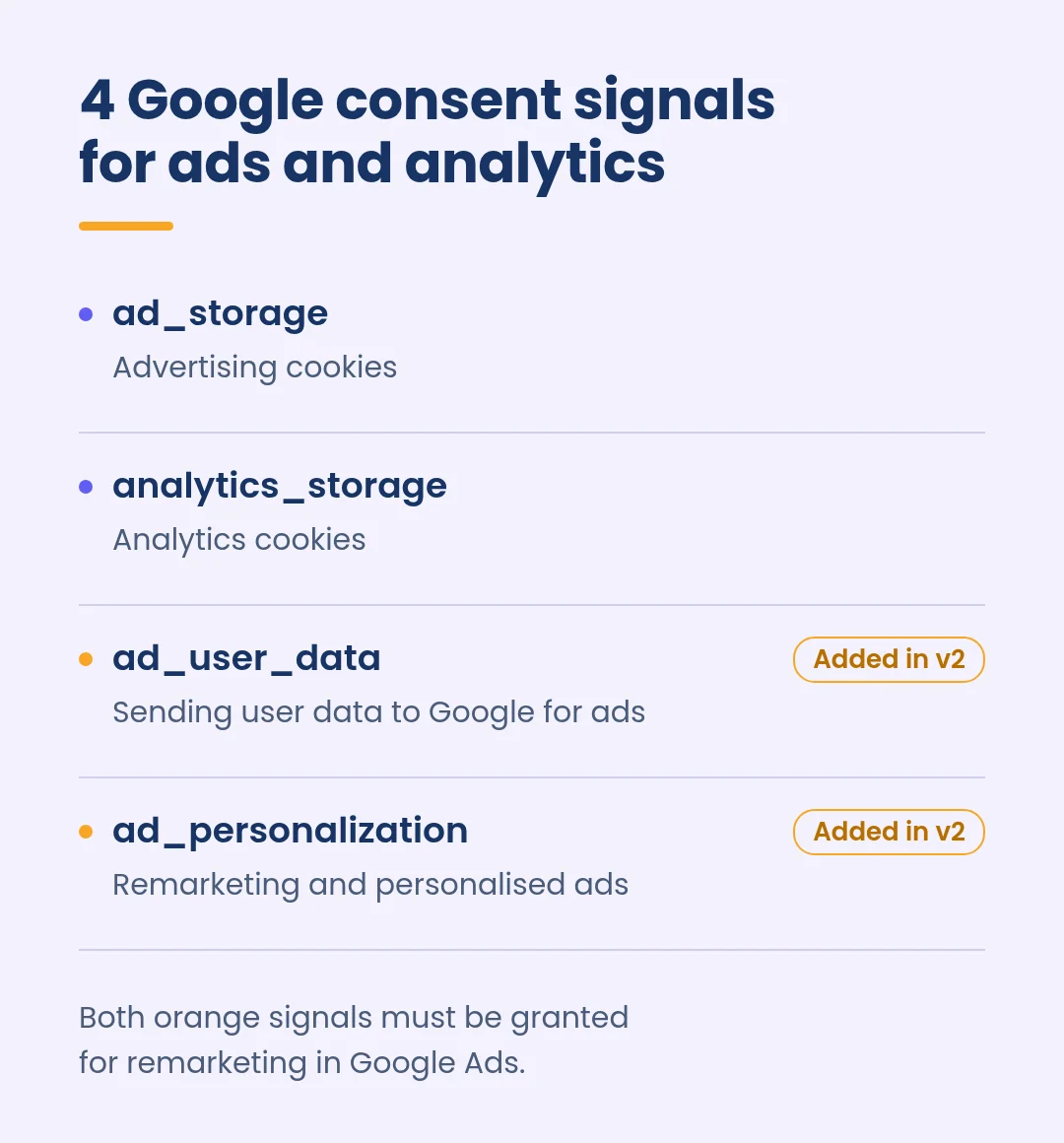
The last 2 are the ones added for v2. Google’s help page on verifying consent signals states that ad_user_data is required for the EEA, the UK and Switzerland.
Google’s reference adds that both ad_user_data and ad_personalization must be granted for personalised advertising. If ad_personalization is denied, remarketing lists stop receiving data from that visitor.
Basic and advanced consent mode
In basic mode, Google tags do not load until the visitor accepts. If they decline, nothing is sent to Google, not even the consent state, and conversion modelling in Google Ads uses a general model.
In advanced mode, tags load with consent denied by default and send cookieless pings until the visitor chooses. Google says this gives an advertiser-specific model rather than a general one.
Which mode to use is a legal and commercial decision, so agree it with whoever signs off your privacy policy. Most CMPs let you choose either.
Microsoft Ads and other platforms
Microsoft Advertising has enforced consent signals for UET tags since 5 May 2025 for visitors in the EEA, the UK and Switzerland. Its UET consent FAQ says that without UET Consent Mode or the IAB TCF, it stops tracking UET conversions and filling remarketing lists.
The same FAQ warns against sending both at once: pick UET Consent Mode or TCF. Microsoft’s setup guide also notes that the Clarity integration needs its own consent setting.
Google’s consent mode controls Google tags only.
Meta, LinkedIn, TikTok and other pixels need the CMP to block them until consent, either directly or through consent settings in Google Tag Manager. Our earlier piece on consent management and privacy policy integration covers the documentation side.
2. Google CMP Partner or Google-Certified CMP: Which You Need
Google runs 2 separate lists, and vendors use both badges in their marketing. They answer different questions.
Advertisers: the CMP Partner Program
The Google CMP Partner Program badges CMPs that integrate with consent mode and Google Tag Manager. Partners are graded Gold, Silver or Bronze on criteria that include customer support and ease of technical integration.
For advertisers, a partner CMP is optional. Google’s EEA consent mode update says you can use a certified partner banner and switch consent mode on, or build your own banner and implement consent mode manually.
Publishers: certified CMPs with the IAB TCF
If you earn money from AdSense, Ad Manager or AdMob, the rule is stricter.
Google’s publisher requirements say a Google-certified CMP integrated with the IAB Transparency and Consent Framework (TCF) has been required for personalised ads in the EEA and UK since 16 January 2024, and in Switzerland since 31 July 2024.
Google also states that it does not check certified CMPs for full compliance with the TCF or privacy laws. Certification is a technical check, not a legal one.
| Question | Advertiser (Google Ads, GA4) | Publisher (AdSense, Ad Manager, AdMob) |
|---|---|---|
| Is a Google-certified CMP required? | No, consent mode can be set up with any banner | Yes, for personalised ads in the EEA, UK and Switzerland |
| Is the IAB TCF required? | No | Yes, through a certified CMP |
| What must be sent? | Consent mode signals, including ad_user_data and ad_personalization | A TCF consent string |
| Where to check | Consent status in Google Ads conversion diagnostics | Google’s list of certified CMPs |
3. 8 Consent Management Platforms Compared
Every CMP below appears on Google’s certified CMP list and in the CMP Partner Program on 25 November 2026.
The table is based on the vendor’s documentation, checked that day, with prices before VAT. We have not tested these products, so it makes no claims about consent rates or reliability.
| CMP | Best suited to | Price is based on | Entry paid plan | Free option | Main limitation |
|---|---|---|---|---|---|
| Complianz | WordPress sites | Number of WordPress sites | $59 a year for 1 site | Free WordPress plugin | WordPress only |
| CookieYes | Small sites on most CMSs | Pageviews, per domain | €9 a month (100,000 pageviews) | Up to 5,000 pageviews | TCF and geo-targeting start on Pro (€23) |
| CookieHub | Small and mid-sized sites | Sessions | €6 a month (5,000 sessions) | Under 1,000 sessions | TCF starts on Business (€30); free banner stops above the cap |
| iubenda | Businesses that also want policy documents | Pageviews | €5.99 a month, or €4.99 billed yearly (25,000 pageviews) | Free plan | 1 language and no geo-targeting on Essentials |
| Cookiebot | Sites priced by size, not traffic | Subpages per domain | €7 a month (1 domain, under 50 subpages) | 1 domain under 50 subpages | 1 to 3 domains with 50+ subpages start at €30 a month each |
| Usercentrics | Growing teams that need apps or multiple domains | Sessions | €7 a month (1,500 sessions) | Under 1,000 sessions, 1 domain | Low session caps; TCF starts on Pro (€30) |
| Didomi | Publishers and multi-brand groups | Monthly unique visitors | Quote only | None listed | No public prices |
| OneTrust | Enterprises buying a wider privacy suite | Visitors, data profiles or data volume | Quote only | None listed | No public prices; more platform than most small firms need |
WordPress and small sites
Complianz is a WordPress plugin with a free version. Its premium plans cost $59 a year for 1 site or $179 for up to 5, with unlimited pageviews and consent records, Google Consent Mode v2, Microsoft Consent Mode and IAB TCF v2.4 support listed on every paid plan.
Complianz states on its site that it is part of iubenda. It is the only option here that runs inside WordPress rather than as a hosted script.
CookieYes prices per domain. Its pricing page lists Free (5,000 pageviews), Basic at €9, Pro at €23 and Ultimate at €50 a month, with extra pageviews on Basic and Pro at €0.30 per 1,000.
Google Consent Mode v2 and Microsoft UET Consent Mode are included on every plan. The IAB TCF, Global Privacy Control and geo-targeting start on Pro.
CookieHub counts sessions rather than pageviews. Starter is €6 a month for 5,000 sessions and Basic is €10 for 30,000, while Business starts at €30 for 120,000 sessions and adds the IAB TCF and cross-domain consent.
Its free plan covers under 1,000 sessions a month, but the banner stops showing once you pass the limit. On paid plans, CookieHub says the banner keeps working and moves you up a plan only after 2 months over the cap.
Mid-market platforms
iubenda bundles the banner with privacy and cookie policy generators. On its pricing page, Essentials is €5.99 a month (€4.99 billed yearly) for 25,000 pageviews, Advanced is €21.99 (€19.99 yearly) for 50,000 and Ultimate is €89.99 (€79.99 yearly) for 150,000.
Extra pageviews cost €0.05 per 1,000 on every plan. Geo-targeting and all banner languages start on Advanced.
Cookiebot and Usercentrics are both Usercentrics products, priced on different units. Cookiebot bills by subpages per domain: Premium Lite is €7 a month for 1 domain under 50 subpages, Medium €30, Large €50 and Extra Large €90 per domain.
The Small plan at €15 per domain needs 4 or more domains, so a single site with 50 to 3,499 subpages pays €30. The IAB TCF is on Premium only, and daily scans cost an extra €99 a month.
Usercentrics Web CMP bills by sessions: Essential is €7 for 1,500, Plus €15 for 3,000, Pro €30 for 15,000 sessions and 3 domains, and Business from €50 for 50,000. TCF support and Consent or Pay start on Pro.
Enterprise platforms
Didomi sells 3 consent management tiers through its offers page, all priced by quote and based on monthly unique visitors across unlimited domains. Google’s certified list shows it on web, app and connected TV.
OneTrust also prices by quote. Its pricing page says consent and data use products are metered on data profiles, visitors or data volume. It suits companies that already need its wider privacy and governance tools.
4. 7-Step Consent Mode Check After Installing a CMP
Installing the banner is the easy part. These checks confirm that Google Ads, GA4 and Microsoft Ads receive the choices your visitors make.
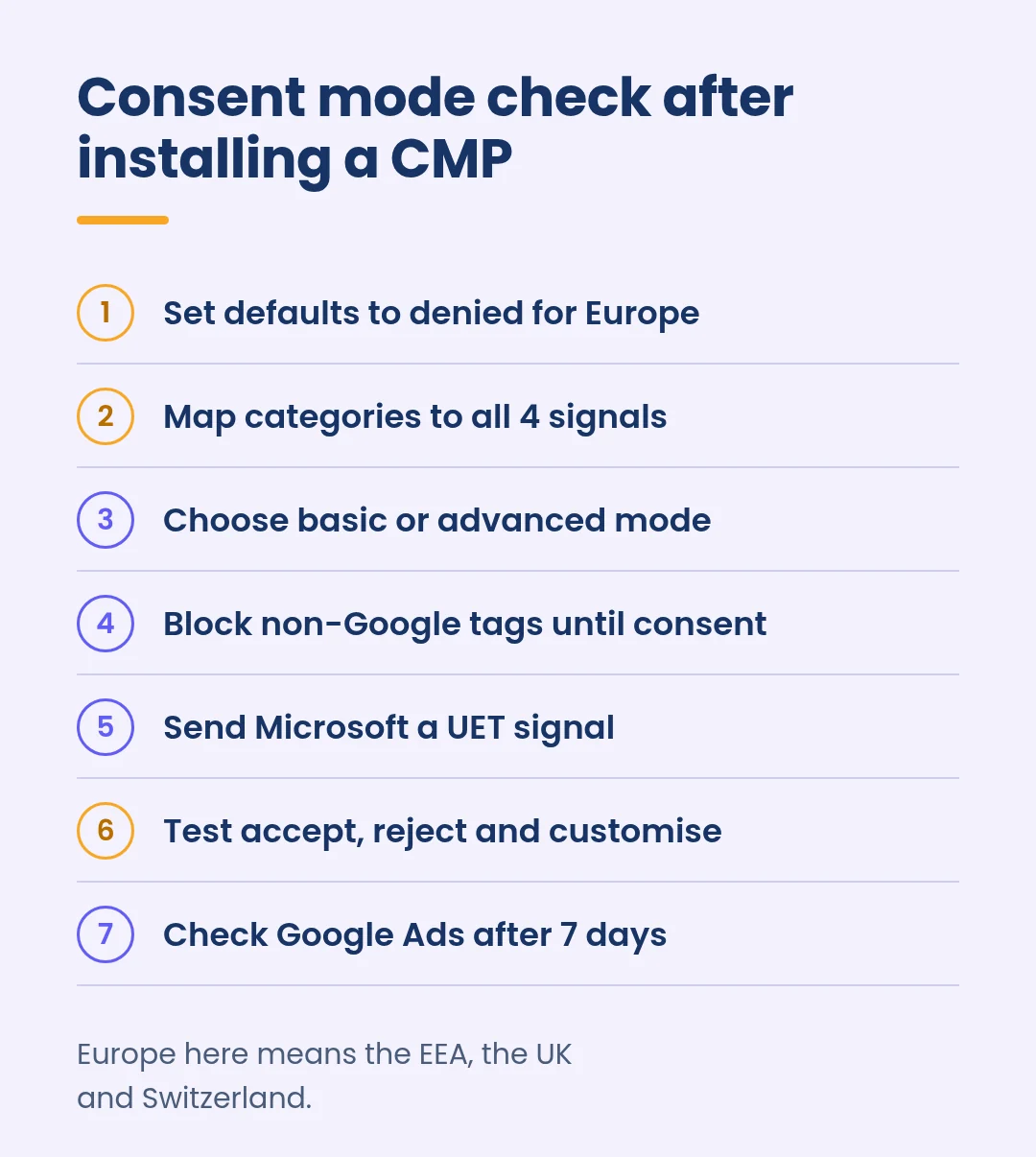
- Set defaults to denied for the EEA, the UK and Switzerland. The default must load before any Google or Microsoft tag fires, or the first page view is sent without a signal.
- Map your banner categories to all 4 Google signals. Marketing consent should update ad_storage, ad_user_data and ad_personalization together; statistics consent updates analytics_storage.
- Choose basic or advanced mode on purpose. Record the decision and who approved it, because it changes what Google receives from visitors who decline.
- Block non-Google tags until consent. Use the CMP’s blocking or Tag Manager consent settings for Meta, LinkedIn, TikTok, Hotjar and similar tags.
- Send Microsoft a signal too. Switch on UET Consent Mode in the CMP, or use TCF, but not both.
- Test 3 journeys. Accept all, reject all and customise, then check the consent state in Google Tag Assistant for each one.
- Check Google Ads after 7 days. Open conversion diagnostics and confirm consent mode shows as active for your conversion tags.
Google notes that consent mode impact results in Google Ads and GA4 need at least 7 full days of data, and only appear when a minimum data threshold is met. If you upload customer lists, Google’s guidance on obtaining consent says consent signals must be sent with that data as well.
Once signals flow, check what reaches the ad platforms. Our guides to lead quality tracking with CRM data and the GA4 consent mode setup cover the next steps.
5. How to Score a CMP Before You Buy
Most CMPs on Google’s lists can send Consent Mode v2 signals. The differences that change your bill and your data are in the billing unit, the plan where key features start and the platforms covered, so score each option on the same 6 questions.
| Question | Score 2 if | Where to check |
|---|---|---|
| What unit is billed, and what is your number? | You know your monthly subpages, sessions or pageviews and the plan that covers them | Pricing page and your GA4 or crawl data |
| Does the plan you would buy send all 4 Google signals? | Consent Mode v2 with ad_user_data and ad_personalization, in basic and advanced mode | Integration docs |
| Does it cover Microsoft and other pixels? | UET Consent Mode is supported and other tags can be blocked until consent | Integration list and blocking settings |
| Is geo-targeting on that plan? | Opt-in banners for European visitors and the right model elsewhere | Plan comparison table |
| Is the IAB TCF included, if you need it? | TCF is on the plan you would buy, or you do not sell ad space | Plan comparison table |
| Can you export consent records? | Consent logs can be exported or kept for the period you need | Feature list or support docs |
Score 0 for no, 1 for partly and 2 for yes. A tool under 8 out of 12 is a weak match for an advertiser selling into Europe.
Work out the monthly cost for your site
Because each vendor bills on a different unit, entry prices are hard to compare. Take one example site: 2 languages, 400 URLs, 40,000 sessions and 120,000 pageviews a month, with geo-targeting needed and no TCF.
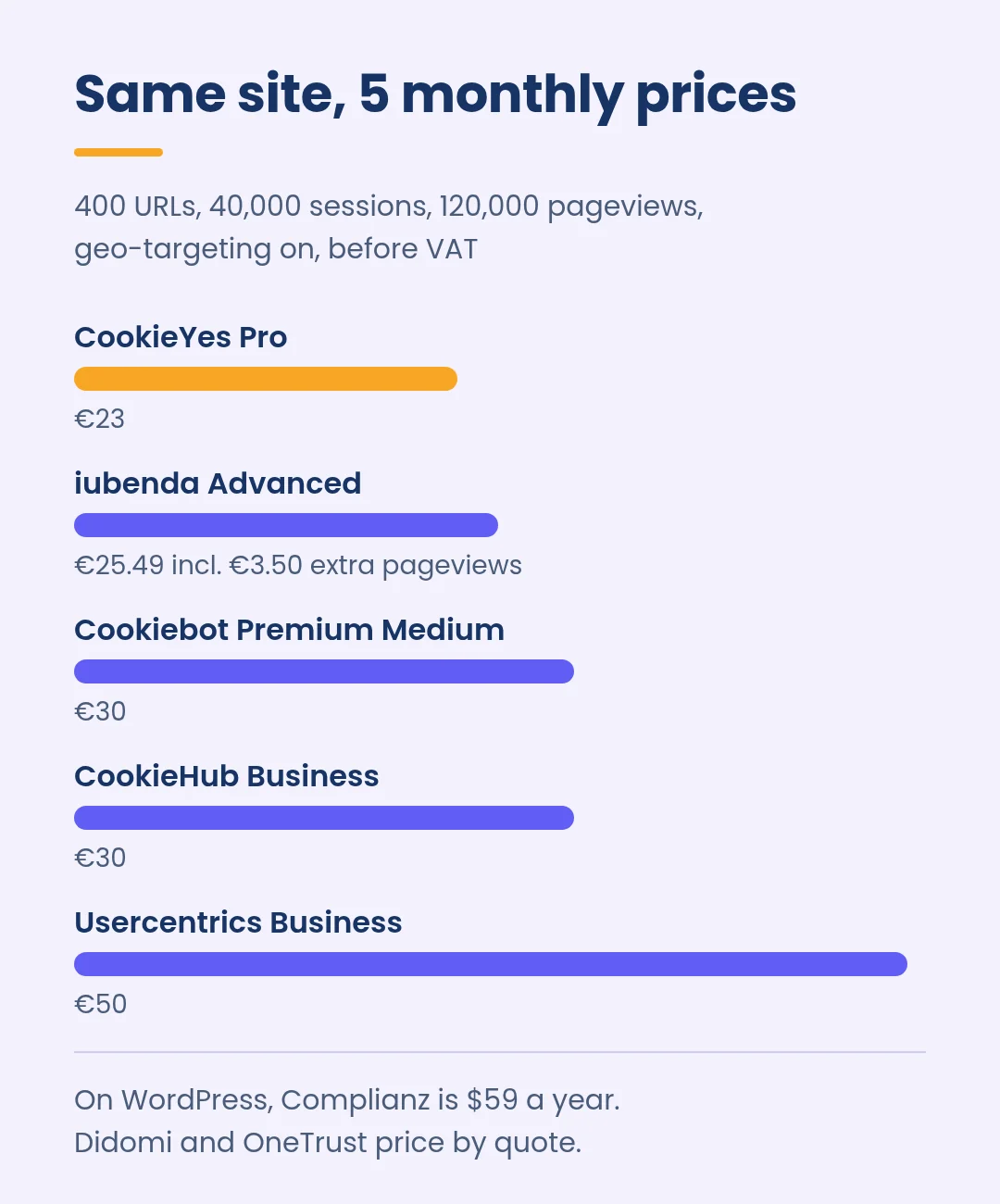
On published prices, that site lands on CookieYes Pro at €23, iubenda Advanced at €21.99 plus €3.50 of extra pageviews, Cookiebot Medium at €30, CookieHub Business at €30 and Usercentrics Business at €50. If the site runs on WordPress, Complianz is $59 a year.
Run the same sum with your own numbers before you sign. Check what happens when traffic spikes too, because CookieYes and iubenda add overage fees, while Cookiebot prices on page count, not traffic.
Keep the check in your launch process
A new landing page template or tag can bypass the CMP without anyone noticing. Add the 3-journey test to your launch checklist, alongside your call tracking and invalid traffic checks.
6. Submit a Product for Editorial Consideration
We update this comparison as tools and prices change. If your company makes consent management or privacy software that helps small and mid-sized advertisers, you can submit it for editorial consideration through our contact page.
Inclusion depends only on relevance to this audience and on evidence we can verify, such as public pricing, documentation and Google certification. No backlink, payment or sponsorship is required, and none is accepted in exchange for a listing.
FAQs
Do I need a Google-certified CMP to run Google Ads in Europe?
No. Advertisers need to collect consent and send consent mode signals, which a certified partner makes easier but does not replace.
A Google-certified CMP with the IAB TCF is required for publishers serving personalised ads through AdSense, Ad Manager or AdMob in the EEA, the UK and Switzerland.
Is a free cookie banner enough for Consent Mode v2?
It can be. Cookiebot, Usercentrics, CookieYes, CookieHub and iubenda list Google Consent Mode on their free plans. Check the traffic cap, the language limit and whether geo-targeting is included before you rely on one.
Does consent mode apply to UK visitors?
Yes. Google states that ad_user_data is required for the EEA, the UK and Switzerland, and Microsoft enforces UET consent signals for the same regions.
Conclusion: Check the Signal, Not Just the Banner
Pick a CMP on the unit it bills, the plan where geo-targeting and TCF start, and the platforms it can signal. Then run the 7-step check, because a banner that looks right can still send Google nothing.
If you want help connecting consent, tracking and campaign data, our analytics and reporting team and paid media team can review the setup with you. You can book a call to talk it through.