

If your business sells by phone, your ad platforms are probably guessing. Google Ads sees a click, GA4 sees a session, and then the caller rings the number on your site and the trail goes cold. The campaigns that drive your best calls look no better than the ones that drive none.
Call tracking software closes that gap by giving each visitor or campaign its own number and passing the call, with its source, back to your reports.
This guide compares 7 options, from the free tracking built into Google Ads to enterprise platforms, and shows you how to set one up properly.
You will get:
- A plain explanation of dynamic number insertion and what Google Ads already tracks for free
- A comparison table of 7 tools with entry prices, usage billing and limits, checked on 24 November 2026
- A 7-step setup checklist for connecting calls to Google Ads, GA4 and your CRM
- A 6-question scoring sheet to shortlist a tool
1. What Call Tracking Software Does
Call tracking assigns phone numbers to marketing sources and records which number each caller dialled. The software then links that call to the visit, campaign or keyword that came before it.
Most tools also record and transcribe calls, route them to the right person and send conversion data to ad platforms. If you want the attribution side in more depth, our earlier piece on call tracking data for marketing attribution covers it.
How dynamic number insertion works
Dynamic number insertion (DNI) is a script on your website. When someone arrives, it swaps your usual phone number for a tracking number drawn from a pool, and remembers the visitor’s source, landing page and click ID.
When that person calls, the software matches the number back to the session. The pool has to be large enough that 2 visitors are not shown the same number at the same time, which is why pool size affects your bill.
Static numbers are the simpler option. You print one number on a flyer, a van or a directory listing, and every call to it is credited to that source.
What Google Ads already tracks for free
Before buying anything, check what Google Ads gives you. Its call conversion documentation lists 5 methods: calls from ads, calls to a number on your website, clicks on a number on your mobile site, clicks on call ads and assets, and imported call conversions.
Calls from ads and website calls use Google forwarding numbers, and you set a minimum call length so short calls are not counted. For website calls, Google’s setup guide notes that the default tag tracks only 1 number per page.
The catch is coverage. Google forwarding numbers are only available in certain countries, and Google only tracks calls from Google Ads. Organic, Meta, email and offline calls stay invisible unless you add a dedicated tool.
2. 7 Call Tracking Tools Compared
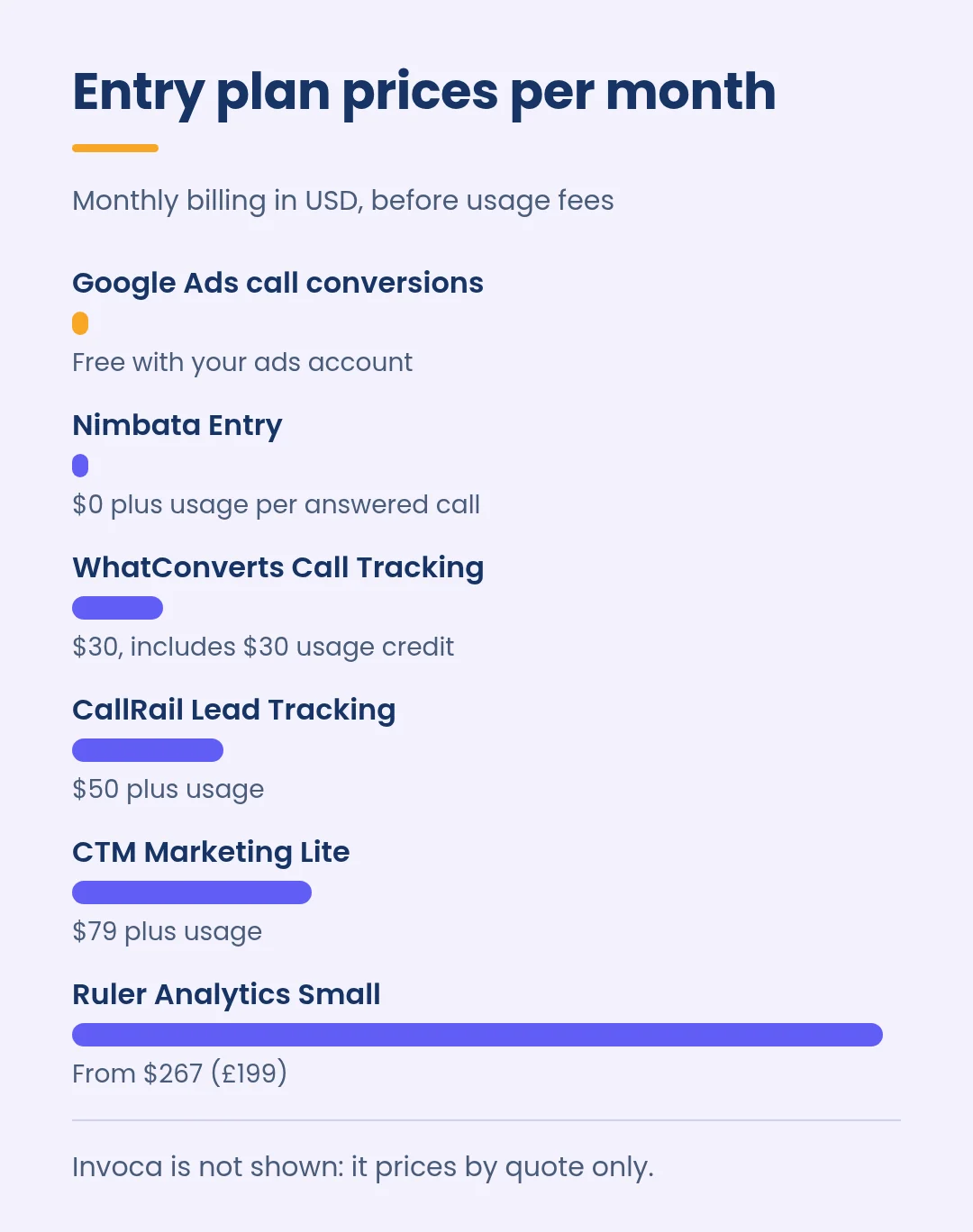
The table summarises each tool’s entry plan, how usage is billed and its main limitation. All details are based on the vendor’s documentation, checked on 24 November 2026. We have not tested these products, so the table makes no claims about call quality or accuracy.
| Tool | Best suited to | Entry price (monthly billing) | How usage is billed | Trial | Main limitation |
|---|---|---|---|---|---|
| Google Ads call conversions | Advertisers who only need Google Ads calls | Free | No fee | Not applicable | Google Ads traffic only; forwarding numbers in certain countries |
| Nimbata | Small teams and agencies wanting predictable call costs | Entry $0; Pro $39 a month | Per answered call, not per minute | 14 days, no card | Google Ads and GA4 links listed from Pro; fair-use charge if average calls exceed 3.5 minutes |
| WhatConverts | Businesses tracking calls, forms and chats in one place | $30 a month, includes $30 usage credit | Per number and minute | 14 days | Form and chat tracking start on the $60 Plus plan |
| CallRail | Local and service businesses in supported countries | $50 a month (Lead Tracking) | 5 numbers and 250 minutes included, then per item | 14 days, no card | Available in the US, Canada, the UK and Australia |
| CallTrackingMetrics | Teams that want routing, IVR and sales tools in one product | $79 a month (Marketing Lite) | Plan fee plus usage | First month of plan fees at $0 | Form tracking and the 3,000 included transcription minutes start on Marketing Pro ($179) |
| Ruler Analytics | B2B and lead gen teams that need multi-touch attribution | From £199 ($267) a month for up to 10k visits | Scaled by monthly traffic | Demo first | Indicative pricing; a full attribution platform, not a light call tool |
| Invoca | Enterprise brands, contact centres and pay-per-call | Quote only | Annual number allowance by plan | Demo first | No public prices; plans are sized in thousands of numbers a year |
Built-in option: Google Ads
Google Ads call conversions cost nothing beyond your ad spend. You can also import call conversions from a CRM, so a call only counts when it turns into a sale, with the sale value attached.
Google’s documentation notes that imports of calls made directly from ads can only be tracked on mobile, and that every import method needs Google forwarding numbers. If you run only Google Ads in a supported country, start here.
Small business platforms
Nimbata charges per answered call rather than per minute, which makes long sales calls cheaper to track. Its pricing page lists Entry at $0 plus usage, Pro at $39, Marketing at $89 and Agency at $149 a month, with up to 20% off on annual plans and number coverage in more than 70 countries.
Read the fair-use note: if average call length per destination goes above 3.5 minutes, Nimbata may add a reconciliation charge. The free trial is capped at 2 tracking numbers and 50 answered calls.
WhatConverts starts at $30 a month for call and text tracking with DNI, campaign and keyword reporting and AI call analysis. Plus ($60) adds forms, chats and ecommerce, Pro ($100) adds call flows, IVR and HIPAA compliance, and Elite ($160) adds multi-click attribution.
Agencies can choose unlimited-account plans from $500 a month. Call transcription is listed at 2 cents a minute.
CallRail starts at $50 a month for Lead Tracking, with 5 local numbers, 250 minutes, call recording, routing and transcription. Lead Tracking Complete ($95) adds form tracking, and the Lead Conversion plans ($150 and $195) add call summaries, sentiment and automatic conversion tagging.
Extra local numbers are $3 each. API access is included, but CallRail charges extra above 1,500 API calls a month, which can surprise teams with heavy CRM syncs.
CallTrackingMetrics (CTM) lists Marketing Lite at $79 a month on monthly billing, or $65 billed yearly, with unlimited users and integrations with Google Ads, Google Local Services Ads and GA4.
Marketing Pro ($179) adds form tracking, 3,000 transcribed minutes, AI call analysis and sub-accounts for agencies.
CTM also offers Sales Engage ($329) with a softphone for inbound and outbound teams, which suits businesses that want call tracking and a phone system in one.
Attribution and enterprise platforms
Ruler Analytics is a first-party attribution platform that includes dynamic call tracking alongside forms, live chat and ecommerce. Its pricing is indicative and scales by traffic, from £199 a month for up to 10,000 monthly visits, with 10% off annual deals.
Choose it when the question is which channels drive revenue across every lead type, not just which ad drove a call.
Invoca prices by quote. Its Pro plan includes 6,000 annual local or toll-free numbers and integrations with Google Ads, GA4, Microsoft Ads, Meta Ads, HubSpot and Slack, plus offline conversion and revenue import.
Higher plans add more numbers, speech-recognition IVR and an affiliate marketing suite. For most small businesses it is more platform than they need.
3. Call Tracking Setup Checklist
Setup decides whether the data can be trusted, whichever tool you choose. Work through these 7 steps before you judge any numbers.
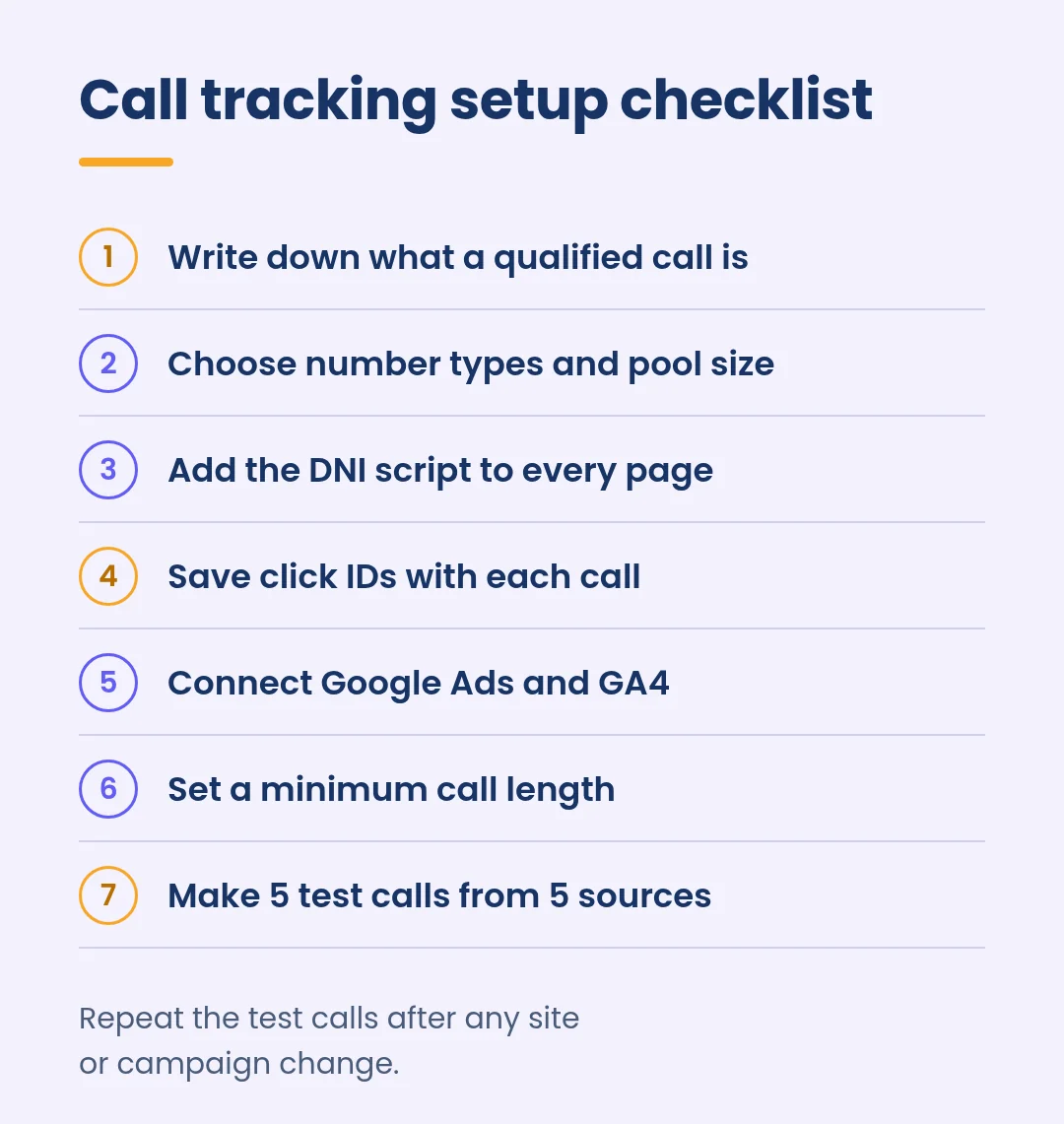
- Write down what a qualified call is. For example, a new customer asking about a service you sell, lasting over 90 seconds. Existing customers, suppliers and spam should not count as leads.
- Choose number types and pool size. Local numbers usually suit local services; toll-free numbers suit national brands. Size the DNI pool to your traffic; vendors publish guidance or calculators for this.
- Add the DNI script to every page. If it only loads on landing pages, a visitor who browses to your contact page will see your main number and the source is lost.
- Save click IDs with each call. The Google Ads click ID (GCLID) and the session source must travel with the call into your CRM, or you cannot send outcomes back to the ad platform later.
- Connect Google Ads and GA4. Send qualified calls as conversions, not every ring, and do not count the same call twice through Google forwarding numbers and a third-party tool. Google advises against its Tag Manager website call tag on sites using DNI.
- Set a minimum call length and spam rules. Google Ads lets you set the minimum length for call conversions; most tools offer spam filters and blocking.
- Make 5 test calls from 5 sources. Use a paid click, an organic visit, a social link, a direct visit and a printed number, then check each call is credited correctly.
Your Google Business Profile needs care too. Google’s profile guidelines require a number that connects to your business and is under your direct control, and do not allow premium-rate numbers. Additional numbers are allowed, so you can list your main line alongside a tracking number.
Check your local rules on call recording and consent before you switch recording on, and tell callers when calls are recorded.
Once qualified calls flow into your CRM, the next step is sending outcomes back to the ad platforms. Our guide to lead quality tracking with CRM data shows how to do that for Google Ads and Meta.
4. How to Score Call Tracking Software
Feature lists across these tools look alike. The differences that change your bill and your data quality are in coverage, billing and integrations, so score each tool on the same 6 questions.
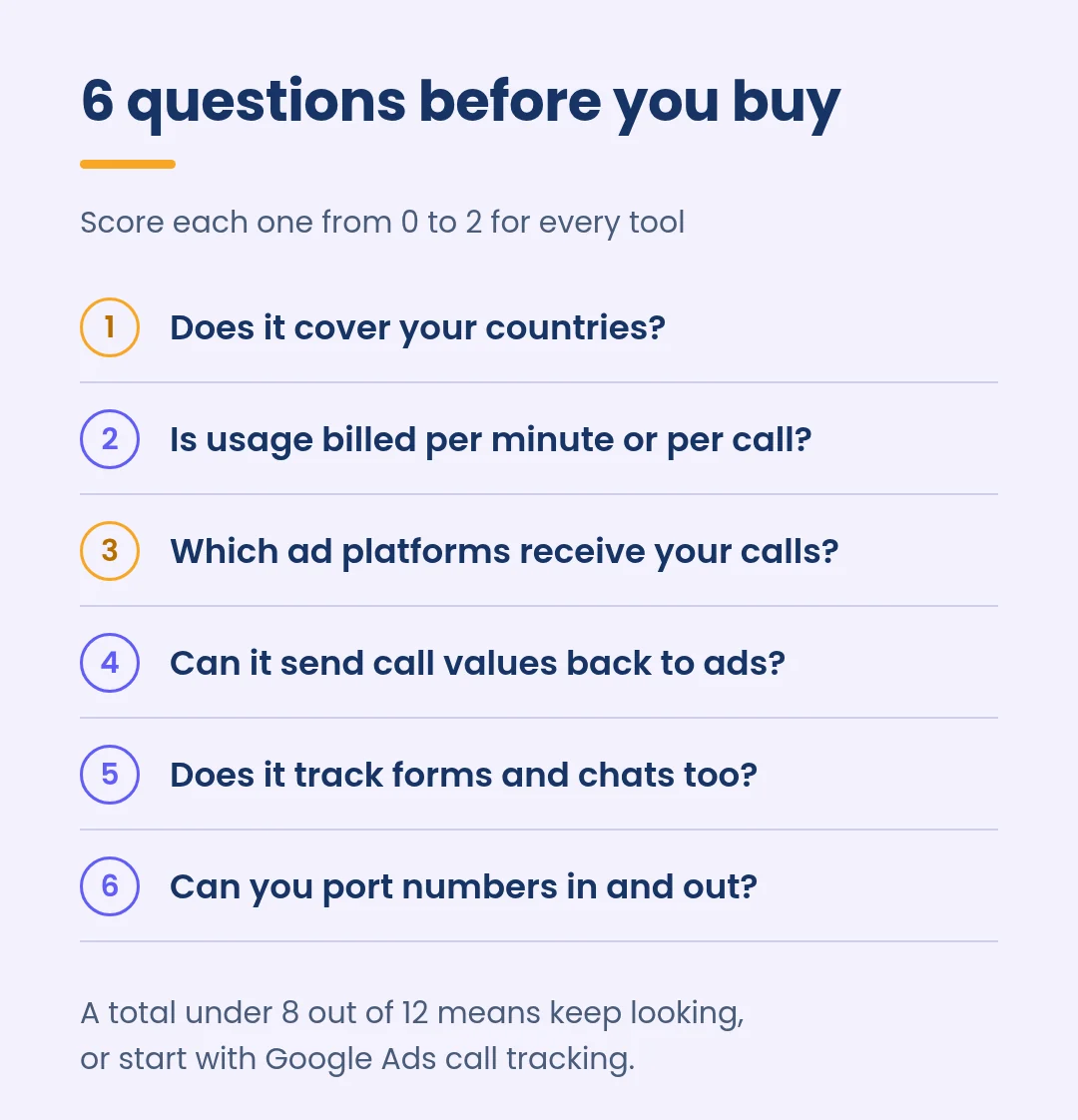
| Question | Score 2 if | Where to check |
|---|---|---|
| Does it cover your countries? | Local and toll-free numbers are available everywhere you advertise | Pricing page or global rate sheet |
| Is usage billed per minute or per call? | You can estimate a month’s cost from your call volume and average call length | Usage tables and fair-use terms |
| Which ad platforms receive your calls? | Native links to every platform you spend on, not only Google Ads | Integration list on the plan you would buy |
| Can it send call values back to ads? | Qualified calls and values are sent as conversions automatically | Integration docs for Google Ads and Meta |
| Does it track forms and chats too? | All lead types land in one report, if you need them | Plan comparison table |
| Can you port numbers in and out? | Porting is supported, so printed numbers survive a change of vendor | Porting section or support docs |
Score 0 for no, 1 for partly and 2 for yes. A tool under 8 out of 12 is a weak match; if every option scores low and you only advertise on Google, use Google Ads call conversions until your needs grow.
Estimate the monthly bill before you sign
Entry prices are only part of the cost. Add up the base fee, the numbers you need above the plan allowance, your expected minutes or answered calls, and any transcription or AI analysis charges.
Then test the estimate with a busy month, not an average one. Per-minute billing rewards short calls; per-answered-call billing rewards long ones.
Check what happens to tracking when the site changes
DNI depends on a script loading on every page, so a redesign or a new landing page template can quietly break it. Add a test call to your launch checklist, along with the other landing page fixes that lower cost per lead.
If junk calls are inflating your numbers, look at the traffic as well as the calls. Our guide to click fraud protection tools explains how to audit invalid clicks in Google Ads.
5. Submit a Product for Editorial Consideration
We update this comparison as tools and prices change. If your company makes call tracking, conversation analytics or lead attribution software that helps small and mid-sized businesses, you can submit it for editorial consideration through our contact page.
Inclusion depends only on relevance to this audience and on evidence we can verify, such as public pricing, documentation and terms. No backlink, payment or sponsorship is required, and none is accepted in exchange for a listing.
FAQs
Do I need call tracking software if I only run Google Ads?
Not always. Google Ads can track calls from ads and from your website with Google forwarding numbers, and you can import call outcomes from a CRM. You need a dedicated tool when you advertise in a country without forwarding numbers, or want to track calls from SEO, social, email or print.
How much does call tracking software cost?
On 24 November 2026, published entry prices on monthly billing ranged from $0 plus usage for Nimbata Entry to $30 for WhatConverts, $50 for CallRail and $79 for CallTrackingMetrics. Ruler Analytics started from £199 a month and Invoca priced by quote. Usage fees come on top.
Can I use a tracking number on my Google Business Profile?
Yes, within Google’s Business Profile guidelines: the number must connect to your business, be under your direct control and not be premium-rate. Additional numbers are allowed, so you can keep your main line listed too and stay consistent with your other directory listings.
Conclusion: Start With the Calls You Already Pay For
Begin with the calls your ads already generate. Turn on Google Ads call conversions, define a qualified call and test it. Move to a dedicated tool when you need other channels, other countries or call values in your CRM, and score each option on the 6 questions before you commit.
If you want help connecting call data to your campaigns, our analytics and reporting team and paid media team can map the setup with you. You can book a call to talk it through.