


Here’s the short answer: a privacy policy tells people what you do with their data, and consent management controls whether you can do it. If you use forms, cookies, pixels, email tools, or ad platforms, you need both working together.
As of July 7, 2026, 19 U.S. states have passed broad privacy laws, and California penalties can reach $2,500 to $7,500 per violation. I’d treat this as a simple two-part setup:
- Privacy policy integration = disclosure at each data collection point
- Consent management = user choice, script blocking, and consent records
- Both must match = what you say in the policy must line up with what your site and tools do
- Email and CRM sync matter = opt-outs and consent withdrawals should update downstream systems right away
- Audit records matter = consent logs and policy version history help show what happened and when
If I had to boil the article down to one point, it would be this: a policy without enforcement is just text, and enforcement without clear disclosure is incomplete.
Quick comparison
| Area | Consent Management | Privacy Policy Integration |
|---|---|---|
| Main role | Collects and applies user choices | Explains data use and sharing |
| User sees | Banner, toggles, preference center | Policy page, form links, footer links |
| Main task | Blocks or allows tags, logs consent | Gives notice at collection and rights details |
| Risk if missing | Tags may run before permission | Users may not be told what happens to data |
| Email impact | Updates opt-in/opt-out status | Explains why email is collected and used |
A few points stand out from the article:
- A cookie banner alone does not cover disclosure
- A privacy policy page alone does not control tags or record consent
- GPC signals, opt-out links, unsubscribe events, and CRM suppression lists should all stay aligned
- Policy updates should happen when you add new tools, vendors, retention rules, or AI use disclosures
So if you’re comparing the two, I’d say this in plain English: one handles the words, the other handles the action. You need both if you want your marketing stack to stay in line as tools and laws change.
Consent Management Systems: How They Handle User Choice
What a CMP Does Inside a Marketing Stack
A CMP turns a visitor’s choice into rules your tools can follow. It scans your site for tracking tools like cookies, pixels, and scripts, then sorts them into groups such as "Strictly Necessary", "Analytics", "Marketing", and "Functional." When someone makes a choice, the CMP sends a technical signal that tells your tag manager what can run and what must stay blocked.
What separates a CMP from a basic banner is the consent log. Each consent action is logged with a timestamp, the policy version shown, and the interface the user saw. That log becomes your audit trail – proof of what the user agreed to and when. Without it, you might be able to say you collected consent, but proving it gets much harder.
How Consent Data Connects to Email, CRM, and Analytics
For consent to mean anything, it has to travel with the customer record. The CMP collects the choice, integrations pass it along, and your CRM or email platform updates the person’s status.
For email, webhooks or APIs should change a subscriber’s marketing status right away. If someone withdraws consent, update that status immediately instead of waiting for a nightly sync. For paid ads, Google Consent Mode v2 can send cookieless pings when consent is denied.
Common Compliance Gaps When Consent Records Are Missing
One common failure happens when non-essential scripts load before the CMP does. In that case, data collection starts before the visitor has any chance to choose. Your Meta Pixel or GA4 tag should never fire before the user sees any choice. To help stop that, the CMP script needs to be the first item in your site’s <head>.
The next gap is sync failure. Someone unsubscribes from your email list, but that signal never makes it to your CRM or ad platform. So even after opting out, they still get retargeted ads. Healthline Media ran into this exact issue, paying a $1.55 million settlement in July 2025 after a CMP misconfiguration allowed sensitive article titles to be shared with ad-tech vendors despite consumer opt-outs.
These problems tend to show up in the same few patterns:
| Compliance Gap | What Goes Wrong |
|---|---|
| Scripts firing before consent | Ad and analytics pixels collect data before any choice is made |
| No consent log | You cannot prove what a user agreed to or when |
| Unsynced opt-outs | Users receive emails or see ads after withdrawing consent |
| GPC signals ignored | Browser-level opt-outs are not honored |
| Uncategorized scripts | New scripts from development or plugin updates run undisclosed |
Run automated cookie scans on a regular schedule to catch new scripts before they turn into a compliance problem.
sbb-itb-2ec70df
What is a Consent Management Platform (CMP)?
Privacy Policy Integration: Disclosure Across the User Journey
A privacy policy explains how you collect and use data. Consent management handles what users let you do. That difference matters. Disclosure tells people what will happen. Consent management decides whether it can happen. And those disclosures need to stay visible and accurate anywhere data gets collected.
What a Privacy Policy Must Disclose for Marketing
For email marketing and analytics, your policy should spell out the exact data types you collect: email addresses, IP addresses, cookie IDs, browsing behavior, purchase history, and device identifiers. It should also explain the purpose in plain English, name third parties or describe them by category, and show users how to use their rights.
For example, "We use your email address to send monthly product updates" says far more than "for marketing purposes." If you use tools like Google Analytics, Meta Pixel, or an email service provider, those count as third-party recipients. You should also include a retention period or a clear rule for how long data is kept.
The policy should explain how users can:
- request access to their data
- ask for deletion
- opt out of the sale or sharing of their personal information under applicable U.S. state laws
As of July 1, 2026, Connecticut also requires an affirmative disclosure on whether personal data is used to train large language models.
Where to Place Privacy Policy Links in Forms, Pages, and Emails
Disclosures need to show up at every point where data is collected. A footer link on every page is the baseline, but it’s only the first step. Signup forms should include a link right at the point of collection, along with a short purpose statement such as: "By subscribing, you agree to receive our monthly newsletter. Read our Privacy Policy." Checkout pages should disclose sharing with payment processors and shipping partners. Email footers need both an unsubscribe option and a link back to the policy.
For small businesses, the rule is simple: every collection point needs a matching disclosure. The table below shows what that looks like in practice.
| User Journey Touchpoint | Required Disclosure | Relevant Law |
|---|---|---|
| Cookie Banner | Notice of tracking, link to policy, opt-in/opt-out | CCPA / U.S. State Laws |
| Email Signup Form | Purpose of collection, link to policy | CCPA / U.S. State Laws |
| Website Footer | Privacy Policy link + "Do Not Sell or Share" link | CCPA / CPRA |
| Checkout Page | Data sharing with payment/shipping processors | CCPA / U.S. State Laws |
| Email Footer | Policy link + easy unsubscribe option | CAN-SPAM / U.S. State Laws |
Each disclosure has to match the way data actually moves through your site and tools. If your policy says you use cookies for analytics, but your CMP is not blocking those cookies until consent is granted, you’ve got a mismatch between what you tell users and what your setup is doing.
Keeping the Policy Current as Tools and Campaigns Change
This is where a lot of businesses slip. The marketing team adds a new chatbot, swaps an analytics pixel, or rolls out a campaign, and the privacy policy stays frozen. That gap between the written policy and the live tech stack is the kind of inconsistency regulators notice fast.
A simple process helps:
- assign one owner
- review the policy every quarter
- update it any time tools, retention rules, or AI use change
States like Oregon, Delaware, and Minnesota now require disclosure of specific, named third parties, not just broad categories.
It also helps to keep a version history with timestamps. Policy version history is your disclosure record. Consent logs are your action record. If a regulator asks what a user was told when their data was collected, you need to show the exact version of the policy that was live on that date. That keeps the policy layer lined up with the consent layer.
Once the disclosure layer is clear, the next question is how consent enforcement matches it.
Consent Management vs. Privacy Policy Integration: Key Differences and How They Work Together
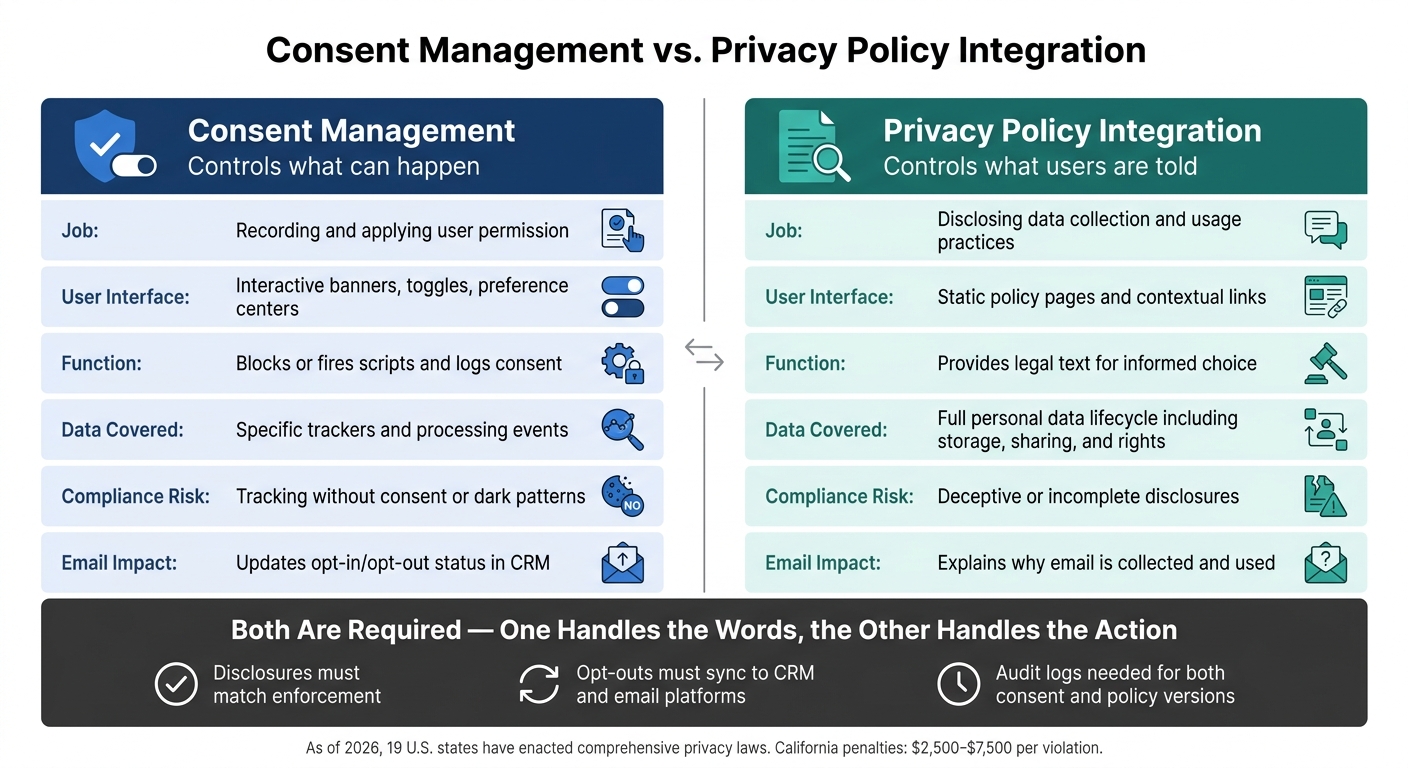
Consent Management vs. Privacy Policy Integration: Key Differences
Once disclosures are in place, the next step is enforcement. A CMP records and applies user choices across email forms, tracking, and subscriber records. A privacy policy explains how data is used. You need both.
Here’s the simple split: a CMP is interactive. It uses cookie banners, toggles, and preference centers. A privacy policy is a static disclosure page.
The table below shows how that plays out in practice.
| Dimension | Consent Management | Privacy Policy Integration |
|---|---|---|
| Job | Recording and applying user permission | Disclosing data collection and usage practices |
| User Interface | Interactive banners, toggles, preference centers | Static policy pages and contextual links |
| Function | Blocks or fires scripts and logs consent | Provides the legal text for informed choice |
| Data Covered | Specific trackers and processing events | Full personal data lifecycle, including storage, sharing, and rights |
| Compliance Risk | Tracking without consent or dark patterns | Deceptive or incomplete disclosures |
A CMP controls what loads. A privacy policy controls what users are told. Those two layers have to match. If you add a new tracker and update only the CMP, you create a disclosure gap. If you update only the policy, the tracker may still fire without valid consent.
Why Email Marketing Needs Both
Email forms need both layers working together at the same time. A signup form should combine an active consent mechanism with a contextual privacy policy link so users can see how their email and tracking data will be used.
If the policy link is missing, the consent is not informed. That’s the catch. It also helps to keep the signup-form consent record tied to subscriber status and unsubscribe signals, so the controls and the disclosures are pointing to the same activity.
Mistakes That Lead to Compliance Problems
The mistake people make most often is treating a privacy policy like a stand-in for consent controls. A detailed policy helps with transparency, but it does not stop non-essential scripts from running, and it does not create a valid consent flow.
The reverse problem shows up just as often. A CMP may block tags while the policy is out of date. Or the policy may be current while the CMP still lets tags fire. Either way, the stack falls out of sync.
The rule here is simple: keep disclosure and enforcement aligned. When you add a new tool, update the CMP map and the privacy policy at the same time.
Conclusion: Building a Privacy Setup That Supports Growth
The practical takeaway is simple: disclosures and enforcement need to move together. Consent management and privacy policy integration are both required. And as your stack changes, both layers need to change with it.
As of 2026, 19 U.S. states have enacted comprehensive privacy laws, and California enforcement has already led to six-figure fines for broken opt-out mechanisms and vendor misconfigurations.
The Baseline for a Trustworthy Marketing Stack
That makes the minimum setup pretty clear.
| Component | What It Requires |
|---|---|
| Privacy Policy | Disclosures on collection, sharing, retention, and user rights; linked in the footer |
| Consent Banner | Location-based opt-in or opt-out flow with required rights links |
| Tracking Control | Tag Manager control for script firing based on CMP signals |
| Email/CRM | Suppression lists synced with opt-out and withdrawal events |
| Audit Log | Timestamped consent records for every user to support audits |
Run cookie scans on a regular basis to catch new trackers before they turn into disclosure gaps. Review your privacy policy each time you add a new marketing tool, vendor, or campaign type.
And here’s the part teams often miss: if a user withdraws consent on your site, that signal has to reach your CRM and email platform too, not just your tag manager. Policy, consent logs, and downstream systems need to stay in sync.
FAQs
Do small businesses really need both?
Yes. Small businesses usually need both.
A privacy policy explains how your business collects, uses, and protects personal data. A consent management system or cookie policy deals with data collected through tracking tools, and it helps manage user opt-ins and preference choices.
They do different jobs, both from a legal side and a day-to-day business side. Keeping both in place helps support compliance and gives people a clearer picture of what happens with their data.
What should I update first after adding a new tool?
Start with a scan and audit to spot any new cookies and scripts the tool adds.
Then group them by type, update your consent management platform so it blocks non-essential scripts until the user gives consent, and revise your privacy policy to reflect the new data collection practices.
How do I prove consent during an audit?
Keep an immutable, audit-ready log as your main proof of consent.
Your consent management system should record each user decision, including:
- The timestamp
- A unique user ID
- The version of the privacy policy or notice shown
- The clear affirmative action the user took
That record is your paper trail. And when consent gets challenged, it matters.
Because the burden of proof sits with the organization, these records must be exportable. They also need to show that consent was informed, specific, and freely given.