


If your Meta Ads Manager shows 70 purchases and Shopify shows 100, part of the gap is usually the browser. Ad blockers stop pixels from loading, Safari shortens cookie lifetimes and every extra script slows the page.
Server-side tagging moves the sending step to a server on your own subdomain, so you decide what each ad platform receives.
The hard part is choosing the tool. Hosting a Google Tag Manager server container can cost nothing for a test site or a few hundred euros a month for a busy store, and the pricing units differ: requests, events or orders. This guide compares 7 options based on each vendor’s documentation, checked on 28 November 2026.
What you will get:
- A plain explanation of what a server container does and what it cannot fix
- A comparison table of 7 server-side tagging tools with pricing units, entry prices and free allowances
- A worked cost example for a site sending 1.5 million requests a month
- A decision guide for picking a tool type by situation
- A 10-point checklist to run before you remove any browser tags
1. What a Server-Side Tagging Tool Does (and Does Not Do)
In a standard setup, your web container loads several vendor scripts in the visitor’s browser and each one sends data straight to its own servers.
With server-side tagging in Google Tag Manager, the browser sends 1 stream of events to a server container. That container then forwards events to GA4, Google Ads, Meta and other tools through server tags.
If you want the longer background on the 2 approaches, our guide to server-side vs client-side data collection covers the trade-offs. This article focuses on the tools that host or replace that server container.
How the data flows
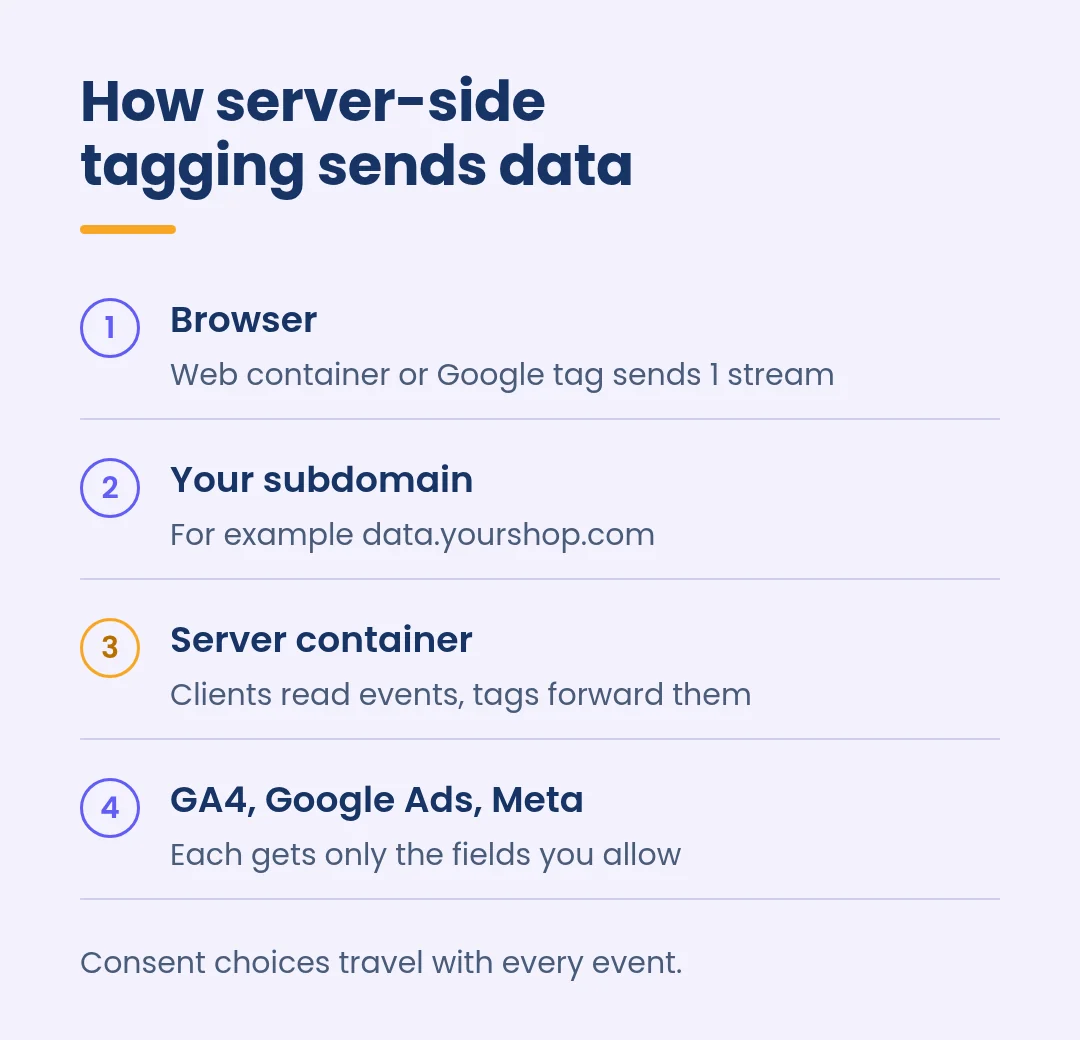
Google recommends running the container on a custom subdomain of your own site, such as data.yourshop.com. Requests then go to your domain rather than a third-party one, which is the basis for the longer cookie lifetimes and fewer blocked scripts that hosting vendors describe.
The server container also lets you remove fields before they leave. You can strip IP addresses, drop query parameters or block a tag from receiving personal data at all. That control is the main privacy argument for the setup.
What it will not fix
Server-side tagging does not replace consent. Google’s consent mode guide for server-side Tag Manager assumes you already have a consent solution: the web container collects the choice and the server container fires tags according to it. If your banner is broken, the server simply forwards broken signals.
Fix the banner first. Our comparison of consent management platforms explains how to check Consent Mode v2 before you add a server layer.
It also will not clean up bad events. If your purchase event fires twice on the thank-you page, it will fire twice through the server too. Audit your GA4 events and conversion actions before migrating, not after.
Google tag gateway: the lighter first step
If you only advertise on Google, start with Google tag gateway for advertisers. It serves the Google tag from your own domain through your CDN, load balancer or web server, without a full server container. Google lists Cloudflare as a 1-click integration.
In its Google Ads help article, Google reports an 11% uplift in signals for advertisers using the gateway, based on Google tag script loads over 1 week in April 2025. Treat that as Google’s own figure, not a forecast for your account.
The gateway does not forward data to Meta, TikTok or your CRM. Once you need those, you need one of the tools below.
2. 7 Server-Side Tagging Tools Compared
The table summarises how each tool charges and where it is strongest. Prices are list prices without VAT, taken from each vendor’s pricing page or documentation on 28 November 2026.
| Tool | Type | Pricing unit | Free allowance | Entry paid price | Strongest use case |
|---|---|---|---|---|---|
| Google Cloud Run (self-hosted) | Hosting for your own GTM server container | Cloud resources used | Not applicable | About $45 per server a month (Google’s estimate); 2 servers recommended | Teams with engineers and an existing Google Cloud account |
| Stape | Managed GTM server hosting | Requests | 10,000 requests | $20 a month for 500,000 requests ($17 billed annually) | Small sites and agencies that want plugins for common platforms |
| TAGGRS | Managed GTM server hosting | Requests | 10,000 requests | €25 a month for 750,000 requests (€22 billed annually) | EU-hosted setups with POAS and offline conversions on the Pro plan |
| Addingwell | Managed GTM server hosting | Incoming requests | 100,000 requests | €90 a month for 1 million requests | Teams that want overage pricing instead of plan jumps |
| JENTIS | Hybrid client and server tag manager | Quote | None listed | On request | Multi-brand groups that need governance across domains and apps |
| Elevar (Audiense Online) | Ecommerce tracking with server-side delivery | Orders | Up to 100 orders a month, 2 destinations | $225 a month for up to 2,000 orders | Shopify stores sending purchases to several ad platforms |
| Cloudflare Zaraz | Edge tag manager (not a GTM container) | Zaraz Events | 1 million events per account a month | $5 per extra 1 million events | Sites already on Cloudflare that want fewer third-party scripts |
Google Cloud Run: full control, full responsibility
Google’s own Cloud Run setup guide is the recommended way to host a GTM server container yourself. Google estimates each server at about $45 a month (1 vCPU, 0.5 GB memory) and recommends at least 2 instances to reduce the risk of data loss during an outage.
Two costs catch people out. Request logging is on by default, and Google warns that above roughly 1 million requests a month the logging charges can become significant. You also own updates: Google recommends updating the tagging server at least for each major release.
Limitation: nobody else monitors it. If the container stops, conversions stop reaching your ad platforms until someone on your team notices.
Stape: plugins and a free test allowance
Based on the vendor’s documentation, Stape offers a free plan for 10,000 requests, then Pro at $20 a month for 500,000 requests, Business at $100 for 5 million and Enterprise at $200 for 20 million. Annual billing lowers these to $17, $83 and $167.
Its differences are the integrations: apps or plugins for Shopify, WordPress, Magento, Wix, BigCommerce and others, plus connectors that send CRM status updates from tools such as HubSpot, Pipedrive and Zoho back to ad platforms. Business adds multi-zone infrastructure, monitoring and up to 20 domains.
Limitation: 10,000 requests is a test allowance, not a production plan for most stores. Features such as Cookie Keeper and the custom loader are designed to keep tracking working under browser restrictions, so ask your legal adviser how they interact with your consent setup.
TAGGRS: EU infrastructure and clear plan steps
TAGGRS lists a free plan for 10,000 requests, Basic at €25 a month for 750,000 requests, Pro at €65 for 3 million and Ultimate at €145 for 10 million. Annual billing brings these to €22, €57 and €127. The vendor highlights EU infrastructure and ISO 27001.
The Pro plan is where the paid-media features start: POAS (profit on ad spend) tracking, offline conversions and multi-domain support. Ultimate adds a dedicated account manager.
Limitation: plan limits are fixed steps, so a site just above 750,000 requests moves to the €65 plan. Check how the vendor treats short traffic spikes such as Black Friday before you commit.
Addingwell: pay for the requests you go over
Addingwell, now branded Addingwell by Didomi, offers a free plan up to 100,000 requests. Paid plans start at €90 a month for 1 million requests, with extra requests at €2.30 per 100,000, and step down in unit cost on larger plans (for example €120 for 5 million).
Its FAQ states that only incoming requests to the GTM container count, including script downloads such as gtm.js, and that forwarding 1 event to GA4, Meta and TikTok still counts as 1 request. Extra containers cost €30 a month, extra domains €10 and extra regions €20.
Limitation: the add-ons add up quickly for agencies or groups with several sites, and unused requests do not roll over.
JENTIS: hybrid tag management for larger groups
JENTIS is not a hosting layer for GTM. It is its own tag management platform that runs tags in the browser and on the server, with plans named Core, Professional and Enterprise and prices on request.
Based on the vendor’s documentation, Professional adds a mobile app SDK, raw data access, multi-container management and a choice of EU or US cloud. Enterprise adds single sign-on, dedicated infrastructure and a solution architect.
Limitation: switching means leaving GTM, so budget for migration time. JENTIS also offers features for visitors who decline cookies, such as Essential Mode and Synthetic Users. Have your data protection officer approve these for each market before you enable them.
Elevar: priced by orders for ecommerce
Elevar is now sold as Audiense Online. Pricing follows order volume rather than requests: Base is free up to 100 orders a month with 2 destinations, Core is $225 for up to 2,000 orders, Advanced $650 for up to 10,000 and Premium $1,250 for up to 30,000.
Overage runs from $0.75 per order on Base to $0.10 on Premium. The product includes a data layer, identity resolution and session enrichment, works on Shopify or through an API for other platforms, and paid plans come with a 15-day trial.
Limitation: it is built for ecommerce. Lead generation sites have no orders to price against, and the API route usually carries an install fee.
Cloudflare Zaraz: fewer scripts at the edge
Cloudflare Zaraz loads third-party tools from Cloudflare’s network instead of the visitor’s browser. Every Cloudflare account gets 1 million Zaraz Events a month free, then $5 per additional 1 million. A Zaraz Event is a page view, a track call or similar.
Limitation: it is a separate tag manager, not a GTM server container, so your existing GTM tags and templates do not carry over. If you exceed the free allowance without enabling the paid plan, Zaraz stops until the next billing cycle.
3. What It Costs: A Worked Example
Pricing units differ, so a like-for-like comparison needs one scenario. Take a site that sends 1.5 million incoming requests a month to its tagging server and takes 1,500 orders. The table uses monthly list prices checked on 28 November 2026.
| Tool | Plan needed | Monthly cost | Notes |
|---|---|---|---|
| Stape | Business (5 million requests) | $100 | Pro stops at 500,000 requests |
| TAGGRS | Pro (3 million requests) | €65 | Basic stops at 750,000 requests |
| Addingwell | 1 million plan plus 500,000 extra | €101.50 | €90 plus 5 × €2.30 |
| Google Cloud Run | 2 servers | About $90 | Google’s estimate; add logging and scaling |
| Elevar | Core (up to 2,000 orders) | $225 | Priced on orders, not requests |
| Cloudflare Zaraz | Paid usage | About $5 | Counts Zaraz Events, not requests |
| JENTIS | Core or higher | On request | Quote only |
To estimate your own request volume, TAGGRS suggests starting from the monthly event count in GA4 (Reports, then Engagement, then Events). Then add script loads, because some vendors, including Addingwell, count downloads of gtm.js and gtag.js as requests.
Add 20 to 30% headroom for seasonal peaks. That margin is our planning rule of thumb, not a vendor figure, but it stops a November traffic spike from pushing you onto a higher plan mid-month.
4. Which Tool Type to Start With
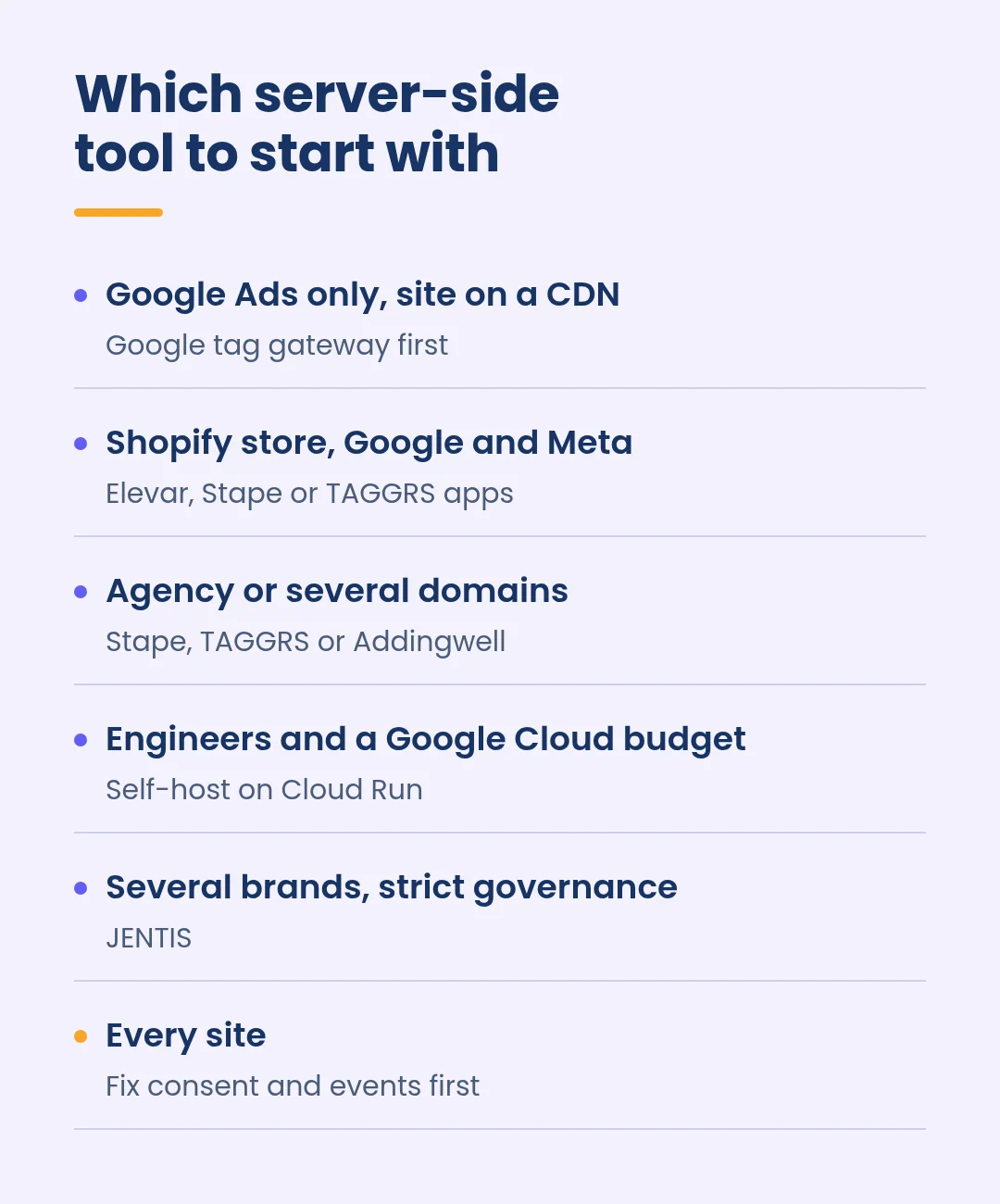
Match the tool to your team, not the feature list
Most feature differences shrink once the container is running. The bigger gaps are who maintains it, how billing scales and whether your ad platforms and CMS are supported out of the box.
- Google Ads is your only paid channel: set up Google tag gateway first and revisit a server container when you add Meta or a CRM feed.
- Shopify store running Google and Meta: compare Elevar’s order-based pricing with the Shopify apps from Stape or TAGGRS for your order and request volumes.
- Agency or group with several domains: compare multi-domain limits and add-on prices at Stape, TAGGRS and Addingwell, since these change the total more than the base plan.
- In-house engineers on Google Cloud: self-hosting on Cloud Run gives full control, provided someone owns monitoring and updates.
- Several brands, apps and strict governance: JENTIS is built for that scope, with the migration cost of leaving GTM.
Where lead generation sites differ
For B2B and service businesses, the gain usually comes from sending qualified lead and sale events back to Google Ads and Meta. Server containers make that easier, but the logic lives in your CRM.
Our guide to lead quality tracking with CRM data covers that side, and if calls drive your leads, see our call tracking software comparison.
5. The 10-Point Pre-Launch Checklist
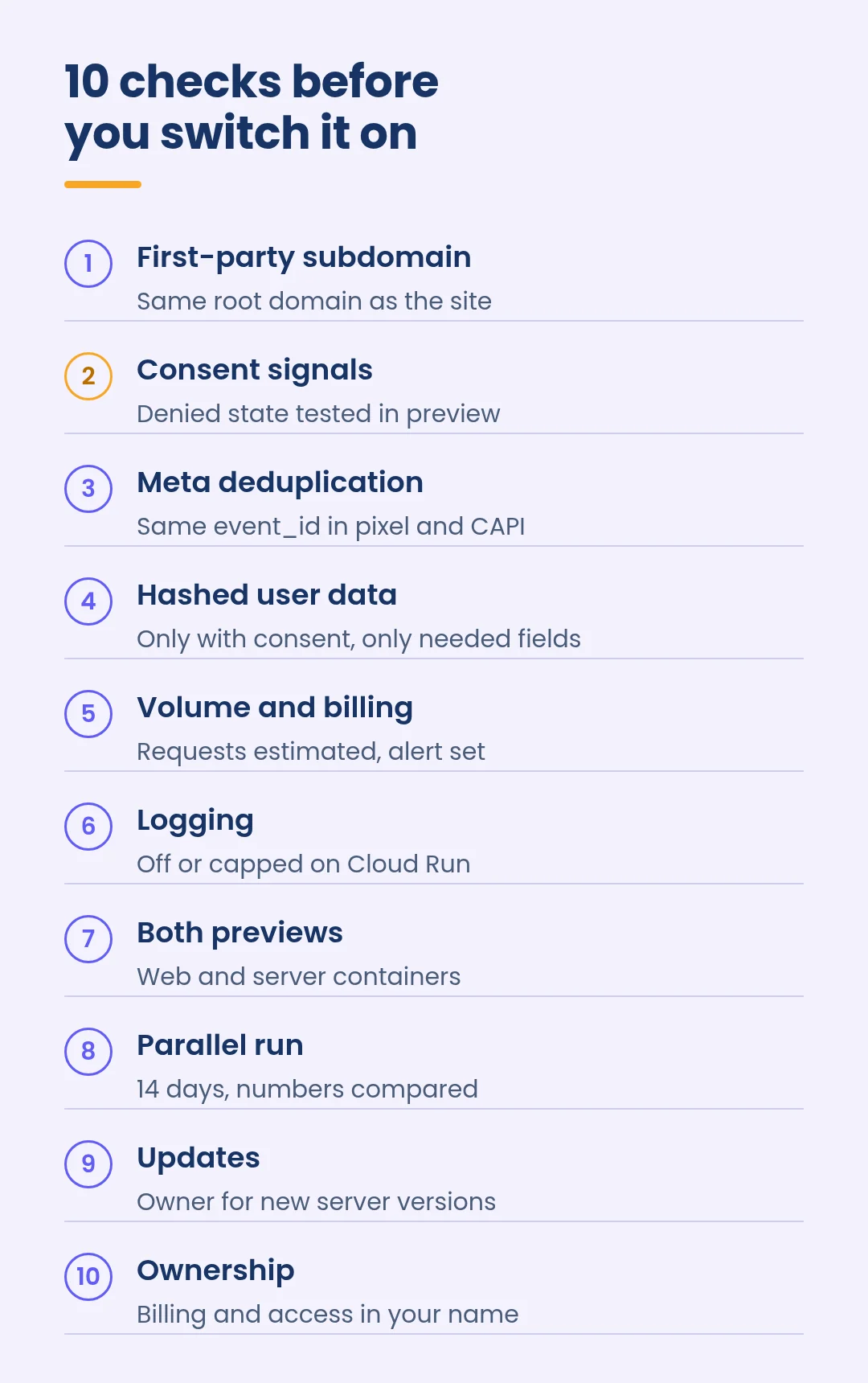
Run these checks with both the browser tags and the server container live. Remove browser tags only after check 8 passes.
| # | Check | How to test | Pass when |
|---|---|---|---|
| 1 | First-party subdomain | Load the container URL in a browser | It resolves on a subdomain of your main domain |
| 2 | Consent signals | Deny consent, then watch the server preview | Tags respect the denied state |
| 3 | Meta deduplication | Compare pixel and Conversions API events in Events Manager | Both carry the same event_id, as {A(META,’Meta requires for deduplication’)} |
| 4 | Hashed user data | Inspect outgoing requests in server preview | Only consented, needed fields are sent, hashed where the platform requires |
| 5 | Volume and billing | Compare the vendor dashboard with GA4 event counts | Usage stays below the plan limit and a billing alert exists |
| 6 | Logging | Open Logs Router in Google Cloud (self-hosted only) | Request logging is off or capped |
| 7 | Both previews | Run GTM preview for web and server containers | Every key event appears once in each |
| 8 | Parallel run | Compare 14 days of conversions per platform | Numbers are stable or higher, with no duplicates |
| 9 | Updates | Name an owner for server updates | Someone is responsible for each major release |
| 10 | Ownership | Review billing and user access | The account and billing belong to your company |
Check 2 is the one most often skipped. If you also run click-fraud filtering, re-test it after migration, because some tools read browser signals that change when tags move server-side. Our click fraud protection tools guide explains what each type relies on.
6. Suggest a Tool for This Comparison
We update this comparison when pricing or features change. If you build a server-side tagging, tag management or first-party data product that solves the problems above, you can submit it for editorial consideration through our contact page.
Include a link to public pricing and documentation. Inclusion depends on relevance and evidence only. It never requires a backlink, payment or sponsorship.
Conclusion: Your First 30 Days
Week 1: audit consent and your GA4 conversion events, and estimate monthly requests. Week 2: pick a tool from the decision guide and set up the subdomain and server container. Weeks 3 and 4: run the 10 checks with browser and server tags side by side, then retire duplicated browser tags.
If you would rather have a second pair of eyes on the setup before you migrate, our analytics and reporting team works on tracking audits for paid media accounts. You can book a call with Growth-onomics and bring your current GTM setup.
FAQs
Is server-side tagging GDPR compliant on its own?
No. It gives you more control over what leaves your site, which helps, but you still need valid consent and a lawful basis for each tool. The server container should read and respect the consent state set by your consent management platform.
How many requests will my website use?
Start from the monthly event count in GA4 and add script loads such as gtm.js, since some vendors count those too. Then add headroom for seasonal peaks. Most vendors offer a free allowance you can use to measure usage before choosing a plan.
Do I need a developer to set this up?
For managed hosts such as Stape, TAGGRS or Addingwell, a marketer comfortable with GTM can usually complete the setup, with DNS help for the subdomain.
Self-hosting on Cloud Run needs someone who can manage Google Cloud billing, logging and updates. Growth-onomics can review the plan before you start if you are unsure which route suits your team.