


A 400-page WooCommerce store and a 30,000-URL store with filter pages need very different audit tools. The first can be checked end to end with free software in an afternoon. The second will hit the free limit before the crawler leaves the category pages.
This guide compares 8 technical SEO audit tools, from Google Search Console to enterprise crawl platforms, on what they check, how far they crawl and what they cost. Prices and limits come from each vendor’s own pages, checked on 20 November 2026. You will get:
- What a crawler finds, and what only Google’s own data can confirm
- A comparison table of 8 tools with free options, entry prices and crawl allowances
- A 60-minute audit workflow you can run this week
- A triage order so the first fixes are the ones that affect indexing
- A quick guide to which tool suits your site size
1. What a Technical SEO Audit Tool Checks (and What It Can’t Tell You)
A site crawler visits your pages the way a search engine bot would. It follows links, records status codes, redirects, canonical tags, titles, robots directives and internal links, then flags patterns such as broken links or duplicate titles.
What a crawler cannot tell you is what Google actually did with those pages. That is why every audit in this guide starts in Search Console and uses the crawler to explain what Search Console shows.
Crawl data vs Google’s own data
Search Console’s URL Inspection tool shows Google’s indexed version of a page, the canonical Google selected, and a rendered screenshot from a live test. Google notes that the canonical can only be read from the indexed data, not predicted by a live test.
A crawler gives you the full picture of your site as built. Search Console gives you Google’s verdict. When the 2 disagree, for example a page your crawler sees as indexable but Google lists as excluded, that gap is usually where the fix is.
JavaScript rendering
If your product details, prices or internal links only appear after JavaScript runs, a crawler that reads raw HTML will miss them. Google explains how it processes JavaScript in its JavaScript SEO basics guide.
Check whether rendering is included in the plan you are looking at.
Based on the vendors’ documentation, it is excluded from Screaming Frog’s free version and, according to Semrush’s knowledge base, limited to higher toolkit tiers. Our guide to technical SEO fixes for JavaScript-heavy sites covers what to do once you find gaps.
Log files and AI crawlers
A crawl shows what bots could reach. Server logs show what they did request, including Googlebot and AI crawlers. Log analysis is a separate feature, offered by some cloud platforms such as JetOctopus.
For most sites under a few thousand pages, logs are optional. Google’s own crawl budget guide says it is aimed at sites with 1 million+ pages, or 10,000+ pages that change daily. If you are deciding what AI bots may crawl, see our comparison of llms.txt, robots.txt and schema.
2. 8 Technical SEO Audit Tools Compared
The table summarises each tool’s free option, entry price and crawl allowance. All details are based on the vendor’s documentation, checked on 20 November 2026. We have not run benchmark tests, so the table makes no claims about crawl speed or accuracy.
| Tool | Type | Free option | Paid entry price | Crawl allowance | Best used for | Main limitation |
|---|---|---|---|---|---|---|
| Google Search Console | Google’s own reporting | Free | None | Not a crawler | Index status, canonicals, Google’s crawl history | Only shows Google’s view of verified properties |
| Ahrefs Webmaster Tools | Cloud audit | Free for verified sites | Paid Ahrefs plans add credits | 5,000 crawl credits per project a month | Small sites that want a free scheduled audit | Verified sites only, no competitor audits |
| Seobility | Cloud audit suite | Basic: 1 project, 100 pages per crawl | Premium €59.90 a month (plus VAT) | 25,000 pages per crawl on Premium | Small teams wanting audits plus rank tracking | Free plan too small for most audits |
| Screaming Frog SEO Spider | Desktop crawler | Up to 500 URLs | £199 per user a year | Unlimited, bound by memory and storage | Hands-on audits, custom extraction | Free version lacks rendering and saved crawls |
| Sitebulb | Desktop and cloud crawler | 14-day trial, no card | Lite $18 (£12.50) a month | 10,000 URLs (Lite), 500,000 (Pro) | Prioritised hints and client-ready reports | Lite excludes structured data and hreflang checks |
| Semrush Site Audit | Part of an SEO suite | Free account, 10 reports a day | SEO plan €134 a month, or €112.52 billed yearly | Varies by plan | Teams already using Semrush for keywords | Crawl limits documented under older plan names |
| JetOctopus | Cloud crawler and log analyser | Trial after a demo | Growth €299 a month, billed yearly | 500K crawled URLs a month | Large sites, log files, AI bot activity | Priced for larger sites; demo before trial |
| Lumar | Enterprise platform | None listed | Quote only | Built for millions of pages | Enterprise teams, pre-release QA | No public pricing |
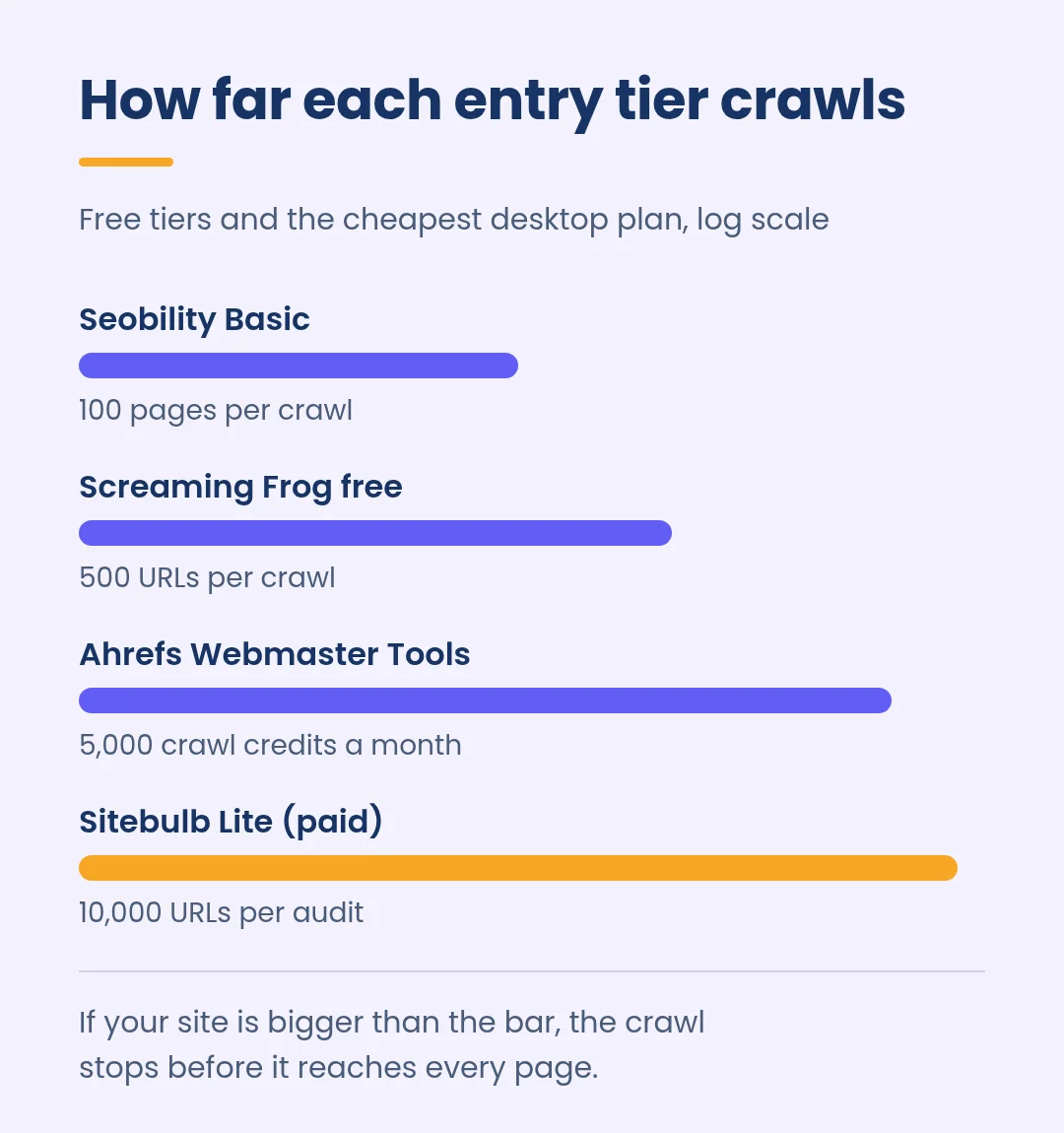
Free starting points
Google Search Console is the baseline for every site. Beyond URL Inspection, the Crawl Stats report shows Google’s requests, response codes and availability problems. It only works on root-level properties, and Google says sites under 1,000 pages should not need it.
Ahrefs Webmaster Tools gives free access to Site Audit for verified websites. Based on Ahrefs’ documentation, it checks 170+ technical and on-page issues and includes 5,000 crawl credits per verified project each month.
Credits are only used on HTML pages that return a 200 status, so redirects and broken URLs do not eat the allowance.
Seobility Basic is free with 1 project and 100 pages per crawl. That is enough to check a small brochure site, but most shops and blogs will need the Premium plan, which lists 3 projects and 25,000 pages per crawl. The 14-day trial asks for a payment method.
Desktop crawlers
Screaming Frog SEO Spider is free for up to 500 URLs. The pricing page shows that JavaScript rendering, saved crawls, scheduling, crawl comparison and Search Console integration need a licence at £199 per user a year.
The paid version also lists AI integrations (OpenAI, Gemini, Anthropic and Ollama), command line automation and an MCP server.
Sitebulb runs on Windows or Mac. On monthly billing, Lite is $18 (£12.50) for 10,000 URLs per audit, and Pro is $42 (£30) for 500,000 URLs, with yearly plans 15% cheaper. Sitebulb says Pro can be raised to 2 million URLs if your computer can cope.
Lite leaves out structured data, hreflang, accessibility and scheduling. JavaScript crawling is included on every plan, and Sitebulb Cloud starts from $125 a month for teams that want shared crawl data.
Cloud platforms and suites
Semrush Site Audit comes with Semrush’s paid plans. To a visitor from Europe on 20 November 2026, the SEO plan showed €134 a month, or €112.52 a month billed yearly. The free account allows 1 demo project and 10 reports a day.
One caution: Semrush’s Site Audit knowledge base still lists crawl limits and JavaScript rendering by older toolkit names (Pro, Guru and Business). Ask Semrush which current plan includes rendering before you rely on it.
JetOctopus combines a cloud crawler with log analysis, Search Console and GA4 data, and reports how Google and AI bots crawl each page. The Growth plan is €299 a month billed yearly (€399 billed quarterly) with 500K crawled URLs and 2M log lines a month. Access to a trial follows a demo call.
Lumar targets enterprise teams. Its platform page describes modules for analysis, monitoring, impact reporting and Protect, which runs automated SEO checks in your CI/CD pipeline before a release goes live. Pricing is by quote.
3. A 60-Minute Technical SEO Audit Workflow
This workflow suits a site of a few hundred pages and uses free tools only. The timings are our suggested split, not a vendor benchmark. On bigger sites, keep the order and stretch each step.
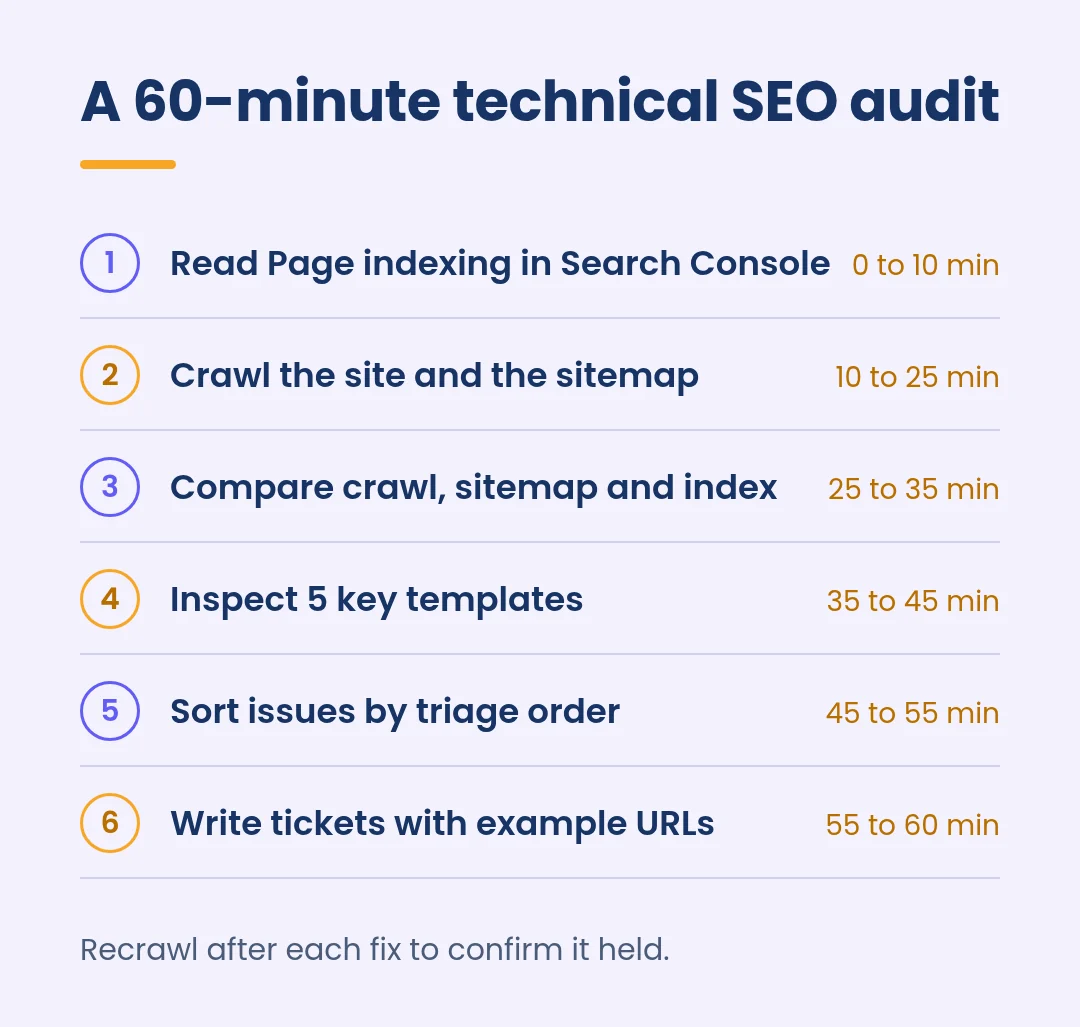
- 0 to 10 minutes: read Page indexing in Search Console. Note the reasons pages are not indexed, and which page types they affect. A blog post excluded as a duplicate is less urgent than a service page marked noindex.
- 10 to 25 minutes: crawl the site. Start from the homepage and, if your tool supports it, add the XML sitemap as a second source so orphan pages show up.
- 25 to 35 minutes: compare crawl, sitemap and index. Look for sitemap URLs that redirect or return errors, pages in the sitemap that no internal link points to, and indexable pages Google has not indexed.
- 35 to 45 minutes: inspect 5 key templates. Pick the homepage, a service or category page, a product page, a blog post and a landing page. Run each through URL Inspection and check the Google-selected canonical and the rendered screenshot.
- 45 to 55 minutes: sort issues by the triage order below. Count affected URLs per template rather than per page.
- 55 to 60 minutes: write tickets. Each ticket needs the issue, 3 example URLs, the template, the owner and how you will confirm the fix.
If the audit shows pages that are indexed but out of date, our guide to content refresh vs new content helps you decide whether to update or replace them.
4. How to Prioritise What the Crawl Finds
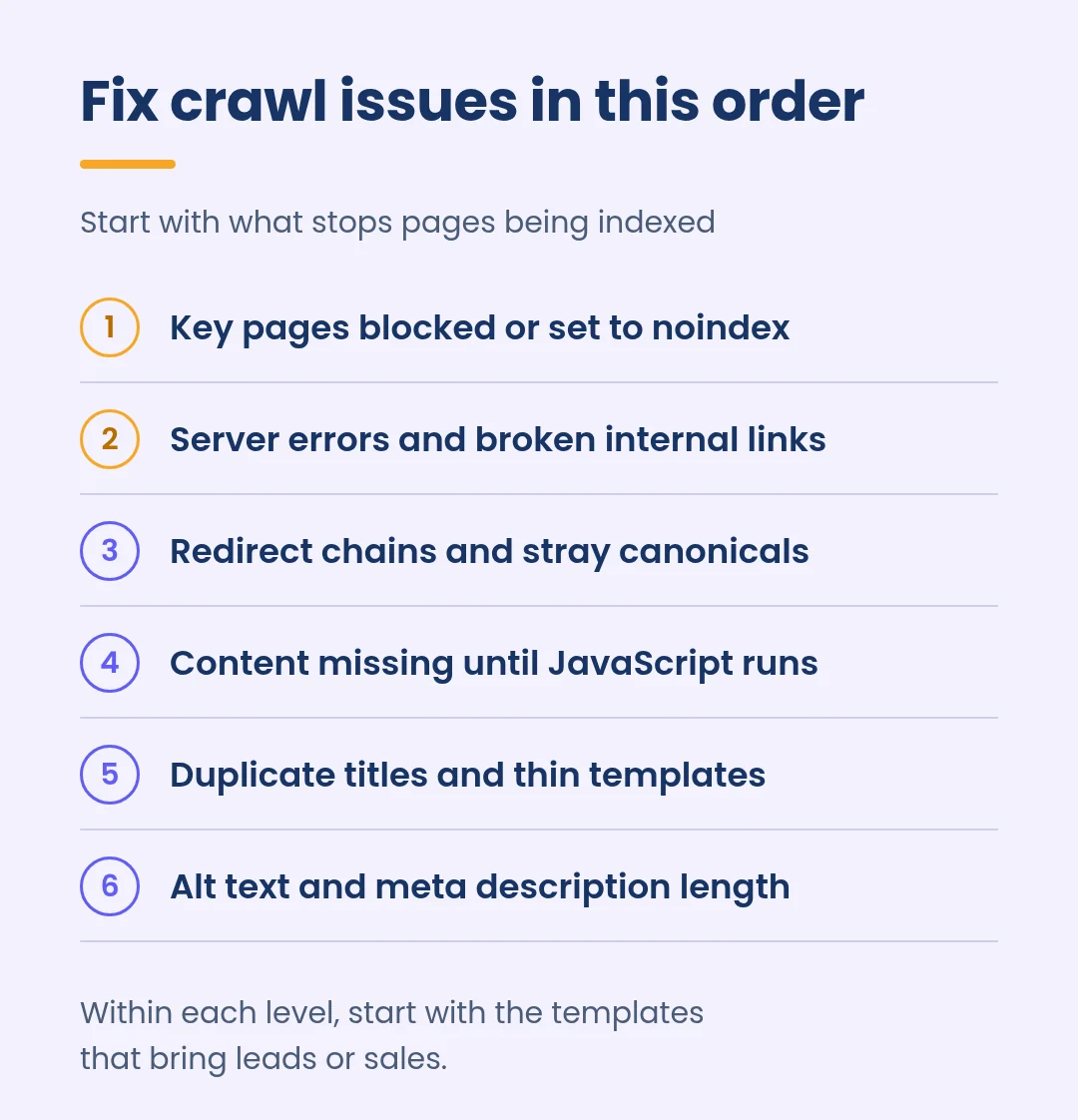
Most crawlers report hundreds of warnings on a typical site. Treating them as equal is how audits stall. Sort by whether the issue stops a page being indexed, then by how much revenue the affected template brings.
| Priority | Issue | How to confirm | Usual owner |
|---|---|---|---|
| 1 | Key pages blocked by robots.txt or set to noindex | URL Inspection: Crawl allowed? and Indexing allowed? | Developer |
| 2 | Server errors (5xx) and broken internal links | Crawl status codes; Crawl Stats host status | Developer or host |
| 3 | Redirect chains and canonicals pointing to other pages | Crawl redirect report; Google-selected canonical | Developer and SEO |
| 4 | Content or links missing until JavaScript runs | Compare raw and rendered crawl; URL Inspection screenshot | Developer |
| 5 | Duplicate titles and thin templates | Crawl duplicate reports; Page indexing duplicate reasons | SEO and content |
| 6 | Missing alt text, long meta descriptions | Crawl on-page reports | Content |
Google’s crawl budget guide supports this order for large sites. It recommends returning 404 or 410 for removed pages, fixing soft 404s and avoiding long redirect chains. It also notes that noindex pages are still requested, so they use crawl time.
Technical fixes only pay off if the pages convert once they are found. Pair the audit with our list of landing page fixes that lower cost per lead, and see why we call technical SEO the bottleneck that holds growth back.
Which tool suits your site size
| Site size | Starting setup | When to upgrade |
|---|---|---|
| Under 500 URLs | Search Console plus Screaming Frog free or Ahrefs Webmaster Tools | When you need JavaScript rendering or saved crawl comparisons |
| 500 to 10,000 URLs | Search Console plus Ahrefs Webmaster Tools, Screaming Frog licence or Sitebulb Lite | When you need hreflang, structured data or scheduled audits |
| 10,000 to 500,000 URLs | Screaming Frog licence, Sitebulb Pro, or a cloud suite such as Seobility or Semrush | When the team needs shared crawls or server logs |
| 500,000+ URLs or many sites | Cloud platforms such as JetOctopus, Sitebulb Cloud or Lumar | When releases need automated checks before they ship |
Once Google indexes the fixed pages, track how they perform across classic and AI results with our guide to the Search Console generative AI report.
5. Submit a Product for Editorial Consideration
We update this comparison as tools change. If your company makes a crawler, site audit or log analysis tool that helps small and mid-sized businesses, you can submit it for editorial consideration through our contact page.
Inclusion depends only on relevance to this audience and on evidence we can verify, such as public pricing, documentation and terms. No backlink, payment or sponsorship is required, and none is accepted in exchange for a listing.
FAQs
What is the best free technical SEO audit tool?
For most small sites, Google Search Console plus one free crawler covers the basics. On 20 November 2026, Screaming Frog’s free version crawled up to 500 URLs, Ahrefs Webmaster Tools included 5,000 crawl credits per verified project a month, and Seobility Basic allowed 100 pages per crawl.
How much does a technical SEO audit tool cost?
Published entry prices on 20 November 2026 ran from £199 a year for a Screaming Frog licence and $18 a month for Sitebulb Lite, to €299 a month for JetOctopus Growth billed yearly. Lumar prices by quote.
How often should I run a technical SEO audit?
Run a full audit at least once a quarter and after any redesign, migration or new template. Scheduled crawls, available on several paid plans, help you catch new errors between full audits.
Conclusion: Start Free, Upgrade When the Crawl Runs Out
Start with Search Console and a free crawler, run the 60-minute workflow, and fix issues in triage order. Pay for a tool when your site outgrows the free allowance or when you need rendering, scheduling or log data, not before.
If you want a second pair of eyes on the findings, our SEO team can review the crawl with you and turn it into a fix plan. You can book a call to talk it through.