


Your website’s growth might be stuck because of technical SEO issues. Even great content won’t rank if search engines can’t access or index it. Here’s why technical SEO matters and what issues could be slowing you down:
- Site Speed: Slow-loading pages hurt rankings and user experience. Google’s Core Web Vitals show that 96% of websites fail at least one performance metric. Fixing things like image compression and server response times can help.
- Crawlability: Search engines can’t rank what they can’t find. Problems like broken links, redirect chains, and orphan pages waste Google’s crawl budget, leaving important pages undiscovered.
- Mobile Optimization: With over 60% of searches on mobile, issues like poor layouts, small fonts, and missing viewport tags can hurt rankings and user experience.
- Structured Data: Adding schema markup helps search engines understand your content, improving visibility with rich snippets in search results.
Fixing these issues ensures your content reaches its audience and improves your site’s performance in search rankings. Let’s dive into the details and solutions to reclaim your lost traffic and growth.
Complete Technical SEO Guide 2026 (Fix Crawl, Index & Speed Issues)
Common Technical SEO Problems That Limit Growth
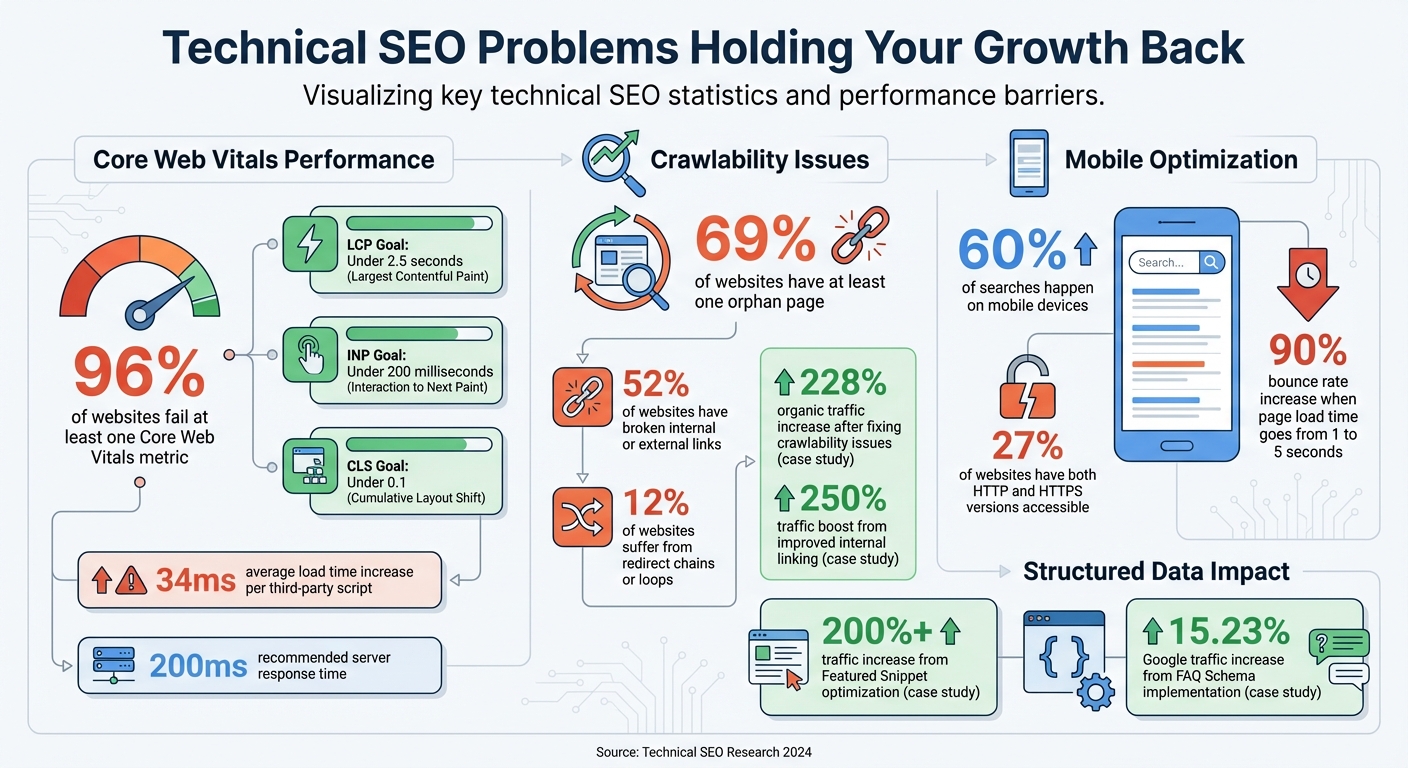
Technical SEO Statistics: Common Website Issues and Performance Metrics
Technical issues can quietly sabotage your website’s search performance and revenue. These challenges, if left unchecked, can pile up and significantly hinder your growth. Let’s break down some key areas that often cause trouble.
Site Speed: Why It Matters More Than You Think
Site speed isn’t just about convenience – it directly impacts your search rankings for both mobile and desktop users. Google evaluates your site’s speed through Core Web Vitals, which measure how well your pages provide a smooth user experience:
- Largest Contentful Paint (LCP): Tracks how quickly your main content loads (goal: under 2.5 seconds).
- Interaction to Next Paint (INP): Measures how fast your page reacts to clicks or taps (goal: under 200 milliseconds).
- Cumulative Layout Shift (CLS): Checks if elements shift around while loading (goal: under 0.1).
A study of 50,000 domains revealed that 96% failed at least one Core Web Vitals metric. Even small things, like adding third-party scripts, can slow down your site – each script increases load time by an average of 34 milliseconds. Google recommends keeping server response times under 200 milliseconds.
"When webpages load faster and more reliably, they not only offer a better user experience, but also tend to rank higher in organic search results." – Cloudflare
To speed things up, focus on these fixes:
- Compress images to reduce file sizes.
- Minify HTML, CSS, and JavaScript by removing unnecessary spaces and comments.
- Use browser caching and a Content Delivery Network (CDN) to serve files faster.
- Set non-essential scripts to load with "async" or "defer" attributes to avoid blocking page rendering.
While speed is critical, it’s just one piece of the puzzle. Your site’s structure and accessibility also play a big role.
Crawlability and Indexing Problems
Search engines can’t rank what they can’t find. Surprisingly, 69% of websites have at least one orphan page – a page with no internal links pointing to it. Even if these pages are in your sitemap, the lack of internal links might signal to Google that they’re not important.
Broken links are another common issue. Over half (52%) of websites have broken internal or external links, which waste crawl budget and frustrate users. Additionally, 12% of websites suffer from redirect chains or loops, which create unnecessary steps and further waste crawl budget.
"If you’re seeing times that are over 1,000ms (that’s over a second per profile, not even to load the page) then that would really be a sign that your server is really kind of slow and probably that’s one of the aspects it’s limiting us from crawling as much as we otherwise could." – John Mueller, Senior Search Analyst, Google
Fixing these issues can dramatically improve performance. For example, Neil Sheth of Only Way Online helped recover a website’s traffic after a botched migration. By addressing orphan pages, redirect chains, and broken links, the site saw a 228% increase in organic traffic in just a few months. Similarly, Felix Norton of Woww revamped an internal linking strategy for an event hiring platform, resulting in a 250% traffic boost in just one week.
Here’s what you can do:
- Keep your site architecture flat, ensuring key pages are accessible within three clicks from the homepage.
- Regularly audit your robots.txt file to ensure you’re not unintentionally blocking important pages.
- Replace redirect chains with direct 301 redirects to the final URL.
- Add self-referencing canonical tags to every unique page to avoid duplicate content issues.
Mobile Optimization in a Mobile-First World
Google now prioritizes your mobile site for indexing and ranking. If your mobile experience is lacking, your desktop rankings will also take a hit.
Common mobile issues include:
- Fixed-width layouts that force horizontal scrolling.
- Font sizes smaller than 16px, making text hard to read without zooming.
- Tap targets smaller than 44×44 pixels, leading to accidental clicks.
- Full-screen pop-ups that block content and may result in ranking penalties.
Another widespread problem is missing viewport tags, which cause browsers to display the desktop version on smaller screens. This makes text unreadable and navigation clunky. Additionally, 27% of websites have both HTTP and HTTPS versions accessible at the same time, creating duplicate content that splits ranking signals. Some sites also block CSS or JavaScript files in their robots.txt file, preventing Google from properly rendering mobile pages.
To optimize for mobile:
- Use fluid CSS layouts that adapt to any screen size.
- Add proper viewport meta tags to guide browsers on scaling your content.
- Test your site with Google’s Mobile-Friendly Test and Lighthouse tools to identify usability issues.
- Focus on improving Interaction to Next Paint (INP), which now measures responsiveness across all user interactions, not just the first one.
While mobile optimization ensures your site stays competitive, structured data can help you stand out in search results.
Structured Data: Unlocking Rich Snippet Potential
Without structured data, you’re missing out on rich search results like Featured Snippets, product carousels, and FAQ boxes that can significantly increase visibility.
For example, Salman Baig of Voxel Reviews targeted the keyword "Best Gaming Laptops under 500." By updating the datePublished and dateModified schema and adding the current date to the top of his post, he secured a Featured Snippet and boosted traffic by more than 200%.
Rich snippets attract higher click-through rates because they provide detailed, visually appealing information directly in search results. Adding structured data is straightforward – use Schema.org markup to tag your content (e.g., Product, Article, LocalBusiness) and test it using Google’s Rich Results Test to ensure everything works as expected. Focus on structured data types that align with your business and content goals.
Measuring How Technical SEO Affects Campaign Performance
To evaluate how technical SEO impacts your campaigns, tools like Google Search Console (GSC) and GA4 are essential. Start by keeping an eye on your organic traffic, particularly non-branded traffic, as technical improvements should lead to noticeable growth in this area.
A high bounce rate can indicate technical issues. For example, if your page load time increases from one to five seconds, bounce rates can skyrocket by up to 90%. This often points to problems like slow loading speeds, rendering issues, or broken mobile functionality.
In GA4, use the "Page Title" filter to identify 404 errors. Once located, fix these broken pages by implementing 301 redirects to preserve user experience and search engine rankings.
Your site’s conversion rate is another critical metric because it directly ties to revenue. A seamless, fully functional website allows users to complete key actions, such as purchases or sign-ups. For instance, addressing technical challenges after a site migration can not only recover lost conversions but even improve them. To maintain efficiency, ensure your crawl budget is allocated to high-priority pages.
Speaking of crawl budgets, GSC’s "Crawl Stats" report is invaluable for tracking how search bots interact with your site. Make sure bots are concentrating on your campaign’s most important pages. Also, check the "Excluded" report regularly to ensure critical pages aren’t being unintentionally blocked by robots.txt files or "noindex" tags.
Here’s a real-world example: Bill Widmer from The Wandering RV added FAQ Schema to an RV insurance guide. This simple update created a rich snippet, increasing Google traffic to that page by 15.23% – all without altering its ranking position. This demonstrates how even small technical tweaks can yield measurable results.
sbb-itb-2ec70df
How to Fix Technical SEO Problems
Improving Site Speed with Core Web Vitals
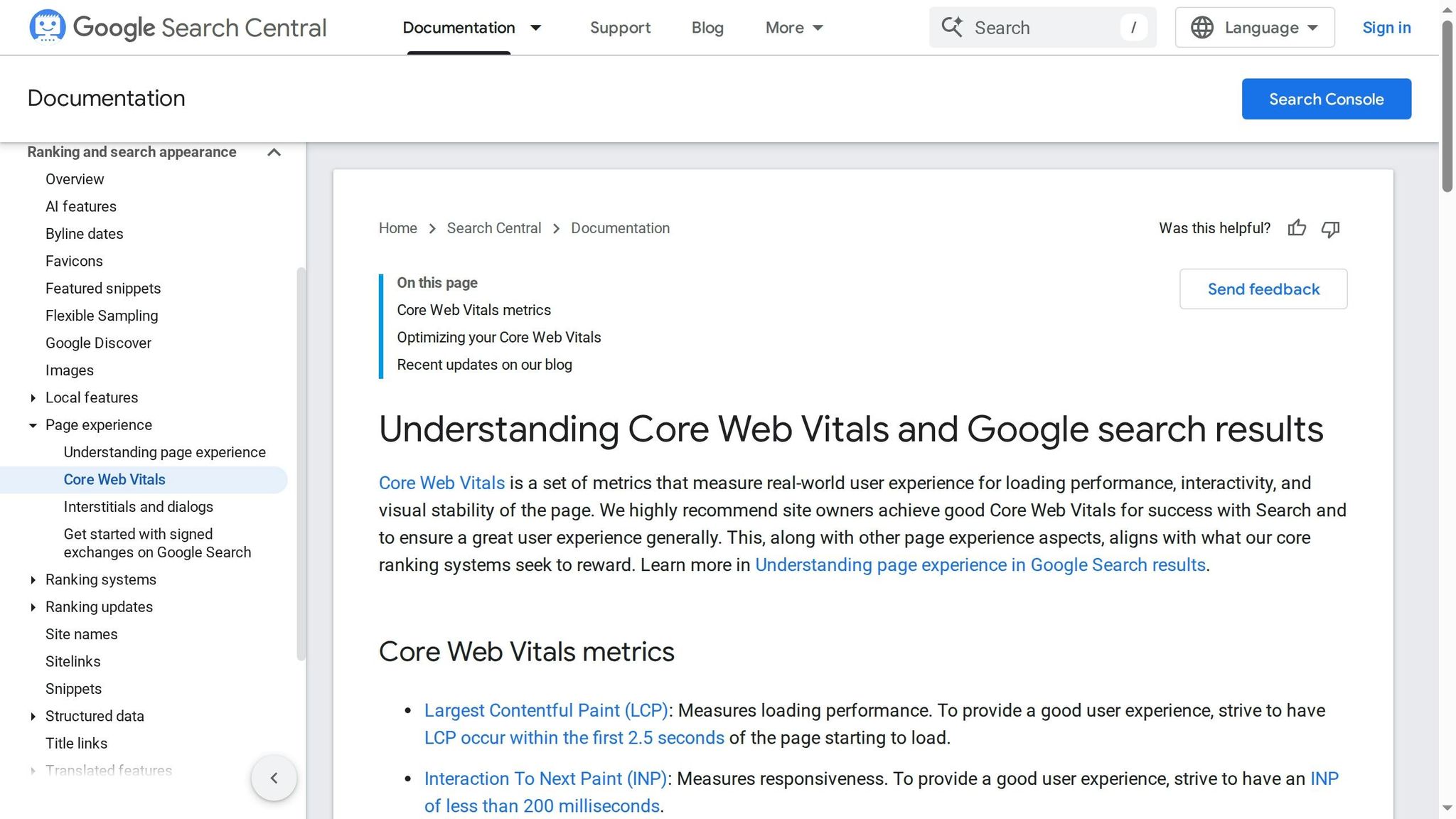
Start by heading over to Google Search Console (GSC) and opening the Core Web Vitals report. This report uses real-world data collected from actual visitors over the past 28 days. In other words, it shows how your site performs under real conditions, not just in a controlled environment. GSC groups URLs with similar issues, so addressing one underlying problem can often improve dozens – or even hundreds – of pages at once.
Focus on pages flagged as "Poor" first, followed by those marked "Need Improvement." Within these groups, prioritize the pages with the most traffic or highest conversion value. For specific issues, click on the problem to view example URLs, then follow the provided link to run a PageSpeed Insights test. This test offers actionable recommendations, such as converting images to WebP format (which can reduce file sizes by 40-80%) or improving server response times.
To meet recommended performance targets, aim to keep your page size below 500KB and limit the number of resources to 50 or fewer. After implementing fixes, use the "Start Tracking" button in GSC to trigger a 28-day validation period. This process helps confirm whether your updates successfully moved URLs from "Poor" to "Good".
Now, let’s tackle crawlability issues, which can further impact your SEO performance.
Fixing Crawlability with Sitemap Audits
Use tools like Screaming Frog to crawl your entire site and pinpoint issues that make it harder for search engines to access your content. Screaming Frog is particularly helpful for identifying redirect chains – those multi-step redirects that waste your crawl budget and slow down processing. Simplify these chains into a single 301 redirect to preserve link equity and improve speed.
Crawl traps are another common problem. These include infinite URL loops, faceted navigation that generates endless parameter-based URLs, or session IDs that create duplicate pages. These traps consume your crawl budget without offering any real value. Screaming Frog can also flag other issues, such as missing or broken sitemaps, duplicate content, or pages blocked by robots.txt files. Start by fixing the highest-priority pages to ensure search engines can access your most important content.
Once crawlability is under control, shift your focus to mobile optimization.
Improving Mobile Optimization with Responsiveness Tests
Your site needs to perform seamlessly on smartphones and tablets. Use Google Search Console’s Mobile Usability report to find pages with mobile-specific issues, such as text that’s too small to read, buttons placed too close together, or content that doesn’t fit within the screen.
To ensure a smooth experience, test your pages on real devices or use developer tools to simulate mobile environments. Check that your mobile speed is on par with desktop performance, fix rendering issues, and make sure buttons and forms are easy to use on smaller screens. Every interactive element should work flawlessly on mobile.
Adding Structured Data for Rich Snippets
Structured data is a powerful way to boost your site’s visibility in search results. By helping search engines understand your content better, structured data can enable rich results that stand out in search listings. Start by using a Schema Markup Generator to create JSON-LD code tailored to your content type, whether it’s an Organization, Product, Article, Event, Recipe, or Review. Place the generated code in your page’s <head> section.
JSON-LD is the preferred format for structured data. After adding the code, validate it using Google’s Rich Results Test to see which rich results your page qualifies for and preview how they’ll look in search. For broader schema validation, use the Schema Markup Validator to ensure compliance with schema.org standards. Finally, monitor your structured data’s performance and address any errors through Google Search Console’s rich results reports.
Partner with Growth-onomics for Technical SEO Solutions

Technical SEO issues can hold your website back, but Growth-onomics is here to help you break through those barriers. Fixing these problems requires a clear and methodical approach – one that identifies issues, prioritizes solutions, and delivers measurable results. That’s where Growth-onomics shines. We specialize in uncovering and resolving the technical challenges that stop search engines from effectively crawling, indexing, and ranking your content.
Our process starts with a detailed audit using a combination of crawl-based tools and Google Search Console. This allows us to pinpoint crawl traps, orphan pages, and JavaScript rendering issues. We then categorize these problems by their level of urgency and align fixes with key SEO priorities: Crawlability, Indexability, Renderability, Rankability, and Clickability. By focusing on what matters most, we ensure your resources are used efficiently to address the issues that will make the biggest difference.
Given the rise of mobile searches, mobile-first optimization is a key focus in our approach. Our audits emphasize crawl budget optimization so that search engine bots concentrate on your most valuable pages. We streamline redirect chains to a single 301 hop and implement structured data to help your pages qualify for rich snippets – enhancing both visibility and user engagement.
At Growth-onomics, we tailor data-driven strategies to your specific challenges. Whether you’re dealing with Core Web Vitals failures, broken links, or duplicate content, we provide actionable solutions designed to boost your search visibility and improve user experience. Our goal is to ensure your technical foundation strengthens – not undermines – your content strategy and link-building efforts.
Up next, we’ll dive into practical steps for putting these strategies into action.
Conclusion: Building a Strong Technical Foundation for Growth
Technical SEO is the backbone of any successful digital strategy. Without a solid technical framework, even the most engaging content can fall flat. As Search Engine Land explains:
"Technical SEO is the process of optimizing your website’s infrastructure so search engines can crawl, render, index, and serve your content correctly and efficiently".
The data doesn’t lie – issues like poor Core Web Vitals and broken links are widespread. These aren’t just minor annoyances; they’re roadblocks that can prevent search engines from finding your most important pages and stop potential customers from taking action.
To stay ahead, regular audits (every one to three months) are a must. Ensure key pages are no more than three clicks away from the homepage, switch to modern image formats like WebP or AVIF to cut file sizes by 40–80%, and use structured data to provide clear context.
The results speak for themselves. When Meteored, a weather platform, teamed up with Cloudflare in 2024 to improve their Core Web Vitals, they experienced noticeable increases in both organic traffic and revenue. Similarly, HomeStyles eCommerce revamped their technical setup and achieved a 78% improvement in Core Web Vitals scores, a 35% boost in mobile conversion rates, and a 22% rise in organic traffic. These examples highlight just how impactful technical SEO improvements can be.
FAQs
How can I enhance my website’s Core Web Vitals to improve SEO?
To give your website’s Core Web Vitals a boost and enhance its SEO performance, focus on improving three critical aspects:
- Loading Speed: Compress and optimize images, implement a Content Delivery Network (CDN), remove render-blocking JavaScript and CSS, and add lazy loading to handle off-screen content efficiently. These steps reduce load times and enhance user experience.
- Interactivity: Streamline main-thread tasks, defer resource-heavy scripts, and ensure JavaScript runs smoothly. This helps your site respond faster to user actions.
- Visual Stability: Assign specific width and height attributes to images and videos, prevent unexpected layout shifts, and use CSS transforms for animations to maintain a consistent visual experience.
Once you’ve made these updates, use tools like Google PageSpeed Insights, Search Console, or Lighthouse to track your progress. These tools will help confirm that your site meets performance benchmarks and delivers a better experience for visitors.
What are the most common technical SEO issues that can block search engines from crawling your site?
When it comes to technical SEO, certain issues can make it harder for search engines to properly crawl and index your site. Common culprits include misconfigured robots.txt files, broken internal links, and redirect chains or loops – all of which can disrupt smooth navigation.
Other frequent challenges include outdated sitemaps, orphan pages (those without any internal links leading to them), and pagination that’s not set up correctly. On top of that, missing canonical tags, duplicate content, and poor mobile optimization can further complicate how search engines interpret your site.
Tackling these technical issues is crucial if you want to boost your site’s visibility and ensure it performs well in search results.
How does structured data improve your website’s search visibility?
Structured data organizes your website’s information in a standardized way, helping search engines understand your content more effectively. This can lead to rich results – like enhanced snippets, star ratings, or product details – appearing directly in search results. These features make your site stand out and provide users with more useful details at a glance.
When your content is displayed more attractively in search listings, it can increase click-through rates and improve visibility, ultimately driving more user engagement and contributing to your business’s growth.
