

A SaaS team decides to opt out of AI training. Someone adds a Disallow for GPTBot, ships an llms.txt for good measure, and reports back that the site is now protected.
There are 3 things wrong with that.
The training crawler they blocked is not the one that decides whether they appear in ChatGPT’s answers. The llms.txt they published controls nothing at all. And their CDN has been quietly blocking a different crawler for 8 months that nobody configured deliberately.
None of this is unusual. These 3 files get discussed as if they occupy the same category, and they do not.
One is access control.
One is a content hint with no enforcement.
One describes meaning to machines that have already arrived.
Confusing them produces 2 failure modes that show up in most technical audits: sites that believe they are protected and are not, and sites that have accidentally removed themselves from AI search while intending to opt out of training.
This article separates what each file truly does, which crawlers contributed to it and what they are for, and how to build a policy that matches what you intend. Details were verified in August 2026, and this context shifts often enough to warrant a quarterly review.
3 Files, 3 Different Jobs
The confusion is worth naming precisely, because the distinction determines everything downstream.
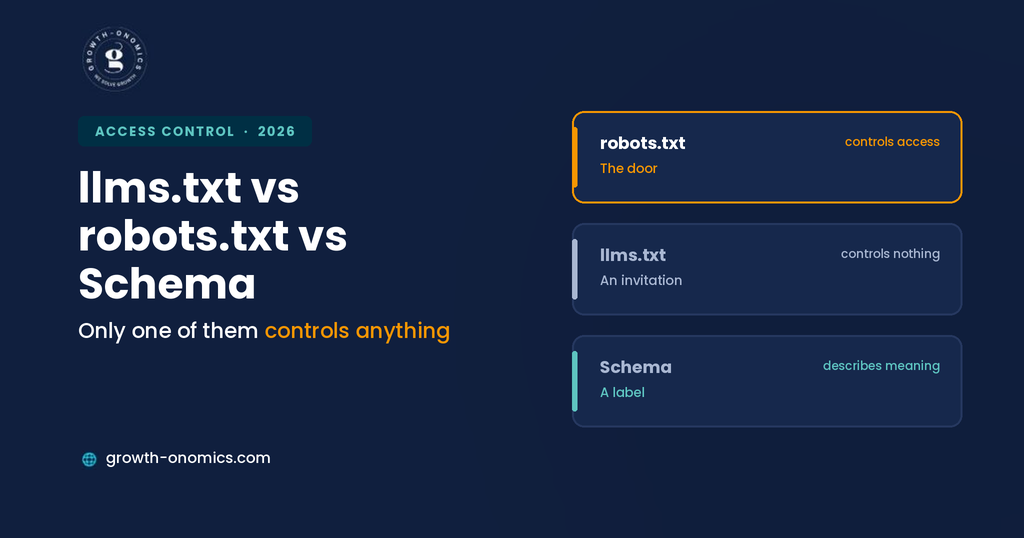
robots.txt is access control. It tells crawlers which paths they may fetch. Compliance is voluntary, but the major providers document their user agents and honor it, which makes it the primary lever you have.
llms.txt is a content hint. It suggests which pages are most valuable and provides clean Markdown versions. It is an invitation, not a gate; nothing in the format prevents a crawler from ignoring it entirely, and no major model provider has committed to reading it in production retrieval.
Schema is a description. Structured data tells a machine what your content means once it has already been fetched. It has no bearing on access whatsoever.
The most consequential error in this space is treating llms.txt as an access control mechanism. Teams publish one believing it restricts something, leave genuinely sensitive content exposed, and never check.
Growth-onomics separates these 3 layers explicitly in technical audits because they are frequently conflated in the same conversation and the resulting policy usually protects nothing while blocking something valuable.
The second error is subtler. Because all 3 files live at the root of a site and get edited by the same person in the same afternoon, they tend to be treated as one configuration decision.
They are 3 decisions with 3 different owners: access is an infrastructure choice, content hints are a documentation choice, and structured data is a development choice.
Quick Comparison
| Dimension | robots.txt | llms.txt | Schema |
| What it does | Grants or denies access | Suggests priority content | Describes meaning |
| Enforcement | Voluntary, widely honored | None | Not applicable |
| Affects AI training | Yes, via training bot tokens | No | No |
| Affects AI search citations | Yes, via search bot tokens | Not demonstrated | Not demonstrated |
| Affects Google Search | Yes | No | Rich results only |
| Adopted by providers | Documented and honored | No commitments | Bing and Google confirmed use |
| Right mental model | The door | An invitation | A label |
What robots.txt Controls
This is the only one of the three with genuine control over access, and its power comes with 3 caveats worth understanding.
Compliance is voluntary but broadly observed. OpenAI, Anthropic, Google, and Perplexity all document their user agents and state that their crawlers honor robots.txt. That is a commitment backed by reputational incentive rather than a technical guarantee, and some crawlers, Bytespider in particular, have documented non-compliance histories. The practical read is that the file works well against the bots you most want to manage and not at all against the ones behaving badly.
User agents can be spoofed. A request claiming to be GPTBot may not be. Verification requires reverse DNS lookup rather than trusting the header, which can be crucial if you are making blocking decisions based on log analysis.
User-directed fetches are a gray zone. When someone asks an assistant to summarize a specific URL, providers often treat that as user-directed access rather than crawling. Your training and crawl directives may not apply the way you expect, which is a genuine gap in the model rather than a bug, and it means content you assumed was excluded can still reach a user who asks for it directly.
For hard enforcement, robots.txt is insufficient. Server-level rules returning a 403, or a bot management service at the WAF layer, are the only reliable mechanism for crawlers that do not comply voluntarily.
The Crawler Families in Need
This is the section that prevents the expensive mistake, because the crawlers do fundamentally different jobs and blocking the wrong family produces the opposite of what you intended.
- Training crawlers feed model training datasets. GPTBot, ClaudeBot, Google-Extended, Applebot-Extended, and CCBot sit here. Blocking these opts you out of having your content used to train future models. It does not remove you from AI search answers, and it does not affect your Google rankings.
- Search and retrieval crawlers index continuously to answer live queries. OAI-SearchBot, Claude-SearchBot, and PerplexityBot sit here. Blocking these removes you from eligibility for AI search citations entirely, which is the mistake that costs visibility.
- User-triggered agents fetch on behalf of a specific person. ChatGPT-User, Claude-User, and Perplexity-User sit here. These fire when someone asks an assistant to look at a page directly.
Two specific points worth knowing.
Google-Extended controls training for Gemini and Vertex AI and has no effect on Google Search rankings, it is the cleanest opt-out lever available, since it costs nothing in search visibility.
And Googlebot must never be blocked, since that removes you from Google Search entirely, including AI Overviews, which are served through the standard index.
The most common misconfiguration is a robots.txt copied from a 2023 example that blocks the whole OpenAI family. That was written before search bots existed as separate tokens, and applying it today opts you out of ChatGPT citations while leaving non-compliant crawlers untouched. If your file has not been reviewed since 2024, assume it encodes a decision nobody would make now.
What llms.txt Does
Less than its advocates claim and more than its critics allow, but nothing at all in the access control category.
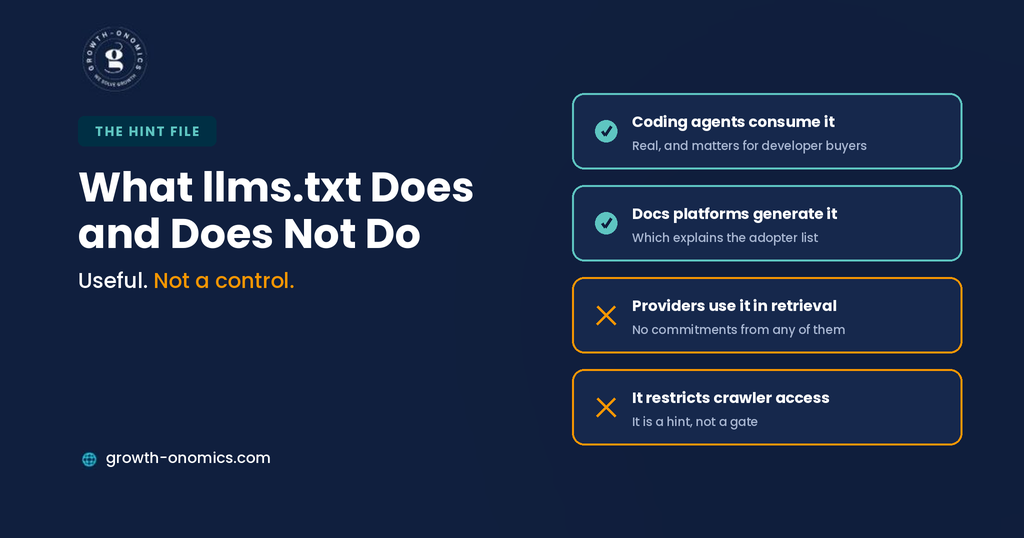
It is a curated content index. A Markdown file listing your most valuable pages with descriptions, plus optionally a full-text version. The premise is that it helps agents find and use your best content efficiently.
Documentation platforms generate it automatically. Mintlify, Fern, GitBook, and Vercel all produce one, which is why the adopter list reads like a developer-tools directory rather than a cross-section of the web.
Coding agents and IDE assistants do consume it. This is a reality, and it has implications if developers are your buyers, since those agents shape how your product gets described inside development workflows.
No major model provider has committed to using it in production retrieval. Google has stated that AI Overviews require no special file or markup. Independent studies looking for a citation advantage have not found one.
It controls nothing. This is the point that gets lost. llms.txt is a hint, and a crawler that ignores it faces no consequence. If you need to restrict access, that is robots.txt and server-level rules, and confusing the two is how content intended to be private stays exposed.
The reasonable position is to publish one if it takes an afternoon, particularly if your documentation platform generates it anyway, and to treat the exercise of writing it as a useful audit of which pages you consider important.
Treating it as either a visibility lever or an access control is unsupported.
What Schema Does
Structured data operates after access has already been granted, which makes it a different category of thing entirely.
It describes rather than controls. Organization markup declares who you are, Product markup declares what you sell, Article markup declares authorship and dates. None of it affects whether a crawler can fetch the page.
Its confirmed benefit is interpretation. Microsoft has stated schema helps its systems understand content for Copilot. Google has said structured data offers an advantage in Search. Both are claims about comprehension, not about preference in retrieval.
Its effect on AI citations is not established. A matched analysis published in 2026 tracked pages that added JSON-LD against comparable controls and found citations barely moved. The correlation between cited pages and schema presence is confounded by site quality.
Where it genuinely earns its place is entity disambiguation, Organization markup with a complete sameAs array connecting your site to verified profiles elsewhere. If your company shares a name with another organization or was recently renamed, that clarity solves a real problem no access directive addresses.
Schema belongs in the same mental category as clean URLs and working canonicals: cheap technical hygiene worth doing once at template level, not a lever anyone should be selling as a visibility strategy.
The Layer Everyone Forgets
Here’s the finding that surprises most teams during an audit, and it sits outside all three files.
Your CDN may be overriding your intent. Research on major CDN networks has found a meaningful share of sites accidentally blocking AI crawlers at the infrastructure layer while their robots.txt says allow. The two layers must agree, and nobody checks the second one because nobody remembers configuring it.
This happens through several routes. Bot management rules enabled by default when the account was set up. Security settings that treat unfamiliar user agents as suspicious traffic. Rate limiting that returns errors to crawlers making systematic requests across a large site. And managed rulesets updated by the provider without a corresponding decision on your side, which is the version nobody could have prevented.
The practical consequence is that a site can have a perfectly considered robots.txt allowing every search crawler, and still be invisible because the CDN returns a challenge page to anything that is not a browser.
Growth-onomics checks server logs and CDN configuration alongside robots.txt for that reason, the file states an intention, and only the logs confirm what actually happened.
Building a Policy That Matches Your Intent
3 defensible positions, depending on what you actually want.
1. Maximum AI visibility. Allow everything, including training crawlers, and keep a server-level rule ready for any bot that misbehaves. This is the reasonable default for most B2B SaaS companies building visibility, since the training crawlers do no direct harm and the search crawlers are how you get cited.
2. Visibility without training. Allow the search and retrieval agents like OAI-SearchBot, Claude-SearchBot, and PerplexityBot while blocking the training crawlers, GPTBot, ClaudeBot, Google-Extended, and CCBot. This is the most commonly chosen middle ground, and it is coherent: you stay eligible for citations without contributing to future model training.
3. Restricted access. If content genuinely must not be fetched, robots.txt is insufficient, because it depends on voluntary compliance from bots you cannot verify. That requires server-level rules or WAF policies, and it should be a deliberate decision with a named owner rather than a directive somebody added during an unrelated project.
Whichever you choose, there are 3 rules that apply. Never block Googlebot, since that removes you from Google Search, including AI Overviews. Verify that your CDN agrees with your robots.txt. And review the policy quarterly, because new crawlers launch regularly and existing ones change their user agent strings.
How to Verify What Is Really Happening
Consider 4 checks, none of which takes long, and all of which are more informative than reading your own robots.txt.
Grep your access logs for AI user agents. This tells you which crawlers actually visit, how often, and which pages they request. Writing rules for bots that never visit is wasted effort; discovering one that visits constantly and was never considered is genuinely useful.
Fetch your own pages as a bot. Request a key page with an AI crawler user agent string and check the response. A 200 with full content means access works. A challenge page, a 403, or an empty shell means something in your stack is blocking regardless of what robots.txt says.
Verify suspicious traffic with reverse DNS. User agent strings can be spoofed, so a bot claiming to be GPTBot may not be. This matters before you make blocking decisions based on volume.
Check the raw HTML while you are there. If your key content only appears after JavaScript executes, access permissions are irrelevant; most crawlers feeding AI answers do not render, so they receive an empty container regardless of what you allowed.
Run all 4 quarterly. The configuration drifts, the crawler settings change, and the failures are silent in every case.
Conclusion
The three files get discussed together because they all sound like AI configuration, and that framing produces bad decisions. Only one of them controls anything.
robots.txt is the door, and the meaningful decision is which crawler family you admit: training crawlers, which affect whether your content trains future models, or search crawlers, which affect whether you appear in answers today. Conflating those two is the expensive mistake, and it usually shows up as a site that opted out of citations while believing it opted out of training.
llms.txt is an invitation with no enforcement, worth publishing if it is cheap and worth nothing as a control. Schema is a label applied after arrival, useful for accuracy and entity clarity, unproven as a visibility lever. Neither belongs in a conversation about access.
And the layer nobody checks, CDN and server configuration overrides all three. A robots.txt stating your intention is not evidence of what is happening, and the only way to know is to look at your logs and fetch your own pages as a bot.
If you want to know what AI crawlers actually see when they reach your site rather than what your configuration says they should, the Growth-onomics team can audit the access layer, the rendering, and the visibility outcome together.
FAQs
Does blocking GPTBot remove me from ChatGPT answers?
No, and this is the most consequential misunderstanding in the category. GPTBot is OpenAI’s training crawler, blocking it prevents your content being used to train future models. OAI-SearchBot is the separate agent that indexes for ChatGPT search, and ChatGPT-User fires when a person asks the assistant to fetch a specific page. Blocking GPTBot while allowing the other two is a coherent policy: no training contribution, full citation eligibility. Blocking all three removes you from ChatGPT answers entirely, which is what a robots.txt copied from an older example typically does.
Can llms.txt stop AI crawlers from using my content?
No. It is a hint about which content is worth reading, not an access mechanism, and nothing in the format prevents a crawler from ignoring it. Access is governed by robots.txt for compliant bots and by server-level or WAF rules for everything else. This confusion is consequential, because a team believing llms.txt restricts access may leave content exposed that they intended to protect. Treat llms.txt as an invitation and robots.txt as the door, and use server rules when you need a lock rather than a request.
Is blocking Google-Extended safe for my search rankings?
Yes. Google-Extended is a separate token controlling whether your content is used for training and grounding in Gemini apps and the Vertex AI API, and Google has stated it does not affect inclusion in Google Search. Blocking it is the cleanest opt-out available, since it costs nothing in search visibility. What you must never block is Googlebot, which is the standard indexing crawler, disallowing it removes you from Google Search entirely, and that includes AI Overviews, since those are served through the normal index.
How do I know if my CDN is blocking AI crawlers?
Fetch your own pages using an AI crawler user agent and read the response. If you get a challenge page, a 403, or an empty shell rather than your content, something above robots.txt is intervening. Then check your bot management settings, security rules, and any managed rulesets your provider enables by default. Research on major CDN networks has found a meaningful share of sites blocking AI crawlers at the infrastructure layer while their robots.txt says allow, and almost none of those blocks were configured deliberately.
Should I block AI crawlers to protect my content?
It depends which outcome you are protecting against, and the two are separable. Blocking training crawlers stops your content contributing to future model training, costs you nothing in search visibility, and is a defensible position for publishers whose content is the product. Blocking search crawlers stops you appearing in AI answers, which for most B2B SaaS companies removes them from a growing discovery channel to prevent a harm that is largely theoretical. The common middle ground, block training, allow search is coherent and takes 10 minutes to implement correctly.
How often should I review this configuration?
Quarterly at minimum, plus immediately when a major AI platform launches. New crawlers appear regularly, existing ones change user agent strings, and CDN providers update managed rules without asking. A quarterly review should cover 4 things: which AI bots appear in your logs, whether your robots.txt still reflects a decision someone made deliberately, whether your CDN agrees with it, and whether your key pages still render server-side. All four fail silently, which is why the calendar reminder matters more than the sophistication of the policy.
