


AI Overviews and AI Mode are both Google Search features, and for SEO they follow the same rules. An AI Overview is a short AI summary that shows on a regular results page only when Google thinks it helps.
AI Mode is a separate, conversational search where people ask longer questions and keep going with follow-ups.
For a small business, that difference changes who sees you and at what point in their research. It doesn’t change what Google needs from your site, how you opt out, or where the visits land in your reports.
This guide sticks to Google’s own documentation as of November 3, 2026. You’ll get:
- A side-by-side comparison of how each feature works and how Search Console counts it.
- What stays the same, from eligibility to the single opt-out setting and where clicks show up in GA4.
- What changes in AI Mode, including longer questions, follow-ups and query fan-out.
- Practical steps for local and service businesses, plus what to skip.
- A monthly tracking routine and a short note for anyone who also runs Google Ads.
1. AI Mode vs AI Overviews: The Short Answer
What an AI Overview is
An AI Overview is an AI-generated snapshot at the top of a normal Google results page, with links to sources. It’s part of the classic results, so the person never leaves the page they started on.
It also doesn’t show for every search. Google’s guide to AI features and your website says AI Overviews appear only when its systems decide they add something to classic Search, “and as such, often don’t trigger.”
What AI Mode is
AI Mode is a full AI search experience. People open it from the AI Mode button on google.com, in the Google app or at google.com/ai, and Google’s AI Mode help page describes it as a place to ask anything and go deeper with follow-up questions.
It’s no longer a side experiment. In May 2026, Google said AI Mode had passed 1 billion monthly users and made Gemini 3.5 Flash its default model. People can now also ask a follow-up straight from an AI Overview and carry on in AI Mode.
Side-by-side comparison
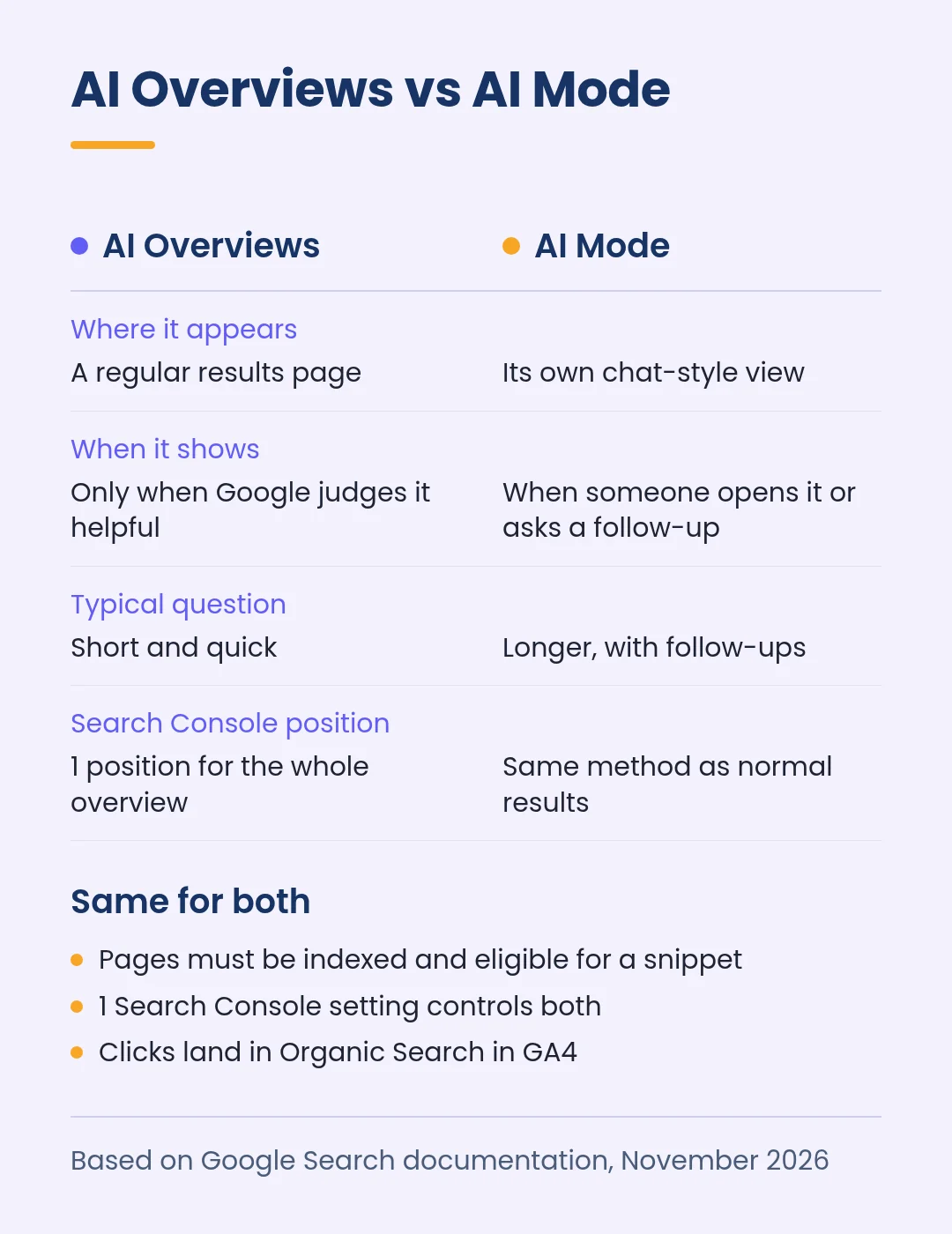
| AI Overviews | AI Mode | |
|---|---|---|
| Where it appears | At the top of a regular results page | In its own conversational view |
| When it shows | Only when Google judges it helpful | Whenever someone opens it, or follows up from an AI Overview |
| Typical question | Short, quick searches | Longer questions; Google puts AI Mode queries at 3 times the length of traditional searches on average |
| Follow-ups | Can hand off to AI Mode | Built in; each follow-up counts as a new query in Search Console |
| Search Console position | The whole overview takes 1 position, shared by every link in it | Same method as a normal results page |
| Ads inside the answer | Yes, in the US and select English-speaking markets | Yes, including on follow-up questions in the US |
The position and follow-up rules come from Google’s notes on how Search Console counts AI Overviews and AI Mode. They explain why the same page can look very different in each feature.
2. What Stays the Same for Your SEO
Here’s the good news for a small team: you don’t need 2 separate strategies.
The same eligibility rules
To appear as a supporting link in either feature, a page has to be indexed and eligible to show in Google Search with a snippet. Google says there are no additional technical requirements.
Google’s newer guide to optimizing for generative AI features goes further. It says Google Search doesn’t use llms.txt files, needs no special schema and doesn’t require you to break content into small chunks.
In Google’s words, optimizing for generative AI search “is optimizing for the search experience, and thus still SEO.”
If you’ve been pitched AEO or GEO as something separate, our AEO vs SEO vs GEO explainer and our guide to llms.txt, robots.txt and schema cover where each term is useful and where it isn’t.
1 setting controls both
Search Console’s Search generative AI control covers AI Overviews, AI Mode and generative AI features in Discover together. Including your site is the default.
There’s no option to stay in AI Overviews but leave AI Mode. If you exclude your site, you get no impressions or traffic from any of these features, and Google notes that content from other sites can still appear in those answers.
Page-level controls also apply to both. The nosnippet, data-nosnippet, max-snippet and noindex rules limit what Google can show from a page in either feature.
The same reports
A click on your link in an AI Overview or in AI Mode counts as a normal click in the Search Console Performance report, under the Web search type.
In GA4, Google’s default channel definitions put these visits in Organic Search, not in the newer AI Assistant channel.
Search Console’s generative AI performance report shows impressions for both features, but it doesn’t split them apart. Our guide to the Search Console generative AI report explains how to read it, and our GA4 AI Assistant channel guide covers visits from ChatGPT, Gemini and Claude.
3. What Changes When People Use AI Mode
Questions get longer and more specific
Google says AI Mode is particularly helpful when a question needs further exploration, reasoning or a complex comparison. Someone might type “roof repair near me” into regular Search, then ask AI Mode which repairs are worth doing on a 1970s house before they sell it.
A question like that rarely matches 1 keyword on your site. It matches pages that explain costs, options, timing and trade-offs.
Query fan-out pulls in more pages
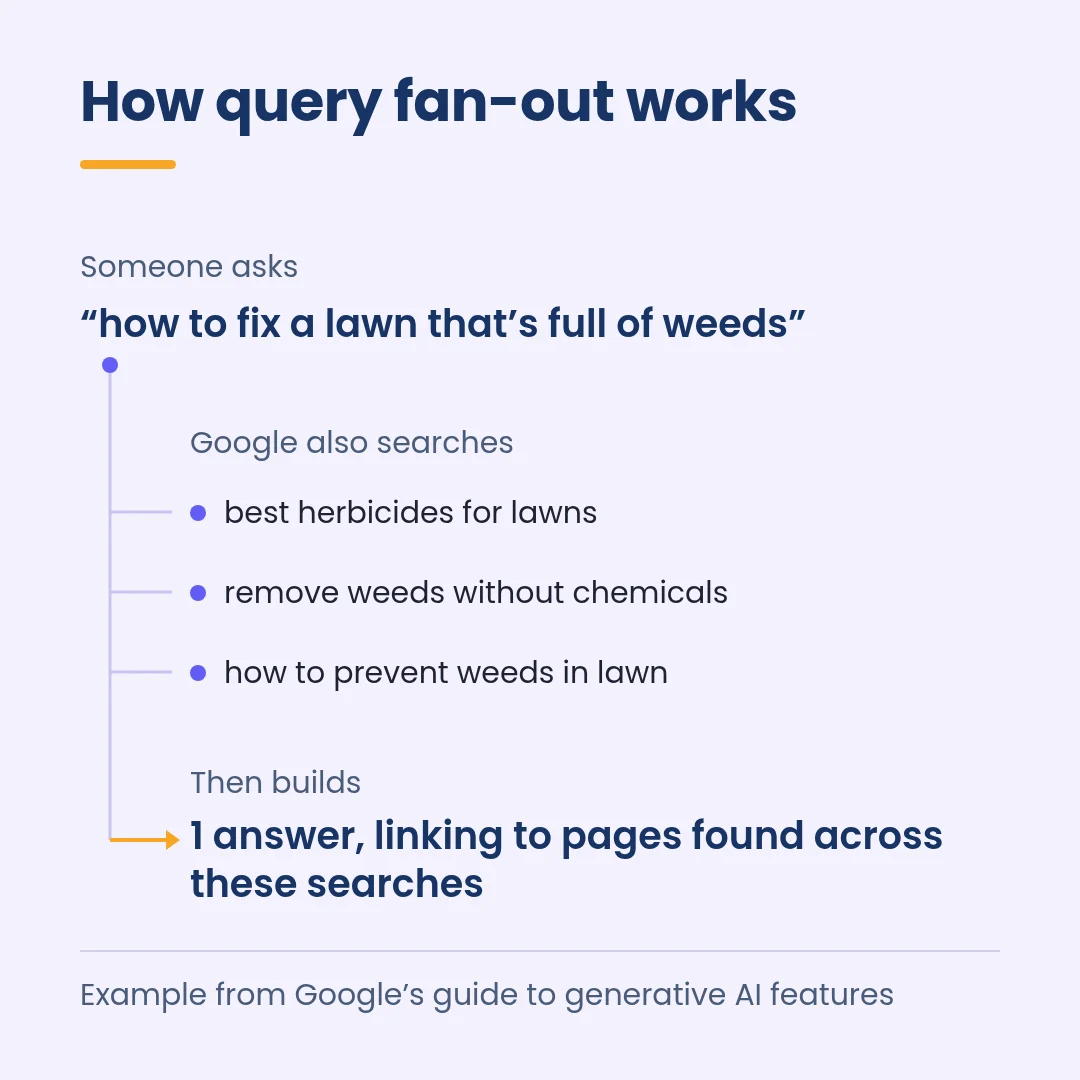
Both features may use what Google calls query fan-out. The model runs several related searches at the same time and builds 1 answer from what it finds.
Google’s own example starts with “how to fix a lawn that’s full of weeds” and fans out to searches about herbicides, chemical-free removal and prevention.
For a lawn care company, a page about preventing weeds could earn the link even if it never ranked for the original question.
Google also notes that AI Mode and AI Overviews may use different models and techniques, so the links each feature shows will vary. Being cited in AI Overviews tells you little about AI Mode, and the reverse.
Follow-ups change how you read Search Console
In AI Mode, every follow-up question is treated as a new query, with its own impressions, clicks and positions. So a page can show up in the 4th question of a conversation without ranking for the 1st.
That’s why AI Mode visibility is better judged over months than through a single query’s average position.
4. What Small Businesses Should Do Differently
None of these steps are AI tricks. They’re the parts of normal SEO that AI Mode rewards more often, because people bring it harder questions.
Answer the next question, not only the first
Think about what customers ask on the phone after they’ve found you: cost, timing, what can go wrong, which option to choose. Google’s guide calls this non-commodity content, meaning pages with first-hand expertise that go beyond common knowledge.
A page that simply lists “kitchen remodeling” says far less than 1 that explains what drives remodel prices in your area and how long permits usually take. Building pages around those questions is what our SEO content strategy service is for.
Keep your Business Profile and product data current
Google says AI responses can include information about local businesses and products, and that Google Business Profile and Merchant Center feeds help you show up in both AI responses and other results.
That data now does more work. In May 2026, Google said it would expand agentic booking in Search to local services in the US, and that for categories like home repair, beauty and pet care, people could ask Google to call businesses for them.
Wrong hours or an old phone number now cost you more than a missed map click.
Make your official pages easy to find
In October 2026, Google announced a test of a section at the top of AI responses that highlights official websites for specific tasks. It also said it is showing more inline links, higher up in answers.
Clear page titles, internal links to your booking or quote page and consistent business details make it easier to tell which page on your site handles a task like “book” or “get a quote.”
Don’t build a page for every variation
Publishing a page for each fan-out query is tempting. Google warns that doing this mainly to manipulate rankings or AI responses breaks its scaled content abuse spam policy.
1 strong page that covers a topic in depth is safer, and much easier for a small team to keep up to date.
| Do | Skip |
|---|---|
| Answer cost, timing and comparison questions on your service pages | A new page for every phrasing of the same question |
| Keep Business Profile hours, services and phone number current | llms.txt or special markup aimed at Google’s AI features |
| Use structured data that matches the visible page | Buying or faking mentions on other sites |
| Check that key pages are indexed and allow snippets | Rewriting every page in a special “AI style” |
Every item in the Skip column comes from Google’s own guidance on its generative AI features.
5. How to Track AI Overviews and AI Mode
What Google’s reports can and can’t tell you
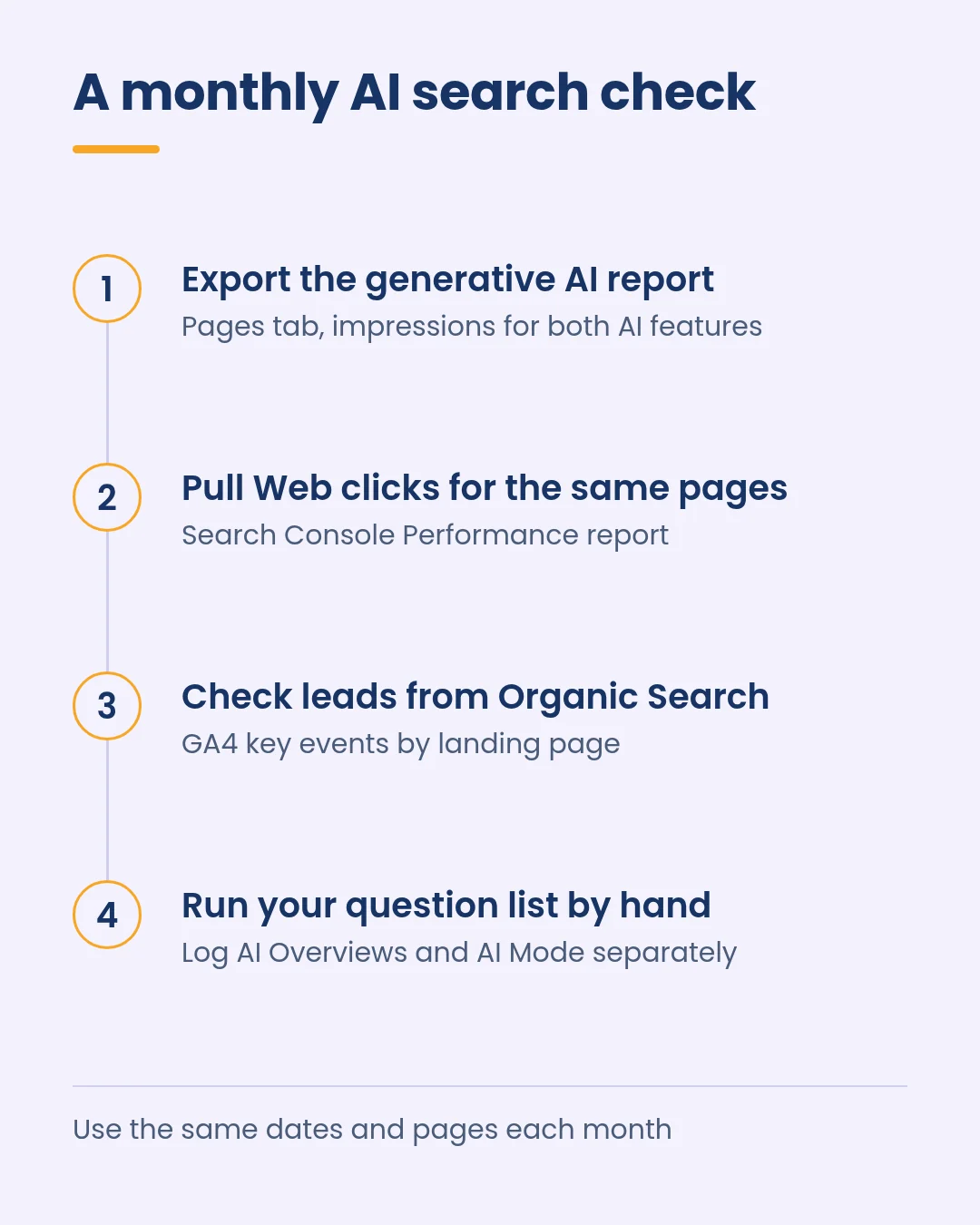
Google gives you 3 views: generative AI impressions for both features combined, total Web clicks in the Search Console Performance report, and Organic Search sessions and key events in GA4.
None of them separate AI Mode from AI Overviews, and the AI report has no clicks or queries. Read them together and compare the same pages and dates.
Add a monthly question check
To see the 2 features apart, you have to look. Pick 10 to 20 questions your customers ask, run each in regular Search and in AI Mode once a month, and log what you find.
| Column | What to note |
|---|---|
| Question | Exact wording, kept the same every month |
| AI Overview shown? | Yes or no |
| Linked in the AI Overview? | Yes or no, plus the URL |
| Linked in AI Mode? | Yes or no, plus the URL |
| Named in the answer? | Yes or no, and how your business is described |
| Other businesses named | Who shows up instead of you |
Results shift by person, place and time, so treat this as a trend line, not a ranking report. Paid tools can automate it, and our roundup of AEO tools that track brand citations compares several.
Tracking the 2 surfaces separately is also how we reported results in our ThePayStubs case study.
Between February 1 and May 22, 2026, its AI Overview citations rose from 1,400 to 2,500, and it reached 74.9% visibility in Google AI Mode, the top share among the brands tracked.
If you also run Google Ads
Ads can now show inside both features. Google’s help page on ads in AI-powered Search experiences says existing Search, Shopping and Performance Max campaigns are eligible automatically, and you can’t target or opt out of AI Overviews or AI Mode on their own.
2 details affect small accounts. Exact and phrase match keywords only qualify when the search itself shows direct commercial intent, while broad match, AI Max, Shopping and Performance Max can also match to the AI answer.
Results are blended into your normal campaign and search terms reports.
Google also says paid ads don’t influence organic AI answers. If you’re weighing broad match or AI Max for this, start with our AI Max for Search setup guide.
Conclusion: Your First 30 Days
AI Overviews and AI Mode share 1 set of rules, so the work is ordinary SEO done with more care. What differs is the question people bring: quick in an AI Overview, longer and more detailed in AI Mode.
- Week 1: check the Search generative AI setting in Search Console, and confirm your key pages are indexed and allow snippets.
- Week 2: update your Business Profile and, if you sell products, your Merchant Center feed.
- Week 3: pick 3 service pages and add clear answers to the follow-up questions customers ask most.
- Week 4: run your first question check, export the generative AI report and set a monthly reminder.
If you’d rather have help, our search engine optimization team works on classic rankings and AI visibility together. You can book a call to talk through your site.
FAQs
Is AI Mode replacing AI Overviews?
Not based on what Google has published. AI Overviews still appear on regular results pages when Google thinks they help, and since May 2026 people can ask a follow-up from an AI Overview and continue in AI Mode. Plan for both.
Can I opt out of AI Mode but stay in AI Overviews?
No. The Search generative AI control in Search Console covers AI Overviews, AI Mode and generative AI features in Discover together. Google says the setting isn’t used as a ranking signal for the rest of Search, so excluding your site doesn’t change your regular results.
Do I need a different SEO strategy for AI Mode?
Google says no special optimization is needed, and eligibility works the same as regular Search.
The difference is depth: AI Mode handles longer questions, so pages that explain costs, options and trade-offs give it more to work with.
Growth-onomics’ answer engine optimization services focus on that kind of content and on tracking citations across Google and other AI assistants.
