


My rule for privacy-first personalization: start with context, and use customer data only when it serves a clear purpose and respects customer choices. Before you launch, define what each field is for, who can access it, and when it gets deleted.
In this guide, I cover how to:
- Control data use: connect permissions, access limits, security, and deletion across your systems and vendors.
- Check U.S. requirements: review state privacy laws, email and text rules, and sensitive-data restrictions with legal counsel.
- Respect choices: separate preferences from consent, enforce opt-outs, and test that withdrawals stop delivery.
- Measure results: compare personalization against a control group, track revenue per eligible customer, and set privacy and complaint stop rules.
- Assign ownership: name campaign owners and follow a 90-day plan to audit, enforce controls, and test one low-risk campaign.
More data isn’t the goal. I focus on <u>measured results with clear limits</u> – and stopping campaigns when those limits fail.
Why Marketing Teams Hate Privacy Laws: Building a Privacy-First Brand | 2026 Partner Summit
2. Build Data Infrastructure With Privacy Controls
Turn the data rules from Section 1 into system controls. Privacy-first personalization depends on a data layer that automatically enforces purpose, access, and deletion.
Map Data From Collection to Deletion as part of your customer journey mapping
Start with a secure customer database, a permission register, controlled campaign exports, and a request log. Link them through one stable internal customer ID. Route website or app events through a tag manager or server-side collector.
Before adding a field, document its definition, purpose, source, owner, sensitivity, permission dependency, retention period, destinations, and deletion method. Store permission records separately, including the purpose, channel, status, timestamp, collection source, and notice version.
The map below helps you decide which data can support personalization, segmentation, activation, and reporting – and which must stay isolated or suppressed.
| System or stage | Data handled | Access controls | Downstream recipients | Removal procedure |
|---|---|---|---|---|
| Event collection | Approved events and session IDs | Restricted event schema; server-side validation | Database; analytics | Disable collection; delete raw events. |
| Customer database | Customer ID, contact details, account records | Role-based access; field masking | Support; approved campaign tools | Correct or delete; sync requests. |
| Permission register | Choices, timestamps, sources, evidence | Restricted writes; logged changes | Database; campaign systems | Revoke permission; sync suppression. |
| Identity matching | Account, email, and device ID links | Service account with limited access | Segmentation; measurement | Delete links and derived IDs. |
| Segment store | Approved audience memberships | Purpose-limited marketing access | Authorized campaign destinations | Remove membership; block recreation. |
| Analytics | Pseudonymous events and aggregates | Read-only analyst access only | Internal reports | Delete personal rows; retain justified aggregates. |
| Campaign vendors | Minimum delivery fields and suppression status | Destination allowlist; API restrictions | Email, SMS, or advertising recipients | Delete or suppress; verify completion. |
| Backups | Encrypted recovery copies | Infrastructure administrators only | Recovery provider | Expire through rotation; restrict restores. |
Control Access, Security, and Retention
Give marketers approved audiences, support staff the account details they need, and analysts restricted reporting access. Require multifactor authentication, encryption in transit and at rest, protected credentials, separate test data, and tamper-resistant audit logs.
Pseudonymization removes direct identifiers, but the records may still be personal data.[5][7] Keep data lineage – the source, transformations, destinations, and deletion status – so access, correction, and deletion requests reach every system, subject to exceptions.
Check authorization server-side before every export or send. Evaluate the current purpose, channel, jurisdiction, sensitivity, and destination. Collection settings alone aren’t enough.
Keep uncertain identity matches separate. When records merge, preserve the most restrictive applicable choice. Sync withdrawals to segments and vendors so later matching cannot reactivate a suppressed customer.
Automate purpose-based expiration, queue failures for follow-up, and verify that vendors complete requests. Treat 90 days for raw behavioral events as a proposed retention period for legal review, not a universal rule. Document legal holds, and make sure restored backups don’t bring back deleted records.
Check US Privacy and Marketing Requirements
Build controls around the permissions and notices each use case requires.
Obtain legal review of requirements and effective dates as of October 14, 2026. Scope that review by customer location, state, industry, data type, activity, and statutory thresholds.
Separate service delivery, optional personalization, direct marketing, targeted advertising, and sensitive-data processing in permissions and notices. Review consent requirements, sale or sharing opt-outs, required preference signals such as Global Privacy Control, and rights to access, correct, delete, or port data. State requirements and exceptions differ.[2][3][4][7] California also emphasizes purpose limitation and data minimization.[8]
Include vendor agreements, security duties, children’s data, and applicable health, biometric, and financial rules in the review. Check CAN-SPAM for commercial email and applicable TCPA requirements for calls and texts. Permission for one channel does not cover another.
FTC expectations include accurate disclosures, honored choices, and avoiding deceptive consent practices. NIST guidance is voluntary – not a legal duty or legal safe harbor.[6][9][1] This guide is not legal advice.
Use the legal review to decide which audiences can launch, which need opt-in, and which must stay blocked.
3. Build Campaigns That Respect Customer Choices
Collect Preferences and Apply Customer Choices
Turn the data rules from Section 2 into controls customers can use. Interest is not consent. Provide a preference center with separate controls for product interests, onsite personalization, email topics, SMS, and targeted advertising. Keep optional questions optional. Ask only when the answer serves a clear customer benefit.
Record each choice’s purpose, status, timestamp, and change history. Use those records to guide every audience rule at launch.
Let customers withdraw permission easily through the preference center. Send preference changes, corrections, and deletion requests to every affected campaign system and vendor. Block new activation and stop queued delivery. Check for failed updates daily, and keep only the legally permitted suppression information needed to prevent reactivation – not the full profile. CAN-SPAM allows up to 10 business days for commercial-email opt-outs, but systems should update sooner.[10][11]
Set Audience Rules and Launch Checks
Require a campaign brief before building an audience. Document the customer benefit, inputs, purpose, permission dependency, eligibility rules, exclusions, retention, vendors, owner, approvals, and rollback method.
Use this table only for consent-dependent activities. Fulfillment, security, and other uses need separate rules reviewed for legal compliance.
| Consent status | Audience and delivery rule |
|---|---|
| Granted | Allow only the approved purpose, channel, and data scope, subject to exclusions and frequency limits. |
| Denied | Exclude from the consent-dependent activity; offer contextual content where appropriate. |
| Withdrawn | Stop affected processing and activation; send the change to downstream systems. |
| Unknown | Do not infer permission from an account, visit, or unchanged default. |
| Expired | Exclude until permission is renewed or a documented, legally reviewed rule permits continued use. |
Before launch, check sensitive-data proxies, age safeguards, jurisdiction, documented segment logic, minimum vendor access, and frequency limits across channels. Test a withdrawal using a test profile. Confirm that delivery stops and record how long it takes. Pause activation when choices conflict or suppression fails.
Use Preferences and Context First
The example below shows how these rules work in practice.
Hypothetical example – not a measured case study: Harbor & Pine, a fictional U.S. outdoor-clothing retailer, lets customers select hiking, camping, or travel interests and separately choose email topics and personalized advertising. A hiking selection can support recommendations for hiking socks and waterproof layers within the stated purpose – not inferred health or income traits. After personalization permission is withdrawn, the site switches to accessories related to the product currently viewed, without using purchase or browsing history. The retailer records the change and propagates it to affected marketing systems.
If a business uses an agency, put its approved purposes, access limits, retention, security duties, and deletion requirements in writing. Specify permitted fields, access duration, incident notification, and data return requirements. Prohibit reuse of customer data for unrelated purposes. The business remains accountable for audience approval and enforcement.
4. Measure Results and Assign Team Roles
After launch, measure only what the approved audience, permissions, and channels allow.
Test With Only the Data Needed
Define the test before accessing customer data. Record the hypothesis, eligible audience, treatment, control, primary metric, review period, and stop rules. Randomize only within the eligible audience. Report consented, opted-out, and ineligible audiences separately.
Use only the fields needed to check eligibility, assign groups, deliver the campaign, measure outcomes, enforce choices, and investigate issues. Report consent-related measurement gaps: results from opted-in customers don’t automatically apply to everyone.
| Testing approach | Business value | Data needed | Main risk | Safeguards |
|---|---|---|---|---|
| Randomized personalized-versus-control test | Estimates incremental conversions and revenue | Eligibility flag, consent or preference status, treatment assignment, outcome event | Re-identification, excessive profiling, small-cell disclosure | Pseudonymous IDs, aggregated reporting, minimum group sizes, short retention |
| Contextual-versus-individualized test | Shows whether first-party context adds value beyond the current session | Current page, device or session context, consent state, outcome event | Linking browsing behavior across sessions | Prefer session-level data, avoid unnecessary persistent IDs, delete raw events promptly |
| Holdout or geo-level test | Measures longer-term revenue or retention effects | Assignment group, region or market, aggregated outcomes | Geographic inference, spillover between groups | Use sufficiently large regions, publish aggregate results, suppress small groups |
| Pre/post comparison | Provides a fast directional read when randomization is unavailable | Campaign dates, eligible population, aggregate outcomes | Confounding from seasonality, pricing, or traffic changes | Record concurrent changes, use a comparable control period, label results as non-causal |
Set a deletion date for raw test records and limit access during analysis. Pseudonymous and aggregated test data still count as controlled data, so keep access limits and deletion dates in place.
Track Results and Set Campaign Stop Rules
Create a metric dictionary with fixed denominators and review periods. Track incremental conversion, revenue per eligible customer, 30- or 90-day retention, preference completion, consent acceptance, withdrawals, complaints, unsubscribes, rights-request completion, and confirmed privacy incidents.
Calculate incremental conversion rate as the difference between treatment and expected control conversions, divided by eligible customers. Report revenue per eligible customer in US dollars, including nonbuyers. Include counts, rates, denominators, audience eligibility, dates, exclusions, and confidence intervals where appropriate – not percentages alone.
Set stop thresholds before launch based on your baseline, not a universal benchmark. Pause for use without permission, sensitive-data exposure, customer harm, targeting fatigue, complaint spikes, withdrawal spikes, or unexplained outcome gaps. First check assignment, delivery, permission state, and measurement quality. Don’t collect sensitive attributes by default to explain a gap, or use manipulative design to increase consent acceptance.[8]
Within 10 business days after a test, document results, limitations, incidents, complaints, stop-rule checks, and the decision to scale, revise, or retire it. Keep a paused campaign paused until its owner documents the cause, limits further processing, corrects the issue, and records approval to resume. Delete unnecessary raw records on schedule.[12][14]
For measurement to work, each task needs a named owner.
Assign Owners and Schedule Reviews
Assign one accountable owner to each campaign. Combine roles only for low-risk work. High-risk decisions need independent privacy or legal review.
Require documented approval for new sources, vendors, segments, persistent identifiers, sensitive attributes, and high-risk profiling. Keep records current for data, permissions, retention, vendors, access, incidents, segments, experiments, and privacy assessments. Each record needs an owner, purpose, access group, review date, and deletion method.
| Role | Decisions and approval responsibility | Review frequency |
|---|---|---|
| Executive sponsor | Sets risk appetite, approves material investment, accepts residual risk | Quarterly and at major program changes |
| Marketing | Defines objective, audience, offer, and metrics | Before launch and after each test |
| Privacy or legal reviewer | Approves purpose, notices, consent basis, sensitive-data use, rights handling, vendors, and high-risk profiling | Before new sources, vendors, segments, or high-risk campaigns |
| Data steward | Maintains definitions, lineage, permissions, quality controls, and retention | Monthly and whenever schemas change |
| Engineering | Implements consent enforcement, segmentation logic, deletion, access controls, and experiment assignment | Before launch and after code changes |
| Security | Reviews safeguards, logging, vendor security, incident response, and access changes | At onboarding, quarterly access reviews, and after incidents |
| Analytics | Validates denominators, test design, statistical interpretation, and reporting | Before launch and after analysis |
| Customer support | Monitors confusion, complaints, rights requests, and escalation patterns | Weekly during active campaigns and monthly afterward |
5. Conclusion: Your 90-Day Rollout
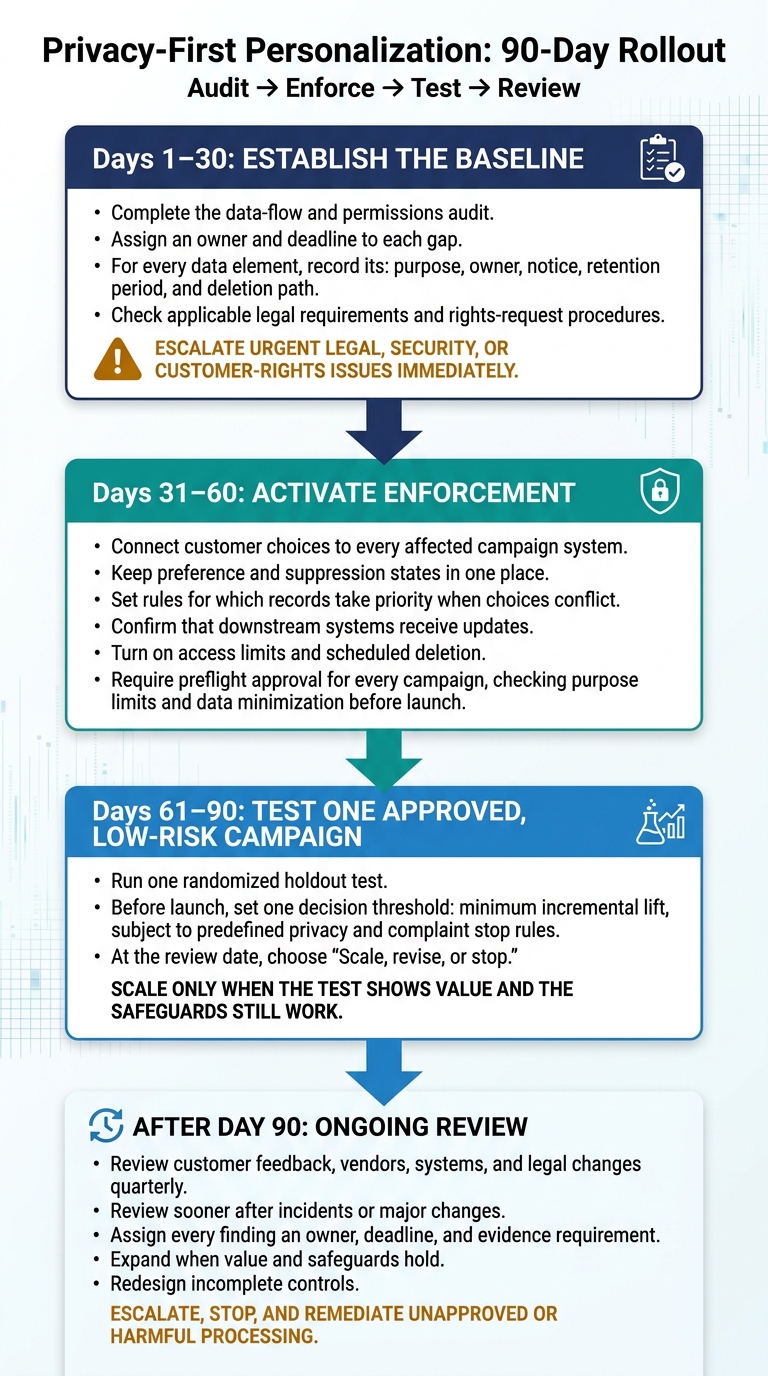
Privacy-First Personalization: 90-Day Rollout
Make privacy-first personalization part of your routine: collect only the data you need, honor customer choices, measure lift, and assign ownership. Review it quarterly as laws, systems, and campaigns change.[15][13]
Plan Your First 90 Days
Put the rules, controls, and ownership outlined above into practice.
Days 1–30: establish the baseline. Complete the data-flow and permissions audit from Section 2. Assign an owner and deadline to each gap. For every data element, record its purpose, owner, notice, retention period, and deletion path. Check applicable legal requirements and rights-request procedures. Escalate urgent legal, security, or customer-rights issues immediately.[16]
With the inventory complete, build the rules into production systems.
Days 31–60: activate enforcement. Connect customer choices from Section 3 to every affected campaign system. Keep preference and suppression states in one place, set rules for which records take priority when they conflict, and confirm that downstream systems receive updates. Turn on access limits and scheduled deletion. Require preflight approval for every campaign, checking purpose limits and data minimization before launch.[8]
Once the controls are live, measure results with one focused test.
Days 61–90: test one approved, low-risk campaign. Run one randomized holdout test using the measurement rules from Section 4. Before launch, set one decision threshold: minimum incremental lift, subject to predefined privacy and complaint stop rules. At the review date, scale, revise, or stop. Scale only when the test shows value and the safeguards still work.
Check Progress and Choose the Next Step
Use this check to assess the program’s progress and decide what to do next.
| Maturity stage | Readiness evidence | Typical gap | Next improvement |
|---|---|---|---|
| 1. Ad hoc data use | Unclear purposes and ownership | Unknown flows; inconsistent opt-outs | Complete the audit; stop high-risk uses |
| 2. Documented purposes and owners | Registers and preference records | Manual enforcement; incomplete deletion | Connect choices to activation |
| 3. Enforced controls | Working suppression, deletion, and logs | Unmonitored failures; control bypasses | Automate monitoring; test stop rules |
| 4. Recurring risk and value reviews | Review records; measured lift | Control drift as complexity grows | Retire low-value data; expand selectively |
After day 90, review customer feedback, vendors, systems, and legal changes quarterly – and sooner after incidents or major changes. Assign every finding an owner, deadline, and evidence requirement. Expand when value and safeguards hold. Redesign incomplete controls. Escalate, stop, and remediate unapproved or harmful processing.[15][13]
FAQs
How can I personalize experiences without persistent customer IDs?
Focus on aggregate intelligence and first-party data. Use context, such as a user’s location or current site activity, to tailor content in the moment. Probabilistic matching lets you infer behavior from grouped signals instead of tracking users in detail.
Give users a preference center where they can choose to share their interests. Then use progressive profiling to build their profiles over time. These methods support privacy-compliant personalization while respecting users’ boundaries.
Which privacy controls should I prioritize on a small budget?
Start with data minimization, transparency, and basic access controls. Collect only the information your business goals require. Use a simple banner to give users clear consent options, and set up role-based access controls so only team members who need sensitive customer information can view it.
These low-cost steps reduce compliance risks and storage needs, build user trust, and help meet core legal requirements – without costly, complex infrastructure.
How can I measure lift when few customers opt in?
Use incrementality testing to compare a group exposed to your campaign with a control group. This helps you measure the impact your marketing actually caused. Randomly assign people to groups without bias to support accurate results when individual-level data is limited.
Pair this with Marketing Mix Modeling (MMM) to account for complex customer journeys without relying only on individual tracking. Privacy-preserving APIs and aggregated summary reports can help you assess ROI while respecting user privacy.