


AI Max for Search is not a new campaign type. It’s a set of settings inside a regular Search campaign that lets Google match your ads to searches beyond your keywords, write extra ad copy and pick which page of your site each click lands on.[1][2]
You can’t really ignore it anymore. New Search campaigns have AI Max switched on by default, and in September 2026 Google automatically upgraded campaigns that used the campaign-level broad match setting or automatically created assets.[1][3] So the useful question for a small business running its own Google Ads is how to set it up so it spends money on searches you actually want.
This AI Max for Search setup guide sticks to the calls you need to make on day one. You’ll get:
- A plain-English map of the three AI Max features and where each one is controlled.
- A readiness checklist for conversion tracking, bidding, budget and landing pages.
- Click-by-click steps to turn AI Max on or off, and what you lose when you switch it off.
- The day-one controls to set before traffic flows.
- A test plan and a decision table for choosing between turning it on, testing it or holding off.
1. What AI Max Actually Changes in Your Search Campaign
Think of AI Max as a layer on top of the campaign you already have. Your keywords, ads, budget and bid strategy stay where they are. Google’s Help Center calls it an optimization layer within existing Search campaigns, and it adds three features.[1]
Search term matching: your keywords become a starting point
Search term matching expands your keywords using broad match and keywordless technology. Google can match your ad to a search based on your keywords, ads and landing pages, even when no keyword in the ad group fits that query.[2]
It’s the one feature you can turn off per ad group.[1] That’s handy: you can keep your highest-value service on its own keywords while the rest of the campaign explores.
Worth knowing: Google Ads Liaison Ginny Marvin has said AI Max isn’t required to appear in AI Overviews and AI Mode. Broad match campaigns stay eligible; AI Max widens eligibility by applying broad match behavior to phrase and exact keywords and adding keywordless matching.[4]
Text customization and final URL expansion
Text customization (formerly automatically created assets) generates extra headlines and descriptions from your ads, landing page copy and assets. Final URL expansion sends a click to a different page on your domain when Google predicts it will perform better, as long as the page fits the query and the ad group’s theme.[2]
Both are campaign-level settings. Final URL expansion needs text customization, so switching text customization off also switches final URL expansion off.[1] The trade-off many advertisers miss: when final URL expansion picks a different page, your pinned RSA assets aren’t used. The same applies when URL inclusions are active.[1] If legal or brand rules force you to pin, keep final URL expansion off.
What stays the same
Negative keywords are still respected. And if a search is eligible for both an AI Max Search campaign and a Performance Max campaign, the one with the higher Ad Rank serves, the same rule that applies between broad match and Performance Max.[5]
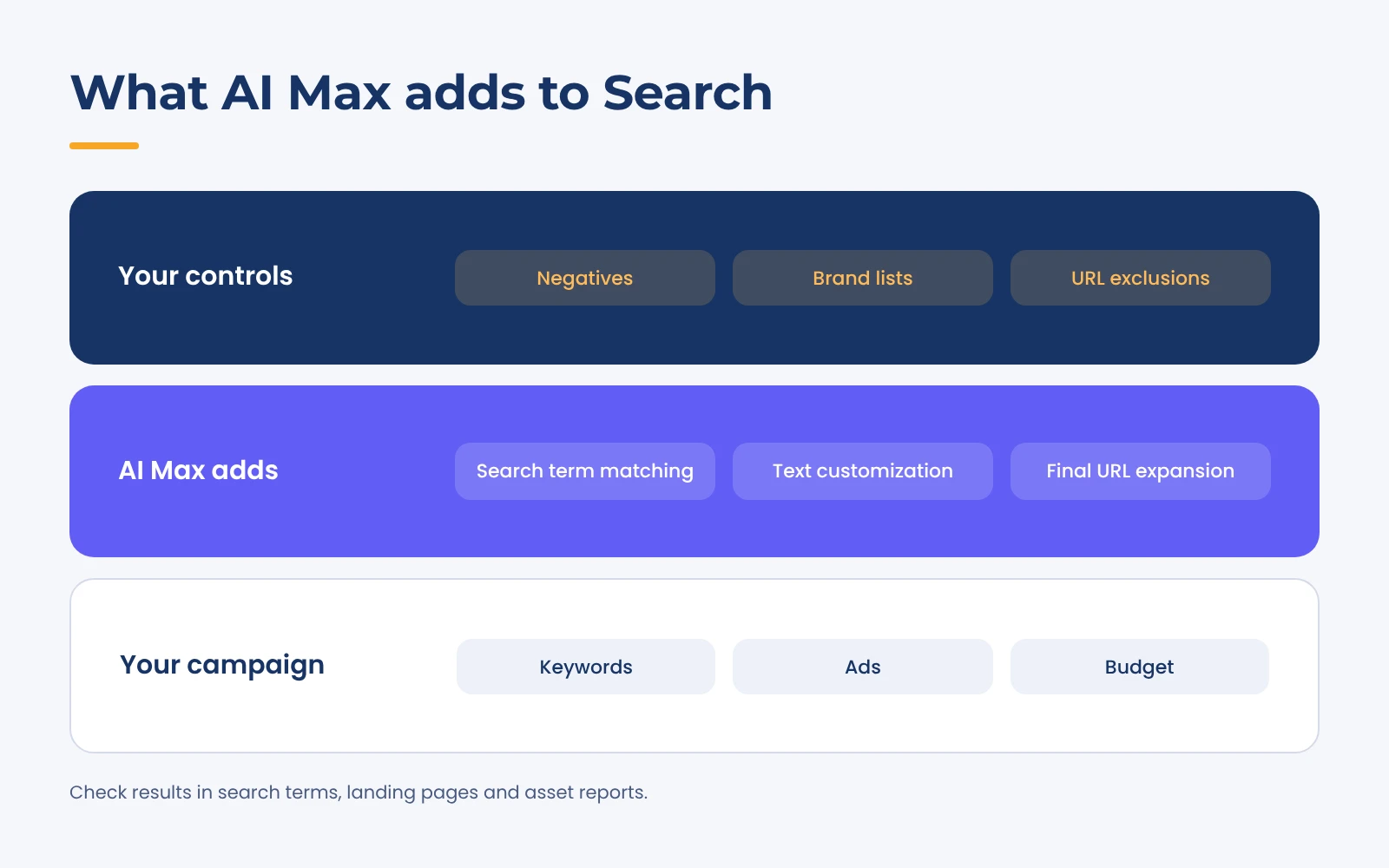
| Feature | What it does | Controlled at | Default with AI Max on | Watch out for |
|---|---|---|---|---|
| Search term matching | Matches ads to searches beyond your keywords | Campaign, then per ad group | On | Doesn’t work with Manual CPC[5] |
| Text customization | Writes extra headlines and descriptions | Campaign | On | Only as accurate as your landing pages[6] |
| Final URL expansion | Sends clicks to the page predicted to perform best | Campaign | On | Needs text customization; overrides pinning[1] |
| Brand, location and URL controls | Limit which brands, places and pages AI Max uses | Campaign or ad group | Nothing set until you add it | Ignored if AI Max is off[1] |
2. Check Four Things Before You Turn It On
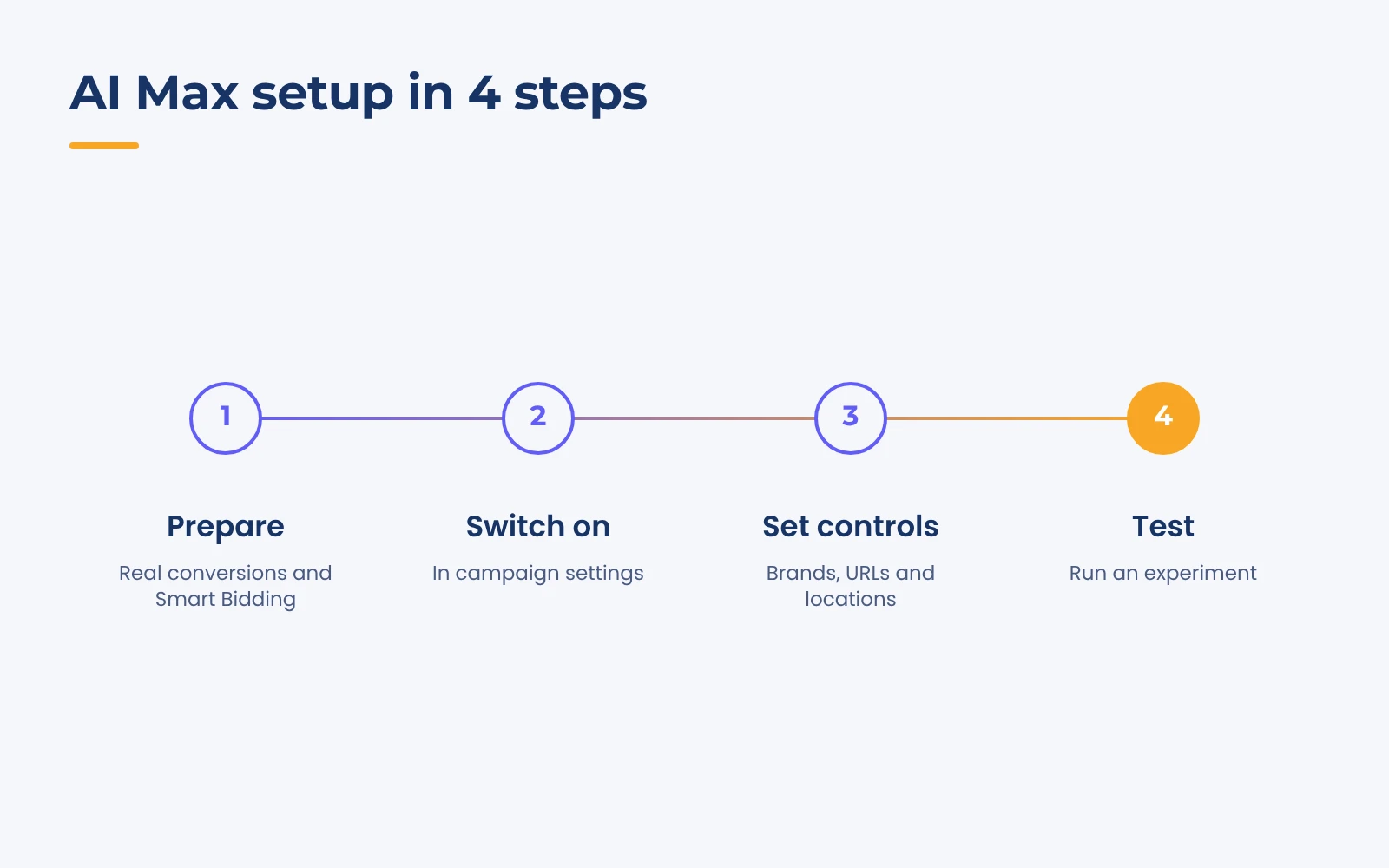
AI Max decides from what your account tells it. Send it the wrong signals and it chases the wrong outcome at a larger scale. The graphic shows the full day-one sequence; this section covers step one.
Conversion tracking you’d trust with your budget
Google says AI Max’s features need conversion-based Smart Bidding to work effectively, and that search term matching won’t work with Manual CPC at all.[1][5]
In small accounts the usual problem isn’t missing tracking. It’s tracking the wrong thing. If page views or button clicks are primary conversions, Smart Bidding will buy more of them. Keep only real leads, calls or sales as primary, and consider enhanced conversions, which Google says improve measurement accuracy by sending hashed first-party data.[7] Our guide to real-time conversion tracking covers setup, and the Google Ads conversion checklist helps you audit what you count today.
Budget headroom and a bid strategy that fits
Google notes that AI Max won’t be effective if a campaign is limited by budget, and shows an alert if you turn it on in one.[2] If your budget already runs out by lunchtime, matching to more searches only spreads the same money thinner. Either raise the budget for the test or narrow the campaign first (fewer ad groups, tighter geography).
For bidding, Maximize conversions or target CPA usually suits lead generation, while target ROAS needs reliable revenue values. Our post on scaling with target ROAS bidding explains when that fits.
Landing pages and tracking templates
With text customization and final URL expansion on, your website becomes your ad copy. Google advises keeping landing page content accurate and current because its AI relies heavily on it as source material.[6] An expired offer on a service page can end up in a headline.
List pages that should never get paid clicks (careers, blog posts, old promotions, thank-you pages) for URL exclusions later. And check your tracking template: Google warns that a static tracking URL without {lpurl}, or {lpurl} in an unusual position, can send expanded traffic to the wrong page or a 404.[2] Unsure a page is ready? Run it through our free landing page optimization checker.
Every row below should pass before you switch anything on:
| Check | Where to look | Ready when |
|---|---|---|
| Primary conversion actions | Goals > Conversions > Summary | Only real leads, calls or sales are primary |
| Bid strategy | Campaign settings > Bidding | Maximize conversions or value, target CPA or target ROAS[5] |
| Budget status | Campaign status column | Not showing Limited by budget[2] |
| Landing page content | Your site | Prices, offers and service areas are current[6] |
| Tracking template | Campaign URL options | Uses {lpurl} correctly, or no template[2] |
| Pages to exclude | Your sitemap or menu | List written down |
| Negative keywords | Negative keywords and shared negative keyword lists | Existing negatives and lists still applied[5] |
3. How to Turn AI Max On or Off
New campaigns: it’s already on
When you create a Search campaign, the option to optimize with AI Max is selected by default. You choose features during setup, and ad group-level settings sit in the Keywords and ads step.[1] If your account isn’t ready, untick it here rather than fixing it after launch.
Existing campaigns: switching it on and off
- Go to Campaigns > Settings and select the Search campaign.
- Choose AI Max in the section menu and toggle on Optimize your campaign with AI Max.
- Review the Search term matching and Asset optimization panels. Text customization and final URL expansion start ticked, so untick anything you’re holding back.
- Select Save.
For several campaigns at once, select them and use Edit > Change AI Max settings.[1] Switching off happens in the same panel, but every AI Max feature goes off together, including brand exclusions set inside AI Max, and URL inclusions or exclusions are ignored. Turning it back on restores your previous settings.[1][5]
Already upgraded by Google? Check what was switched on
According to the Google Ads API team, campaigns auto-upgraded from the broad match setting got search term matching only, while automatically created assets campaigns got search term matching plus text customization, with final URL expansion off in both.[3] Open the AI Max panel and confirm the settings match what you’d choose today.
Dynamic Search Ads weren’t part of that wave; Google moved their automatic upgrade to February 2027.[8] That migration needs its own checklist, which we’ll cover in a separate guide.
4. Set Your Controls Before Traffic Flows
Controls are what make AI Max workable for a small business. Set them before the campaign starts learning, not after a bad week.
Brand inclusions and exclusions
Brand settings use lists created under Tools > Shared library > Brand lists.[9] Brand exclusions (campaign level) stop ads serving on searches tied to brands you name. Brand inclusions (campaign or ad group level) limit serving to brands you select. If both are set, exclusions win.[1][10]
The common day-one move is excluding your own brand from non-brand campaigns, so cheap branded clicks don’t flatter the numbers. Google advises using brand settings only where a campaign really needs them.[10] Brand exclusions versus negative keywords deserves its own post, and we’ll cover it separately.
Locations of interest and URL rules
Locations of interest (ad group level) reaches people based on the geographic intent in their search, including keywordless matches.[2] URL exclusions (campaign level) keep final URL expansion away from pages you list, so add your excluded-pages list here. URL inclusions (ad group level) point AI Max at pages you want used, but they also stop pinned assets from being respected.[1]
Text guidelines for generated copy
Each campaign can have up to 25 term exclusions and 40 messaging restrictions written in plain language.[11] Google opened the beta to all advertisers in February 2026.[12] Useful starters for a small business:
- Don’t mention prices or discounts, for example $99 or 20% off. (Term exclusions can’t block prices, so use a messaging restriction.)[11]
- Don’t promise same-day or 24/7 service.
- Never mention cities outside our service area.
- Always spell our brand name as YourBrand.
Keep each one specific: Google warns vague guidelines can remove many good assets and hurt performance.[11] Google’s AI Brief, which adds messaging, matching and audience guidelines, was still a closed beta as of September 2026.[13][14]
5. Test AI Max, Then Read the Right Reports
Google’s averages are encouraging. At launch it said advertisers activating AI Max typically see 14% more conversions or conversion value at a similar CPA/ROAS, and 27% for campaigns mostly on exact and phrase match.[15] In 2026 it said using all three features brings an average of 7% more conversions or conversion value at a similar CPA/ROAS than search term matching alone.[8] These are Google’s internal figures for non-retail advertisers, not a forecast. Your own test is the number that matters.
Run an AI Max experiment instead of flipping the switch
Google’s AI Max experiment splits traffic inside your existing campaign, with AI Max off for one share and on for the rest.[16] The one-click version on the Recommendations page sets a 50/50 split.[5] For more control, go to Campaigns > Experiments, select the plus button, then Campaign features and settings > AI Max for Search campaigns. With one campaign selected, you can untick text customization or final URL expansion for the trial arm.[16]
Check eligibility first. The flow isn’t available if the campaign already uses text customization, targets the Display Network, uses a portfolio bid strategy, shared budget or bidding exploration, or has an active experiment.[16]
Our advice for small accounts: don’t change budgets, bids or ads mid-test, judge on cost per qualified lead or ROAS rather than clicks, and leave auto-apply unticked so you make the call. Google doesn’t publish a minimum test length, so run it until one or two leads can’t swing the verdict.
What to check in the reports
Google recommends waiting at least 2 weeks after enabling AI Max before changes such as adding negatives.[9] Then review weekly:
- Search terms report: filter Match type for AI Max and add the Source column to see why each search matched.[2][9]
- Search terms and ad combinations: the query, headline and landing page side by side.[9] Search Engine Land reported an expanded version appearing in some accounts in October 2026.[17]
- Landing pages report: the Selected by column shows URLs AI Max chose.[9]
- Asset report: generated copy is labelled Google AI; remove anything off-brand.[9]
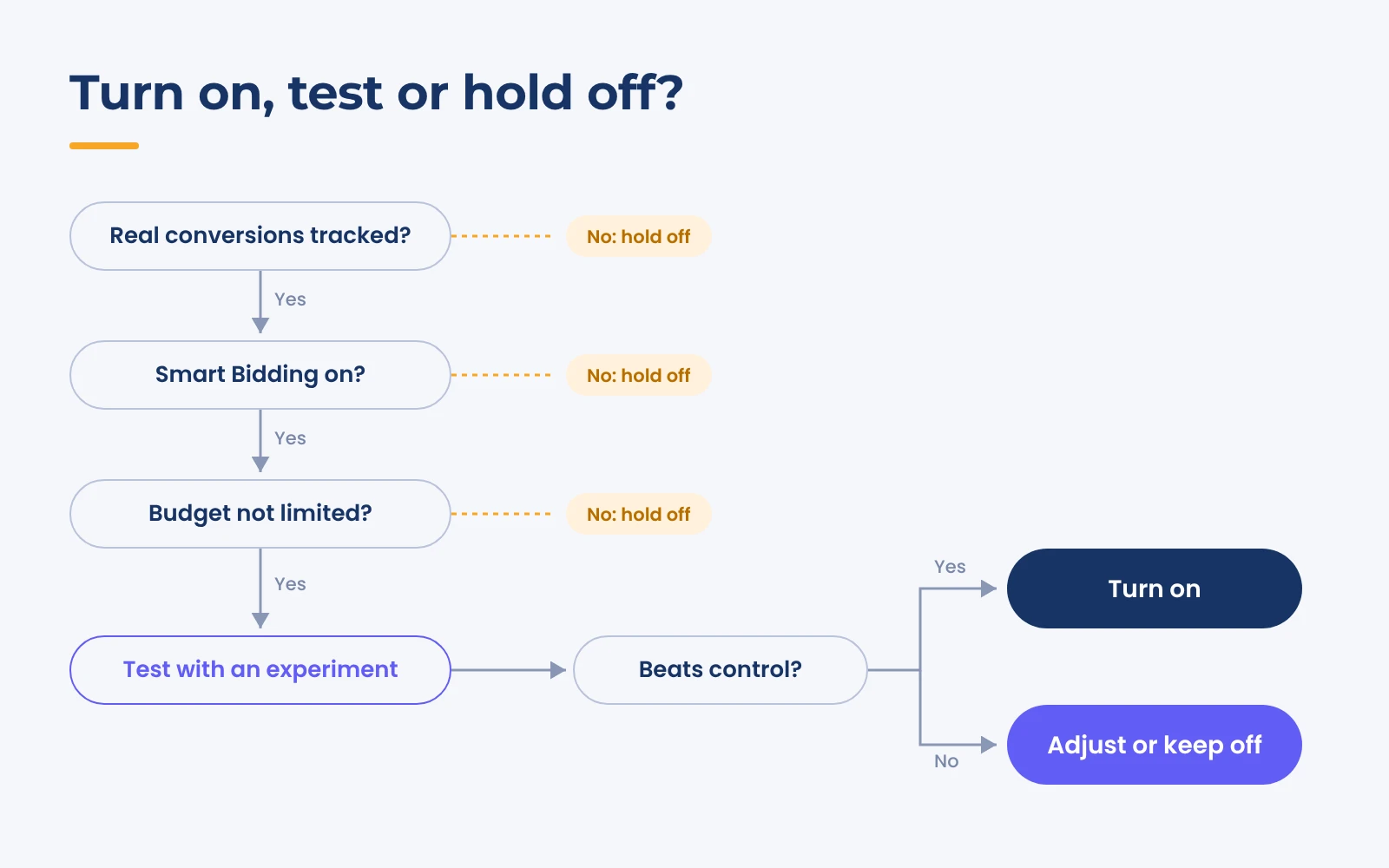
Turn on, test or hold off: a decision table
| Your situation | Starting point | Why |
|---|---|---|
| Solid lead or sales tracking, Smart Bidding, budget not limited | Test with all features on | The test shows whether AI Max adds profitable volume |
| Same, but you must pin headlines | Test with final URL expansion off | Pinning isn’t respected when another page is chosen[1] |
| Experiment beat the control on cost per lead or ROAS | Turn on by applying it | Your own data supports it |
| Auto-upgraded in September 2026 | Review now and add controls | Features may be live without your controls[3] |
| Page views or clicks are primary conversions | Hold off; fix tracking | Smart Bidding would chase the wrong goal |
| Manual CPC, or Limited by budget | Hold off; fix bidding or budget | Search term matching needs Smart Bidding; AI Max isn’t effective when budget-limited[2][5] |
Conclusion: Your First 30 Days With AI Max
AI Max rewards clean inputs and exposes messy ones. The sensible order for small advertisers:
- Days 1 to 3: pass the readiness table, then set brand lists, URL exclusions and text guidelines.
- Days 4 to 18: run the AI Max experiment and leave it alone for Google’s recommended 2 weeks.[9]
- Day 18 onward: review reports weekly, then apply, adjust or switch off once the result is clear.
Want a second pair of eyes first? Request a free Google Ads audit or see how our performance marketing team runs paid search.
FAQs
Is AI Max for Search a separate campaign type?
No. It’s an optimization layer inside an existing Search campaign, selected by default on new ones. It adds search term matching, text customization and final URL expansion, plus brand, location and URL controls.[1][2]
Does AI Max work with Manual CPC bidding?
Only partly. Google says search term matching doesn’t work with Manual CPC and recommends a conversion or conversion value-based strategy, such as Maximize conversions, for the full feature set.[5]
Should a small business turn on AI Max?
Test it if your tracking counts real leads or sales, you use Smart Bidding and the campaign isn’t limited by budget. If any of those fail, fix them first. Growth-onomics offers a free Google Ads audit if you want help checking where your account stands.