


If your ads run on more than one screen, device-level caps can miss the mark. A 3-per-device cap can turn into 9 views when one person uses a laptop, phone, and tablet. And most ad impact happens in the first two exposures per week, while 4–6 total weekly exposures is often the range to aim for.
Here’s the short version:
- Single-device capping limits ad views on one browser, app, or device.
- Cross-device capping limits ad views for one person across linked devices.
- Single-device is often enough for small, simple, one-channel campaigns.
- Cross-device makes more sense when you run ads across mobile, desktop, and CTV.
- The tradeoff is setup: cross-device capping needs identity data, platform support, and often more spend.
If I had to sum it up in one line: single-device capping controls screens; cross-device capping controls people.
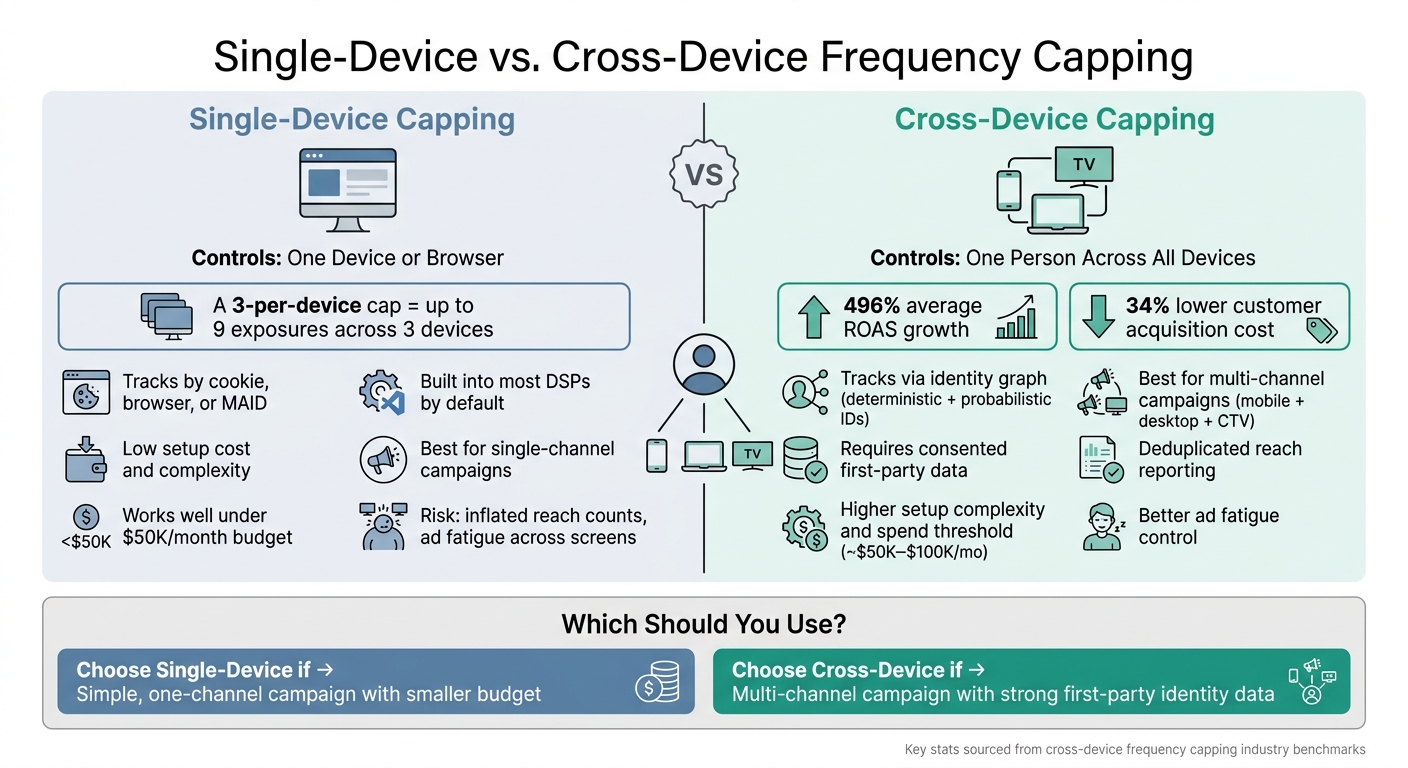
Single-Device vs. Cross-Device Frequency Capping: Side-by-Side Comparison
Amazon DSP Ads Frequency Capping Explained with AMC Analysis

sbb-itb-2ec70df
Quick Comparison
| Criteria | Single-Device Capping | Cross-Device Capping |
|---|---|---|
| What it limits | One device or browser | One person across devices |
| Best for | One-channel campaigns | performance marketing campaigns |
| Cost/setup | Lower, simpler | Higher, more setup |
| Main risk | Repeat views across screens | Data matching gaps |
| Reach reporting | Can overcount users | More deduplicated |
| Fatigue control | Weaker | Better |
For U.S. advertisers, the choice comes down to one question: Are you trying to cap a device, or the person behind it?
Single-Device Frequency Capping: How It Works, Where It Helps, and Where It Falls Short
At the device level, frequency capping is precise, but it’s also narrow. Single-device capping tracks one browser, one app, or one device ID. Once that limit is hit, the DSP stops serving the ad on that device until the time window resets. Simple enough.
The catch is that it can’t tie the same person across screens. So if someone sees your ad on a laptop, then later on a phone, and then again on a tablet, each device gets its own cap.
That’s why single-device capping works best in simpler setups. As soon as people start bouncing from screen to screen, it gets a lot less dependable.
When Single-Device Capping Works Well
Single-device capping works well when a campaign stays inside one environment, like desktop display or a single mobile app. It also fits local service businesses, short campaign flights, and advertisers working with smaller budgets.
There’s a practical reason for that: cross-device frequency tools often need $50,000 to $100,000 per month in spend, which puts them out of reach for many smaller advertisers. For those advertisers, device-level capping with daily and weekly limits is usually enough.
When Single-Device Capping Wastes Budget
The weak spot shows up fast when one person uses a few devices in the same day. A 3-per-device daily cap can turn into 9 exposures if that person uses three devices.
And that matters, because CTR drops sharply as frequency goes up. On top of that, platforms report frequency separately, so overdelivery can slip by unnoticed until results start to fall.
Cross-Device Frequency Capping: Person-Level Control Across Channels
Cross-device frequency capping sets one limit for one person across all linked devices, instead of treating each device like a separate user. So if someone hits the cap on their phone, that same ad can be held back on their laptop or smart TV for the rest of the set time window. That only works if the system can connect those devices to the same person through identity resolution.
At the core, cross-device capping relies on identity resolution built from deterministic IDs, probabilistic signals, and household-level CTV data. Once those devices sit under one profile, the cap can start cutting duplicate reach and trimming wasted impressions.
How Cross-Device Capping Improves Reach and Efficiency
Person-level capping helps reduce repeat impressions and keeps media spend aimed at new reach. That matters even more in high-cost channels like CTV, where wasted impressions add up fast. Brands using unified frequency caps across mobile, desktop, and CTV reported an average 496% ROAS growth and a 34% drop in customer acquisition costs.
Setup Tradeoffs and Data Requirements
The catch is data dependence. Deterministic matching needs consented first-party data, while probabilistic methods bring more uncertainty. Support also varies by platform, which can make setup uneven across channels.
Because of that, cross-device capping tends to work best when teams combine DSP caps with clean rooms or attribution tools for cross-channel verification.
The next step is comparing where each approach fits best.
Cross-Device vs. Single-Device Frequency Capping: Side-by-Side Comparison
The gap between these two approaches shows up in three places fast: reach accuracy, budget use, and ad fatigue. Single-device caps track the device. Cross-device caps track the person. That sounds like a small distinction, but it changes a lot once someone moves from phone to laptop to CTV.
Without deduplication, reach can look bigger than it is. On paper, it may seem like you reached three people. In practice, it could just be one person using three screens. That same person can also keep getting hit with the same ad on each device, which is where waste and fatigue start to pile up.
| Dimension | Single-Device Capping | Cross-Device Capping |
|---|---|---|
| Control Level | Device/browser level (cookie or MAID) | Person level (identity graph) |
| Implementation | Minimal – default in most DSPs; requires only basic tracking pixels, cookies, or MAIDs | Moderate to high – requires identity graph integration and consented first-party data |
| Ad Fatigue Risk | High – same user hit across every screen | Low – cap follows the person, not the device |
| Budget Efficiency | Lower – pays for redundant impressions | Higher – 34% lower CAC on average |
| Privacy Fit | Weak – fails in Safari/iOS cookieless environments | Stronger – works with consented deterministic IDs |
| Reach Counts | Inflated – counts devices as unique users | Deduplicated – deduplicates the same person |
Cross-device caps also hold up better when mobile IDs disappear or get reset. That matters more now than it used to, since device-based tracking has gotten less reliable.
Which Approach Fits Common Campaign Types
The best fit comes down to your channel mix, how people move between screens, and whether you have usable identity signals. A simple desktop display buy usually doesn’t need much extra setup. A campaign spread across mobile and CTV is a different story.
| Campaign Scenario | Recommended Approach | Why |
|---|---|---|
| Single-channel desktop display | Single-Device | Low complexity; minimal device switching |
| Multi-channel (mobile + CTV) | Cross-Device | Prevents repeat exposure across screens |
| High-consideration B2B | Cross-Device | Long cycles need fewer, cleaner touches |
| Small budget (under $50K/mo) | Single-Device | Setup overhead outweighs gains |
| Retargeting (cart abandoners) | Single-Device (high frequency) | Recent intent supports tighter repetition |
| Privacy-first / cookieless | Cross-Device (deterministic) | Authenticated IDs preserve control |
There’s also a practical split in how this works in the wild. Logged-in environments make person-level capping much easier because the ID signal is already there. Open-web campaigns can still do it, but they usually need more identity plumbing behind the scenes.
Choosing the Right Capping Strategy and Final Takeaways
Single-device capping makes sense for simple, single-channel campaigns. Cross-device capping fits multi-channel campaigns when you have usable identity data. At that point, the big question is simple: how often does the same person switch between devices?
That’s where cross-device capping starts to pull ahead. It cuts duplicate exposure across screens, which helps protect CTV spend and lowers fatigue. Without person-level control, the same user can hit the cap on each device on its own. In plain English, you can end up paying for extra impressions that don’t add reach.
Use cross-device capping when you have strong first-party IDs or logged-in data. Without those signals, probabilistic matching can still help, but it often matches at the household level instead of the person level. So the deciding factor is whether your data can track one person across screens.
Key Points to Close the Comparison
Single-device capping is simpler, built into most platforms by default, and works well for contained campaigns. Cross-device capping gives you tighter control, protects budget across screens, and is the better choice when you need person-level control as audiences move between devices. The gap between the two gets bigger as your channel mix becomes more complex.
A simple way to think about it:
- Start with single-device capping for smaller, single-channel campaigns.
- Move to cross-device capping when spend, channel mix, and identity data make person-level control worth it.
FAQs
How do I know if cross-device capping is worth the setup?
Cross-device capping is often worth setting up when customers move between devices during the buying journey. If someone sees your ad on a phone, then later on a laptop, you don’t want to treat that person like two different users.
That matters for a few reasons. It can help cut ad fatigue, improve attribution accuracy, and reduce wasted ad spend that comes from counting one person multiple times.
It may also help lower customer acquisition costs and improve brand sentiment. The catch is that it depends on strong identity resolution, and the setup can get pretty complex from an integration standpoint.
What data is needed for person-level frequency capping?
Person-level frequency capping depends on a persistent, one-of-a-kind identifier that ties a visitor to the same profile across devices. That way, the system can treat them as one person, not a string of separate browser sessions.
In most cases, that identifier comes from login-based data, like an email address, username, or customer ID. It can also come from identity graphs, which pull together first-party data, tracking pixels, CDPs, and probabilistic matching into a single user profile.
What weekly frequency cap should I start with?
Growth-onomics says your weekly frequency cap should match your product category, price point, and purchase cycle.
For high-consideration purchases, start with 3 to 5 impressions per week. Impulse purchases often do well at 7 to 12 impressions per week.
As a general rule, keep your cross-device cap under 10 per week. That usually helps you balance reach without wearing people out.
Why does this matter? Because performance often starts to slip after 3 to 4 exposures. So don’t guess – A/B test your cap against conversion data and see where results start to level off.