


If I want to know whether LinkedIn ads drove pipeline or closed revenue, I can’t rely on Campaign Manager alone. In B2B, sales cycles often run 90, 180, or 365 days, so I need a setup that connects ad clicks, view-throughs, CRM stages, and offline deals.
Here’s the short version:
- LinkedIn’s native stack is the starting point: Campaign Manager + Insight Tag + Conversions API
- Dreamdata, HockeyStack, Factors AI, Fibbler, and LeadJourney go deeper into multi-touch and account paths
- HubSpot works well if my team already runs reporting in the CRM
- Attribution App fits cross-channel revenue reporting
- Supermetrics is for teams that want to build reports in BigQuery, Snowflake, Power BI, or Looker Studio
What I’d look at first:
- Attribution depth: last-touch vs. first-touch vs. multi-touch
- CRM tie-in: Salesforce and HubSpot deal sync
- View-through support: whether ad impressions get credit
- Offline conversion data: sales calls, meetings, and closed-won deals
- Setup time: simple native setup vs. analyst-heavy warehouse build
Are LinkedIn Ads Working? How to Attribute Pipeline and Results (Even When It’s Not Obvious)
sbb-itb-2ec70df
Quick Comparison
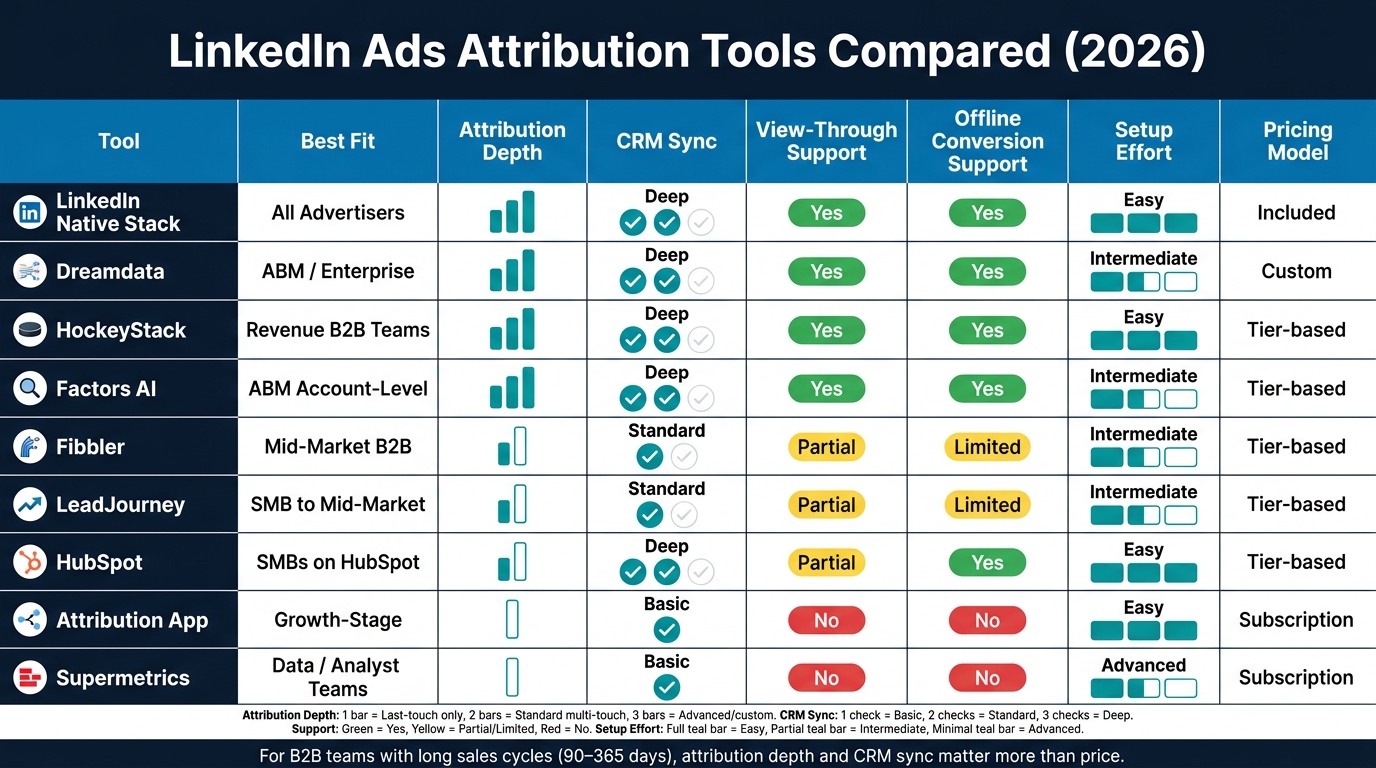
LinkedIn Ads Attribution Tools Compared: Features, Fit & Setup Effort (2026)
| Tool | Best fit | Main strength | Main limit |
|---|---|---|---|
| LinkedIn native stack | Any advertiser | Built-in tracking and offline event support | Mostly LinkedIn-only reporting |
| Dreamdata | ABM and revenue teams | Account-level revenue attribution | More setup and higher cost |
| HockeyStack | B2B teams focused on pipeline | Long windows and lift reporting | Can be more than small teams need |
| Factors AI | ABM teams | Company-level view-through analysis | Setup and CRM hygiene matter a lot |
| Fibbler | Mid-market B2B | Multi-touch journey tracking | Less depth than bigger platforms |
| LeadJourney | SMB to mid-market | Simple journey and pipeline reporting | Lighter feature set |
| HubSpot | SMBs already in HubSpot | Closed-loop CRM reporting | Best for simpler funnels |
| Attribution App | Growth-stage teams | Cross-channel revenue view | Depends on clean tracking |
| Supermetrics | Data teams | Custom reporting in BI tools | No built-in attribution model |
My takeaway: if I just need basic conversion reporting, LinkedIn’s own tools may be enough. If I need to tie ad spend to pipeline and revenue across a long buying cycle, I’d move to an attribution platform or a CRM/data setup that can show more than the last click.
How We Chose the Top LinkedIn Ads Attribution Tools
Every tool in this roundup had to clear a pretty simple bar: can it connect LinkedIn activity to pipeline and closed revenue? That was the lens we used throughout.
We judged each option based on what matters most to U.S. small and midsize businesses, not just big enterprise teams with analysts on standby. The review focused on five practical areas: LinkedIn data access, attribution depth, CRM and pipeline connectivity, usability for nontechnical teams, and setup effort. If a tool was a pain to put in place, it ranked lower.
LinkedIn data access and attribution depth
A solid tool needs to pull in LinkedIn Campaign Manager data through a native LinkedIn Ads API connection, track Insight Tag events, and support Conversions API and offline conversion imports. If those pieces were missing, the tool lost points.
We also paid close attention to multi-touch attribution. In B2B, LinkedIn often shows up early in the buying journey or somewhere in the middle, long before a deal closes. That means tools that only show last-touch results can make LinkedIn look weaker than it is.
The better options let teams compare first-touch, last-touch, linear, and position-based models using the same dataset. They also include view-through measurement, which helps teams see when a campaign shaped a buying decision even without a click.
CRM, pipeline, and reporting usability
Tracking clicks and conversions is one thing. Tying that activity to revenue is where these tools either help or get in the way.
Each platform needed to connect with Salesforce and HubSpot at the opportunity and deal level, with support for deal stages, pipeline value, and close dates. We scored tools lower when they relied on manual CSV uploads or slow refresh cycles. That kind of setup makes pipeline reporting harder to trust, and nobody wants to explain fuzzy numbers in a sales meeting.
We also looked at reporting from the point of view of a marketing manager or sales leader who needs answers fast and doesn’t want to touch SQL. The main test was simple: could a nontechnical user quickly see which LinkedIn campaigns drove the most pipeline? If that answer required a custom report build, the tool was a weak fit for SMB teams. Clear dashboards mattered more than export-heavy workflows.
Top LinkedIn Ads Attribution Tools in 2026
LinkedIn’s native stack: Campaign Manager, Insight Tag, and Conversions API
Before you bring in any third-party tool, get LinkedIn’s own setup running first. Campaign Manager, the Insight Tag, and the Conversions API are the base layer every advertiser should have in place.
The Insight Tag is a site-wide script. It tracks on-site conversions and lets you assign USD values and attribution windows. Campaign Manager then reports post-click and view-through conversions. [4][5][13][16]
The Conversions API adds a server-side layer. It sends conversion events from your CRM or backend systems straight to LinkedIn, including qualified leads, opportunities, and closed-won deals. When you use it alongside the Insight Tag, the two can deduplicate events and pick up conversions that browser tracking can miss. LinkedIn also supports attribution windows of up to 180 days with a 90-day lookback, which is a big deal for long B2B sales cycles. [2][5][12][16][18]
There’s a catch, though. This setup is still centered on LinkedIn itself. It shows how LinkedIn performed, but it doesn’t give you cross-channel reporting, multi-touch modeling, or account-level journey tracking. If you’re an SMB with a simple funnel, that may be enough, but scaling often requires a performance marketing agency to manage complex attribution. If your buying journey is longer and messier, this is the starting line, not the whole revenue attribution answer.
Once LinkedIn tracking is set up, the next call is pretty simple: stick with platform reporting or add a revenue attribution layer.
Dedicated attribution platforms: Dreamdata, Factors AI, Fibbler, HockeyStack, and LeadJourney
If native tracking is the baseline, these tools sit on top of it. They add CRM and revenue context to your LinkedIn data, which is where things start to get much more useful.
Dreamdata uses impression attribution at the account level to model the impact of ads even when no one clicks. That makes it a strong fit for upper-funnel campaigns. [9][10]
HockeyStack supports incrementality reporting, which helps teams sort out correlation from causation. It also supports conversion windows up to 365 days for post-click and view-through attribution. [11][14][15][17]
Factors AI identifies anonymous companies that viewed your LinkedIn ads and matches those accounts to later CRM deals. For ABM teams, that makes view-through attribution far more practical. [20][21][22]
Fibbler and LeadJourney add company-level tracking, multi-touch journeys, and CRM sync for mid-market B2B teams.
| Tool | Best For | Key LinkedIn Capability |
|---|---|---|
| Dreamdata | Mid-market to enterprise ABM | Impression attribution + CAPI sync |
| HockeyStack | Revenue-focused B2B teams | Incrementality reporting + long attribution windows |
| Factors AI | ABM and account-level analysis | View-through + anonymous company matching |
| Fibbler | Mid-market B2B | Multi-touch journey tracking + CRM sync |
| LeadJourney | SMB to mid-market | Journey tracking + pipeline reporting |
CRM and data tools: HubSpot, Attribution App, and Supermetrics
If your team already works out of a CRM or data warehouse, lighter tools can still help close the attribution gap.
HubSpot’s native LinkedIn Ads integration syncs impressions, clicks, and lead gen form submissions straight into the CRM. It also appends tracking parameters to destination URLs, which supports closed-loop attribution from the ad click all the way through contact creation and deal closure. Marketing Hub Professional and Enterprise users can also use multi-touch, lifecycle, and revenue attribution reports that connect LinkedIn activity to pipeline stages and closed-won revenue. For small teams with a simple funnel, that’s often enough. For more complex journeys, native reporting falls short. [25][30][31][32]
Attribution App works as an external attribution layer for teams that want cross-channel ROAS and lifetime value modeling beyond what one platform can show. It pulls in LinkedIn Ads spend and integrates through Segment to assign revenue contribution across the buyer journey. That makes it a good fit for growth-stage companies that want more than CRM-native reporting but aren’t ready for a full B2B attribution platform. [29]
Supermetrics is not an attribution platform. It’s a data connector. It pulls granular LinkedIn campaign metrics into BigQuery, Snowflake, Power BI, or Looker Studio, where analysts can build custom attribution models and blended ROAS dashboards using USD and MM/DD/YYYY. It works best for teams with in-house analytics resources that want to own the model instead of using a vendor’s pre-built logic. [24][26][27][28][33]
Comparison Table: Tools by Use Case, Attribution Depth, and Setup Effort
Use this table to line up each tool with the level of LinkedIn attribution, CRM sync, and setup work your team can handle. The trade-off is pretty straightforward: native LinkedIn and CRM-based options are easier to get running, while dedicated attribution platforms and warehouse-based setups give you more depth.
| Tool | Best For | LinkedIn connection | Attribution models | CRM Sync | View-through / impression tracking | Offline Conversion Support | Ease of use | Pricing |
|---|---|---|---|---|---|---|---|---|
| Campaign Manager + Insight Tag + Conversions API | All advertisers (baseline) | Native LinkedIn stack | Last-touch only [13][3][8] | Limited (offline events via Conversions API) [56][57][58][59] | Clicks + view-through (configurable windows) [55][6] | Basic (Offline Conversions API) [56][57][58][59] | Simple / out-of-the-box | Included with LinkedIn Ads |
| Dreamdata | ABM, mid-market to enterprise | Hybrid (ad account + Company Intelligence API + CRM) [35][39] | Advanced/custom (seven standard models + custom/ML-based) [42][43][9][35][38][37] | Advanced (accounts + revenue attribution) [35][38] | Clicks + view-through + paid/organic company-page impression attribution [35][39][9] | Full (CRM-based pipeline attribution) [35][38] | Advanced – requires analytics or RevOps support [35][38][37] | Custom / sales-driven |
| HockeyStack | Revenue-focused B2B teams | Native ad account connector [15][11] | Standard to advanced (configurable weighting, lift reports) [34][15][11][7] | Standard to advanced (pipeline + revenue) [7] | Not stated | Advanced (CRM-based deal progression) [7] | Intermediate – flexible reports, moderate learning curve [34][15][11][7] | Subscription pricing [15][11] |
| Factors AI | ABM, account-level analysis | Insight Tag + company-level enrichment [36][20][40] | Standard multi-touch (account-level journeys) [21][41][44] | Standard CRM sync (contacts + deals) [21][41] | Clicks + view-through + company-level attribution [36][20][40] | Limited | Intermediate | Custom pricing |
| HubSpot | SMBs with simple funnels | Native LinkedIn Ads integration + Conversions API [47][49][50][54] | Limited | Deep (contacts + deals + lifecycle stages) [47][50][54] | Click-based + lifecycle-stage events [47][49][50][54] | Standard (lifecycle stage sync via Conversions API) [47][49][50][54] | Simple / out-of-the-box | Tier-based |
| Attribution App | Growth-stage, cross-channel ROAS | Native ad account + dynamic URL tagging [45][46][48][52] | Standard multi-touch (cross-channel revenue allocation) [45][46] | Standard CRM sync (via Segment, Marketo, Zuora) [46][48][52] | Clicks only | Limited (CRM revenue events) [46][48][52] | Intermediate | Subscription-based |
| Supermetrics | Teams with in-house analytics | LinkedIn Ads connector → data warehouse [24][51][53] | None native (model built in BI layer) [24][51][53] | None native (analyst-built in warehouse) [24][51][53] | None native; build in BI/warehouse [24][51][53] | None native [24][51][53] | Advanced – analyst-first | Subscription by connector/destination |
Best picks for SMBs, ABM teams, and custom analytics setups
The table above turns a crowded tool set into a simpler choice by team type.
For lean or SMB teams, HubSpot makes the most sense if your pipeline already lives in the CRM. It gives you the fastest route to closed-loop LinkedIn reporting. The catch: it won’t do much for messy, multi-touch buyer journeys.
For ABM teams, Dreamdata is a strong fit when you need account-level pipeline attribution and deeper revenue tracking. Factors AI works well when your team wants view-through attribution tied back to identified companies.
For teams with internal analytics resources, Supermetrics is the fit if you want full control and prefer to build your attribution model in your own warehouse. HockeyStack is the better managed route when you want custom reporting without building the whole thing from scratch.
For longer sales cycles, attribution window length and CRM sync depth usually matter more than sticker price.
Pros and Cons by Tool
Where each tool is strongest and weakest
Not every attribution tool does the same job. Some are built for speed. Others go deeper into revenue reporting, account journeys, or multi-touch analysis. That’s the tradeoff in plain English: speed, depth, and data quality.
The table below lays out where each option shines, where it falls short, and what changes once LinkedIn’s own attribution rules and anonymization limits come into play.
| Tool | Main Pros | Main Cons | Best Fit | Notes on LinkedIn Attribution Limits |
|---|---|---|---|---|
| Campaign Manager + Insight Tag + Conversions API | No added platform cost; fast setup; CAPI can improve signal quality and attribution completeness | Last-touch reporting only; no cross-channel view | Any advertiser needing a baseline | Bound by LinkedIn’s native reporting windows |
| Dreamdata | Data-driven multi-touch attribution on closed-won deals; strong revenue and ROAS visibility over long B2B sales cycles [60][61][10] | Higher cost; depends on clean CRM/event data; excludes impressions | Mid-market to enterprise B2B with longer sales cycles | Pulls conversion data into its own attribution engine, so it can go beyond LinkedIn’s last-touch rules – but won’t capture impression-level influence [61][10] |
| Factors AI | View-through attribution; account-level visibility; multi-touch models for ABM teams [20][21][22] | More complex setup; first-sync backfill is often limited to about 30 days; accuracy depends on clean CRM hygiene | ABM teams wanting account-level and view-through attribution | Extends LinkedIn’s native view-through by matching anonymous ad viewers to CRM accounts, but still depends on LinkedIn’s attribution windows [20][63][64] |
| Fibbler | Lightweight setup; useful for tailored dashboards and quick visibility | Narrower scope than full multi-touch platforms | Small teams that want a straightforward attribution setup | Better for streamlined reporting than deep, cross-channel attribution |
| HockeyStack | Account-based journey mapping; links LinkedIn impressions and engagement to pipeline and revenue [17][19][62] | Premium pricing; extra ABM setup; overkill for smaller teams | ABM programs tracking accounts, not just leads | Depends on LinkedIn’s anonymization and identity-matching limits |
| LeadJourney | Streamlined configuration; low-friction for teams that don’t need a full analytics stack | Limited depth for multi-touch and cross-channel attribution | Teams that want a focused, lightweight reporting tool | Better for simple attribution workflows than complex revenue modeling |
| HubSpot | Native LinkedIn integration; maps ad interactions to lifecycle stages and deals; minimal engineering needed [68][69] | Limited to contacts that enter HubSpot; no algorithmic cross-channel modeling; requires disciplined UTM tagging | SMBs and mid-market teams already on HubSpot | Attribution only activates after contacts enter HubSpot [68][23] |
| Attribution App | Consistent multi-touch logic across LinkedIn, Google Ads, and other channels; fractional credit models [67][65] | Requires clean UTM, pixel, and CRM hygiene to avoid mis-attribution | Growth-stage teams with multi-channel ad spend | Decouples attribution from LinkedIn’s default last-touch model, but accuracy depends on clean tracking across every channel [67][65] |
| Supermetrics | Pulls up to 10 years of non-demographic LinkedIn data; full control in your BI tool of choice [66] | No attribution modeling built in; demographic data capped at 6 months; reach metric limited to 92-day windows [66][28] | Analysts and data teams building custom models | LinkedIn API limits apply directly – Supermetrics surfaces them rather than working around them [66] |
The big split here is simple: the deeper you want to go, the more setup work you usually take on. A lightweight tool can get you moving fast. But if you want account paths, multi-touch credit, and revenue tieback over long sales cycles, things get heavier fast.
There’s also one limit that shows up everywhere: LinkedIn’s anonymization rules. No matter which platform you pick, those rules make impression-level identity matching hard across the board.
Conclusion: Choosing the Right LinkedIn Ads Attribution Tool
Choose the simplest setup that answers the revenue question you need to answer right now.
If you only need lead-volume reporting, native LinkedIn tracking may be enough. If you need multi-touch revenue analysis, a dedicated attribution platform makes more sense. And if your team already does most reporting in HubSpot, Salesforce, or a data warehouse, a CRM- or BI-based setup can be the better fit.
Start with those three paths, then narrow the choice based on how your team sells, tracks, and reports.
When long sales cycles and buying committees are part of the deal, a dedicated attribution platform often earns its price. On the other hand, CRM-native or data-pipeline tools are often the better route when reporting already happens in HubSpot, Salesforce, Looker, or Power BI.
Key factors to check before picking a tool
Before you decide, check these five fit factors:
- Attribution model: Do you need first-touch, last-touch, multi-touch, or algorithmic attribution? Match the model to the exact question you’re trying to answer.
- Account-level vs. contact-level: ABM programs need account-level visibility. If one person usually makes the call, contact-level data can work just fine.
- Offline conversion support: If deals close by phone or in person, make sure the tool can pull in CRM pipeline data, not just website events.
- Integration effort: Clean CRM data is a must for any dedicated platform. Skip that step, and the model becomes hard to trust.
- Budget fit: Match the tool’s cost to your ad spend and the depth of reporting you need.
This tradeoff is why attribution tools matter at all:
"Judging a LinkedIn program on a 6-week cost per lead will cause you to cancel campaigns before the opportunities they influenced have been created." – Stelios Kalafatakis, Performance Marketing Specialist, Growth-onomics [1]
Even the best tool falls flat if tracking is messy, CRM data is sloppy, or your measurement goals aren’t clear.
FAQs
Which LinkedIn attribution tool is best for long B2B sales cycles?
For businesses with long B2B sales cycles, Dreamdata is the tool to look at. It’s built for long B2B buying journeys and uses machine learning to track anonymous visitors, spot decision-makers, and map the full buyer journey.
Its account-based attribution ties marketing activity to revenue, so teams can see how each touchpoint affects the account over time.
Do I need a CRM to track LinkedIn ads to revenue?
Yes. A CRM is a must if you want accurate revenue tracking.
LinkedIn Ads and analytics tools can show clicks, leads, and form fills. But they can’t show what happens after someone enters your sales pipeline. That’s the missing piece.
When you sync your CRM data with the LinkedIn Ads API, you can tie campaigns to actual sales stages. That means you can measure ROAS based on closed deals, not just online conversions.
How important is view-through attribution for LinkedIn ads?
View-through attribution matters a lot in B2B marketing because it tracks conversions from people who saw an ad but didn’t click on it.
That matters because B2B buying journeys are often long and messy. A person might notice your ad today, visit later through another channel, and convert months down the line. In some cases, that sales cycle can stretch to nearly 200 days.
By counting those ad views, view-through attribution gives you a better picture of how ads shape brand awareness and influence buying over time. It can also make ROI calculations more accurate than click-only or last-click models, which tend to miss that early impact.