

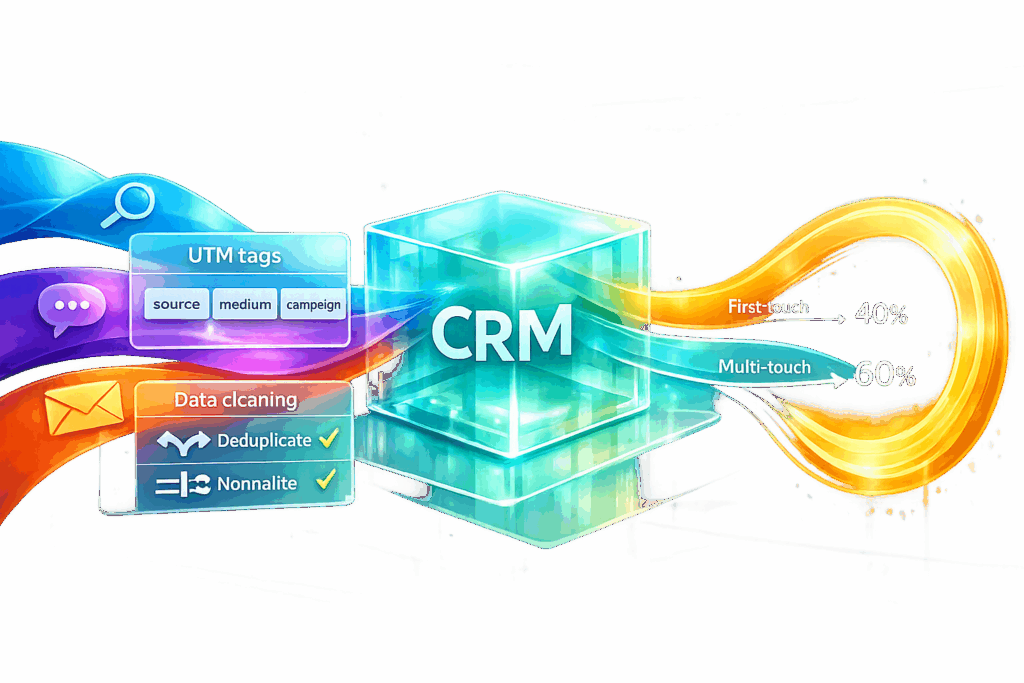
Your CRM is more than just a database – it’s the missing link between your marketing efforts and actual revenue. While tools like Google Analytics and ad platforms track clicks and sessions, they don’t show what happens after someone fills out a form. That’s where CRM data comes in. It connects leads, sales, and revenue to specific marketing campaigns, helping you focus on what truly drives profit.
Here’s the issue: disconnected systems and poor data hygiene can lead to inaccurate insights. To fix this, you need to integrate your CRM with ad platforms, track UTM parameters consistently, and choose the right attribution model. This guide explains how to set up your CRM, avoid common pitfalls, and use attribution data to make smarter budget decisions.
Key Takeaways:
- CRM vs. Analytics Tools: Your CRM tracks post-click data (like conversions and revenue) that analytics tools miss.
- Integration is Key: Sync your CRM with ad platforms to fix data gaps and enable offline conversion tracking.
- Clean Data Matters: Standardize UTM parameters, remove duplicates, and ensure accurate data entry.
- Attribution Models: Choose models like first-touch, last-touch, or multi-touch based on your sales cycle and data volume.
- Actionable Insights: Use CRM data to identify profitable channels, adjust budgets, and improve ROI.
CRM data isn’t just for tracking leads – it’s a tool for tying marketing spend directly to revenue. Let’s dive into how to make it work for you.
CRM Data and Attribution: The Basics
What Attribution Analysis Measures
Attribution analysis identifies which marketing efforts contribute to business outcomes. It maps the customer journey from the first interaction to the final purchase, tracking every touchpoint along the way – ads, emails, webinars, sales calls, and more.
Some teams focus on lead-level attribution to measure funnel activity, while others prioritize opportunity-stage attribution to assess revenue impact. The most precise method ties marketing expenses directly to closed deals and revenue. As House of MarTech explains:
"Attribution measured at the lead level tells you which channels drive volume. Attribution measured at the revenue level tells you which channels drive profit."
Without revenue-focused attribution, you risk pouring resources into channels that generate leads but fail to deliver paying customers.
How CRM Data Connects Marketing to Revenue
A CRM serves as the link between marketing initiatives and actual sales. While tools like Google Ads can track clicks and Google Analytics monitors on-site behavior, neither provides insight into what happens after someone fills out a form. This is where CRM systems shine – they track lead conversions and assign value to completed sales.
By using identifiers such as email addresses or phone numbers, you can connect online interactions with CRM records. In B2B settings, this becomes even more critical for account-based attribution, where the buying journey often involves multiple decision-makers. A CRM compiles these various touchpoints, offering a holistic view of the process.
However, even the most detailed CRM data can lead to inaccurate insights if there’s no proper integration between systems.
Why Disconnected Data Creates Problems
For CRM attribution to work, your ad platforms, analytics tools, and CRM must sync seamlessly. If they don’t, you may end up with inconsistent conversion data. For example, one platform might report higher conversion numbers than another due to differences in tracking windows, definitions, or attribution rules.
House of MarTech highlights this issue:
"If your Google Ads dashboard, Google Analytics, and Salesforce are all reporting different conversion numbers for the same campaign, you do not have a reporting problem – you have an integration problem."
Disconnected data can lead to misguided decisions. Marketing teams might celebrate a channel for producing a high volume of leads, while sales teams see few of those leads converting. Data match rates below 60% render attribution models unreliable, especially now that about 75% of iOS users are invisible to browser-based tracking. First-party CRM data is more important than ever for accurate measurement. Additionally, poor data hygiene – like having duplicate records in over 15% of your CRM – can fragment customer journeys and obscure the impact of important touchpoints.
sbb-itb-2ec70df
Setting Up Your CRM for Attribution
Required CRM Data Fields
To ensure precise attribution, your CRM needs to capture both the origin of leads and their journey through the funnel. This means including the five core UTM parameters – utm_source, utm_medium, utm_campaign, utm_term, and utm_content – along with fields for first-touch and last-touch data. Standard fields like "HubSpot Original Source" or Salesforce’s "Lead Source" often fall short. As Shad Malik, CEO of TrackFunnels, points out:
"HubSpot Original/Latest Source or Salesforce Lead Source fields… group visits into broad buckets and can change over time. They do not store exact utm_campaign, utm_medium, or utm_content values."
To address this, set up separate first-touch and last-touch fields in your CRM. First-touch fields should lock in the original source and only populate if empty. In contrast, last-touch fields update with every new form submission to reflect the most recent interaction. Beyond UTM parameters, include fields for Landing Page URL, Form Name, and Timestamps to provide context for conversions. For B2B scenarios, where buying cycles are longer, set your tracking cookie Time-To-Live (TTL) to 90–180 days so first-touch data remains intact.
Additionally, ensure your Opportunity or Deal object has a "Primary Campaign Source" or "Deal Source" field. This allows you to directly link revenue to the campaigns that generated it. Without this connection, you’ll struggle to tie closed deals back to their marketing origins.
Mapping Your Customer Journey
Once your CRM fields are in place, the next step is defining a clear customer journey to capture every interaction. This involves six key steps: capturing UTMs on arrival, populating hidden form fields, storing the data in CRM fields, maintaining both first- and last-touch history, linking contacts to revenue, and reporting outcomes. Each step must be precise – hidden form inputs, for example, must exactly match your CRM field API names to avoid data loss.
To integrate your analytics tools with your CRM, pass a session ID or client ID from platforms like GA4 into form submissions. This allows you to track a lead’s complete web traffic history within your CRM. Also, set tracking cookies for your parent domain (e.g., .example.com) to ensure attribution data stays intact as users navigate between your marketing site and product app.
Automate UTM field mapping during lead conversion to avoid losing data. For instance, when a Lead converts to a Contact, ensure all UTM data is carried over. Similarly, when an Opportunity is created, use CRM workflows (like Salesforce Flow) to pull UTM values from the associated Contact. This prevents "unknown" deal sources from appearing in your reports.
By following these steps, you’ll lay the groundwork for accurate multi-touch attribution.
Organizing Data for Multi-Touch Attribution
To support multi-touch attribution, you need to track every interaction – not just the first and last. This requires a complete history of touchpoints, which can be achieved using the Campaign Member object. This object creates a snapshot of UTM data for each interaction. By adding and updating custom UTM fields on Campaign Member records, you can build a detailed audit trail without overwriting Lead or Contact fields.
As House of MarTech emphasizes:
"Your CRM only earns revenue credit for marketing when UTMs survive the jump from first click to form to deal."
Consistency in UTM naming is critical to avoid fragmented data. For example, inconsistent tags like utm_source=google versus utm_source=Google_Ads will split your reports. To prevent this, create a shared naming document and enforce its use across teams.
For conversions missed by browser pixels – due to ad blockers or privacy settings – implement server-side tracking through Conversions APIs (CAPI). With about 75% of iOS users no longer visible to browser-based tracking, relying on first-party CRM data is now more important than ever.
Connecting Ad Platforms to Your CRM
Setting Up Platform Integrations
Linking your ad platforms to your CRM creates a seamless flow of data, allowing you to better understand and enhance campaign performance. The foundation of this connection lies in capturing unique click identifiers like GCLID (Google Click Identifier) for Google Ads and fbclid for Meta Ads. These identifiers are automatically added to URLs when someone clicks on your ad.
The integration process varies depending on the platforms you use. For instance, HubSpot provides a straightforward "point-and-click" integration for Google Ads, making it easy to capture GCLIDs through its forms. On the other hand, Salesforce requires you to create a custom field (commonly named GCLID__c) and include hidden form fields to collect the data. For platforms like GoHighLevel, middleware tools like Zapier or Make are essential to sync data between your ad platform and CRM.
But connecting the platforms is just the start. To truly optimize performance, you need to set up a feedback loop that sends sales data back to your ad platforms. This process, known as Offline Conversion Tracking (OCT), uses click IDs to inform platforms like Google Ads or Meta when a lead progresses to "Qualified" or "Closed-Won." Antoine Martin, Founder of Web Marketing International, emphasizes the importance of this step:
"Without CRM integration, your ad platforms are blind to what happens after the form fill. They treat a CEO requesting a $100K engagement the same as a student downloading a free resource."
This feedback allows ad algorithms to focus on generating revenue rather than just clicks. For Google Ads, its bidding algorithm typically needs 15–30 offline conversions within a 30-day period to start optimizing effectively. Over 60–90 days, this integration can improve lead quality by 2–3× without increasing your ad budget.
Additionally, server-side tracking via Conversions APIs (CAPI) has become more reliable than browser-based tracking, especially as privacy changes like App Tracking Transparency (ATT) have made traditional tracking methods less effective. For example, Meta’s Conversions API can achieve match rates of 40%–70% when using hashed emails.
Once your platforms are connected, the next step is ensuring consistent tracking parameters.
Maintaining Consistent UTM Parameters
Without consistent UTM naming, your attribution data can become fragmented. For instance, if one team member uses utm_source=google while another opts for utm_source=Google_Ads, your CRM will treat these as entirely separate sources. As House of MarTech points out:
"If one person uses utm_source=google and another uses utm_source=Google_Ads, you have a split in your data that will follow you everywhere."
To avoid this, create a shared naming convention document and ensure all teams follow it. Define specific values for UTM parameters, such as always using lowercase, replacing spaces with underscores, and standardizing terms for common sources like google, facebook, and linkedin. Configure your web forms to automatically capture these UTM parameters from URLs or browser cookies and pass them into your CRM.
Default CRM fields may seem convenient, but they often group visits into broad categories, losing the granular data needed for precise attribution. By standardizing UTM parameters, you can directly tie utm_campaign values to CRM Campaign objects, linking closed-won revenue to specific marketing efforts.
Once your UTM parameters are aligned, automating their capture and validation becomes essential.
Automating Data Sync and Validation
Automation ensures your attribution data flows smoothly and accurately without manual input. Use JavaScript on landing pages to capture UTM parameters into hidden form fields. Leverage first-party cookies or localStorage to persist this data across sessions. This approach strengthens the attribution process and reduces errors.
Maintaining clean CRM data is equally critical. Encourage sales teams to update pipeline stages within 24 hours. Delays in updating the CRM can lead to misattribution – if a lead closes on Monday but isn’t logged until Friday, the conversion timestamp may be off, disrupting ad platform reporting.
Regular audits are also vital. Use tools like Google Tag Manager’s preview mode or specialized tracking solutions to confirm that tracking pixels and API calls are functioning correctly at every stage of the funnel. If your data match rates fall below 60%, most attribution models lose reliability. Once your CRM data flows consistently, consider shifting from Target CPA to Target ROAS bidding to maximize the value of your conversions.
Lastly, bridge your analytics tools and CRM by passing session IDs or client IDs – such as those from GA4 – into your form submissions. This method allows you to track leads through their full journey, from their initial click to the final deal. It provides a complete picture of the customer lifecycle, empowering your marketing team and ad algorithms with the insights they need to drive better performance.
Get Marketing Attribution Data in Your CRM with Google Tag Manager
Choosing an Attribution Model
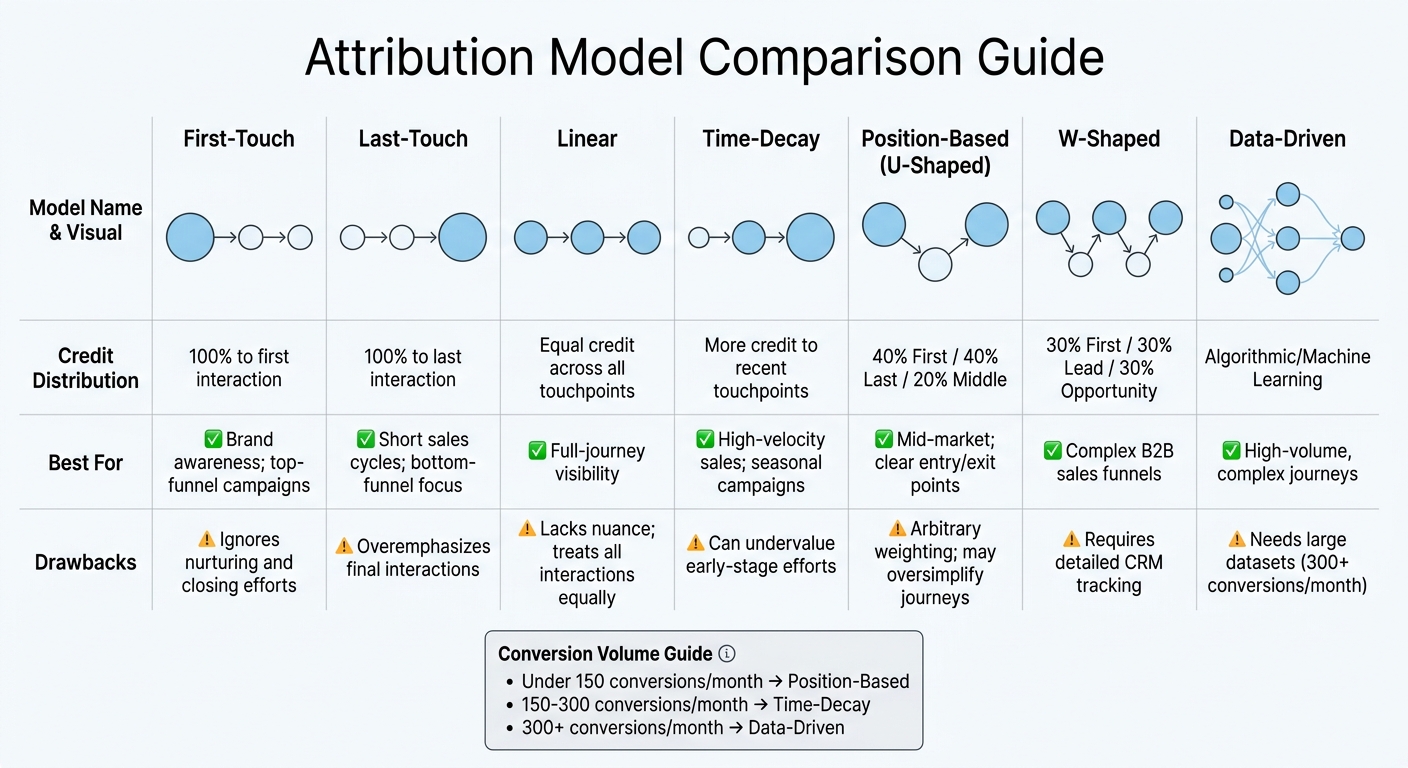
Attribution Models Comparison: Credit Distribution and Best Use Cases
Once you’ve integrated CRM data with ad platforms and tracked closed deals, the next step is assigning conversion credit through the right attribution model. Your choice here directly impacts which marketing efforts get credit – and funding – moving forward.
Common Attribution Models Explained
Attribution models fall into two main categories: single-touch and multi-touch.
- Single-touch models give all the credit to one interaction. For example:
- First-touch attribution credits the very first interaction a customer had with your brand.
- Last-touch attribution focuses on the final interaction before the conversion.
- Multi-touch attribution (MTA) spreads the credit across multiple interactions. Here are some common approaches:
- Linear attribution divides credit equally across all touchpoints.
- Time-decay attribution gives more weight to recent interactions. For example, a 7-day half-life is common, but B2B teams with longer sales cycles might extend this to 30–45 days.
- Position-based (U-shaped) attribution assigns 40% of the credit to the first and last touchpoints, with the remaining 20% spread across the middle interactions.
- W-shaped attribution allocates 30% each to the first touch, lead creation, and opportunity creation, with the remaining 10% distributed among other touchpoints. This model works well for complex B2B funnels with clear pipeline stages.
- Data-driven (algorithmic) attribution uses machine learning to assign credit based on how interactions correlate with conversions. However, this requires a significant amount of data. Google Ads recommends at least 600 conversions per month for optimal performance, though some models can work with as few as 300–400 conversions. Below these thresholds, the results may lack accuracy.
Aligning Models with Business Objectives
The best attribution model depends on your sales cycle, conversion volume, and business priorities. House of MarTech offers this guideline:
"The right multi-touch attribution model depends primarily on your monthly conversion volume: use position-based attribution under 150 conversions, time-decay attribution between 150 and 300, and algorithmic (data-driven) attribution above 300."
For businesses with short sales cycles, such as e-commerce, time-decay or last-touch models are often effective. On the other hand, long B2B sales cycles (90+ days) typically benefit from position-based or W-shaped models, as these account for both early awareness and the final conversion trigger. If your goal is to measure brand awareness, first-touch attribution can identify which channels bring in new prospects and leads. Meanwhile, last-touch attribution is better for optimizing final-stage conversions.
Many teams now combine multi-touch attribution for tactical decisions, marketing mix modeling (MMM) for strategic budget allocation, and incrementality testing to confirm causation. In fact, multi-touch attribution has become increasingly popular, with 75% of companies using it in 2024, compared to 58% previously. Tying these models to CRM revenue data ensures a data-driven approach to marketing attribution.
Before committing to an attribution model, it’s crucial to assess your data quality. As House of MarTech warns:
"Attribution model integration built on broken tracking is just sophisticated noise."
If your tracking isn’t tied to actual CRM revenue – or if your match rates are below 60% – your insights won’t be reliable. To avoid this, standardize UTM parameters, clearly define what counts as a conversion (e.g., lead, qualified opportunity, or closed revenue), and align your lookback window with your sales cycle.
Attribution Model Comparison
| Model | Credit Distribution | Best For | Drawbacks |
|---|---|---|---|
| First-Touch | 100% to first interaction | Brand awareness; top-funnel campaigns | Ignores nurturing and closing efforts |
| Last-Touch | 100% to last interaction | Short sales cycles; bottom-funnel focus | Overemphasizes final interactions |
| Linear | Equal credit across all touchpoints | Full-journey visibility | Lacks nuance; treats all interactions equally |
| Time-Decay | More credit to recent touchpoints | High-velocity sales; seasonal campaigns | Can undervalue early-stage efforts |
| Position-Based (U-Shaped) | 40% First / 40% Last / 20% Middle | Mid-market; clear entry/exit points | Arbitrary weighting; may oversimplify journeys |
| W-Shaped | 30% First / 30% Lead / 30% Opportunity | Complex B2B sales funnels | Requires detailed CRM tracking |
| Data-Driven | Algorithmic/Machine Learning | High-volume, complex journeys | Needs large datasets (300+ conversions/month) |
It’s worth noting that platform-reported conversions can be inflated – sometimes 2–3 times higher than actual CRM revenue. Direct integration with your CRM is essential for accurate attribution insights.
Using CRM Attribution Data to Improve Results
Once you’ve chosen an attribution model, the challenge lies in turning that data into practical strategies. As Clwyd Probert, Founder of Marketing Mary, puts it:
"Attribution isn’t an analytics project – it’s a budget allocation project."
The aim is to pinpoint which channels generate the most profit, adjust your budget accordingly, and create dashboards that keep your team focused on strategies that work.
Creating Attribution Dashboards
An effective attribution dashboard starts with clarity about what each system is responsible for. For instance, use GA4 for behavioral tracking (what visitors do on your site), self-reported data for customer-declared influence (what buyers say brought them in), and your CRM as the financial record for pipeline and revenue tracking. This separation avoids confusion when data from different platforms doesn’t align.
Consistent UTM naming conventions are critical. Stick to standardized, lowercase tags like "google" to avoid fragmented data that can undermine your dashboard. Marketing operations expert Prose emphasizes:
"If a marketer cannot read the campaign name without opening a spreadsheet, future reporting is already in trouble."
When mapping UTM parameters to CRM lead source fields, make sure your dashboard includes essential fields such as Original Lead Source (this should never be overwritten), Latest Lead Source, Self-Reported Source, and Opportunity Source. Protect the Original Lead Source by setting it as read-only for sales reps and automated workflows.
To capture hard-to-track influences like word-of-mouth and "dark social", add a required picklist and free-text field ("How did you hear about us?") to high-intent forms. This becomes even more important as 75% of iOS users are now invisible to browser-based tracking due to privacy updates from Apple.
Finally, set up a monthly reconciliation view to compare data across systems. Don’t expect a single perfect number – look for trends instead. Validate your findings with geo-lift or holdout tests to confirm that your top-performing channels are genuinely driving revenue.
With a well-structured dashboard, you’re equipped to identify your most effective channels.
Finding Your Best-Performing Channels
To pinpoint your top channels, focus on closed revenue rather than just lead volume. As House of MarTech explains:
"Attribution measured at the lead level tells you which channels drive volume. Attribution measured at the revenue level tells you which channels drive profit. These are often different channels."
This requires linking data from ad platforms (clicks), analytics tools (on-site behavior), your CRM (leads and closed deals), and your data warehouse (a unified source of truth). By passing session or client IDs from your analytics tool into CRM form submissions, you can track a closed deal back to its original traffic source.
To avoid double-counting, use a centralized attribution model. This prevents platforms like Google and Meta from each claiming full credit for the same conversion, ensuring accurate reporting.
When analyzing performance, distinguish between demand capture (e.g., search channels that capitalize on existing intent) and demand creation (e.g., social media or podcasts that build awareness). Multi-touch attribution often reveals that nurturing and awareness channels – like email and content – are undervalued by last-touch models. For instance, email marketing accounts for 28% of B2B touchpoints but receives only 8% of credit in traditional last-touch models.
Keep in mind that attribution models lose reliability if match rates between data sources drop below 60%. Before relying on channel rankings, audit your data quality and confirm that your tracking ties back to CRM revenue.
These insights pave the way for smarter budget decisions.
Adjusting Marketing Budget Based on Data
Companies using multi-touch attribution typically reallocate 18% to 22% of their budgets across channels, often achieving customer acquisition cost (CAC) reductions of 12% to 19% through improved channel optimization informed by CRM data.
Examine sales cycle lengths in your CRM by segment (e.g., SMB vs. Enterprise) and set tailored lookback windows. For example, enterprise deals may require a 120–180 day window, while the standard 30-day window used by 73% of B2B organizations may miss early touchpoints in longer sales cycles.
Dive deeper into underperforming campaigns, keywords, or audience segments to fine-tune your spending. Instead of making broad cuts, establish clear ROAS or CPA thresholds that trigger budget adjustments automatically. This helps avoid emotional decisions based on short-term data swings.
To validate budget changes, run incrementality tests like geo-lift or holdout experiments. These tests ensure that channels identified as top performers in your CRM data are genuinely driving additional revenue when spending increases. Combining multi-touch attribution with Marketing Mix Modeling (MMM) and incrementality testing provides a more accurate measure of net-new conversions, not just correlations.
Maintaining Accurate CRM Data
Accurate CRM data is the backbone of effective attribution. Even the most advanced attribution models crumble when the data in your CRM is unreliable. Here’s a startling fact: B2B contact data deteriorates at a rate of 22.5%–30% annually, and in high-turnover sectors like tech, that number can skyrocket to 70.3% per year. Poor data quality isn’t just a minor inconvenience – it costs businesses an average of $15 million annually.
The situation is even more challenging when you consider that 76% of CRM users admit that fewer than half of their organization’s entries are complete and accurate. When your attribution data is incomplete, it’s nearly impossible to confidently determine which channels are driving revenue, leaving budget decisions to guesswork.
Setting Up Data Governance Rules
Data governance often fails because it lacks ownership. As the Prospeo Team aptly points out:
"’Data quality is everyone’s responsibility’ is the most dangerous sentence in CRM governance. It means nobody has a deadline, nobody has a metric, and nobody gets held accountable when the database rots."
The solution? Assign a dedicated data steward – usually someone in RevOps – with the authority to enforce data standards and reject incomplete or inaccurate records. This individual should track specific metrics like data completeness and duplicate rates, with quarterly targets tied to their performance. Define a Minimum Viable Record (MVR) that includes mandatory fields such as name, company, job title, and region. Records missing these fields shouldn’t be saved. Critical attribution fields like Original Lead Source, pipeline stage, and deal amount should be locked down with field-level permissions, ensuring only authorized roles can edit them.
It’s also essential to create a shared glossary that aligns all departments on field definitions. For example, clearly document what qualifies as an "MQL" versus "Sales Accepted" to avoid discrepancies in reporting.
Finally, conduct quarterly audits to maintain data accuracy. Treat records older than 90 days as questionable and take steps to verify or update them. Businesses with stringent data quality standards report 30% higher sales revenue compared to their competitors.
Fixing Common Data Issues
Did you know nearly 90% of CRM contact records are incomplete, and 20% are outright unusable? Duplicates, missing fields, inconsistent formatting, and outdated information wreak havoc on attribution tracking.
Start with deduplication. Integrations and web forms contribute to an 80% duplicate rate, while CSV imports result in only 19% duplicates. Use exact matching for identical email or phone fields, and employ fuzzy matching to catch variations like "Bob" versus "Robert" or "IBM" versus "International Business Machines". When merging records, establish clear logic based on recency or completeness, and ensure all activity history and notes are preserved.
| Dirty Data Type | Impact on Attribution |
|---|---|
| Duplicates | Inflated lead counts, broken attribution, multiple owners |
| Incomplete | Broken segmentation, weak routing, tracking challenges |
| Inconsistent | Reporting errors, failed automation, messy sync issues |
| Outdated | High bounce rates, wasted outreach, misleading pipeline views |
| Invalid | Deliverability issues, failed integrations, unreliable scoring |
For incomplete records, leverage automated enrichment tools like Apollo.io or Clearbit to fill in gaps such as job titles, company sizes, and contact details at the point of capture. Replace free-text fields with dropdown menus for standardized entries like industries, countries, and states to eliminate formatting errors.
Before making any changes, always back up your data. As ApexVerify warns:
"The most expensive data cleaning mistake is the one you can’t undo. Always backup before you begin."
Export your CRM data before performing any large-scale deduplication or cleaning to safeguard against accidental deletions.
Addressing these major data issues is just the first step. The next challenge is ensuring your team adopts consistent data entry practices.
Teaching Teams Proper Data Entry
Accurate CRM data doesn’t just improve attribution – it helps sales teams close deals faster. Verified CRM data can speed up deal closures by 23%. Yet, 37% of CRM users admit that team members sometimes "make up" answers in the CRM to craft a more favorable narrative for higher-ups. This undermines attribution accuracy and erodes trust in the system.
Make proper data entry a priority during new hire onboarding. Show employees how accurate data directly impacts their productivity. For instance, reducing the 27% of time sales reps waste searching for accurate contact information allows them to focus more on selling. Better data entry also strengthens attribution analysis, leading to smarter marketing budget decisions.
Use guardrails to guide the process without creating bottlenecks. Automated prompts and picklists can help standardize entries without slowing down workflows. Replace open-text fields with dropdown menus to eliminate spelling errors and formatting inconsistencies.
To ensure accountability, implement a RACI model that defines who is Responsible, Accountable, Consulted, and Informed for each data type. For example:
- Marketing: Owns identity data (e.g., name, email, phone)
- Sales: Handles qualitative data (e.g., call notes, sentiment)
- RevOps: Manages operational data (e.g., lead source, UTM parameters, pipeline stage)
A great example of this approach comes from Gousto, a UK-based meal-kit company. In 2025, they moved away from a "shared responsibility" model and assigned dedicated data stewards. They also implemented automated quality checks directly into their data pipeline. This shift ensured accountability and prevented their CRM data from degrading after initial cleanup efforts.
Conclusion
Accurate CRM data lays the groundwork for turning attribution into a reliable decision-making tool. By integrating ad platforms, analytics, and your CRM into a unified system, you can shift your focus from lead volume to what truly matters – closed revenue and profit. This approach helps identify the channels that genuinely drive business growth.
The key to effective attribution isn’t an overly complex model – it’s clean, reliable data. Clean data, achieved through standardized UTM parameters, precise CRM mapping, and strong data management practices, eliminates tracking errors. As House of MarTech wisely states:
"The goal is not perfect attribution. It is attribution that is reliable enough to guide better decisions than you are making now."
To get there, connect your ad spend to CRM revenue data, use consistent UTM naming conventions, assign a dedicated data steward, and regularly review your attribution model to adapt to changing behaviors. These steps transform your data into actionable insights, delivering better marketing outcomes without the endless pursuit of perfection.
Attribution is an evolving process. With privacy regulations tightening and third-party cookies disappearing, first-party CRM data is becoming even more critical. Companies that prioritize data quality today will be equipped to make smarter budget decisions in the future.
Take control of your CRM data. Clean it up, integrate your tools, and build your strategy around closed revenue insights.
FAQs
What CRM fields are needed to capture UTMs correctly?
To make sure your CRM captures UTM parameters correctly, set up dedicated fields for utm_source, utm_medium, utm_campaign, utm_term, and utm_content. These parameters are essential for tracking where your traffic comes from and understanding the details of your campaigns.
How do I connect CRM revenue back to my ad platforms?
To tie your CRM revenue directly to ad platforms, start by integrating your CRM system (like HubSpot) with platforms such as Google Ads or Meta Ads. Set up your CRM to track revenue data and connect it to ad interactions using offline conversion tracking or API integrations. This setup allows ad platforms to link revenue back to specific campaigns or keywords, helping you fine-tune performance based on real sales results.
Which attribution model should I use with my conversion volume?
Choosing the right attribution model hinges on how credit is assigned to different touchpoints in your customer journey. If you’re working with a high volume of conversions, multi-touch models like linear, time decay, or position-based can often give you more detailed insights into performance.
Your sales cycle also plays a big role in this decision. For instance, if you have a longer sales cycle, a time decay model might be more effective since it gives more weight to touchpoints closer to the conversion. On the other hand, if your focus is on identifying key interactions, first-touch or last-touch models might be better suited.
Ultimately, the attribution model you choose should align with your overall strategy and measurement objectives, ensuring it accurately reflects your business priorities.