

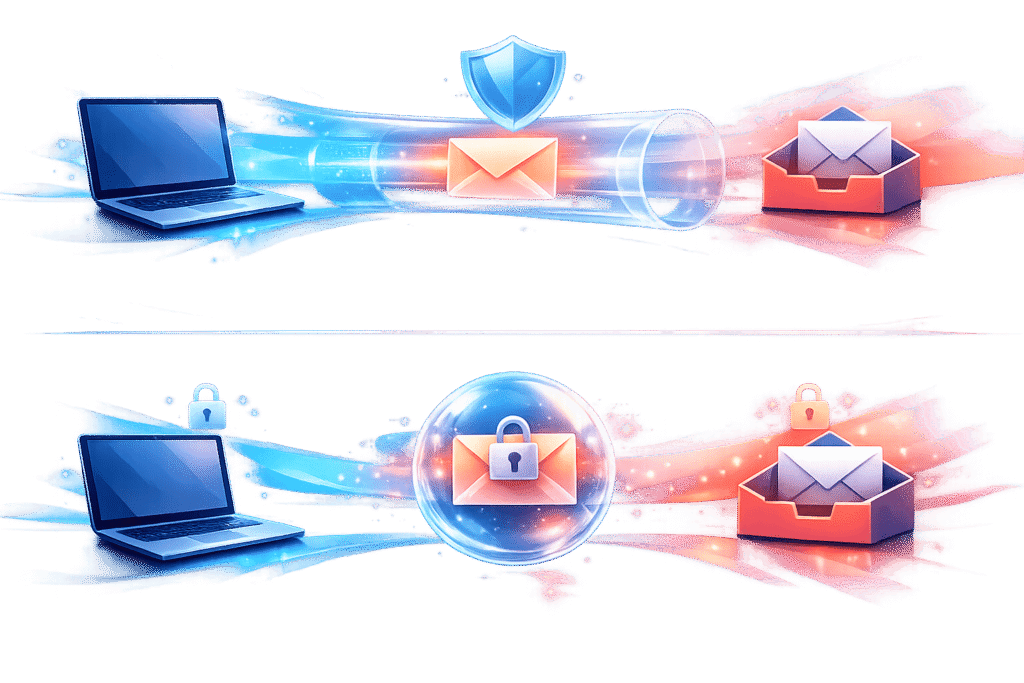
TLS and End-to-End Encryption (E2EE) both protect email data – but they serve different purposes:
- TLS secures data in transit between servers, like an armored truck safeguarding delivery. It works automatically and is ideal for everyday emails.
- E2EE encrypts data at all times, ensuring only the sender and recipient can access the content. This is best for sensitive data like contracts or personal information.
Key Differences:
- TLS protects emails while they travel but leaves them exposed at rest (e.g., on servers).
- E2EE keeps emails encrypted even on servers, but it requires managing encryption keys and limits features like personalization and analytics.
Quick Takeaway: Use TLS for general communications and E2EE for highly sensitive information or compliance with strict regulations like HIPAA or GDPR. Combining both offers the most secure approach.
Quick Comparison:
| Feature | TLS | E2EE |
|---|---|---|
| Protects in transit | Yes | Yes |
| Protects at rest | No | Yes |
| Provider access | Yes (can read content) | No (zero-access) |
| Setup complexity | Automatic | Requires key exchange |
| Best use case | Mass emails | Sensitive data |
Encryption is essential for protecting email data. Choose the right method based on your needs and the sensitivity of your information.
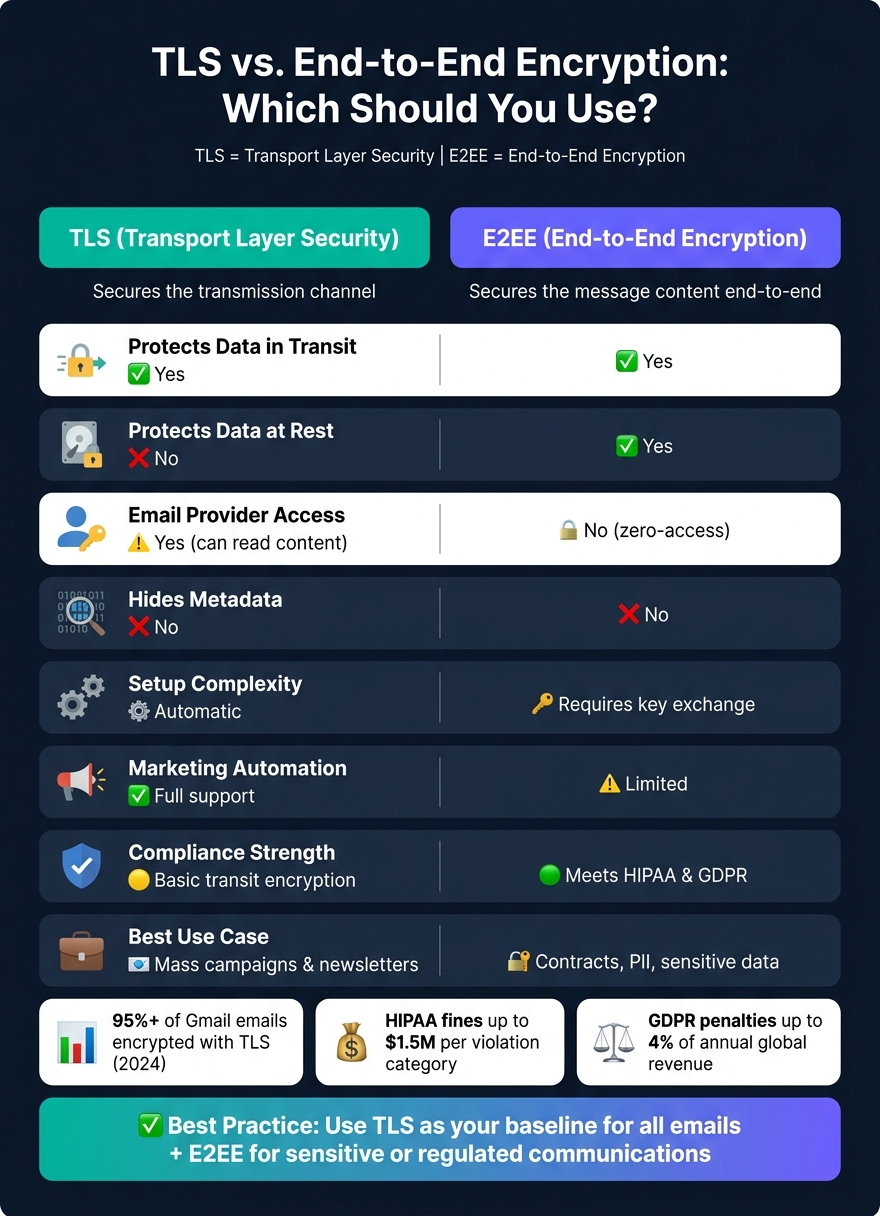
TLS vs. End-to-End Encryption: Side-by-Side Security Comparison
How TLS Secures Email Data in Transit
What is TLS and How Does it Work?
Transport Layer Security (TLS) is a protocol designed to create a secure, encrypted connection between two parties communicating over a network. It acts as a protective layer between the application layer – where email protocols like SMTP and IMAP function – and the transport layer (TCP). Essentially, TLS wraps your data in an encrypted "tunnel" to keep it safe while it moves across the internet.
TLS provides three key security features: encryption (which scrambles data during transit to prevent unauthorized access), authentication (which confirms the server’s identity through digital certificates), and integrity (which ensures the data hasn’t been tampered with using message authentication codes). The initial connection uses asymmetric encryption, while the actual data transfer relies on symmetric encryption for efficiency.
"TLS is the underlying protocol that encrypts data in transit, ensures integrity, and authenticates servers." – Akash Deep, ExpressVPN
The current version, TLS 1.3, was introduced in 2018 and is both faster and more secure than TLS 1.2. It reduces the handshake process to a single round trip (1-RTT), cutting down on latency, and enforces Perfect Forward Secrecy. This means even if a server’s private key is compromised later, past sessions remain protected.
TLS in Email Marketing Workflows
TLS plays a vital role in protecting email data at various stages of a marketing workflow. For instance, when you log into your email service provider (ESP) to design a campaign, the connection between your browser and the platform is secured by HTTPS, which is powered by TLS. Gmail, for example, has required HTTPS as its default since 2010.
When you send an email, your ESP’s mail server uses SMTP with STARTTLS. This feature upgrades an unencrypted connection to a secure TLS-encrypted one. On the receiving end, when the recipient’s email client retrieves the message, protocols like IMAP or POP3 over TLS ensure that the final leg of the journey is also protected.
However, STARTTLS has a weakness: if the receiving server doesn’t support TLS, the connection can fall back to plaintext. To prevent this, Mail Transfer Agent Strict Transport Security (MTA-STS) can be implemented. This ensures that emails are only delivered over secure connections.
TLS: Pros and Cons
TLS is a foundational tool for securing email in transit. It operates automatically, integrates seamlessly with existing systems, and is widely supported. According to Google, over 95% of emails received by Gmail are encrypted with TLS as of 2024.
That said, TLS has its limitations. Once an email arrives at its destination, TLS no longer protects it. Emails are often stored in plain text on servers, making them accessible to the email provider or IT administrators. Additionally, TLS does not encrypt metadata such as sender and recipient information, timestamps, or subject lines, leaving this data exposed.
| Feature | Detail |
|---|---|
| Protects data in transit | Yes – encrypts the transmission channel |
| Protects data at rest | No – stored in plain text on the server |
| Hides email metadata | No – headers remain exposed |
| Setup for marketers | Automatic – no user configuration needed |
| Downgrade risk | Yes – STARTTLS can be stripped without MTA-STS |
| Recommended version | TLS 1.3 – faster handshake with mandatory forward secrecy |
"Transport Layer Security (TLS) is the standard means of performing encryption in transit for email." – Google
Up next, we’ll look at how End-to-End Encryption builds on TLS to enhance email security further.
sbb-itb-2ec70df
How End-to-End Encryption Protects Email Data
What is End-to-End Encryption?
End-to-end encryption (E2EE) ensures that a message is encrypted on the sender’s device and can only be decrypted on the recipient’s device. This means that only the sender and recipient can access the content.
Unlike TLS, which secures the pathway data travels through, E2EE protects the actual content – even when it’s stored on a server waiting to be accessed. The message remains encrypted both during transit and while at rest.
E2EE uses asymmetric cryptography. The sender encrypts the message using the recipient’s public key, and only the corresponding private key can decrypt it. A true E2EE setup ensures that service providers don’t hold the decryption keys. This means they can’t access the content, even if legally required to do so.
"With E2EE, messages are encrypted before leaving your device using keys your provider doesn’t hold. Even if the email provider’s servers are compromised, encrypted messages remain unreadable." – DeBounce
However, E2EE does not protect metadata. Details like sender, recipient, and subject lines are still visible. It’s best to keep subject lines generic, such as "Secure: Monthly Report", to avoid revealing sensitive information. Now, let’s explore how E2EE fits into email marketing workflows.
E2EE in Email Marketing
E2EE strengthens security for sensitive email communications in marketing. The two most common E2EE standards in email are S/MIME and PGP (Pretty Good Privacy). Both encrypt the message body and attachments, but they differ in their approach to trust and key management.
| Feature | S/MIME | PGP (GPG) |
|---|---|---|
| Trust Model | Certificate Authority (centralized) | Web of Trust (self-managed) |
| Setup Difficulty | Easy (built into Outlook, Apple Mail) | Moderate (requires plugins) |
| Best For | Corporate environments | Technical users, open source |
| Key Management | Centralized (IT manages certificates) | Decentralized (users manage keys) |
For marketing teams within managed IT environments, S/MIME is often the better option. IT departments can centrally issue and revoke certificates, which is crucial when managing employee transitions to maintain access to archived communications. S/MIME certificates are relatively affordable, typically costing $10–$25 per user annually.
However, E2EE can complicate standard email marketing processes. Mailing list servers often need to modify headers, add unsubscribe links, or archive messages for compliance – tasks that become impossible when the message body is encrypted. For instance, Google’s Client-Side Encryption (CSE) for Workspace disables multi-send mode, email layouts, and smart features when enabled.
"The idea is that no matter what, at no time and in no way does Gmail ever have the real key. Never. And we never have the decrypted content. It’s only happening on that user’s device." – Julien Duplant, Product Manager, Google Workspace
E2EE: Pros and Cons
E2EE provides stronger protection than TLS alone, making it particularly useful for industries that handle sensitive information. For example, HIPAA violations for failing to encrypt data can lead to fines of up to $1.5 million per violation category, while GDPR penalties can reach 4% of annual global revenue. For organizations managing health or financial data, E2EE is becoming an expectation rather than an option.
That said, there are trade-offs. Managing encryption keys adds complexity, and losing a private key can result in permanent loss of access to all encrypted messages. Additionally, E2EE limits personalization and automation since servers can’t read the encrypted message to insert dynamic content or apply filters.
| Feature | Details |
|---|---|
| Protects data in transit | Yes – content is encrypted before leaving the sender’s device |
| Protects data at rest | Yes – remains encrypted on mail servers |
| Hides email metadata | No – sender, recipient, subject, and timestamps are still visible |
| Setup for marketers | Complex – requires key or certificate exchange with recipients |
| Mailing list compatibility | Low – breaks footers, moderation, and archiving |
| Compliance strength | High – meets HIPAA and GDPR standards |
The best strategy is to use TLS and E2EE together. TLS secures the transmission channel for most email traffic, while E2EE ensures the confidentiality of highly sensitive communications. This layered approach balances usability with security, providing robust protection at every stage of email delivery.
TLS vs. End-to-End Encryption: Which One Should You Use?
Security Scope and Use Case Comparison
TLS focuses on securing the network path your email travels through, while E2EE is all about protecting the actual content of the message from sender to recipient. This distinction becomes crucial once the email is delivered. With TLS, your email provider can still access stored messages. On the other hand, E2EE ensures that the provider has no access to the content because they don’t hold the decryption keys.
"TLS protects the connection; E2EE protects the actual message content." – Adebisi Oluwasoya, Senior Security Analyst
For most campaigns, TLS does the job. But if your emails include sensitive information like contracts, financial documents, or personally identifiable information (PII), E2EE is the safer choice. However, keep in mind that both TLS and E2EE leave subject lines unencrypted, so avoid putting sensitive details there.
Next, let’s explore how these encryption methods impact marketing operations.
Impact on Marketing Operations
E2EE introduces operational challenges. Since servers can’t access encrypted content, features like automated personalization, content indexing, and analytics stop working. For example, if a Gmail user receives a PGP-encrypted email, Gmail won’t index that email – making it unsearchable. Additionally, common features like unsubscribe links, add-to-list options, and moderation workflows become unusable when the email body is encrypted.
These differences can significantly affect how scalable and user-friendly your campaigns are.
| Factor | TLS | E2EE |
|---|---|---|
| Automation compatibility | Full support | Limited – breaks footers and filters |
| Personalization | Works seamlessly | Blocked – servers can’t read content |
| Analytics and indexing | Enabled | Disabled |
| Setup burden | None – runs automatically | Requires key or certificate exchange |
| Best for | Mass campaigns, newsletters | Sensitive one-to-one communications |
TLS is ideal for scalability and ease of use, while E2EE excels in ensuring confidentiality. For most marketing teams, the practical choice is to use TLS as the default and rely on E2EE for highly sensitive communications. These operational differences underline the importance of matching your encryption method to the specific needs of your campaign.
Regulatory and Compliance Considerations
Beyond security and operational factors, regulatory requirements also play a role in choosing between TLS and E2EE. While TLS meets basic transit encryption standards, stricter regulations often demand the added protection of E2EE. For example, HIPAA and PCI-DSS mandate data-at-rest encryption, which TLS alone doesn’t provide.
The stakes are high. Violations of financial data security under SOX can result in penalties of up to $5 million and 20 years in prison. For marketers in industries like healthcare and finance, E2EE is more than a recommendation – it’s becoming a legal necessity.
"Just having data encrypted point-to-point doesn’t solve the problem… The real issue is, ‘What do you do when you send PHI to the wrong person?’" – Jason Karn, Total HIPAA
Karn’s observation highlights a key advantage of E2EE: persistent access controls, such as the ability to revoke access or set expiration dates for messages. These features add an extra layer of security that standard encryption methods don’t offer. For organizations handling sensitive data, this kind of control can mean the difference between a manageable error and a serious compliance breach.
Comparing transport-layer-security (TLS) with end-to-end encryption when sending outbound emails.
Conclusion: Choosing the Right Encryption for Your Email Marketing
When deciding between TLS and E2EE, your choice should reflect the balance between ease of use and the sensitivity of the data being shared. The type of content you send and your audience’s needs should guide your decision.
TLS is a dependable option for everyday emails. It works automatically, requires no extra effort from you or your recipients, and ensures that your emails are secure while in transit. For newsletters, promotional messages, or general business communications, TLS gets the job done.
E2EE, on the other hand, is a must for sensitive information. If your emails include contracts, financial details, or personal data, TLS alone isn’t enough – especially if you need to comply with regulations like HIPAA or GLBA. As cybersecurity experts often emphasize:
"TLS secures the connection, not the content. To meet HIPAA, GDPR, and other regulations, you need full content-level encryption, not just transport security." – Trustifi
The most effective approach is layered encryption. Use TLS as a baseline for all email transmissions, ensuring general security, and incorporate E2EE or secure portal encryption for emails containing sensitive information. This way, you can keep your routine campaigns running smoothly while safeguarding critical data.
Encryption is just one piece of the email security puzzle. Pairing encryption with authentication protocols like SPF, DKIM, and DMARC strengthens your defenses even further. For those looking to build a comprehensive, data-driven marketing strategy that integrates security with performance, platforms like Growth-onomics can help you create a resilient and secure marketing framework.
"Encryption is not a checkbox – it is an architecture decision that affects performance, key management operational burden, and compliance posture." – Eric Bang, Cybersecurity Evangelist
FAQs
Does TLS encrypt my email on the server?
TLS (Transport Layer Security) ensures your email is encrypted only during transmission between servers. However, once the email reaches a server, it’s usually stored as plain text. Most email providers retain the keys needed to access and manage these stored messages, which means they could potentially read or scan your email content. If you want genuine privacy for stored emails, end-to-end encryption is essential.
When should I use E2EE instead of TLS?
When it comes to sharing highly sensitive information – like financial details, contracts, or health records – End-to-End Encryption (E2EE) is the gold standard for security. While TLS (Transport Layer Security) does a great job of protecting data during transit, it doesn’t safeguard it once it’s stored on servers, leaving a potential vulnerability.
E2EE takes things a step further by ensuring that your message remains encrypted from the moment it leaves the sender until it reaches the recipient. This means that even email providers or intermediaries can’t access the content. For businesses looking to implement stronger data protection, Growth-onomics provides support to integrate these advanced security measures seamlessly.
How can I stop STARTTLS downgrade attacks?
To guard against STARTTLS downgrade attacks, consider using MTA-STS or DANE. These protocols ensure encrypted TLS connections and validate certificates, making it difficult for attackers to intercept emails by forcing unencrypted delivery. Additionally, configure your mail servers to support only modern TLS versions (1.2 and 1.3) while disabling older, less secure versions. For extra security on specific emails, you can leverage the REQUIRETLS extension to mandate TLS-protected sessions for those communications.