


Real-time ad spend optimization saves time and improves campaign performance by automating budget adjustments based on live data. Instead of manually analyzing metrics like CPC or ROAS, this system reallocates budgets within 30-60 minutes to maximize efficiency and minimize waste. Businesses can achieve up to an 82% performance boost and 85% cost efficiency improvement by acting on real-time insights.
Here’s what you need to know to get started:
- Key Metrics: Focus on ROAS, CPA, CPC, and conversion rates to track success.
- Requirements: API access to ad platforms, a centralized data infrastructure, and clear budget rules.
- Data Pipeline: Build a system to fetch, process, and display ad performance data in real time.
- Automation Rules: Set conditions to pause low-performing ads, increase budgets for high-performing ones, and maintain guardrails to avoid overspending.
- Continuous Improvement: Review automated decisions regularly, refine benchmarks, and expand automation gradually.
This approach allows you to allocate your budget effectively, act on fresh performance data, and reduce manual effort, ensuring campaigns remain competitive in fast-changing markets.
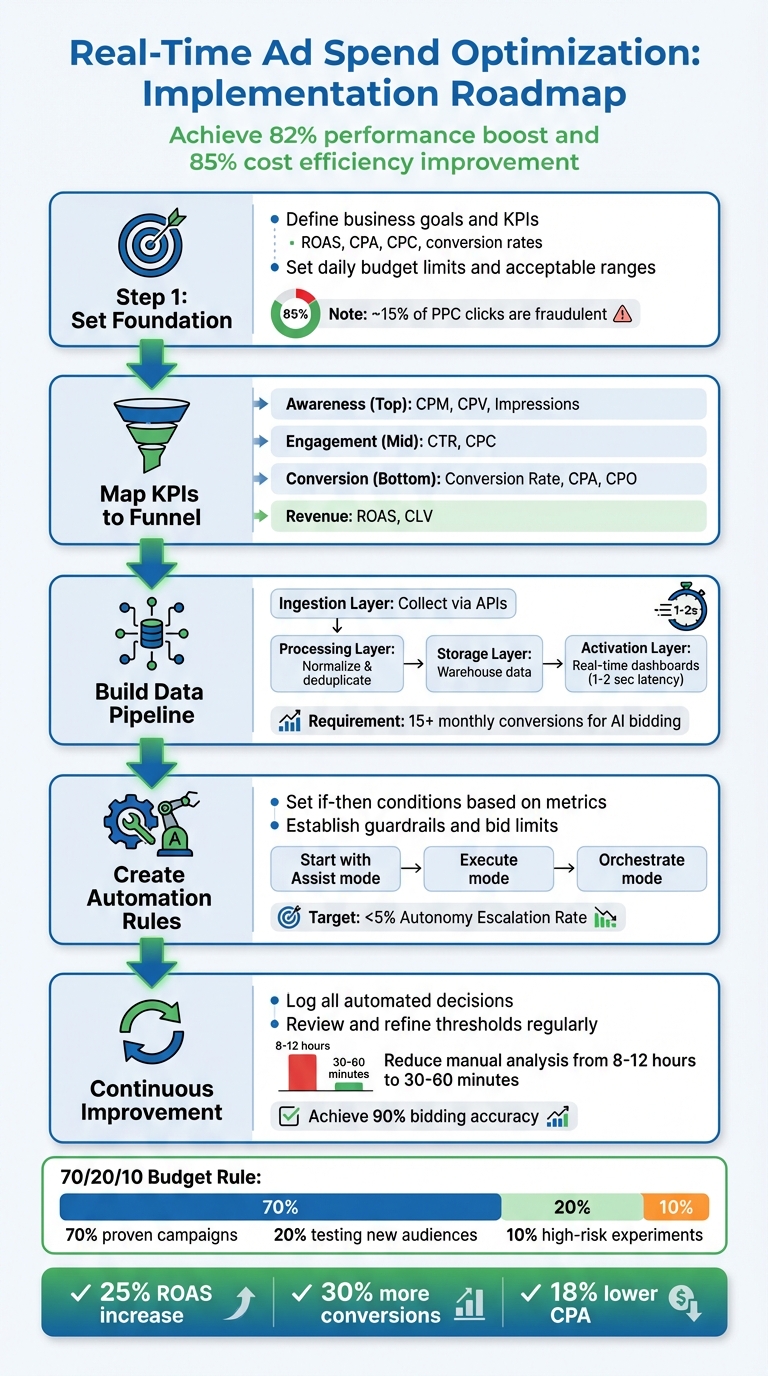
5-Step Real-Time Ad Spend Optimization Implementation Process
Optimize with Me Live Campaigns of Real Meta Ad Accounts!
Setting Up the Foundation for Real-Time Optimization
Building a strong foundation is essential for real-time optimization. It starts with setting clear goals, aligning key performance indicators (KPIs) to your funnel, and ensuring your data is accurate and reliable.
Defining Business Goals and Metrics
To measure success effectively, you need to define clear targets – whether that’s increasing sales, generating qualified leads, or boosting brand awareness – and connect them to measurable metrics. Some of the most important metrics for real-time tracking include:
- ROAS (Return on Ad Spend): This profitability measure is calculated by dividing revenue from ads by ad costs.
- CPO (Cost per Opportunity): Particularly useful for B2B campaigns, this metric focuses on pipeline quality rather than just lead volume.
- CPA (Cost Per Acquisition): Tracks the cost of acquiring each customer.
- CPC (Cost Per Click) and CTR (Click-Through Rate): Help assess engagement and budget efficiency.
It’s also crucial to set daily budget limits and define acceptable ranges for CPA and ROAS to avoid unexpected automated changes.
"Budget pacing is about distributing your budget evenly over a specific period… Pacing sets the plan; tracking measures reality."
- Konstantin Govorkov, Senior Demand Generation Manager at Improvado
When calculating ROAS, remember to include hidden costs like administrative fees, vendor charges, and subscriptions. Another factor to keep in mind: approximately 15% of all PPC clicks are estimated to be fraudulent, which can inflate costs and distort your data if not addressed.
Once your metrics are clear, map them to the appropriate stages of your marketing funnel.
Mapping KPIs to Funnel Stages
Each stage of the funnel requires a tailored approach to metrics:
- Awareness (Top of Funnel): Focus on metrics like impressions, CPM, and CPV to see if you’re effectively reaching your target audience.
- Engagement (Middle of Funnel): Use CTR and CPC to gauge how well your ads are connecting with your audience. For instance, if CTR drops during the day, your system can automatically replace underperforming ads with better ones.
- Conversion (Bottom of Funnel): Pay attention to conversion rate, CPA, and CPO. These metrics often depend on attribution windows but are vital for optimizing conversions.
- Revenue Stage: Measure business impact using ROAS and Customer Lifetime Value (CLV).
Key actions for each funnel stage:
- Awareness: Adjust frequency caps and refine reach targets.
- Engagement: Replace underperforming creatives or headlines.
- Conversion: Allocate budget to higher-performing offers or channels.
- Revenue: Fine-tune bidding targets and channel caps.
| Funnel Stage | Primary Metrics |
|---|---|
| Awareness (Top) | CPM, CPV, Impressions |
| Engagement (Mid) | CTR, CPC |
| Conversion (Bottom) | Conversion Rate, CPA, CPO |
| Revenue (Bottom) | ROAS, Conversion Value |
Assigning static or dynamic values to different conversion actions allows AI-driven bidding tools to prioritize high-value customers instead of just focusing on volume.
"Innovating on how we bid using conversion values helps us reach customers more effectively and turn potential into actual results."
- Luis Machino, Senior Manager of Digital Marketing & CRM at Mitsubishi Motors Canada
With KPIs aligned to funnel stages, the next step is ensuring your data is both current and statistically reliable.
Understanding Data Freshness and Statistical Significance
Real-time optimization depends on how quickly you can act on fresh data. If there’s too much delay, you risk making decisions based on outdated information. Companies that prioritize data freshness are 23% more likely to outperform their competitors.
However, it’s equally important to balance immediacy with statistical significance. Some decisions require larger sample sizes to filter out random fluctuations. For AI-driven bidding, aim for at least 15 monthly conversions to base your rules on meaningful trends.
To manage data freshness effectively, set Service Level Agreements (SLAs) for different data types. For example:
- Campaign monitoring data should update hourly.
- Attribution data might update daily.
Keep in mind that attribution credit can shift over a 12-day window as models refine their calculations, so adding guardrails can help manage this uncertainty. Using cohort-based targets and rolling time windows ensures your decisions reflect real trends rather than temporary spikes.
Stale data can lead to underreporting ROAS, causing you to cut budgets for campaigns that are actually performing well. Automated alerts can help your team respond quickly if data updates fall behind schedule, preventing costly mistakes.
Building a Real-Time Data Pipeline
Creating a reliable data pipeline is essential for implementing real-time optimizations. After laying the groundwork, the next step involves setting up the infrastructure to bring real-time data into your decision-making process. A well-built pipeline gathers ad performance data from multiple platforms, standardizes it, and makes it instantly accessible for analysis. This setup aligns with your goals and metrics, enabling split-second decisions.
Designing the Target Architecture
A real-time data pipeline typically has four core layers, each playing a vital role in moving data from ad platforms to dashboards:
- Ingestion Layer: Collects raw metrics via platform APIs.
- Processing Layer: Transforms raw data using tools like AWS Lambda or Apache Spark, handling tasks such as normalization and duplicate removal.
- Storage Layer: Stores raw data in systems like Amazon S3 and processed metrics in data warehouses such as Snowflake or Amazon Redshift.
- Activation/Reporting Layer: Displays live performance data using visualization tools like Amazon QuickSight or Streamlit, with a latency goal of 1-2 seconds to support real-time decisions.
For ad-tech companies managing their own bidding systems, capturing OpenRTB events (like winning bids) is crucial for tracking budgets and refining bid strategies.
| Component | Purpose | Example Tools |
|---|---|---|
| Data Sources | Extracting raw performance metrics | Google Ads API, Facebook Marketing API, LinkedIn Ads API |
| Ingestion | Capturing real-time events/clicks | Amazon Kinesis, Redpanda, Kafka |
| Processing | Normalization and deduplication | Apache Spark, AWS Lambda, Redpanda Connect |
| Storage | Long-term and queryable storage | Snowflake, Amazon Redshift, Amazon S3 |
| Visualization | Real-time monitoring and pacing | Streamlit, Amazon QuickSight, Mixpanel |
Once you’ve mapped out your architecture, the next step is to configure and operationalize your pipeline.
Step-by-Step Pipeline Setup
Begin by setting up API access for each ad platform. Keep in mind that the Google Ads API has strict throttling limits: short-term usage averages 6,000 units over 5 minutes, with high-usage accounts capped at 1,800,000 units. To work around these limits, use "change-event" or "change-status" reports to sync only the data that has changed since the last update. For larger accounts with over 20,000 ad groups, fetching data in bulk is more efficient than making multiple small requests.
Use incremental loading with last-modified timestamps to transfer only new or updated data. Google Ads cost metrics are reported in "micros" (one-millionth of the currency unit), meaning $1.00 is represented as 1,000,000. Your processing layer should divide these values by 1,000,000 and convert all currencies to USD during normalization. These details are crucial for enabling quick, data-driven budget adjustments.
"Ad-networks only export data at an aggregate level (without user details) and at fixed intervals (lowest granularity is generally a day)." – Mixpanel Docs
Ensuring data quality is non-negotiable. Assign a unique insert_id to every record by hashing the ad network name, date, and campaign ID. This prevents duplicate entries during re-syncs. Store only base metrics and calculate derived metrics (e.g., CPC, ROAS) on demand. Schedule ingestion functions to run shortly after ad networks update their data – typically around 8:00 AM UTC for finalized metrics from the previous day.
Set up "refresh windows" (commonly 1 to 30 days) to backfill late-arriving data or update existing records. Organize data in ingestion-time partitioned tables, allowing you to overwrite specific date partitions without affecting the rest of the dataset. For Google Ads pipelines, make sure to enable Performance Max (PMax) tables, as they are often excluded by default.
Once the pipeline is stable, connect it to dynamic dashboards for real-time insights.
Creating Real-Time Dashboards
Develop dashboards that auto-refresh, allow drill-downs, and trigger alerts when KPIs deviate. Ensure these dashboards follow U.S. formatting standards. By connecting visualization tools directly to your data warehouse, you enable instant querying. For instance, Snowflake integrates with Streamlit to create custom, interactive dashboards in Python, displaying real-time charts for metrics like impressions and clicks. Additionally, Redpanda’s Snowflake connector can deliver up to twice the throughput of standard Kafka Connect when streaming data.
Design dashboards with custom filters for date ranges and regions, and include drill-down features to move from aggregate views to detailed ad performance data. Set up automated alerts to notify your team of unexpected KPI changes or budget spikes, allowing for swift reallocation of resources. Balance update intervals to keep data fresh without exceeding API rate limits – cache static details and focus real-time updates on performance metrics that change frequently throughout the day.
Implementing Real-Time Optimization Rules
Once your real-time data pipeline and dashboards are up and running, the next step is to put insights into action with automated optimization rules. These rules create a structured feedback loop where performance data prompts specific actions, like shifting budgets, adjusting bids, or pausing campaigns. The challenge lies in finding the right balance – acting quickly to seize opportunities while avoiding the risks of over-adjusting. These strategies build on your monitoring efforts, turning data insights into meaningful campaign tweaks.
Defining Optimization Rules
Optimization rules are essentially "if-then" conditions based on performance metrics. They can handle tasks like reallocating budgets, pausing low-performing campaigns, swapping out CTAs for specific audience segments, or tweaking CPA and ROAS targets. For instance, you might set a rule to increase a campaign’s daily budget by 20% if its ROAS stays above 3.0 for three consecutive days. On the flip side, you could pause an ad set that spends $25 without generating a single conversion.
A good starting point is to focus on pausing underperforming campaigns. One case study found that switching to AI-driven rules boosted performance by 20% in just seven weeks. From there, you can gradually increase automation by scaling high-performing campaigns. Start with conservative thresholds to minimize risks. Roman Vinogradov, VP of Product at Improvado, highlights the value of pre-built templates for automating checks, such as ensuring "Avg. CPC/CMP/CPA is at or below $X".
Before fully automating, consider using an "Assist" mode. In this setup, the system suggests changes, but a human reviews and approves them. This lets you test the logic and see the potential impact over a 2–4 week pilot. When you’re ready to move to "Execute" mode, include safeguards like feature flags and manual kill-switches to quickly reverse changes if performance veers off track. Setting boundaries is critical to keep automation from causing unintended disruptions.
Setting Benchmarks and Guardrails
Guardrails are essential for keeping automation in check, especially during short-term fluctuations. Establish bid limits for metrics like CPA and ROAS to prevent drastic changes. For example, if your target CPA is $15, you might set a lower limit of $10 and an upper limit of $20. Any adjustments outside this range would require human intervention. Using rolling averages, like a 3-day ROAS, instead of single-day data can also help avoid overreacting to temporary spikes or dips.
Industry benchmarks can guide your initial setup. For example, eCommerce brands often see an average ROAS of 2.05× with a $45 CPA, while SaaS campaigns typically achieve around a 1.7× ROAS with a $133 CPA. To allocate budgets effectively, follow the 70/20/10 rule: dedicate 70% to proven campaigns, 20% to testing new audiences or creatives, and 10% to high-risk experiments.
For campaigns performing exceptionally well, consider "freeze" rules. For instance, you might lock campaigns with a ROAS above 4.0 for five days to preserve their stable performance during a learning phase. Another useful metric is the Autonomy Escalation Rate, which tracks how often decisions are escalated to humans versus handled automatically. A rate below 5% is a good indicator that your system is ready for higher levels of automation. As The Pedowitz Group puts it:
"Optimization is earned. Start with suggestive recommendations, allow limited auto-shifts, then expand scope as lift persists across cohorts" – The Pedowitz Group
Granularity of Real-Time Decisions
Real-time optimization can be applied at different levels – campaign, ad set, or creative – each requiring varying amounts of data to ensure reliable decisions. Campaign-level adjustments are the most stable since they aggregate data across multiple ad sets. Ad set-level changes offer more precision but need sufficient conversion data. For example, Meta’s trigger-based rules suggest at least 1,000 impressions, 10 clicks, or 5 results before activating a rule.
Creative-level optimization offers the most precision but demands the most data. Use compound logic with statistically significant thresholds. For instance, you could set a rule to trigger when the cost per purchase exceeds $50 and the reach surpasses 5,000. Trigger-based rules act as soon as insights change, with platforms like Meta offering latencies as short as 7.5 minutes. Schedule-based rules, on the other hand, operate at fixed intervals.
Avoid making major changes during a campaign’s learning phase. Automation works best with mature campaigns that have stable performance metrics. Start with metadata triggers (like budget adjustments) that respond quickly, and gradually incorporate more complex, stats-based triggers (like spend milestones) as your confidence grows. This step-by-step approach ensures a balance between quick decision-making and maintaining campaign stability.
Executing and Refining the Optimization Process
To keep your optimization efforts on track, it’s crucial to follow a structured daily workflow. Begin by monitoring your pacing – ensure your actual spending aligns with your planned daily targets. For instance, check mid-day progress against your budget to spot any discrepancies early. Afterward, identify any underperforming campaigns by reviewing your dashboard for metrics that fall outside your established benchmarks.
Step-by-Step Workflow for Real-Time Optimization
When you identify issues, act swiftly. Shift budgets toward high-performing channels and pause campaigns with low conversion rates. Many platforms, for example, refresh their optimization every 15 minutes. Additionally, refine your audience targeting and tweak creatives, tailoring your calls-to-action for specific segments or directing traffic to channels that consistently yield better results.
With resources often limited, it’s essential to focus on actions that deliver the most impact.
Prioritizing Actions Under Limited Resources
To make the most of your time and effort, prioritize high-spend campaigns. Even small tweaks in these areas can lead to noticeable performance gains. Similarly, pay close attention to campaigns nearing performance thresholds – minor adjustments here can prevent them from crossing your guardrails.
Adopting a risk-based approach can help streamline your workflow. For instance, only approve major budget changes manually while automating routine adjustments. Leveraging AI for bid optimization can drastically cut down manual analysis time, reducing hours of work to just 30–60 minutes. This frees up your team to focus on strategic decisions. Targeting high-value, predictive segments can also maximize conversions, as predictive traits are increasingly used to guide real-time decision-making.
Continuous Improvement and Automation
Optimization isn’t a one-and-done task – it’s an ongoing process. Log every automated decision, including inputs, costs, and outcomes, to create an audit trail for regular reviews. This historical data is invaluable for refining your optimization strategies. For example, if you notice that paused campaigns often bounce back quickly, you might adjust your thresholds to avoid prematurely stopping them.
As you grow more confident in automation, gradually expand its role. Start in “Assist” mode, where AI provides recommendations that require human approval. Then transition to “Execute” mode, allowing automatic adjustments within predefined limits. Eventually, progress to “Orchestrate” mode, where multi-channel loops and automated rollbacks handle complex tasks. The Pedowitz Group offers this advice:
"Optimization is earned. Start with suggestive recommendations, allow limited auto-shifts, then expand scope as lift persists across cohorts".
Keep an eye on your Autonomy Escalation Rate – the percentage of decisions requiring human intervention compared to total automated changes. A rate below 5% signals your system is ready for greater autonomy. To push further, integrate machine learning techniques like multi-armed bandits for dynamic budget allocation or Bayesian forecasting to predict demand shifts and adjust spending proactively. These methods help you move from reactive to predictive optimization, refining your process with each iteration.
Case studies highlight how continuous refinement can lead to impressive results. For example, Booyah Advertising transitioned over 600 reports into an automated data pipeline using Improvado. This shift achieved 99.9% data accuracy and cut daily budget-tracking updates by 50%. Tyler Corcoran, Marketing Analytics Manager at Booyah Advertising, shared:
"If we don’t trust the data, the agency won’t trust the reports… With Improvado, we now trust the data. It’s 99.9% accurate".
Similarly, Orangetheory reduced its analytics development time by 60% and avoided hiring additional staff by implementing an automated data system for real-time insights. These examples serve as proof that continuous improvement doesn’t just enhance efficiency – it drives better results across the board.
Conclusion: Key Takeaways for Real-Time Ad Spend Optimization
Real-time ad spend optimization transforms how budgets are managed by leveraging live data to make dynamic adjustments. It allows for quick reallocation of funds from underperforming campaigns to those delivering strong results. For example, one e-commerce retailer saw a 25% increase in ROAS, while a SaaS company boosted trial sign-ups by 30% and reduced CPA by 18%.
The key to success lies in creating a structured feedback loop where performance data drives budget adjustments, while human oversight ensures strategic guardrails are in place. As The Pedowitz Group explains:
"Optimization is earned. Start with suggestive recommendations, allow limited auto-shifts, then expand scope as lift persists across cohorts".
This phased approach begins with Assist mode, where AI suggests changes for human approval. Over time, as the system proves reliable, you can transition to Execute and Orchestrate modes for greater automation.
Another critical factor is ensuring high-quality, unified data. Centralizing data from multiple platforms is essential for building a comprehensive feedback loop. Roman Vinogradov, VP of Product at Improvado, highlights this:
"Unlike relying solely on individual platform algorithms, Improvado aggregates data from all your digital marketing campaigns to improve ad spend tracking, and identify trends and opportunities that platform-specific tools can’t see".
This centralized approach enhances performance tracking and supports the entire optimization process.
Once the data foundation is solid, implementation becomes the next step. Partnering with experts like Growth-onomics can streamline this process. Their services cover everything from defining key KPIs and setting up data pipelines to implementing automated rules and fostering continuous improvement. The benefits are clear: AI-driven bidding can cut manual analysis time from 8–12 hours to just 30–60 minutes, while achieving 90% bidding accuracy and an 85% improvement in cost efficiency.
Real-time optimization is not a one-and-done effort – it’s an ongoing process. Regularly refine your thresholds, leverage the right tools, and stay committed to continuous improvement. By doing so, you can shift from reactive budget management to a predictive strategy that consistently delivers stronger results.
FAQs
How does real-time ad spend optimization enhance campaign performance?
Real-time ad spend optimization lets your campaigns react instantly to shifting market conditions by leveraging live performance data like cost-per-action (CPA), conversion rates, and auction trends. This means budgets can be reallocated, bids adjusted, and audience targeting fine-tuned on the fly, ensuring your ad dollars are spent where they’ll have the greatest impact. The result? Improved return on ad spend (ROAS) and less money wasted on underperforming placements.
It also allows you to tackle problems like unexpected CPA spikes or tracking errors as they happen, minimizing potential losses. On top of that, marketers gain the flexibility to test creative ideas, refine targeting, and optimize bids in real time. This dynamic approach can lead to better click-through rates, higher conversions, and stronger ROI. By creating a constant feedback loop, real-time optimization keeps campaigns running smoothly, saves valuable time, and delivers clear, actionable results.
How can I set up a real-time data pipeline for optimizing ad spend?
To create a real-time data pipeline for optimizing ad spend, here’s a streamlined approach:
- Select the right advertising APIs: Start by connecting to platforms like Google Ads or Meta Ads. Check that the APIs are compatible with your tools, and pay attention to rate limits and data formats to ensure smooth integration.
- Stream data in real time: Use a low-latency platform like Kafka or AWS Kinesis to enable a continuous flow of information. This ensures your data is always up-to-date and ready for processing.
- Store and process efficiently: Save raw event data in a scalable cloud data warehouse such as Snowflake. Then, clean and prepare the data for analysis using tools like dbt or Spark to make it actionable.
- Analyze and act: Leverage AI models or analytics tools to assess key metrics like CPA (Cost Per Acquisition) and ROAS (Return on Ad Spend). Use these insights to make real-time adjustments to bids, budgets, or targeting through API integrations.
- Monitor and improve: Set up dashboards and alerts to track performance and flag issues, such as overspending. Regularly refine your pipeline to ensure it stays efficient and effective.
This setup helps automate ad spend adjustments, driving better outcomes while saving time and effort.
How can I ensure accurate and reliable data for real-time ad spend optimization?
To make sure your real-time ad spend optimization is grounded in accurate and dependable data, start by setting up a clear and consistent attribution model. Stick to a single, reliable metric like ROAS (Return on Ad Spend) or CPA (Cost per Acquisition), and ensure all systems are aligned in how they interpret data. Strengthen your data pipeline with rigorous checks like schema validation and de-duplication to catch and eliminate errors early on.
Real-time monitoring plays a key role here. Use dashboards to keep an eye on critical performance metrics such as CPA, ROAS, and click-through rates. Set up alerts to flag unusual activity, like sudden cost spikes or missing data, so you can act quickly. It’s also a good idea to maintain detailed logs of optimization decisions – recording input data, model outputs, and budget adjustments – to ensure transparency and accountability.
Lastly, don’t forget to regularly test and fine-tune your models. A/B testing or control groups can help confirm whether changes are actually driving improvements before you roll them out permanently. By following these practices, you’ll keep your data accurate and reliable, ensuring your ad spend delivers the best possible ROI.
