


Most e-commerce businesses struggle when their CMS operates without an OMS. Why? A CMS handles content like product descriptions and navigation, but it’s not built for managing orders, inventory, or fulfillment. This disconnect creates data silos, slows processes, and negatively impacts customer experience.
Here’s the solution: Integrating an OMS with your CMS. This setup syncs real-time inventory, automates order processing, and improves customer satisfaction. For example, businesses using OMS-CMS integration have seen up to a 30% increase in sales and 146% revenue growth, as seen in SkullCandy‘s case.
Key benefits include:
- Real-time inventory management: Avoid stockouts and overstocking.
- Faster order processing: Automate fulfillment and reduce errors.
- Improved customer experience: Offer real-time tracking and personalized recommendations.
- Operational efficiency: Consolidate data and reduce manual tasks.
While CMS-only systems are simpler to set up, they lack the flexibility and scalability of an OMS-integrated system. Though the initial investment is higher, the long-term gains in efficiency and revenue make OMS integration the smarter choice for growing businesses.
Optimize Your eCommerce Journey: Unveiling the Power of Salesforce OMS Integration
sbb-itb-2ec70df
1. CMS-Only Systems
Relying solely on a CMS for e-commerce operations means leaning on a tool designed for content creation, not for managing complex commerce workflows. This gap often leads to inefficiencies and challenges across various areas of the business.
Inventory Management
Without an integrated OMS, inventory tracking becomes a manual and inefficient process. Marketing teams may handle product content within the CMS, while stock data is stored in separate systems. This creates data silos, which, according to 80% of IT leaders, hinder digital transformation efforts. The lack of real-time visibility into inventory across channels can lead to costly issues.
Take Zabars, for example. This family-owned retailer struggled with manual inventory processes that were both time-consuming and prone to errors, resulting in frequent data discrepancies. Such disconnects don’t just cause operational headaches – they also have financial consequences. Businesses risk overstocking, tying up capital in storage costs, or facing stockouts, which can lead to lost sales and unhappy customers. These inventory challenges also slow down order processing, creating further complications.
Order Processing
Manual order entry adds delays and increases the likelihood of errors. As Deck Commerce points out, "manual order processing is time-consuming and prone to human error".
One global pharmacy retailer faced significant fulfillment delays due to these manual processes, which directly impacted customer satisfaction. After implementing Salesforce Commerce Cloud alongside KIBO OMS, they reduced order processing time by 30% and saw a 20% boost in customer satisfaction.
Customer Experience
The effects of a CMS-only system extend to the customer experience. Customer service teams often lack access to accurate, up-to-date order information, leading to longer wait times and slower issue resolution. Manish Sharma, a Senior Technical Consultant at GSPANN, notes that while "Salesforce Commerce Cloud is a robust e-commerce platform", its "built-in order management features may fall short when handling complex workflows such as omnichannel fulfillment, advanced inventory tracking, and real-time updates". This can limit customers’ ability to enjoy modern conveniences like buy online, pick up in store (BOPIS) or ship-from-store options, further impacting satisfaction.
Operational Efficiency
Over time, the inefficiencies of a CMS-only system take a toll on operations. Simple tasks like product updates or campaign launches require extensive coordination, stretching what should take hours into days. Teams end up stuck in reactive mode, addressing problems rather than focusing on strategic growth.
As order volumes grow – especially during busy seasons – these inefficiencies become even more pronounced. The entire order-to-cash cycle slows down, overhead costs climb, and scaling the business becomes a significant challenge.
2. OMS-Integrated CMS
Pairing an Order Management System (OMS) with your Content Management System (CMS) bridges critical operational gaps that standalone CMS platforms often can’t address. This combination connects the customer-facing side of your e-commerce business with a robust backend designed to handle orders and inventory seamlessly. In short, it streamlines processes, eliminates inefficiencies, and enhances overall performance.
Inventory Management
With an OMS-CMS integration, your inventory is synchronized across all sales channels in real time. This means you can monitor stock levels from warehouses, retail locations, and suppliers through a single dashboard. The OMS calculates Available-to-Promise rates, helping you maintain just the right amount of inventory – avoiding overstocking while ensuring you’re prepared for demand. It also tracks which products are performing best by location and channel, enabling accurate demand forecasting and reducing the risk of stockouts.
For instance, in 2021, e-commerce orders had a return rate of 16.6%. When returns happen, the system automatically processes refunds and updates inventory, ensuring your stock levels reflect the latest changes without manual intervention.
Order Processing
Manual data entry becomes a thing of the past with this integration. As Zuora highlights, "Order management integrations make it possible to generate real-time inventory updates across your entire system, ensuring accurate stock levels on all platforms". Payments are processed automatically, confirmation emails are sent out, and orders move smoothly through stages like "Submitted", "Processing", and "Shipped."
The OMS also optimizes fulfillment by routing orders to the closest warehouse or retail location to the customer. This reduces shipping costs and delivery times. Retail stores can even double as mini distribution hubs, fulfilling orders locally using in-store inventory.
Customer Experience
Customers benefit from real-time order tracking and inventory visibility, reducing the need to contact support. And when they do need help, customer service teams can access complete order histories instantly, leading to faster resolutions.
The Adobe Experience Cloud Team puts it best: "An OMS can often make the difference between satisfied customers and negative reviews, so it’s more important than ever for retailers to embrace omnichannel retail tools". This is especially relevant given that 86% of U.S. consumers say they’d switch brands for better customer service.
Beyond operational improvements, the integration enhances customer engagement. By syncing OMS data with your CRM, you gain a complete view of each customer’s purchase history and preferences. This enables personalized marketing, such as tailored recommendations and communications. Considering that multichannel shoppers spend three times more than single-channel shoppers, this feature has the potential to significantly boost revenue.
Operational Efficiency
Centralizing data and automating tasks is a game-changer. Accounting processes like invoice generation, payment tracking, and revenue recognition are automated, speeding up cash flow reconciliation.
Additionally, all your data is consolidated into one system, making it easier to analyze revenue trends and profitability. Instead of wasting time compiling data from multiple sources, your team can focus on strategic planning and growth initiatives, leaving behind the headaches of reactive problem-solving.
Advantages and Disadvantages
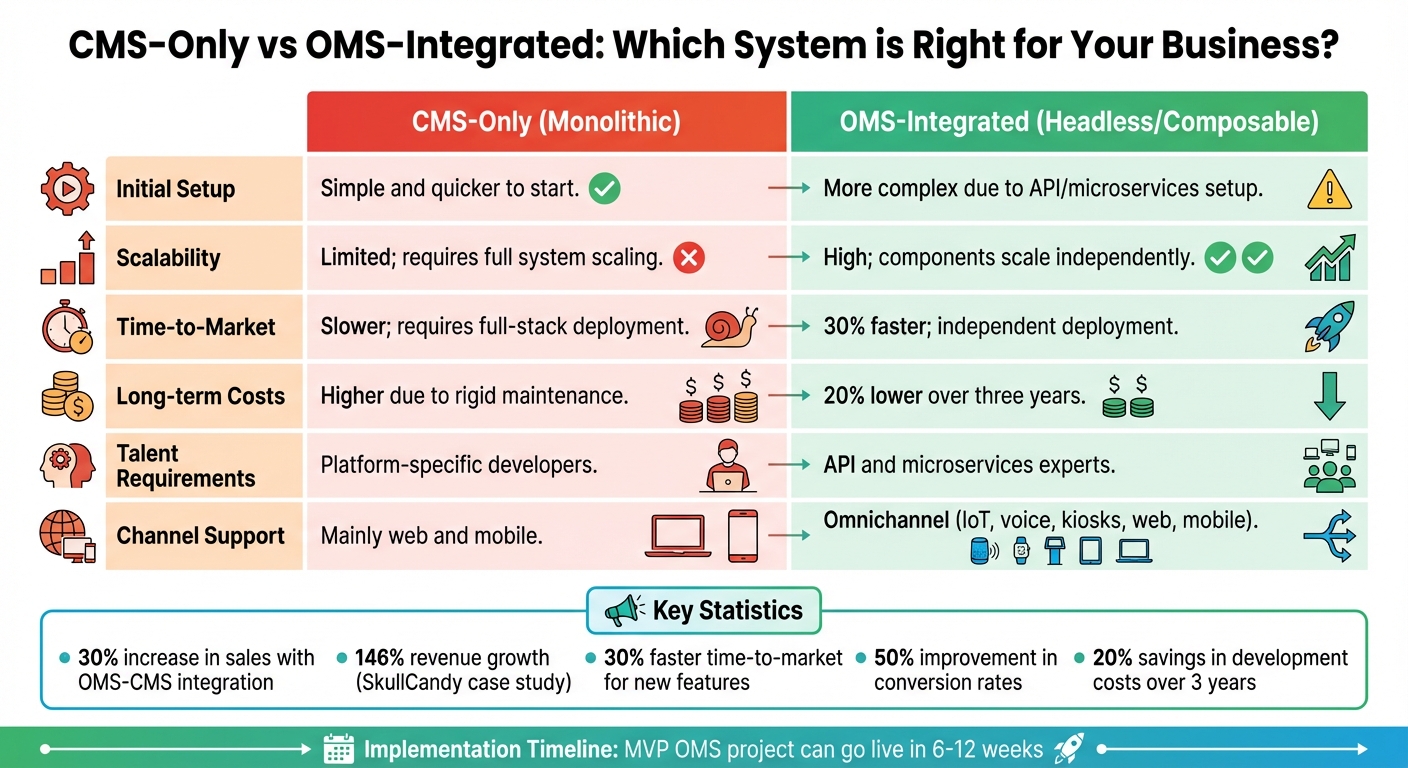
CMS-Only vs OMS-Integrated Systems: Complete Comparison for E-commerce
When deciding between CMS-only systems and OMS-integrated solutions, the right choice often depends on your business’s complexity and growth plans. Here’s a closer look at how these two approaches stack up.
CMS-only systems are straightforward to set up and don’t require advanced technical expertise. They’re ideal for businesses with basic content needs and limited sales channels. However, their rigid structure can be a drawback. For example, even small front-end updates often demand full system changes, making scalability a challenge. As Developers.dev points out:
"A poorly integrated CMS/e-commerce stack can increase customer churn by up to 15% due to inconsistent user experience".
On the other hand, OMS-integrated systems tackle these limitations by introducing more flexibility and efficiency. Unlike CMS-only setups, OMS integrations synchronize data in real time, streamlining processes like inventory management and order tracking. Companies adopting a composable strategy often see faster results – 30% quicker time-to-market for new features and content, and up to 20% savings in development costs over three years. The API-first architecture enables individual components, such as pricing or inventory, to scale independently. This approach supports omnichannel growth across platforms like web, mobile, IoT, and voice.
A great example is SkullCandy. Between April 2022 and October 2025, the lifestyle brand transitioned to a headless approach using BigCommerce paired with a headless CMS. Within just six months, they launched seven international storefronts, achieving remarkable results: a 104% boost in site traffic, 146% revenue growth, and a 50% improvement in conversion rates.
However, it’s worth noting that OMS-integrated systems require a higher upfront investment and demand specialized skills in APIs, microservices, and modern JavaScript frameworks. Yet, as Nicola Kinsella, VP of Global Marketing at Fluent Commerce, explains:
"An MVP (minimum viable product) OMS project can go live in 6–12 weeks. Even a really complex one rarely takes more than 9 months".
This phased implementation approach reduces risks compared to the all-or-nothing deployments typical of monolithic systems.
Here’s a quick comparison of the two approaches:
| Factor | CMS-Only (Monolithic) | OMS-Integrated (Headless/Composable) |
|---|---|---|
| Initial Setup | Simple and quicker to start | More complex due to API/microservices setup |
| Scalability | Limited; requires full system scaling | High; components scale independently |
| Time-to-Market | Slower; requires full-stack deployment | Faster; independent deployment |
| Long-term Costs | Higher due to rigid maintenance | 20% lower over three years |
| Talent Requirements | Platform-specific developers | API and microservices experts |
| Channel Support | Mainly web and mobile | Omnichannel (IoT, voice, kiosks) |
For businesses focused on growth, scalability, and efficiency, OMS-integrated CMS platforms often emerge as the preferred choice.
Conclusion
Deciding between a standalone CMS and an OMS-integrated solution ultimately hinges on what your business needs to thrive. While traditional CMS platforms can handle basic content management, they often fall short when it comes to the real-time data synchronization and multi-channel demands that modern e-commerce businesses face.
Integrating an OMS tackles many of the limitations of standalone CMS systems. It breaks down data silos, automates workflows that would otherwise require manual effort, and delivers seamless consistency across all your sales channels.
Before diving into integration, make sure your CMS and OMS can communicate effectively through reliable APIs. Start by testing the integration in a sandbox environment to identify any issues early. Conduct load testing to ensure your site can handle high traffic without slowing down. Also, take the time to clean up your data – standardize SKUs, product descriptions, and customer information – to avoid synchronization errors that could disrupt operations. A phased rollout is often the safest route: begin with a limited segment of your site or internal users, gather feedback, and monitor performance closely before expanding to all channels. This step-by-step approach minimizes risks compared to launching everything at once. While the upfront costs may be higher, adopting a composable strategy often accelerates the rollout of new features, giving you a competitive edge in the market.
For e-commerce businesses aiming to scale across multiple channels while delivering fast, tailored customer experiences, integrating an OMS isn’t just a technical improvement – it’s a strategic move that can directly influence revenue. Beyond streamlining operations, it lays the groundwork for a more responsive and customer-focused shopping experience.
FAQs
How does integrating an OMS improve the shopping experience for customers?
Integrating an Order Management System (OMS) with a CMS streamlines the shopping experience by automating essential tasks like capturing orders, updating inventory, processing payments, and tracking shipments. This means customers get accurate stock information, instant order confirmations, and real-time shipment updates – helping to build trust and improve satisfaction.
By syncing data in real time between the OMS and systems like inventory management tools or CRMs, businesses can avoid issues like overselling or stock shortages. Customers benefit from timely updates on their orders, which cuts down on support requests. The result? A smoother, more tailored shopping experience that keeps customers coming back and strengthens loyalty.
What are the upfront costs and time required to integrate an OMS with a CMS?
Integrating an Order Management System (OMS) with a Content Management System (CMS) can come with a broad range of costs and timelines, influenced by factors like system complexity, the integration’s scope, and the resources at your disposal.
You’ll need to account for several expenses, such as initial setup costs, potential software licensing fees, and any necessary development or customization. As for timing, the process could take anywhere from a few weeks to several months, depending on the size of your project and the expertise of your team or external partners. To get a clearer picture of what to expect, it’s a good idea to consult with seasoned professionals or agencies, such as Growth-onomics. They can help you create a realistic plan and ensure the integration aligns with your business objectives.
How can integrating an OMS improve a small e-commerce business’s CMS performance?
Integrating an Order Management System (OMS) with a Content Management System (CMS) can make a world of difference for small e-commerce businesses. It simplifies order processing, keeps inventory in check, and creates a smoother shopping journey for customers.
When these two systems work together, businesses can update content quickly, offer more dynamic and engaging experiences, and even personalize what customers see – all while making backend operations more efficient. This kind of integration can help small businesses grow and stay competitive in today’s fast-moving market.
