


Monitoring A/B tests in real time helps you spot issues quickly, saving resources and improving decision-making. Without it, you risk technical errors, uneven traffic splits, or invalid results. Here’s what you need to know:
- Why It Matters: Real-time monitoring catches problems like tracking errors or sample ratio mismatches early, preventing wasted time and skewed results.
- Key Tools: Use platforms like Optimizely, Google Analytics 4 (GA4), and Google Tag Manager (GTM) to manage experiments and track live data.
- Setup Tips: Define clear objectives, ensure proper tracking, and test your setup for accuracy. Use tools like BigQuery to create live dashboards.
- Metrics to Watch: Focus on conversion rates, revenue per visitor, and error rates. Use alerts to flag deviations or technical issues.
- Final Steps: Ensure data quality, analyze results with statistical significance (p ≤ 0.05), and document findings for future tests.
Real-time dashboards and alerts enable faster, data-driven decisions, helping you identify winning strategies and avoid costly mistakes.
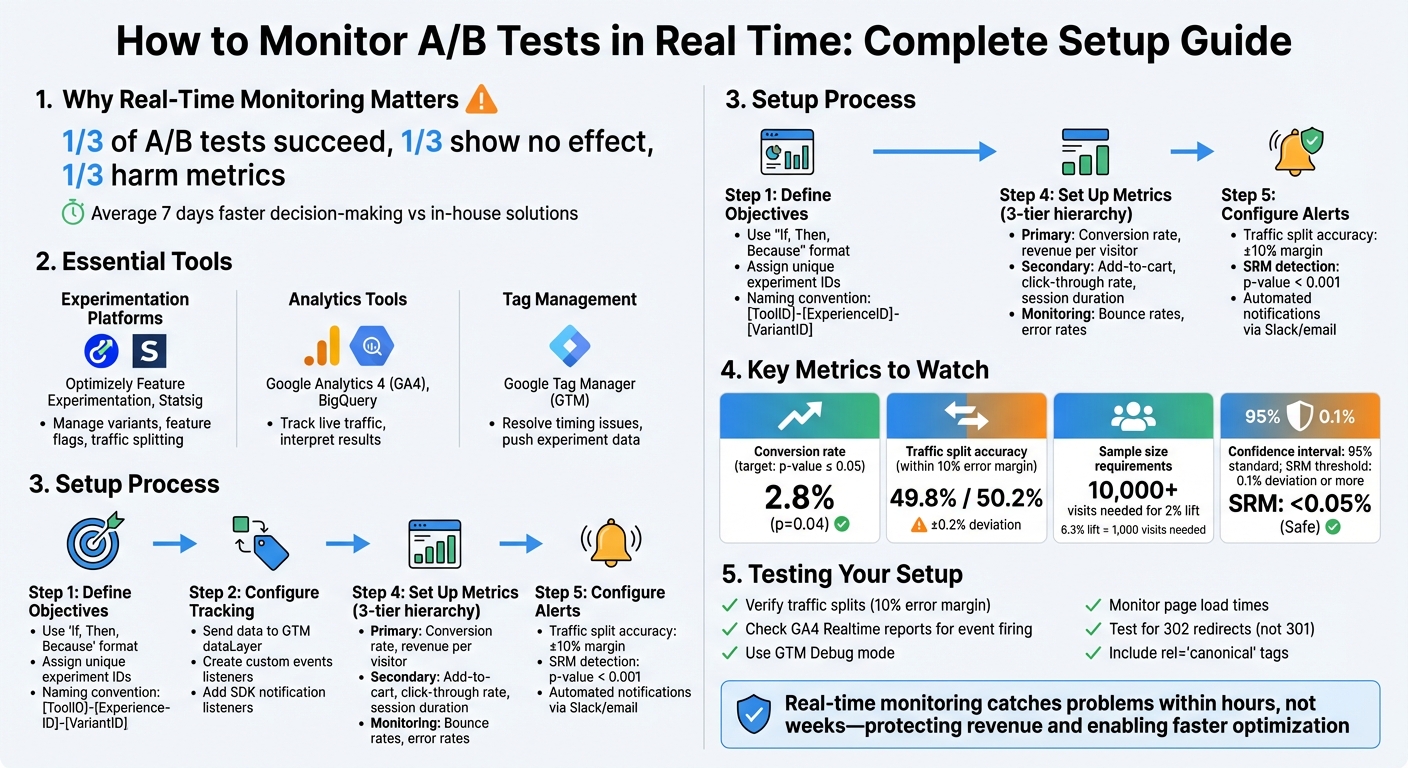
Real-Time A/B Test Monitoring Setup: Essential Steps and Tools
What You Need Before Starting
Tools and Platforms You’ll Need
To set up real-time monitoring, you’ll need three essential components working together. First, use experimentation platforms like Optimizely Feature Experimentation or Statsig to manage your testing infrastructure. These platforms handle tasks such as managing variants, deploying feature flags, and splitting traffic. Second, analytics tools like Google Analytics 4 (GA4) play a key role in interpreting results and tracking live traffic through continuously updated Realtime reports. Finally, tag management systems like Google Tag Manager (GTM) help resolve timing issues by pushing experiment data to the data layer before your analytics platform fully loads.
If you want to take things further, consider adding specialized tools like Vertex AI Search or Userpilot to enhance your monitoring and analytics capabilities. Opt for tools that integrate with your data warehouse. Many modern platforms now support "warehouse native" setups, allowing you to store test data in systems like Microsoft Fabric for better data management and governance.
Once your tools are selected, the next step is configuring your tracking system for accurate data capture.
Setting Up Tracking and Metrics
Start by defining your test objectives clearly using an "If, Then, Because" format. Assign unique experiment IDs and variant labels to each group (e.g., flagKey, ruleKey, and variationKey). To avoid data duplication across different tools, it’s a good idea to use a standardized naming convention like [ToolID]-[ExperienceID]-[VariantID].
Send experiment data to GTM’s dataLayer using custom events like optimizely-decision or experience_impression. In GTM, create user-defined variables such as exp_variant_string and Holdback to track which version users are seeing. Add SDK notification listeners (like onDecision) to send experiment data directly to GA4 in real time. Make sure your GTM script is placed as close as possible to your experimentation snippet in the <head> tag to minimize data discrepancies.
If your experiment involves testing different URLs, use 302 (temporary) redirects instead of 301 redirects to protect your SEO rankings. Also, include rel="canonical" tags on variant pages pointing to the original version to avoid duplicate content penalties.
Testing Your Setup
Before launching your experiment, verify that your traffic splits stay within a 10% error margin. Check GA4’s Realtime reports to ensure events like experience_impression are firing as expected and that parameters like experimentId or variationKey are being captured accurately.
Use GTM’s Debug mode to confirm that all tags are correctly implemented. Watch out for signs of bias – if certain queries or categories only appear in one variant, adjustments may be needed. Additionally, monitor technical performance metrics such as page load times and error rates to ensure the experiment doesn’t negatively affect the user experience. If your monitoring dashboard shows unintended traffic splits, pause the test immediately and resolve any tagging or configuration issues before proceeding further.
sbb-itb-2ec70df
Creating and Using Real-Time Dashboards
How to Build a Real-Time Dashboard
GA4’s standard reports take 24–48 hours to process, which makes them impractical for real-time monitoring. To bypass this delay, you can stream GA4 data into BigQuery using the events_intraday table, which supports streaming data. Once your data is in BigQuery, connect it to Looker Studio and set the data freshness interval to 1 minute. This setup allows you to access near real-time insights without waiting for GA4’s usual processing time.
When building your dashboard, organize metrics into three tiers to streamline monitoring:
- Primary metrics: Conversion rate, revenue per visitor.
- Secondary metrics: Add-to-cart actions, checkout pageviews.
- Monitoring metrics: Bounce rates, error rates.
This structured approach ensures you’re tracking overall performance while keeping an eye out for potential issues. Mike Miner, Head of Customer Support at JustPark, highlighted the importance of real-time insights:
"It’s important for us to see how we’re doing in real time, and we found the best way to do this is with Geckoboard".
By setting up a dashboard like this, you can transform raw data into actionable insights, enabling faster optimization of your tests.
Metrics to Track on Your Dashboard
To ensure your traffic is healthy, compare intended splits with actual splits. A split is typically considered accurate if the relative difference is 10% or less. Beyond validating traffic, focus on these key metrics:
- Primary metrics: Conversion rate, revenue per user.
- Secondary metrics: Click-through rate, session duration.
- Monitoring metrics: Bounce rates, error rates.
For more specialized insights, consider tracking a Frustration Score, which combines indicators like rage clicks and repeated submissions to highlight UX issues. When monitoring revenue-related metrics, use a stats engine that accounts for skewed data distributions to avoid false positives.
Real-time alerts take this a step further, helping you address deviations as they happen.
Setting Up Alerts for Problems
Automated alerts can notify your team via Slack or email whenever key performance indicators (KPIs) deviate from expected ranges or error rates increase. To make these alerts effective:
- Define specific conditions for both increases and decreases in metrics like conversion rates, traffic volume, and user engagement.
- Align alert triggers with your business objectives.
- Limit alert frequency to avoid overwhelming your team with notifications.
Additionally, tailor alerts to the responsibilities of individual team members. For example, send technical error alerts to developers and notify product managers about drops in conversion rates. This targeted approach ensures the right people can act quickly when issues arise.
Reading and Understanding Real-Time Data
Primary Business Metrics
Key metrics like conversion rate and revenue per visitor are essential for evaluating the success of your tests. These indicators should align directly with the customer behaviors you’re trying to influence. For instance, if you’re testing a new checkout process, focus on metrics such as completion rates and average order value rather than metrics that take longer to show meaningful results.
To put this into perspective, achieving a 6.3% boost in conversions requires about 1,000 visits, while a smaller lift of 2% would need over 10,000 visits. Always aim for a p-value below 0.05 to ensure statistical significance.
When analyzing revenue-focused metrics, consider the performance of different traffic sources. For example, traffic from paid ads, which often reflects low-to-medium intent, tends to show larger gains in A/B tests compared to high-intent traffic from organic search. Breaking down performance by traffic source can reveal where your test variant delivers the most impact.
Supporting Metrics and Statistical Indicators
Secondary metrics like add-to-cart rate, click-through rate, and session duration can provide valuable context for your results. For example, if your conversion rate improves but the bounce rate increases, it may signal issues like audience mismatch or friction in the funnel.
Confidence intervals are another critical tool for interpreting real-time data. Many dashboards simplify this by using color codes – green for positive results that exceed the confidence interval and red for negative results. If the confidence interval includes zero (e.g., [-1.1%, 3.0%]), the result isn’t significant.
To dig deeper, segment your data by device type (mobile vs. desktop), location, or user type (new vs. returning). This helps identify whether a variant performs differently across specific groups. Pair these quantitative insights with qualitative tools like session replays and heatmaps to better understand the reasons behind any performance changes.
Identifying and Fixing Problems
Keeping an eye out for Sample Ratio Mismatch (SRM) is crucial. Use chi-squared tests to verify that your traffic split matches the intended distribution. If the p-value drops below 0.001 with a deviation of 0.1% or more, it could indicate assignment or logging issues that need immediate attention.
Track cumulative exposures to identify ramp-up problems or technical glitches early. Additionally, if more than 1% of users experience multiple test variants, this crossover rate suggests underlying issues that need to be resolved.
Sheena Green, Director of Ecommerce and Optimizations at Ultra Mobile, emphasizes the importance of adaptability in testing:
"Testing resources are expensive – from development and creative to time spent – and we’re limited by those things. So if we’re able to put something into market, even if it’s a loss, and we’re able to learn and pivot quickly, it’s a huge win for us and it keeps us agile".
Real-time monitoring tools can also track Frustration Scores or detect rage clicks, helping you quickly identify UX problems. When you notice data spikes, consider both internal factors (like marketing campaigns) and external influences (such as holidays or seasonal trends) that might temporarily distort your metrics.
After addressing these real-time challenges, you’ll be better prepared to move forward with your final analysis.
Moving from Real-Time to Final Analysis
Checking Data Quality
Now that your monitoring setup is in place, it’s time to ensure your data is dependable before diving into analysis. Start by running a chi-squared test for Sample Ratio Mismatch (SRM) and performing A/A testing to verify platform consistency. If the p-value drops below 0.001 and you notice a deviation of 0.1% or more, this could point to issues with assignment or logging that need immediate attention.
Double-check that your SDK reports are configured correctly and that events include the proper unit identifiers, like userID or stableID. Keep an eye out for external factors – such as holiday traffic surges, overlapping campaigns, or slower load times – that might distort your metrics. If your traffic was gradually ramped up, make sure to set the analysis start date to when the split reached stability to avoid skewing your results.
Once you’ve confirmed that your data is clean and reliable, you’re ready to prepare it for deeper analysis.
Preparing Data for Analysis
With data quality confirmed, export and clean your dataset. Calculate the p-value (≤0.05) and use a 95% confidence interval to ensure your results are statistically sound. If the relative lift is smaller than the width of the confidence interval, it indicates the results lack statistical significance.
To uncover deeper insights, segment your data by factors like device type, user status, or demographics. Aggregating metrics over several weeks instead of daily can help tighten the confidence interval, making it easier to detect meaningful trends and achieve statistical significance.
When formatting your data, follow U.S. standards: use the dollar sign ($) for currency, MM/DD/YYYY for dates, and commas as thousand separators. This ensures clarity and consistency across your analysis.
Recording Your Observations
As you analyze the data, document every observation and note any external factors that could have influenced the results. Building on your real-time monitoring logs, include not just the metrics but also the context behind them. This documentation can become a treasure trove for future tests, helping you track long-term trends and compare current performance against historical data.
Be sure to record external influences like holiday traffic spikes, marketing campaigns, or technical hiccups that occurred during the test. Log health check alerts, including SRM warnings and traffic split percentages. Additionally, track how different audience segments responded – mobile users, for instance, might show different behaviors compared to desktop users.
Don’t forget to include your original hypothesis, the specific changes tested, and whether the results aligned with your expectations. This level of detail not only helps refine future tests but also strengthens your ability to draw actionable conclusions.
"A failed A/B test is not a waste of time. Every test provides an opportunity to learn more about your audience and refine your approach".
This insight from Josh Gallant, Founder of Backstage SEO, is a valuable reminder of the importance of learning from every experiment, whether it succeeds or not.
Facebook’s A B Platform Interactive Analysis in Realtime – @Scale 2014 – Data
Conclusion
Real-time monitoring transforms A/B testing into a process of quick, informed decision-making. Instead of waiting weeks to uncover issues, you can identify technical glitches, traffic imbalances, or underperforming variants within just hours of launching a test. This speed is a game-changer – teams using real-time experimentation platforms have shaved an average of 7 days off their decision-making time compared to in-house solutions. Acting quickly not only protects revenue but also equips teams to make decisive moves when it matters most.
The data is clear: one-third of A/B tests succeed, one-third show no effect, and one-third actually harm key metrics. With real-time monitoring, you can double down on successful variants faster and shut down those that hurt performance. Industry leaders agree – being able to learn and pivot quickly is essential for staying agile in a competitive market.
Pairing technical oversight with clear business metrics is crucial. Tools like SRM monitoring and automated KPI alerts can help you catch problems early. Whether it’s spotting a spike in frustration scores or detecting uneven traffic distribution, identifying these issues early means you can pause, fix the problem, and relaunch without wasting valuable traffic or time.
Speed isn’t just about convenience – it’s a competitive edge. Real-time analytics empowers teams to iterate faster and act with confidence. Whether you’re confirming a small lift in conversions or a major breakthrough, having immediate access to actionable data allows you to implement winning strategies and move on to the next experiment without delay.
At Growth-onomics (https://growth-onomics.com), we specialize in helping businesses adopt data-driven strategies that include effective A/B test monitoring and analysis. Our Data Analytics services go beyond data collection, equipping you to make smarter, faster decisions that lead to measurable growth. With these monitoring techniques, we help fuel sustainable, data-backed success for your business.
FAQs
What issues can real-time monitoring help identify during A/B tests?
Real-time monitoring plays a crucial role in ensuring your A/B tests run smoothly and deliver reliable insights. It allows you to catch issues as they arise, helping you avoid errors that could skew your results or lead to costly missteps. For instance, it can pinpoint traffic allocation problems, such as an uneven distribution of visitors between test variants, or flag unexpected metric changes like sudden swings in conversion rates, bounce rates, or revenue. It’s also invaluable for spotting data quality issues, like missing or delayed events, which could undermine the accuracy of your analysis.
Beyond these, real-time monitoring can highlight tests that are under-sampled or too short, preventing you from drawing conclusions prematurely. It also helps detect technical glitches or performance issues that might harm the user experience. By identifying these problems early, you have the opportunity to pause, adjust, or even stop a test, ensuring that your final conclusions are drawn from clean, trustworthy data.
How can I make sure my real-time A/B test tracking is accurate?
To make sure your real-time A/B test tracking is spot-on, start by integrating a dependable SDK and initializing it with your API key before any test-related code runs. This step ensures you’re capturing all events right from the start. Stick to consistent ISO 8601 timestamps, and make sure each event is clearly marked as either part of the test or control group. Automating event logging at crucial conversion points – like checkout – can help minimize errors and ensure you gather complete data.
Double-check your traffic-splitting logic to confirm that audience assignments match your experiment design. Also, verify that your sample size is large enough to achieve the desired confidence level before going live. Set up a real-time dashboard to keep an eye on important metrics like revenue and conversion rates. Testing your setup with known values is a smart way to confirm everything is working as expected. Lastly, enable alerts to quickly catch issues like missing data or unusual metric changes. By following these steps, you’ll be well-prepared to track and analyze your A/B tests with confidence.
What metrics should you focus on when analyzing real-time A/B test results?
When examining real-time A/B test results, keep your attention on a few critical metrics: conversion rate, statistical significance (p-value), confidence interval, uplift, and revenue per visitor (RPV). These numbers are your go-to indicators for understanding how well your test variations are performing and for making informed decisions based on the data.
By focusing on these metrics, you can spot trends early, confirm the reliability of your results, and fine-tune your approach to drive growth. Real-time tracking of these factors gives you the flexibility to adapt quickly to shifts in user behavior and make the most of emerging opportunities.
