


Maximize Conversions is a Google Ads bidding strategy designed to help you get the most conversions possible while fully utilizing your daily budget. Powered by AI, it automates bid adjustments using real-time data like device type, location, and time of day. This strategy is ideal for:
- New campaigns: Quickly gather data and optimize performance.
- Fixed budgets: Ensure every dollar is spent to maximize conversions.
- Short-term promotions: Capture high-intent traffic during limited-time offers.
However, it’s not the best choice if your business has varying conversion values, low conversion volume, or lacks clear tracking data. For businesses prioritizing high-value conversions or specific cost-per-acquisition goals, alternatives like Maximize Conversion Value or Target CPA may work better.
To succeed with Maximize Conversions, ensure reliable tracking, align your budget with historical CPA, and give the algorithm time to learn. Monitor metrics like conversion volume and CPA to measure performance effectively.
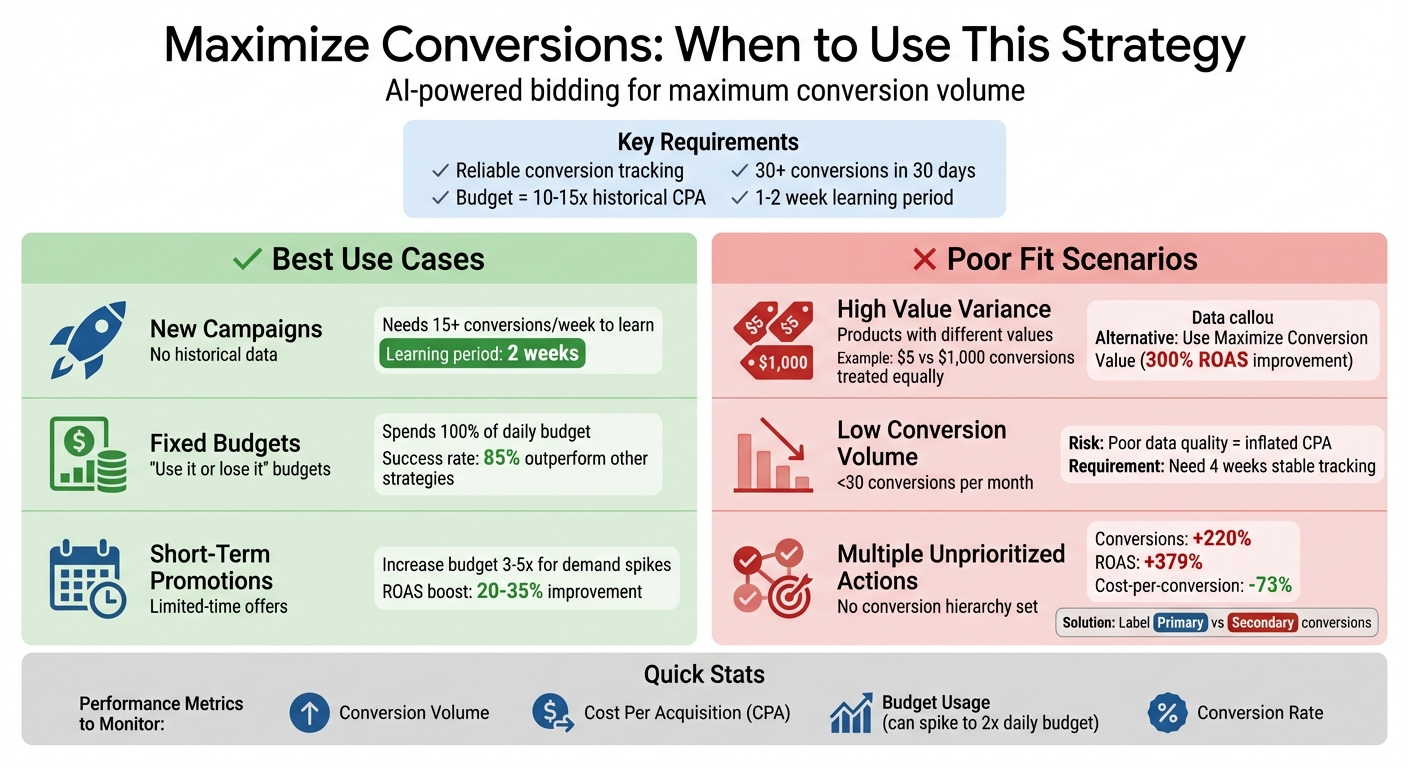
When to Use vs Avoid Maximize Conversions Bidding Strategy
When to Add a Maximise Conversions Bidding Strategy
What Is Maximize Conversions and How Does It Work?
Maximize Conversions is a Smart Bidding strategy powered by Google’s AI. Its purpose is simple: to get the highest number of conversions possible for any type of conversion while using your entire daily budget. This strategy relies on auction-time bidding, where each auction is evaluated individually. Using a mix of historical performance data and real-time contextual signals, it determines the best bid for each opportunity. If your current spend is below the daily budget, the system will ramp up spending quickly to find more conversion opportunities. Let’s break down how Google’s AI makes this happen.
How Google’s Smart Bidding Powers Maximize Conversions
The backbone of this strategy is Google’s machine learning, which evaluates real-time signals that manual bidding simply can’t access. These signals include factors like device type, physical location, time of day, browser, operating system, and language. It also incorporates audience data, such as Customer Match lists and website visitor lists, to refine its decisions.
By combining these real-time inputs with your campaign’s historical conversion data, the algorithm calculates the ideal bid for each auction in an instant – across thousands of auctions at a time. Since the system handles bidding automatically, manual adjustments like location or time-of-day bids are mostly overridden. The only exception is when a device bid adjustment is set to -100%, which prevents bidding on that device entirely. This advanced approach focuses on conversion volume, not conversion value, which we’ll explain further below.
What Maximize Conversions Does and Does Not Optimize For
The primary focus of this strategy is boosting the total number of conversions, not optimizing for cost per conversion or revenue. It seeks out the cheapest conversions available to maximize volume, regardless of whether a conversion is worth $10 or $1,000 to your business.
| Feature | Optimizes For | Not For |
|---|---|---|
| Primary Goal | Total number of conversions | Conversion value or revenue |
| Budget Behavior | Fully spends the daily budget | Underspending to hit a specific CPA |
| Best Use Case | Fixed budgets, lead generation, new campaigns | E-commerce with varying product values |
Maximize Conversions is most commonly used in Search campaigns, but there are tailored versions for App campaigns that focus on installs or in-app actions. If your goal is to prioritize high-value conversions or maintain a specific cost-per-acquisition, this strategy might not be the best fit. However, if your goal is to maximize conversion volume within a fixed budget, this tool delivers exactly that. This foundational understanding will help you decide when and how to use this strategy effectively as we explore further in the article.
When Should You Use Maximize Conversions?
Understanding when to use Maximize Conversions is key to getting the most out of this strategy. It’s not a universal fix, but it shines in situations where driving volume takes priority over cost efficiency. Let’s explore three scenarios where this approach works best.
Launching New Campaigns or Accounts
Starting from scratch with a new campaign or account can be tricky, especially when there’s no historical data for Google’s AI to rely on. This is where Maximize Conversions comes in handy. It focuses on generating conversion volume, giving the algorithm the data it needs to learn and optimize more quickly.
By experimenting with bids, this strategy ensures your budget is spent consistently while gathering valuable performance insights. Typically, this learning phase lasts about two weeks. During this time, the algorithm collects real-time signals to establish a baseline understanding of what drives conversions for your business. To make the most of this period, aim for at least 15 conversions per week. If your primary conversion numbers are low, consider tracking micro-conversions like newsletter signups or add-to-cart actions to provide additional data for the AI.
Maximizing Leads or Transactions on a Fixed Budget
If your goal is to fully utilize your budget, Maximize Conversions can be a game-changer. The strategy is designed to spend your entire daily budget, ensuring every possible conversion opportunity is captured. As Seer Interactive explains:
"This bidding strategy can be wildly effective if you operate on a ‘use it or lose it’ advertising budget as Google will leverage every opportunity to spend that daily budget".
Across various industries, this approach has shown impressive results, outperforming other bidding strategies in 85% of experiments. However, it’s essential to align your budget with your campaign goals before activating this strategy. If you’re currently underspending compared to your daily budget, switching to Maximize Conversions will likely lead to a noticeable increase in spending. To prepare, use Google’s budget simulator to estimate how changes in budget might impact conversion opportunities. Keep in mind, this strategy focuses on spending the full budget rather than achieving a specific cost-per-acquisition, making it perfect for campaigns where volume is the primary goal.
Short-Term Campaigns or Promotions
Maximize Conversions is particularly effective for short-term promotions, such as holiday sales, product launches, or limited-time offers. In these cases, the goal is straightforward: generate as many conversions as possible within a short window. The strategy’s aggressive approach ensures you capture high-intent traffic, even if competition drives up costs.
For seasonal campaigns, consider increasing your daily budget by 3–5 times to account for demand spikes. Use Google’s seasonality adjustments to help the algorithm anticipate short-term shifts in conversion rates during your promotion. If you run recurring seasonal events, keeping these campaigns in "draft" mode when inactive can preserve valuable historical data and optimization signals for future use. Advertisers who fine-tune AI-driven campaigns during promotional periods often see a 20% to 35% boost in ROAS compared to traditional campaign setups. To maximize results, let the strategy run for the entire promotional period without making early adjustments, as performance tends to stabilize after the first two weeks of algorithm learning.
When Should You Avoid Maximize Conversions?
While Maximize Conversions can deliver great results in many situations, it’s not always the right choice. Misusing this strategy can lead to wasted budgets and underwhelming outcomes. Here are three scenarios where it’s best to steer clear of this approach.
High Variance in Conversion Value
If your business offers products or services with varying price points, Maximize Conversions might not work in your favor. The algorithm treats all conversions the same, which means it could prioritize low-value actions over high-value ones.
Google’s AI tends to go for the easiest and cheapest conversions to boost the overall count. This could result in neglecting higher-value opportunities that are more expensive to secure. Michelle Morgan, Co-Founder of Paid Media Pros, puts it simply:
"A conversion worth $1000 to your business deserves a higher bid than one worth only $5. If your tracking is not properly set for value-based bidding, this won’t work".
For lead generation campaigns, switching to Maximize Conversion Value has been shown to improve ROAS by nearly 300%. If your business model includes a range of product prices, service tiers, or varying lead quality, Maximize Conversion Value is a better fit. Assigning relative values to non-ecommerce actions can help the algorithm focus on quality.
Now, let’s look at how low conversion volume or poor data quality might disrupt this strategy.
Low Conversion Volume or Poor Data Quality
Maximize Conversions thrives on data. Without enough conversion volume, the algorithm lacks the insights needed to identify key signals – like time of day, location, or device type – that drive results. Google suggests having at least 30 conversions per month before using any conversion-based automated bidding strategy.
If your tracking isn’t reliable, the AI might chase low-quality conversions, inflating your cost-per-acquisition (CPA). Sparse bottom-funnel conversions can lead to inefficient budget use or higher CPAs.
Before enabling Maximize Conversions, make sure your conversion tracking has been stable and accurate for at least four weeks. If your primary conversion action doesn’t generate enough volume, consider targeting a more frequent upper-funnel goal like "Add to Cart" to provide the AI with more data. For lead generation campaigns, importing offline conversion data can offer better insights into which leads bring real business value.
Another common issue arises when multiple conversion actions aren’t clearly prioritized.
Multiple Conversion Actions Without Prioritization
When you don’t prioritize your conversion actions, the algorithm will default to pursuing the easiest and cheapest conversions – even if they don’t align with your business goals. Maximize Conversions is designed to maximize the number of conversions, regardless of their individual value.
In testing, proper prioritization improved conversions by 220%, boosted ROAS by 379%, and lowered cost-per-conversion by 73%.
To avoid this issue, use Google’s Primary and Secondary conversion labels wisely. Only mark your most important events as "Primary", as these influence bidding decisions directly. Use "Secondary" labels for engagement metrics that provide insights but shouldn’t drive bidding. If your conversion actions vary in business importance, assign specific values to each and consider using Maximize Conversion Value instead. This ensures the algorithm focuses on high-impact actions.
Preparing Your Campaign for Maximize Conversions
Before activating Maximize Conversions, ensure your tracking data and budget are properly aligned with your campaign’s needs. The algorithm relies entirely on the data you provide – errors in tracking or mismatched budgets can derail its performance. Here’s how to get your campaign ready for success.
Ensure Reliable Conversion Tracking
Accurate and stable conversion tracking is essential before enabling automated bidding. In GA4, every interaction is recorded as an event, but you must manually mark high-value actions – such as purchases or form submissions – as conversions. Without this setup, the strategy won’t know what to optimize for.
Tools like Google Tag Manager (GTM) allow you to track specific actions like button clicks or AJAX form submissions, while GA4’s interface handles simpler triggers, such as page views. For more complex needs, like tracking video views or cross-device conversions, use Google Ads conversion tracking instead of importing data from Google Analytics.
Test your setup using GA4’s Realtime report or DebugView to confirm that triggers fire correctly. As one expert from the AI-performance marketing agency Serphoom puts it:
"GA4 is powerful, but it’s only as smart as the way you set it up".
Be sure to check for duplicate tags or overlapping events between GA4 and Google Ads to avoid double-counting conversions. If you’ve recently updated your tracking setup, wait at least four weeks (or three conversion cycles) before switching to Maximize Conversions. For lead generation campaigns, consider setting up Enhanced Conversions or Offline Conversion Import (OCI) to help the AI identify leads that turn into actual sales. As Google Ads Support notes:
"Better measurement is the fastest way to improve lead quality".
| Tracking Requirement | Recommended Tool | Purpose |
|---|---|---|
| Cross-Device Data | Google Ads Conversion Tracking | Tracks users moving between devices |
| Lead Quality | Offline Conversion Import | Links digital leads to offline sales |
| Tag Flexibility | Google Tag Manager | Tracks button clicks or AJAX triggers |
| Testing/Validation | GA4 DebugView | Verifies events in real time |
Once your tracking is solid, focus on aligning your budget to support the algorithm effectively.
Set a Budget Aligned With Historical CPA
Maximize Conversions is built to spend your entire daily budget to achieve the highest possible number of conversions. To make this work, set your daily budget at 10–15 times your historical CPA (for example, $250 for a $25 CPA).
Before making the switch, ensure your campaign has recorded at least 30 conversions in the past 30 days – this provides the algorithm with enough data to function effectively.
Use tools like the Google Ads budget simulator and impression share metrics to evaluate your budget’s potential. Once you’ve switched, avoid making changes during the 1 to 2 week learning period, as adjustments will reset the algorithm’s progress. If changes are unavoidable, limit budget increases or decreases to no more than 50% at a time.
Keep in mind that during the learning phase, Maximize Conversions may cause your daily spend to reach up to twice your average daily budget. Plan your finances accordingly.
Establish a Clear Conversion Event Hierarchy
A clear hierarchy of conversion events ensures the algorithm prioritizes high-value actions. For instance, mark high-intent actions like "Purchase" or "Form Submission" as Primary, while using Secondary for lower-priority actions like "Add to Cart".
If your primary conversion event is rare (fewer than 30 conversions in the first five days), consider optimizing for a higher-funnel event that occurs more frequently. This gives the algorithm the data it needs to perform effectively. Jyll Saskin Gales, a Google Ads coach and consultant, emphasizes:
"Maximize conversions relies on accurate conversion data in order to work effectively. Google can’t maximize something it can’t see!".
Assigning values to different conversion actions can help reflect their importance to your business. For example, you might value a lead at $10 and a sale at $100. This not only strengthens Maximize Conversions but also builds the foundation for transitioning to advanced strategies like Maximize Conversion Value in the future.
Measuring Results and Optimizing Over Time
Once your campaign is live, it’s crucial to monitor key metrics like conversion volume, CPA (cost per action), and budget usage. Since full budget utilization is typically expected, your focus should shift to evaluating actual CPA and overall campaign performance. Tools like impression share metrics and the budget simulator can help you identify potential growth areas. Regularly check the Optimization Score and the Recommendations tab for actionable insights. The Insights page is another valuable resource, revealing which search themes and audience segments are driving the best results. However, don’t rush to conclusions – wait until you’ve gathered at least 30 conversions in a month before assessing performance. These initial observations set the stage for diving deeper into performance metrics.
Key Metrics to Monitor
If you’ve already set up reliable conversion tracking, you’re in a good position to measure success. Keep an eye on conversion volume and conversion rate to ensure the AI is targeting high-intent opportunities effectively. Your CPA will indicate whether the strategy is delivering a profitable return.
During the learning phase or periods of high demand, it’s normal for daily costs to occasionally spike – potentially reaching up to twice your average daily budget. However, the monthly spend won’t exceed the set limit. To estimate how budget changes might affect conversion volume, use the budget simulator instead of relying on "Lost IS (budget)" metrics. Also, continue to review your Optimization Score, Recommendations tab, and Insights page for trends in search themes and audience segments.
When analyzing data, remember to exclude recent days if there’s a known delay in conversions. For example, if users typically take seven days to convert, omit the last seven days from your analysis. And only evaluate campaign performance once you’ve hit at least 30 conversions in a month to ensure the data is reliable.
Understanding the Learning Period
The algorithm needs time to adjust as it collects and processes data. Use the Bid Strategy Report to assess the campaign’s current status and identify any issues, such as conversion delays, reporting glitches, or whether the strategy is still in the "Learning" phase. After making significant changes, give the campaign 5 to 7 days to stabilize before tweaking anything further.
For a more accurate evaluation, wait until at least two full conversion cycles have passed. A conversion cycle refers to the time between a click and the resulting conversion being reported. The "30-day, 30-conversion rule" is a good benchmark – Smart Bidding tends to perform best when a campaign achieves at least 30 conversions in a 30-day window.
If conversion tracking malfunctions or there’s a data outage, use the Data Exclusions tool to prevent the algorithm from learning from flawed data. For short-term events like flash sales lasting 2–3 days, apply seasonality adjustments to inform the AI about expected spikes in conversion rates instead of manually altering the bid strategy. These steps ensure the algorithm adapts effectively without unnecessary disruptions.
Signs to Pivot or Refine Strategy
Once your campaign has stabilized with at least 30 conversions in 30 days, you can consider refining your approach. For better cost control, switch to Target CPA, or if your conversion values vary significantly, opt for Maximize Conversion Value. As Jyll Saskin Gales explains:
"Target CPA is a Smart Bidding strategy that is like Maximize conversions’ big sister. Rather than spending your budget to get as many conversions as possible, it focuses on achieving a specific cost-per-acquisition".
If your campaign is consistently flagged as "limited by budget", you have two options: increase the budget to allow for further optimization or switch to Target CPA to prioritize efficiency over spending.
If performance drops, focus on improving your creatives or landing pages before changing the bidding strategy. When making adjustments, avoid drastic changes – don’t alter the budget or CPA target by more than 50% at once, as this could reset the learning phase. If you’re seeing high click volume but low conversions, investigate issues like landing page relevance or tracking accuracy before blaming the bidding strategy.
A real-world example from late 2024 illustrates this process. Digital Marketing Consultant Vijay Sood transitioned a Google Ads account to Maximize Conversions. Initially, CPC spiked dramatically, raising concerns. However, within weeks, the machine learning algorithm fine-tuned the bids, reducing the cost per conversion from $1,700 per month to under $20. This demonstrates the value of patience and a data-driven approach when optimizing campaigns.
Conclusion
Maximize Conversions is an AI-powered bidding strategy designed to drive growth for campaigns that fit specific criteria. It’s particularly effective for new campaign launches, “use it or lose it” budgets, and short-term promotions where the goal is to secure as many conversions as possible within a set spending limit. By analyzing thousands of auction-time signals, Google’s AI pinpoints opportunities to boost conversions.
However, this strategy isn’t ideal for every situation. Since it fully utilizes your daily budget, it may not be the best choice if cost efficiency or conversion value fluctuates significantly. In such cases, you might want to set an optional Target CPA or explore a value-based alternative like Maximize Conversion Value.
To see results, you’ll need patience, strong data, and a testing period of at least four weeks. During this time, keep an eye on conversion volume, CPA, and budget usage. Budget simulators can also help fine-tune your approach. When applied thoughtfully, Maximize Conversions can pave the way for steady, data-backed growth.
FAQs
What’s the difference between Maximize Conversions, Target CPA, and Maximize Conversion Value?
Maximize Conversions is a bidding strategy that leverages Google’s AI to automatically adjust your bids, aiming to generate the highest possible number of conversions while using your entire daily budget. This approach is perfect if your primary goal is to drive as many leads or sales as possible without focusing on a specific cost per conversion.
Target CPA, in contrast, is designed to achieve conversions at a specific cost-per-acquisition (CPA) that you set. This strategy is ideal when you need tight control over how much you’re spending for each conversion.
Maximize Conversion Value shifts the focus to the total monetary value of conversions, such as revenue or profit, instead of just the number of conversions. It’s particularly useful when the value of each conversion varies – for example, a $500 sale versus a $50 sale – and you want to prioritize higher-value outcomes.
In short, use Maximize Conversions for volume, Target CPA for cost efficiency, and Maximize Conversion Value to prioritize revenue or profit within your budget.
How can I ensure accurate conversion tracking before using the Maximize Conversions strategy?
To get the most out of the Maximize Conversions bidding strategy, it’s crucial to have accurate conversion tracking in place. Here’s how you can set it up:
- Set clear conversion goals: Decide what actions you want to track, like purchases, sign-ups, or leads, and define them in Google Ads.
- Implement the global site tag (gtag.js) and event snippets: Add these to the specific pages where conversions happen to ensure proper tracking.
- Run a test conversion: Complete a test action on your site and confirm that the tags are firing correctly in real time.
- Analyze your conversion data: Regularly check Google Ads to make sure your data matches your goals. Look at metrics like conversion counts, values, and attribution settings.
- Ensure you have enough data: Google suggests having at least 15 conversions in the last 30 days before using this strategy.
Accurate tracking isn’t just a technical step – it’s the foundation for making smart, data-driven decisions and improving your campaign performance.
When should you avoid using the Maximize Conversions strategy?
If you’re considering the Maximize Conversions bidding strategy, it’s important to know when it might not be the best fit. This strategy may not work well if you don’t have enough conversion data for the algorithm to learn effectively, need to stick to specific Cost Per Acquisition (CPA) or Return on Ad Spend (ROAS) targets, or are working with a very limited budget that doesn’t allow for the strategy’s spending flexibility.
It’s also worth noting that this approach might not suit campaigns where the focus is on conversion value rather than simply boosting the number of conversions.
In these scenarios, you’ll want to explore other bidding strategies that better align with your goals and budget constraints to achieve more tailored results.
