


Feature flags are powerful tools that let you control feature rollouts without deploying new code, but they come with security risks. Mismanagement can lead to data breaches, compliance violations, or system vulnerabilities. Here’s how to secure your feature flagging system:
- Use Server-Side Evaluation: Keep sensitive data and logic secure by evaluating flags on the server, especially for features involving payments or user data.
- Encrypt Data: Always use HTTPS/TLS for communication between SDKs and services to prevent interception.
- Apply Role-Based Access Control (RBAC): Restrict who can create, modify, or activate flags based on roles. For example, developers can create flags, while product managers handle production toggles.
- Adopt the Principle of Least Privilege: Limit access to only what’s necessary for each role, reducing the risk of accidental or malicious changes.
- Enable Approval Workflows: For high-risk flags, require reviews and approvals before changes go live.
- Set Safe Defaults: Ensure flags default to the safest state (usually "off") to maintain stability during outages or errors.
- Remove Old Flags: Regularly clean up unused flags to reduce technical debt and potential vulnerabilities.
- Ensure Compliance: Avoid exposing Personally Identifiable Information (PII) and use pseudonymization techniques to protect user data.
Proper governance, encryption, and access controls transform feature flags into secure tools for controlled rollouts and compliance with regulations like HIPAA and CCPA. By following these practices, you can minimize risks while maintaining flexibility in feature deployment.
Feature flags, dark launches & safe deployments: reducing risk in production
Core Security Principles for Feature Flagging
When it comes to feature flagging, three key security principles stand out: Principle of Least Privilege, Separation of Duties, and Zero Trust. These principles act as safeguards, ensuring unauthorized access is blocked and potential damage is minimized if something goes wrong.
Principle of Least Privilege
The Principle of Least Privilege (PoLP) focuses on granting users access only to the resources, data, and applications they need to perform their tasks – nothing more. In feature flagging, this means carefully controlling who can modify, activate, or delete flags based on their role.
Google’s security engineers Oliver Barrett, Aaron Joyner, and Rory Ward describe it as:
"Least privilege is a broad concept… that grants the least privilege necessary for any given task or action path."
To implement PoLP effectively, granular permissions are essential. For instance, a developer might need access to create flags during development but should not have the ability to toggle production flags that impact thousands of users. Similarly, support teams may need read-only access to troubleshoot issues but should not have the authority to make changes that could lead to outages.
Server-side evaluation adds an extra layer of protection by keeping sensitive information and targeting logic secure. Here’s how access can be structured:
| Feature Flag Action | Recommended Access Level | Purpose |
|---|---|---|
| Create/Delete Flags | Developers / Lead Engineers | Avoids unnecessary code clutter and unauthorized logic branches. |
| Toggle (On/Off) | Product Managers / SREs | Enables controlled rollouts or emergency "kill switch" actions. |
| Configure Targeting | Data Scientists / Product Owners | Ensures experiments reach the intended user groups. |
| Production Access | Senior Staff / Authorized Roles | Reduces the likelihood of accidental global outages. |
To strengthen PoLP, integrate your feature flagging system with Single Sign-On (SSO). This ensures access is automatically revoked when employees leave or change roles. Additionally, maintaining detailed audit logs and removing outdated flags after rollouts can lower technical debt and reduce security risks.
With these controls in place, the next step is to separate duties, further reducing the chance of unauthorized changes.
Separation of Duties
Separation of duties ensures that no single person has unchecked control over the system. For feature flagging, this means dividing responsibilities so that one individual cannot both create and activate a flag. This approach significantly lowers the risk of unauthorized changes.
Broken Access Control topped OWASP‘s 2021 list of web security vulnerabilities. By splitting roles – such as having developers create flags and product managers or senior engineers approve their activation – you can mitigate this risk.
For especially sensitive flags, consider using the four-eyes principle, which requires a second authorized person to review and approve changes before they go live. As Unleash emphasizes:
"In some cases, additional controls like feature flag approvals using the four-eyes principle are necessary for critical changes."
Role-Based Access Control (RBAC) can help define clear permissions, while centralized management and audit logging ensure accountability and provide a reliable compliance trail.
Zero Trust Approach
The Zero Trust model takes security a step further by assuming that no user, device, or application is trustworthy by default. Every access request is continuously verified, adhering to the "Never trust, always verify" mantra.
Unlike traditional perimeter-based models, Zero Trust requires ongoing validation for every request to modify or evaluate a flag. This is particularly important because feature flags dictate which code paths are executed in your application. Evaluating critical flags server-side ensures sensitive data – like API keys and targeting logic – remains secure.
A deny-by-default configuration is key, granting access only when specific rules are met. Evaluating flags at the highest level for each user request, combined with server-side SDKs for managing Personally Identifiable Information (PII), ensures data stays protected.
To further enhance security, micro-segmentation can divide your feature flag environment into isolated zones based on teams or projects. This limits lateral movement, so even if an attacker gains access to one area, they can’t automatically control flags tied to critical systems like payment processing or infrastructure.
Best Practices for Secure Feature Flag Design and Implementation
Creating and managing feature flags effectively requires organization, clear naming, and thorough evaluation. These practices help maintain system stability and security while avoiding common challenges. Centralized management and clear naming conventions are key starting points.
Centralized Management and Clear Flag Naming
A centralized platform is essential for managing feature flags. It ensures that each flag is uniquely identified and behaves consistently across all environments. Without this, teams risk reusing old flag names or unintentionally duplicating them in different systems. A unified platform eliminates these issues, providing a single source of truth for all flags.
Descriptive naming is equally important. Avoid cryptic codes like NEXT_OLD_GEO3; instead, use meaningful names such as Privacy_Features_Europe to make flags easier to understand and manage across teams. This clarity is especially valuable during incidents when a problematic feature needs to be quickly located and disabled.
To maintain organization, assign an owner to each flag, set an expiration date, and promptly remove flags that are no longer in use. Once a rollout is complete, the flag should be deleted entirely. As Harness aptly states:
In a feature flags world, there are no rollbacks – just turn it off
.
Server-Side First Approach
Browsers and mobile apps come with inherent risks, as they allow users to manipulate code directly. For sensitive features, such as those involving entitlements, payments, or Personally Identifiable Information (PII), always evaluate flags server-side. Keeping user data and targeting logic within your secure application environment minimizes exposure to potential threats.
When client-side evaluation is unavoidable – such as for user interface changes or performance optimization – enable Secure Mode. This approach uses request signing with a shared secret on the server, preventing users from impersonating others or accessing unauthorized flag settings. To further enhance security, bundle SDKs through package managers like npm or yarn rather than relying on script tags, which can introduce vulnerabilities through third-party injections.
Once server-side controls are in place, don’t overlook fallback strategies. Setting safe defaults ensures your system remains stable during unexpected disruptions.
Safe Defaults and Operational Controls
Your application should be designed to function even if the feature flag service becomes temporarily unavailable. To achieve this, rely on locally cached data or hardcoded defaults to keep the system operational during outages. As Unleash explains:
If you need to restart your application to turn on a flag, that’s configuration, not a feature flag
.
When initializing SDKs, use cached data or predefined safe defaults to handle network issues gracefully. A good rule of thumb is to make the default variation of any flag represent the safest state – typically with the feature disabled. This way, if something goes wrong, your system won’t expose incomplete or risky functionality.
For critical features and third-party integrations, implement kill switches. These inverted flags allow you to instantly disable problematic code paths without requiring a full rollback. Dan Bovey, Senior Fullstack Engineer at OakNorth, highlights their importance:
We’re working with real bank accounts and real money, so code quality and release governance are non-negotiable. Feature flags are critical to making that work
.
Additionally, during traffic surges, long-term operational toggles can help protect system stability. For example, you can temporarily disable resource-heavy features like recommendation engines to reduce load and safeguard core functionality.
sbb-itb-2ec70df
Governance and Access Control for Feature Flags
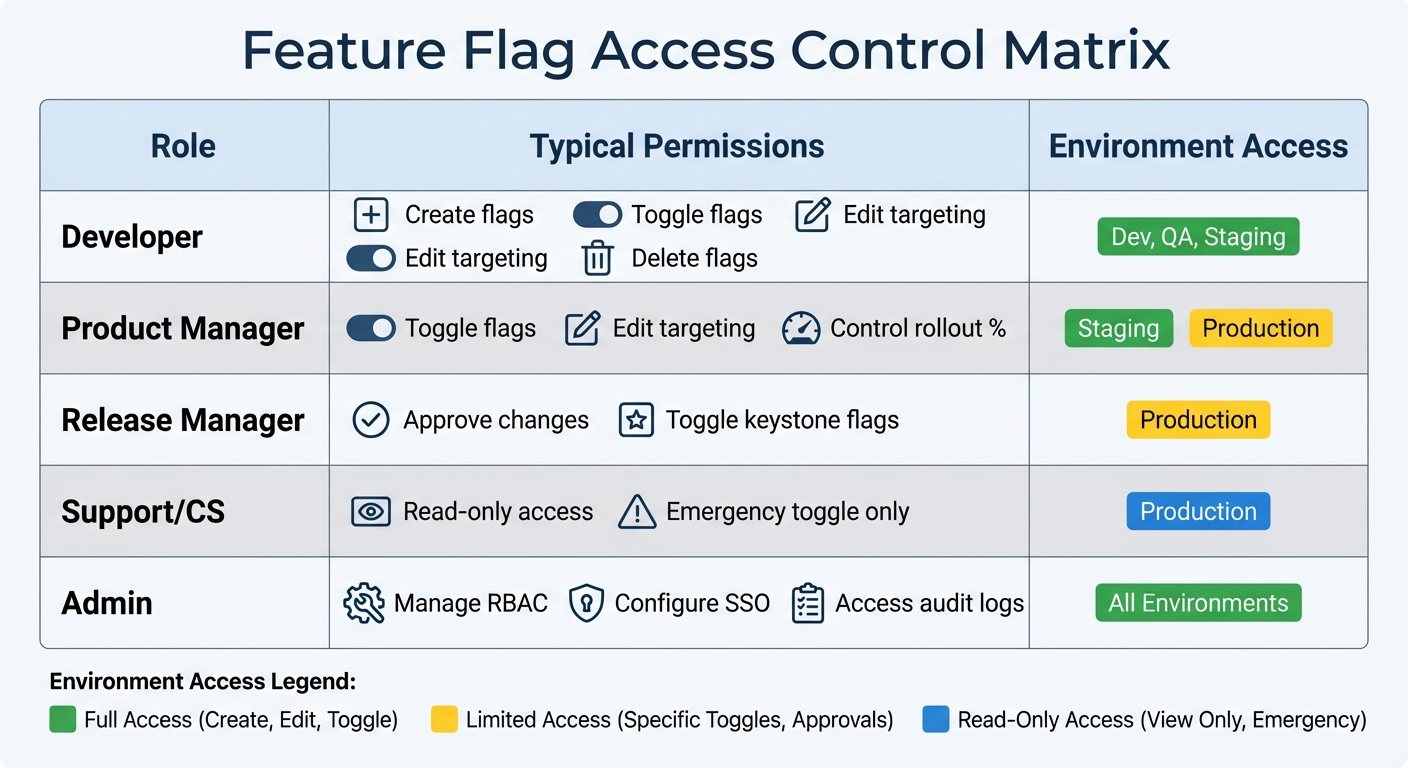
Feature Flag Access Control: RBAC Permissions by Role and Environment
Effective governance ensures feature flags don’t turn into security risks. Centralized management plays a key role by offering clear visibility and enforcing compliance across all environments. This approach helps teams avoid issues like reusing flag names or creating conflicting configurations. With a strong governance framework in place, it becomes easier to implement advanced access control strategies.
Role-Based Access Control (RBAC)
Role-Based Access Control (RBAC) is a practical way to align feature flag permissions with specific roles and responsibilities. Instead of granting universal access, assign precise permissions based on the tasks each role performs. For instance, a developer might handle flag creation and toggling in development and staging environments, while a product manager oversees rollout percentages in production. Release managers, on the other hand, are often tasked with approving changes to critical flags that control major UI components or core business logic.
Production environments should have stricter access policies compared to development or testing environments. For example, temporary logins or support staff might only have read-only access in production. Additionally, integrating your feature flag platform with Single Sign-On (SSO) providers like Okta or SAML ensures access is automatically revoked when someone leaves the organization.
Approval Workflows for High-Risk Flags
When dealing with high-risk flags, thorough reviews are a must. Changes to these flags should always require approval before going live. A common strategy is the four-eyes principle, where at least two individuals must approve any modification. This process mirrors pull request workflows, where one person proposes a change, and another reviews it before it’s implemented.
To streamline this, tag high-risk, financial, or permanent flags so they automatically enter an approval queue. Consolidating updates into a single request ensures consistency. Every step in the approval process – request submission, review comments, and final approval – should be logged in an immutable audit trail. This not only supports compliance but also simplifies incident response.
Change Management Across Environments
Change management processes help ensure feature flags are updated and removed at the right time, reducing errors and technical debt. A structured workflow for moving flags from development to production is key. Each flag should pass through defined stages: Define, Develop, Production, Cleanup, and Archived. This approach helps identify bottlenecks and ensures unnecessary flags are removed after their rollout is complete.
Setting expiration dates during flag creation is another helpful practice. Modern systems can notify teams when a flag has been inactive for seven days, signaling it might be safe to remove. Detailed audit trails showing who made changes and when they occurred support both compliance and faster troubleshooting. For projects requiring confidentiality, private flag settings can limit visibility to specific groups until the approval process is finalized. These measures promote secure and efficient lifecycle management for feature flags.
| Role | Typical Permissions | Environment Access |
|---|---|---|
| Developer | Create, Toggle, Edit Targeting, Delete | Dev, QA, Staging |
| Product Manager | Toggle, Edit Targeting, Rollout % | Staging, Production |
| Release Manager | Approve Changes, Toggle Keystone Flags | Production |
| Support/CS | Read-only, Toggle (Emergency only) | Production |
| Admin | Manage RBAC, SSO, Audit Logs | All Environments |
Data Protection and Compliance in Feature Flagging
Ensuring data protection and adhering to compliance standards are crucial aspects of managing feature flags securely. Since feature flags often interact with sensitive user information, encryption and compliance measures are non-negotiable. To highlight the importance of these practices, consider this: 66% of companies have failed data privacy audits in recent years.
Encryption and Secure Data Handling
To safeguard data, all communication between SDKs and feature flag services must use HTTPS/TLS protocols, which prevent man-in-the-middle attacks. Server-side evaluation is another critical measure – it keeps sensitive details like user IDs and email addresses confined to your application’s environment, avoiding unnecessary exposure on client-side devices. For client-side implementations, enable Secure Mode using a server-generated hash and leverage the HTTP REPORT method to secure evaluation contexts. Additionally, mark specific user traits as private attributes, enabling targeted functionality without transmitting raw data. For further protection, deploy a Relay Proxy to handle local flag evaluations, ensuring that private data remains secure.
Feature flags should never store static secrets such as API keys or database credentials. These should be managed separately within configuration systems designed for stronger encryption. Beyond secure communication, risks can be further mitigated by minimizing the data shared and employing pseudonymization techniques.
Data Minimization and Pseudonymization
Reducing the amount of data sent to feature flagging systems significantly lowers compliance risks. Instead of using individual user IDs, group users based on categories like subscription plans, regions, or account types, and use these group identifiers for targeting. For added security, hash unique identifiers – like email addresses – into consistent aliases using secure algorithms. This approach supports statistical analysis and percentage rollouts while protecting personally identifiable information (PII).
For mobile SDKs, disable unnecessary collection of device-level data (e.g., OS version or model), and where applicable, set contexts to anonymous to prevent indexing in the flagging system.
"To safeguard this data, follow the data security principle of least privilege (PoLP), ensuring that all Personally Identifiable Information (PII) remains confined to your application."
– Unleash
If PII is unintentionally transmitted, use available APIs to search for and delete affected instances promptly. While many platforms automatically remove unused attribute fields within 30 days, taking proactive steps to delete such data ensures compliance.
Using Flags to Enforce Compliance Policies
Feature flags can also play a direct role in enforcing compliance. For example, they can control access to restricted features or content based on geography. Flags can be configured to meet jurisdiction-specific requirements, such as displaying CCPA-compliant options for users in California. They also act as compliance "kill switches", allowing you to disable non-compliant features across all environments instantly, without requiring a new code deployment. This is particularly helpful for organizations governed by regulations like HIPAA or PCI DSS.
Some SDKs even honor browser Do Not Track (DNT) requests by automatically disabling analytics data transmission when users enable this privacy setting. To further enhance compliance, integrate your feature flag platform with corporate identity providers using SAML or SCIM, and enforce multi-factor authentication (MFA) for team members with access to configurations. This integration ensures that access is revoked when employees leave and provides an audit trail for compliance-related changes. By aligning flag configurations with broader role-based access control (RBAC) and audit practices, organizations can maintain enterprise-wide compliance effectively.
Conclusion
Secure feature flagging plays a vital role in protecting sensitive data while enabling controlled and compliant growth. By using server-side evaluation and enforcing strict Role-Based Access Control (RBAC), organizations can maintain robust security at scale. Adopting the best practices highlighted in this guide – like implementing the principle of least privilege and automating cleanup workflows – helps create a solid foundation for a secure and efficient feature management system.
Feature flags also act as a critical safety mechanism during incidents. They allow authorized team members to quickly disable problematic features, significantly reducing Mean Time to Recovery (MTTR) and limiting the scope of potential disruptions. This ability to respond swiftly underscores the importance of meticulous flag management.
For organizations looking to take their feature flagging to the next level, Growth-onomics (https://growth-onomics.com) offers actionable, data-driven strategies. Their expertise in areas like performance marketing, data analytics, and customer journey mapping ensures that feature flagging systems align seamlessly with both technical and business objectives. By integrating secure feature flagging with governance frameworks, companies can accelerate innovation while adhering to the compliance standards required for certifications such as SOC2, HIPAA, and FedRAMP.
Security should never be an afterthought. When paired with strong governance, encryption, and access controls, feature flags become indispensable tools – not just for rapid experimentation but also for meeting stringent regulatory requirements.
FAQs
How does server-side evaluation improve the security of feature flags?
When feature flags are managed on the server side, security gets a significant boost. All the logic and values tied to these flags stay on a secure backend system, meaning users can’t directly access or tamper with them. This setup minimizes the chances of unauthorized changes or the exposure of sensitive information.
Another key benefit of handling feature flag logic on the server is the protection of sensitive data, like Personally Identifiable Information (PII). Since this data never reaches the client side, it stays shielded from potential vulnerabilities, offering tighter control and reducing the risk of data breaches.
How does the Principle of Least Privilege enhance feature flag security?
The Principle of Least Privilege is all about giving users just the right amount of access they need – no more, no less. This means users only have the permissions required to create, modify, or manage feature flags, keeping their access strictly limited to what’s necessary.
Why does this matter? By restricting access, you cut down on the chances of unauthorized changes, whether they’re accidental or deliberate. This approach also helps tighten security, reducing potential vulnerabilities. In practice, it protects sensitive configurations and ensures that only the right people can make critical adjustments, keeping both your system and your users safe.
How can feature flags help ensure compliance with data protection regulations?
Feature flags offer an effective way to navigate compliance with data protection laws such as GDPR and CCPA. By placing functionality that involves handling personally identifiable information (PII) behind server-side toggles, you gain precise control over when and how sensitive data is processed.
These toggles can also enforce role-based access controls, ensuring that only authorized personnel can access certain features or data. Beyond access control, feature flags support environment-specific configurations and provide detailed audit logs. These logs serve as valuable documentation to demonstrate your compliance efforts to regulators. This method allows you to securely manage data while staying adaptable to changing legal requirements.
