

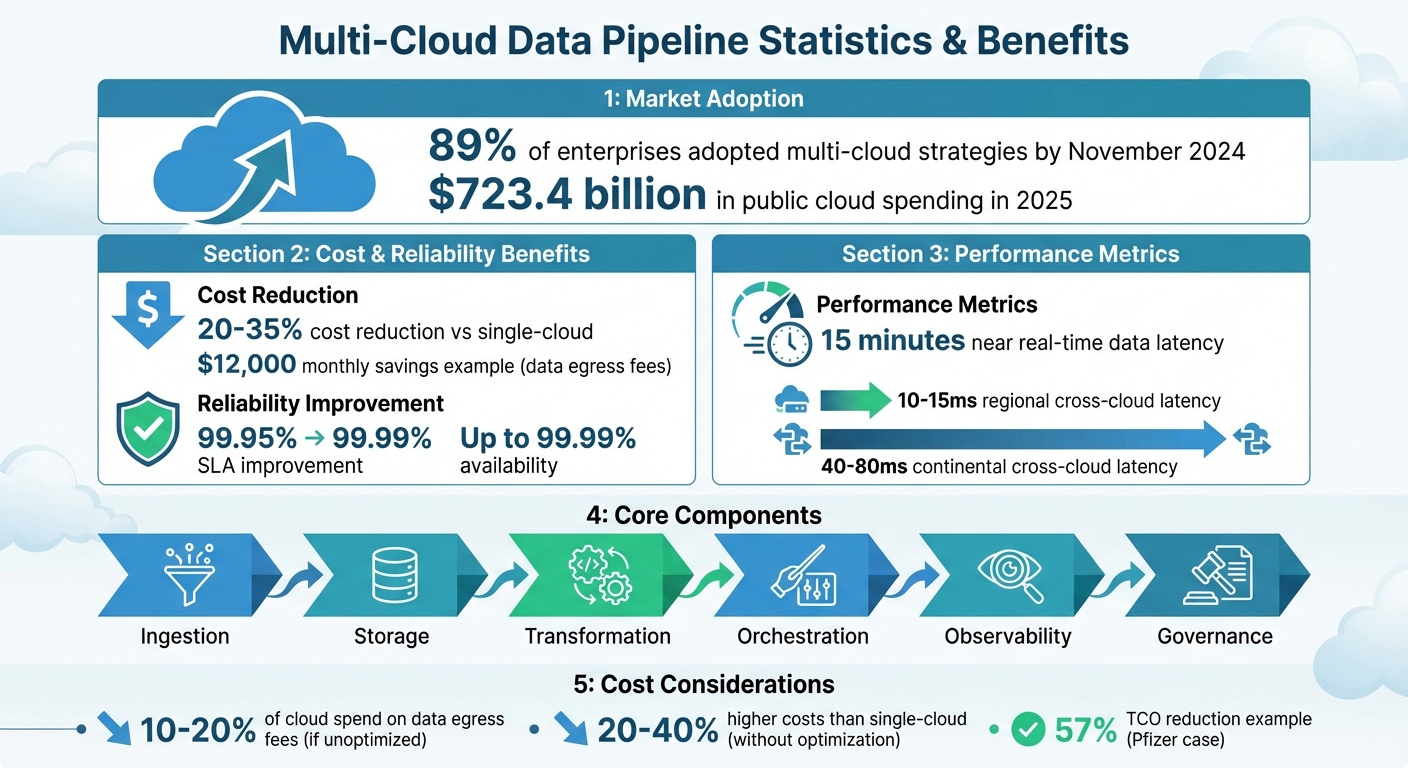
Multi-cloud data pipelines are essential for managing and analyzing data across platforms like AWS, Google Cloud, and Azure. These pipelines automate data flow, improve resilience, and reduce costs. By November 2024, 89% of enterprises had adopted multi-cloud strategies, with public cloud spending reaching $723.4 billion in 2025. Marketing teams rely on these systems to unify data from diverse sources, enabling real-time insights and smarter decision-making.
Key takeaways:
- Multi-cloud benefits: Avoid vendor lock-in, reduce costs by 20–35%, and improve reliability (up to 99.99% availability).
- Core components: Ingestion, storage, transformation, orchestration, observability, and governance.
- Challenges: Managing latency, egress fees, and ensuring data quality.
- Best practices: Use cloud-agnostic tools, automate quality checks, and monitor pipelines with tools like OpenTelemetry.
This guide explains how to design, implement, and optimize multi-cloud data pipelines for scalability, cost efficiency, and reliability. Whether you’re working with Google Analytics 4 data in BigQuery or integrating workloads across AWS, Azure, and Google Cloud, this roadmap helps ensure your pipelines deliver accurate, actionable insights.
Multi-Cloud Data Pipeline Benefits: Cost Savings, Reliability & Key Statistics
Orchestrating multi-cloud data pipelines with Control-M – Joe Goldberg, Basil Faruqui
Planning Your Multi-Cloud Data Pipeline Architecture
The success of your data pipeline depends heavily on a well-thought-out architecture. A solid plan ensures scalability, resilience, and cost efficiency. Organizations often evolve their setups, starting with disaster recovery, moving to active-active configurations, and eventually achieving a provider-agnostic model. The journey typically begins with leveraging a secondary provider for disaster recovery, progresses to active-active setups for stateless services, and culminates in advanced data replication strategies.
There are three common patterns for multi-cloud setups:
- Active-Active: This approach runs live traffic across multiple clouds simultaneously, ensuring maximum availability.
- Active-Passive: Here, one cloud acts as the primary, with another on standby for disaster recovery.
- Cloud-Native Workload Distribution: Tasks are assigned based on each provider’s strengths – for example, running AI workloads on Google Cloud while using AWS for data warehousing.
A notable example is Deutsche Bank, which enabled 4,000 developers to operate within a single HashiCorp Terraform workflow across their multi-cloud environment in 2025. This setup abstracted the complexities of varying cloud APIs while maintaining consistent security and governance.
"Multi-cloud is an operating model rather than a reusable architecture pattern. Success depended more on discipline than on specific tooling choices." – Sunilkumar Reddy Eraganeni, Senior Data Engineer
Selecting the Right Multi-Cloud Architecture
The choice between cloud-agnostic and cloud-native tools is pivotal to shaping your pipeline. Cloud-agnostic platforms like Snowflake allow you to query data across AWS, Azure, and Google Cloud without physically moving it. These tools simplify management and reduce vendor lock-in risks. On the other hand, cloud-native options like BigQuery, Redshift, and Azure Synapse integrate deeply with their respective ecosystems, often offering better performance for single-cloud workloads.
To maintain flexibility, use open data formats like Parquet, Avro, or Delta Lake. These formats ensure seamless data movement between storage systems such as S3 and Google Cloud Storage. For orchestration, tools like Airflow or Dagster running on Kubernetes can help abstract provider-specific differences. For instance, a global energy company utilized an internal developer platform with ArgoCD for CI/CD and Grafana for observability. This reduced developer onboarding time from several weeks to just 30 minutes.
Cross-cloud calls come with latency – 10–15ms regionally and 40–80ms continentally – and can increase costs. Multi-cloud setups often cost 20–40% more than single-cloud environments due to duplicated services and data egress fees. Careful tool selection and optimization are crucial to controlling these expenses.
Mapping Data Sources and Checking Compatibility
Data pipelines often pull from diverse sources like ad platforms, CRMs, and web analytics tools. For example, Google Analytics 4 (GA4) only exports raw data to BigQuery. If your analytics hub is on AWS or Azure, a multi-cloud setup becomes necessary.
Standardizing data contracts early is critical. Define clear schemas and interfaces upfront to avoid integration issues during scaling. Tools like OpenMetadata or Amundsen can serve as centralized metadata catalogs, tracking lineage, schemas, and operational data across providers. This creates a unified view of your data structures.
Process data close to its ingestion point to minimize latency and reduce cross-cloud egress fees. In one example from late 2025, a global retailer ingested transactional data into AWS S3 via Kinesis, transformed it using Apache Beam, and wrote it to both Google BigQuery for business intelligence and Amazon Redshift Spectrum for internal audits. This strategy leveraged the strengths of multiple clouds while minimizing unnecessary data movement.
Automate monitoring for schema drift. Platforms like GA4 frequently change data structures, which can disrupt downstream workflows. Implement Change Data Capture (CDC) to maintain synchronization across systems. Additionally, map IAM roles and encryption keys across clouds to ensure consistent security policies.
Once compatibility is secured, establish clear SLOs and SLAs to maintain reliability.
Setting Service Level Objectives (SLOs) and SLAs
With your architecture and data flows in place, defining precise reliability targets is essential for managing performance and mitigating risk. Start with Service Level Indicators (SLIs), which are raw metrics like data freshness, error rates, and job success ratios. Use these to set Service Level Objectives (SLOs) – target thresholds such as 99.9% of requests succeeding over a 30-day period. Finally, establish Service Level Agreements (SLAs), which are customer-facing commitments, typically set slightly below SLOs to allow for a safety margin.
Align SLOs with business priorities. For example, real-time triggers may demand higher reliability than daily reports. Segment pipelines by priority to meet varying SLOs without over-allocating resources. If a one-hour outage costs $250,000, a standby environment becomes a justifiable investment.
| Metric Type | Description | Example |
|---|---|---|
| Data Freshness | Age of data relative to current time | Age of oldest unprocessed queue item |
| Data Correctness | Percentage of error-free data | Fraction of items with schema errors |
| Job Completion | Deadline for batch process finish | Total elapsed time from start to completion |
Consider provider dependencies. Each cloud provider offers different uptime guarantees, which means your pipeline’s SLA cannot exceed the reliability of the underlying infrastructure. Use tools like OpenTelemetry, Prometheus, or Grafana to aggregate SLIs from all providers into a single dashboard. Monitor your "error budget burn rate" to detect potential SLA breaches before they occur.
"A multi-cloud system without rehearsed failover is an illusion. I treat DR like a product feature that must be tested." – TheLinuxCode Architecture Guide
Regularly test your failover processes through "Game Days" or "Failover Fridays." Simulating outages ensures that recovery time objectives (RTO) and recovery point objectives (RPO) are met. This practice validates your architecture’s reliability and readiness for real-world challenges.
Building Core Components of a Multi-Cloud Data Pipeline
With your architecture mapped out and Service Level Objectives (SLOs) in place, it’s time to focus on building the pipeline’s core components. These include ingestion, storage, transformation, and orchestration – the essential elements that ensure smooth data flow across multiple clouds. Each component requires thoughtful tool selection to balance performance and flexibility.
The main challenge lies in transferring data between providers while keeping costs, latency, and vendor lock-in under control. For example, latency can vary significantly depending on the tools and regions in use, sometimes reaching up to 100 milliseconds. Additionally, data transfer fees can eat up 10–20% of your total cloud budget if not carefully managed. Making smart choices about tools and implementation strategies can mean the difference between a scalable, efficient pipeline and one that becomes a financial drain.
Below, we’ll explore ingestion methods, storage solutions, and orchestration strategies for building effective multi-cloud pipelines.
Data Ingestion Tools and Methods
Ingestion is where data enters your pipeline, setting the stage for everything that follows. The tools you choose here can shape the entire system. Cloud-native options like AWS Glue, Azure Data Factory, and Google Cloud Dataflow are tightly integrated into their respective ecosystems. For instance, AWS Glue offers serverless ETL at $0.44 per DPU hour, while Azure Data Factory excels in hybrid setups, bridging on-premises systems with cloud resources. Google Cloud Dataflow stands out for unifying stream and batch processing.
However, these tools often require connectors or managed agents for multi-cloud scenarios. Open-source alternatives like Airbyte and Apache Kafka provide more flexibility. Airbyte, for example, offers over 300 pre-built connectors and can be self-hosted to avoid data egress fees.
"For multi-cloud scenarios, deploying Airflow on Kubernetes gives you the flexibility to run workloads close to data sources, reducing cross-cloud transfer costs and latency."
- Arthur C. Codex, Reintech
Your ingestion strategy – real-time or batch – depends on your latency needs. Tools like Apache Kafka and Amazon Kinesis handle real-time streams for use cases such as fraud detection, where sub-minute latency is critical. For larger datasets that don’t require immediate processing, batch ingestion tools like AWS Glue or Apache NiFi are more cost-effective. Techniques like Change Data Capture (CDC) can also help by tracking real-time database changes without the need for full bulk loads.
For datasets over 100 GB, consider staged transfers. Move data to intermediate cloud storage (e.g., Amazon S3, Google Cloud Storage) before using cloud-native transfer services. This approach reduces network egress costs and minimizes the workload on orchestration tools. To further cut costs and latency, deploy ingestion workers in the source region and compress data using formats like Parquet or Avro.
Once data is ingested, the next critical step is choosing the right storage solution.
Storage Options for Multi-Cloud Environments
Storage choices directly impact both performance and cost. Platforms like Snowflake and Databricks are cloud-agnostic, running natively across AWS, Azure, and Google Cloud. Snowflake, for instance, separates compute, storage, and services into independent layers, allowing better scalability and preventing over-provisioning.
In 2025, Pfizer consolidated its global data using Snowflake’s Snowpark and Snowgrid, which enabled collaborative workspaces and cross-cloud data sharing. This move cut their total cost of ownership (TCO) by 57% and sped up data processing by a factor of four.
Cloud-native options like Amazon Redshift, Google BigQuery, and Azure Synapse offer deep integration with their ecosystems. While these can deliver better performance for single-cloud workloads, they may increase dependency on one provider. For multi-cloud setups, data federation technologies allow you to query across clouds without physically moving data, reducing duplication and egress fees.
For example, a global retail company working with Innovatics in 2025 optimized demand forecasting by storing raw Point-of-Sale data in AWS S3 while replicating only aggregated features to Azure ML. This strategy saved $12,000 per month in data transfer fees, reduced stockouts by 30%, and freed up $2.3 million in inventory.
For disaster recovery, a tri-cloud backup model can be effective: use one cloud for primary backups (e.g., AWS), another for incremental backups (e.g., Azure), and a third for long-term archival (e.g., Google Cloud). Innago, a property management software company, cut its AWS backup costs by 40% in 2025 using a multi-cloud backup strategy.
Managing Pipelines Across Multiple Clouds
With SLOs defined and architecture in place, managing pipelines across clouds ensures consistent operations. Orchestration tools play a key role here, coordinating workflows and ensuring tasks execute in the right order. Apache Airflow is a leading choice, widely adopted for its Python-based Directed Acyclic Graphs (DAGs), which make pipelines version-controllable and testable. It also offers over 100 provider packages for AWS, Azure, and Google Cloud.
Other options like Prefect and Dagster bring unique strengths. Prefect provides a clean interface and faster development cycles, while Dagster emphasizes software-defined assets and a testing-first approach.
"Multi-cloud isn’t a choice. It’s a consequence of acquisitions, compliance, and vendor strategy."
- Stéphane Derosiaux, Conduktor
Reliability is crucial for pipelines. Design tasks to be idempotent – rerunning them with the same input should yield identical results. Airflow’s date partitioning feature ({{ ds }}) ensures reruns process the correct data slice without creating duplicates. Separating tasks by responsibility – extract, transfer, transform, or load – simplifies debugging and maintenance.
For example, a payment gateway client working with Innovatics in 2025–2026 implemented a multi-cloud pipeline using AWS Kinesis for ingestion, Google Cloud BigQuery for storage, and Azure ML for forecasting. By keeping raw transaction data in AWS and sending only aggregated summaries to Google Cloud, the client saved $8,000 monthly in egress fees, reduced latency to 15 minutes for cash flow visibility, and saved $200,000 monthly through optimized cash positioning.
To enhance security and reliability, avoid hardcoding credentials. Use secrets backends like AWS Secrets Manager, Google Cloud Secret Manager, or Azure Key Vault to fetch connection details at runtime. Implement circuit breakers to halt pipelines automatically if error rates exceed a set threshold (e.g., 5%), preventing cascading failures and data corruption.
Maintaining Data Quality, Observability, and Governance
Building reliable multi-cloud pipelines requires more than just solid design; it demands constant monitoring, thorough quality checks, and strict governance. Without these, even the best pipelines can fail silently or run into compliance issues. Here’s how to maintain visibility, protect data integrity, and enforce security across various cloud environments.
Setting Up Monitoring and Observability
Monitoring ensures your pipeline is running, while observability helps diagnose issues. By using logs, metrics, and traces, observability makes internal processes visible, turning a "black-box" system into one that’s easy to understand and troubleshoot.
"Observability turns a black-box data pipeline into a transparent, diagnosable, and self-improving system."
- Hugo Lu, CEO, Orchestra
A great starting point is adopting OpenTelemetry (OTel) as your standard for instrumentation. Since it’s vendor-neutral, OTel works seamlessly across AWS, GCP, and Azure without locking you into a specific provider’s tools. Deploy local OTel Collectors in each cloud environment to attach metadata – like region, account ID, or host details – before sending telemetry to platforms such as Grafana or Orchestra.
Key practices for monitoring include:
- Tracking metrics: Monitor execution times, error rates, throughput, and data freshness.
- Using JSON logs: Include correlation IDs to trace issues across cloud systems.
- Leveraging traces: Identify latency spikes or pinpoint errors.
For example, aim for a failed records rate below 0.1% as a Service Level Objective (SLO). In real-time pipelines, monitor Kafka consumer lag to stay under 1,000 messages or ensure partition delays don’t exceed 5 minutes.
To control costs, use tail-based sampling, which keeps traces of errors or high latency while sampling fewer routine runs. When dealing with unstable network links, configure collectors with a file_storage extension to buffer telemetry locally, avoiding data loss during outages.
For cross-cloud pipelines, propagate W3C Trace Context headers to maintain trace continuity, especially in asynchronous systems like SQS or Pub/Sub. Secure all communication with TLS and scrub Personally Identifiable Information (PII) at the collector level before it reaches your backend.
With observability in place, the next step is automating data quality checks.
Automating Data Quality Checks
Manual checks can’t keep up in multi-cloud setups. Automating validation ensures consistency and catches problems before they spread downstream. Managing data quality rules as code – using tools like Terraform – makes it easier to version-control changes via GitHub and apply rules consistently across environments.
Focus on universal data quality metrics such as accuracy, completeness, and consistency to avoid fragmented reporting. Multi-cloud environments, while offering flexibility, can magnify existing data issues like duplicates or inconsistent formats.
"Multicloud acts like an amplifier: it enhances environments with excellent data quality, but it can also magnify existing data issues."
- Shivaram P R
Embed quality checks early – at the ingestion phase – rather than waiting until the data reaches its destination. Use orchestrators like Airflow, Dagster, or Orchestra on Kubernetes to trigger these checks across clouds from a single control plane. External probes, like Cloud Functions or Lambda, can also serve as "heartbeat" monitors to confirm fresh data is arriving at its destination.
Set thresholds for key metrics. For example:
- System lag: Warnings at 2 minutes, critical alerts at 10 minutes.
- Backlog size: Warnings at 100 MB, critical alerts at 1 GB.
Integrate CI/CD pipelines with tools like Cloud Build or GitHub Actions to automatically run Terraform plans and validation tests whenever pipeline code changes. Standardize data formats using Parquet, Avro, or ORC to maintain consistency across cloud ecosystems.
Automated checks are critical, but they need to be paired with strong governance to ensure security and compliance.
Implementing Governance and Security Policies
Governance and security policies are essential for protecting data and meeting compliance requirements across clouds. Start with centralized Identity and Access Management (IAM) by using a unified identity provider like Okta or Azure AD. Implement Multi-Factor Authentication (MFA) and Role-Based Access Control (RBAC) to manage access consistently.
Data encryption is another cornerstone. Use TLS for data in transit and AES-256 for data at rest. For more sensitive workloads, opt for Customer-Managed Encryption Keys (CMEK) to retain control over encryption keys instead of relying solely on cloud provider defaults.
Finally, ensure data remains secure as it moves between clouds. Scrub PII at the collector level and enforce encryption throughout the pipeline.
These governance practices, combined with monitoring and automated quality checks, create a comprehensive framework for maintaining reliable and secure multi-cloud data pipelines.
Deploying and Optimizing Multi-Cloud Pipelines
To make the most out of your multi-cloud pipelines, it’s crucial to focus on efficient deployment and cost control. A phased rollout helps minimize risks, and continuous optimization ensures you avoid unnecessary spending on cloud resources.
Phased Deployment and Testing
Roll out your pipeline in three stages over 12 weeks.
- Foundation Phase (Weeks 1–4): Begin by setting up storage and enabling basic batch ingestion to get data flowing.
- Transformation Phase (Weeks 5–8): Implement business logic (e.g., using DBT) and establish CI/CD pipelines.
- Reliability & Governance Phase (Weeks 9–12): Focus on comprehensive testing, observability dashboards, and cost optimization.
Testing plays a critical role throughout this process. Use tools like Great Expectations and cloud emulators (e.g., LocalStack for AWS or BigQuery Emulator for GCP) to run unit, integration, and regression tests. This approach helps catch problems early without racking up high cloud costs. Additionally, set up circuit breakers to automatically stop pipelines if error rates exceed 5%. Route failed records to a Dead Letter Queue (DLQ) so edge cases don’t disrupt the entire system.
Reducing Costs in Multi-Cloud Setups
Multi-cloud setups can be cost-efficient, but only with careful planning. Without optimization, data egress fees alone can account for 10–20% of your total cloud spend. To cut costs, process data where it resides and replicate only aggregated results.
Take DataPulse, for example. In December 2025, this SaaS analytics company revamped its S3-to-GCS pipeline by standardizing tagging across AWS, GCP, and Azure and switching to compressed Parquet formats. This move aimed to reduce their total cloud spend by 20–30%. Similarly, a global retail client working with Innovatics in 2026 saved $12,000 monthly on data egress fees, reduced stockouts by 30%, and freed up $2.3 million in tied inventory.
For compute costs, consider using AWS Spot Instances or GCP Preemptible VMs for non-critical batch jobs. These can lower expenses by as much as 90%. For steady workloads, take advantage of platform-specific commitment discounts like AWS Savings Plans, GCP Committed Use Discounts, or Azure Reserved Instances. Automate resource allocation with Kubernetes tools to adjust based on demand, and compress data both at rest and in transit to save on storage and transfer costs.
"Cloud bills rarely explode because of compute alone. Often, it’s the movement of data, especially across regions and providers, that silently drives costs up."
- Transcloud
To manage costs effectively, adopt a FinOps framework. Centralize cost tracking with unified tagging and shared dashboards across AWS, GCP, and Azure for real-time visibility. These strategies not only save money but also improve agility and reliability.
Using Reliable Pipelines for Marketing Insights
When optimized correctly, multi-cloud pipelines can deliver quick and actionable marketing insights. For instance, Growth-onomics uses such pipelines to provide near real-time data – often within 15 minutes of generation. This allows teams to monitor campaign performance, customer journeys, and conversion metrics almost instantly.
A well-structured pipeline also enables advanced analytics by integrating data from multiple sources, such as ad platforms, CRM systems, and web analytics. Unified dashboards help identify which marketing channels deliver the best ROI.
In one case, a global payment gateway provider worked with Innovatics in 2025 to create a cash flow prediction pipeline spanning AWS, GCP, and Azure. The system achieved 15-minute latency for real-time cash flow visibility and saved $200,000 monthly through optimized cash positioning. For Growth-onomics, this level of reliability means more precise customer journey mapping, better attribution models, and data-driven strategies that clients can trust to scale their businesses efficiently. With fewer data gaps and faster reporting, teams can confidently make high-stakes decisions based on accurate, timely information.
Conclusion: Building Reliable Multi-Cloud Data Pipelines
Creating a dependable multi-cloud data pipeline isn’t just about linking multiple clouds – it’s about ensuring fault tolerance, scalability, and delivering accurate, timely data. A solid foundation starts with a six-layer architecture: ingestion, storage, transformation, orchestration, observability, and governance. This structure guarantees reliability from start to finish. Incorporating Active-Active redundancy and idempotent designs further ensures smooth handling of failures.
The growing adoption of multi-cloud setups highlights their cost advantages and ability to deliver high service levels. These systems can reduce costs by 20–35% compared to single-cloud deployments, while improving SLAs from 99.95% to 99.99%. This shift underscores the importance of building pipelines that are not only resilient but also adaptable.
For marketing teams, the benefits are massive. Reliable pipelines enable near real-time analytics – often within just 15 minutes. This means teams can monitor campaign performance, track customer journeys, and adjust strategies based on up-to-date data instead of relying on outdated reports. In short, dependable pipelines turn fresh data into actionable insights, driving smarter decisions and competitive growth.
Achieving this level of reliability requires processing data where it resides to minimize egress fees, rigorous pre-production testing, and centralized observability across cloud environments. Regular "Failover Friday" drills during off-peak times also prepare teams to handle outages with confidence.
The roadmap is straightforward. Start with a phased rollout over 12 weeks, focus on automating cost tracking and quality checks, and remember that multi-cloud is ultimately a strategic business decision – not just a tech solution. By following these principles, you equip marketing teams with the tools to leverage real-time insights effectively. With the right architecture and disciplined operations, multi-cloud data pipelines become a powerful asset – delivering reliable insights and supporting the growth your business demands.
FAQs
When should I choose active-active vs active-passive?
When deciding between active-active and active-passive setups, consider your system’s needs and priorities.
An active-active configuration ensures continuous availability and minimal downtime by using all regions simultaneously. It allows for immediate failover, making it ideal for systems where uninterrupted service is critical. However, this approach comes with higher costs and added complexity in management.
On the other hand, active-passive is a more budget-friendly option. Secondary regions remain on standby and are only activated when needed. While this reduces costs, it does mean a longer recovery time during failover.
Your choice should align with your tolerance for downtime, budget constraints, and the level of operational complexity you’re prepared to handle.
How can I reduce cross-cloud egress fees fast?
To cut down on cross-cloud egress fees quickly, focus on reducing data movement and fine-tuning your system. Some effective strategies include:
- Selective replication and caching: Keep data closer to where it’s accessed most frequently.
- Compression: Shrink transfer sizes to save on costs.
- Multi-region strategies: Position data in regions that match user or application needs for localized access.
On top of these, keep an eye on costs and set up automated controls to avoid unnecessary data transfers. This way, you can manage expenses effectively without sacrificing performance.
What should I monitor to meet pipeline SLOs?
To ensure your pipeline meets its Service Level Objectives (SLOs), keep a close eye on critical metrics that reflect performance, reliability, and potential failures. Pay particular attention to processing latency, throughput, and error rates, as these provide a clear picture of system health. Don’t overlook data quality – watch for issues like duplication or corruption – and monitor infrastructure health, especially when operating across multi-cloud setups. Regular reviews of these metrics and setting up alerts can help you quickly identify and resolve problems, keeping your system running smoothly.
