


Want to lower your CPA and maximize your marketing ROI? Here’s a quick guide to help you optimize your ad spend and focus on profitability. Cost-per-acquisition (CPA) is the key metric that shows how much you’re spending to acquire a paying customer. The goal? Spend less while attracting high-value customers.
Key Takeaways:
- Calculate CPA: Divide total marketing costs by new customers. Include all expenses like ad spend, software, and salaries.
- Set Target CPA: Aim for a Lifetime Value (LTV) to CPA ratio of at least 3:1 for sustainable growth.
- Cut Waste: Audit campaigns to eliminate those exceeding your CPA threshold. Reallocate funds to top performers.
- Scale Smartly: Gradually increase budgets for high-performing campaigns. Monitor metrics like Quality Score and conversion rates.
- Test & Adjust: Continuously test new creatives, targeting, and landing pages to improve results.
- Track Data: Use accurate conversion tracking and attribution models to make informed decisions.
By following these steps, you can reduce wasted spend, improve campaign efficiency, and drive growth. Let’s dive deeper into each step.
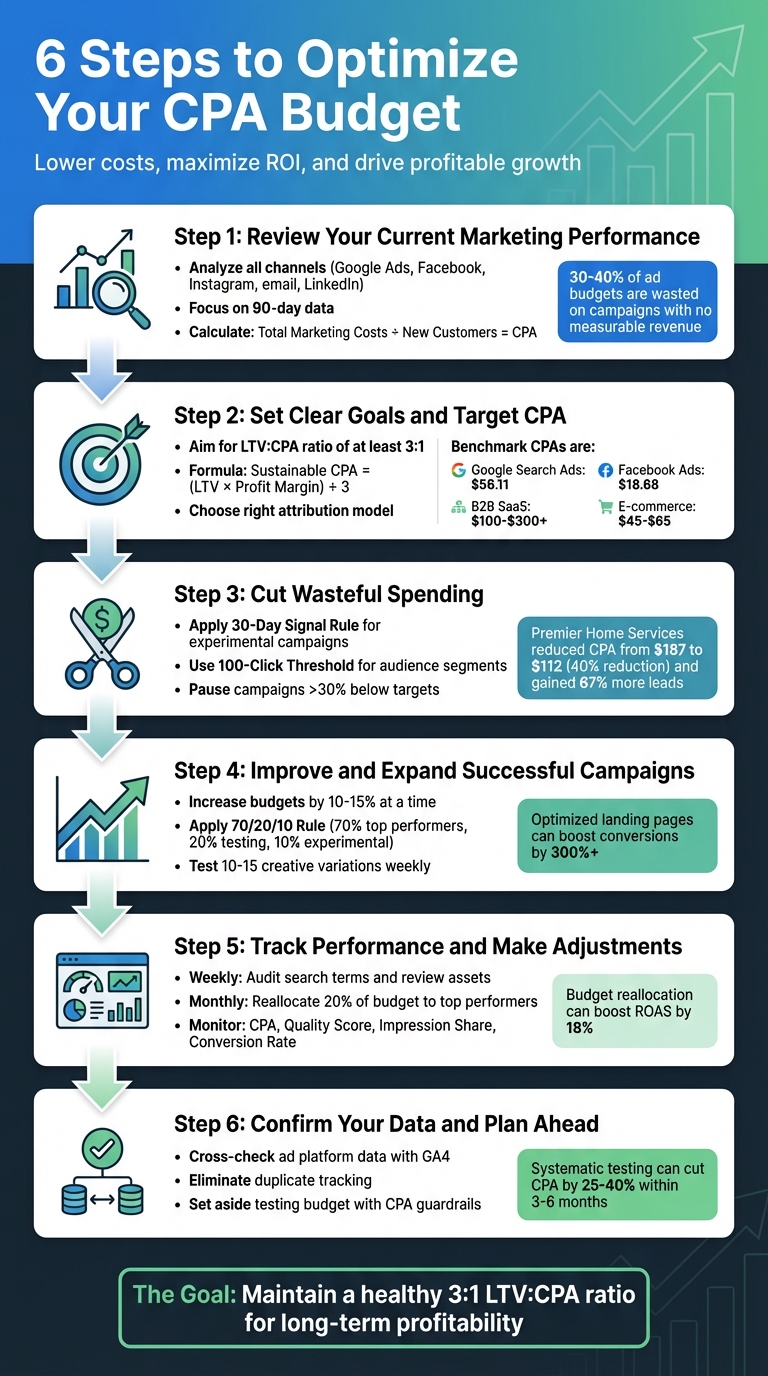
6-Step CPA Budget Optimization Process for Marketing ROI
How Can You Lower Your CPA With PPC Bid Optimization? – Marketing and Advertising Guru
sbb-itb-2ec70df
Step 1: Review Your Current Marketing Performance
Start by analyzing how your marketing efforts are performing across all active channels – think Google Ads, Facebook, Instagram, email campaigns, and LinkedIn. Focus on gathering data from the past 90 days, including details on spend, leads generated, and customer conversions.
The key is to prioritize metrics that directly impact revenue. While figures like cost-per-click (CPC) and cost-per-lead (CPL) can show interest levels, cost per acquisition (CPA) is the most meaningful metric. Why? Because it reveals how much it costs to turn a lead into a paying customer. Angrez Aley, Senior Paid Ads Manager at Ryze AI, sums it up perfectly:
"CPA is the ultimate gut check for marketing efficiency. It answers the question that matters: are you spending budget wisely to bring in actual, paying customers?"
This review is essential for reallocating your budget effectively and ensuring long-term profitability. Once you’ve analyzed this data, you’ll be ready to set clear CPA targets in the next step.
Review All Marketing Channels and Campaigns
Start by collecting detailed spend and conversion data from every platform you’re using. Don’t rely on blended averages – break down the data by channel, audience type, device, and even location. This will help you identify underperforming areas with a Google Ads audit. For instance, you might find that improving your site’s load time boosts conversions. Research shows that e-commerce sites with a one-second load time can hit conversion rates of 3.05%, while those with a five-second load time drop to just 1.08%.
It’s also important to assess lead quality, not just quantity. A channel providing $10 leads with a 2% close rate is far less effective than one generating $50 leads with a 20% close rate. To ensure accuracy, manually verify your conversion tracking. This includes checking form submissions, phone calls, and chat interactions. Phone calls, in particular, are often overlooked but can be a goldmine for local businesses.
Calculate Your Actual CPA
To get an accurate CPA, validate the conversions reported by ad platforms against your CRM or sales data. Platforms like Facebook Pixel or Google Ads might over-report conversions due to different attribution windows.
Here’s the formula to calculate your CPA:
Total Marketing Costs ÷ Total Number of New Customers = CPA.
Make sure to include all relevant costs – ad spend, software, agency fees, creative production, and team salaries. For retail businesses, don’t forget to adjust your CPA after the return window closes by subtracting refunded orders from your total acquisitions.
Once you’ve calculated your CPA, compare it to industry benchmarks. For example:
- Google Search Ads average around $56.11 per acquisition.
- Facebook Ads typically cost about $18.68 per acquisition.
These benchmarks vary by industry. B2B SaaS companies often see CPAs between $100 and $300+, while e-commerce businesses usually range from $45 to $65. Use these figures as a baseline to guide your optimization efforts moving forward.
Step 2: Set Clear Goals and Target CPA
With performance data at your fingertips, it’s time to set clear target CPAs (Cost Per Acquisition). This number represents the maximum you’re willing to spend to acquire a customer profitably. But it’s not just a random figure – it has to align with your financial realities. When your target CPA is grounded in your business’s economics, every dollar spent on marketing contributes to actual growth.
A good rule of thumb? Aim for an LTV (Lifetime Value) to CPA ratio of at least 3:1. Anything less, like a 1:1 ratio, means you’re losing money once operating costs and the cost of goods sold are factored in. On the other hand, achieving a 4:1 ratio or higher signals you’ve built a highly efficient acquisition process, ready to scale aggressively. As Rob Andolina, Founder and CEO of Keywordme, explains:
"As long as your LTV is significantly higher than your CPA, you’re on the right track to building a profitable, sustainable business."
When calculating your CPA, don’t just focus on revenue – profit margins matter. Here’s a quick formula: Sustainable CPA = (LTV × Profit Margin) ÷ 3. For example, if your LTV is $2,000 and your profit margin is 40%, your sustainable CPA would be:
($2,000 × 0.40) ÷ 3 = $267.
This ensures you’re not just breaking even but actually driving profitability.
Calculate Target CPA Based on Customer Lifetime Value
If you haven’t already, start by calculating your Customer Lifetime Value (LTV). This represents the total revenue a customer generates throughout their relationship with your business, minus costs like goods sold and servicing expenses. For subscription businesses, this could span years; for e-commerce, it might include repeat purchases and even referrals.
Once you know your LTV, work backward to figure out your maximum affordable CPA. This calculation helps you decide which marketing channels can handle higher spending while staying profitable. Keep in mind that CPAs will vary across channels, and that’s fine. The key is ensuring each channel stays within your profitability limits. Your target CPA should reflect your business model and margins – not just industry averages.
Another factor to consider is your payback period – how long it takes to recoup the cost of acquiring a customer. Many SaaS companies aim for a payback period of less than 12 months. If your payback period stretches too long, even a healthy LTV-to-CPA ratio won’t save you from potential cash flow issues.
Finally, make sure to choose an attribution model that accurately represents your customer journey.
Select the Right Attribution Model
Attribution is critical for understanding how different touchpoints impact your CPA. Your attribution model determines how credit is assigned across the customer journey, and picking the wrong one can skew your results. For instance, last-click attribution gives all the credit to the final interaction before conversion. While this works for short sales cycles, it tends to undervalue top-of-funnel efforts like social media or content marketing.
For longer and more complex customer journeys, multi-touch attribution (MTA) offers a clearer picture by tracking interactions across devices and channels. Even better, data-driven attribution (DDA) uses machine learning to assign credit based on how each touchpoint influences the likelihood of conversion. With tools like Google Analytics 4 now defaulting to DDA, this approach is becoming the norm.
If you’re navigating a privacy-first environment or managing rapid growth, Marketing Mix Modeling (MMM) might be a better fit. This method uses statistical analysis to link spending patterns with overall sales, making it ideal for scenarios where tracking individual users isn’t possible. The trick is to align your attribution model with your sales cycle and data capabilities. Businesses with simple sales processes can start with last-click, but as your marketing strategy grows more complex, your attribution approach should evolve too.
Step 3: Cut Wasteful Spending
Now that you’ve set clear CPA targets, it’s time to tackle wasteful spending. Did you know that most ad accounts waste 30% to 40% of their budget on campaigns that generate no measurable revenue? This inefficiency can seriously hurt your bottom line. Interestingly, around 80% of budget waste comes from just 20% of activities. On the flip side, about 20% of your audience often drives 80% of your most efficient conversions. So, focusing on the right areas can make a big difference.
Start by auditing your campaigns against your CPA targets. Don’t just look at the number of conversions – check if those conversions are profitable. If a campaign is delivering leads but the CPA exceeds your profit margin, you’re essentially paying to lose money. Once you identify these inefficient campaigns, it’s time to cut them loose.
Find and Stop Low-Performing Campaigns
To eliminate waste, set clear criteria for identifying low-performing campaigns. For experimental campaigns, apply the 30-Day Signal Rule – if there’s no significant improvement within 30 days, reallocate the budget. For specific audience segments or geographic areas, use the 100-Click Threshold – exclude any segment that gets 100+ clicks without a single conversion.
Dive into the metrics. For example, review search terms in Google Ads to weed out irrelevant queries. Broad match keywords without proper negative keywords can account for 35% of wasted ad spend. Here’s a real-world example: Premier Home Services partnered with Stratagem Systems to conduct weekly search term reviews over a 60-day period. By cutting irrelevant queries, David Ramirez’s team slashed their Google Ads CPA from $187 to $112, a 40% reduction, while maintaining their $25,000 monthly budget. This adjustment led to 67% more leads by reallocating funds from underperforming segments to high-intent campaigns.
Keep an eye on your Quality Score in Google Ads too. A low score increases your cost per click, which drives up your CPA. Geographic targeting is another area to scrutinize – 18% of budget waste comes from poor geographic targeting. If certain locations consistently exceed your CPA threshold, shift that budget elsewhere. For instance, moving funds from a $142 CPA region to an $89 CPA region can immediately cut your overall CPA by 18%.
Move Budget to High-Performing Campaigns
Once you’ve paused the underperforming campaigns, don’t let that budget go to waste. Redirect it to campaigns that are exceeding your CPA targets. Use a tiered system to categorize your campaigns:
| Performance Tier | Metric Status | Budget Action |
|---|---|---|
| Tier 1: High Performers | ROAS >20% above target | Increase budget by 15-30% |
| Tier 2: Solid Performers | Meeting ROAS/CPA targets | Maintain current budget |
| Tier 3: Underperformers | 15-30% below targets for 2+ weeks | Reduce budget by 30-50%; reallocate to Tier 1 |
| Tier 4: Failing | >30% below targets; no improvement | Pause immediately; reallocate 100% of budget |
Make adjustments gradually to avoid disrupting campaign momentum. For underperformers, cut budgets by 20-30% and monitor for 7-14 days before making additional changes. For high performers, increase budgets by 15-30% at a time while keeping an eye out for diminishing returns. Timing matters too – shift budgets on Tuesdays or Wednesdays in the early morning to minimize disruption, avoiding Mondays or peak traffic periods.
The cost of keeping money in the wrong campaigns can be staggering. For example, if Campaign A has a 2:1 ROAS and Campaign B has a 5.25:1 ROAS, every $1,000 you leave in Campaign A is costing you $3,250 in unrealized revenue. By reallocating budgets strategically, you can lower your CPA while maximizing your returns.
Step 4: Improve and Expand Successful Campaigns
Once you’ve cut out wasteful spending, it’s time to focus on scaling your best-performing campaigns. But remember, scaling should be done carefully to maintain efficiency. If you go too fast, your costs can skyrocket, and the efficiency that made your campaigns successful could disappear.
Increase Spending on Top Campaigns
Focus on campaigns that generate 15–30 conversions per month – this gives you enough data for automated bidding to work effectively. Before increasing budgets, check your Impression Share. If your campaign is already capturing most available impressions, increasing the budget might not deliver much value and could just inflate costs.
When scaling, take it slow. Stick to 10–15% budget increases at a time. A good rule of thumb is the 70/20/10 Rule: allocate 70% of your budget to your top-performing "Performance Engines", 20% to testing new opportunities, and 10% to riskier, experimental ideas.
High Quality Scores (7–10) are your ally here. They help lower your CPCs, making it more affordable to scale. As Ian Dawson, Lead Strategist at HawkSEM, explains:
"Improving QS can help reduce click costs, which in turn help lower CPA".
Keep an eye on key metrics like Conversion Rate, Quality Score, CTR, CPC, and CPA. Also, check top-of-page bid estimates to avoid overbidding, which can erode your campaign’s efficiency. After increasing your budget, make sure to update your creatives to keep the momentum going.
Test Variations for Better Results
Once you’ve started scaling, it’s time to test new creative elements. Testing helps you find better-performing hooks and offers. In 2026, creative quality plays a huge role in campaign success, with top advertisers testing 10–15 creative variations each week. Instead of making small tweaks, try completely different approaches – new headlines, offers, or angles. Focus on high-impact elements like the first 3 seconds of a video or the main headline of an ad.
If your CTR drops by 20%, it’s time to refresh your ads. Update ad copy every 30–45 days to keep performance strong. Use at least two to three Responsive Search Ads (RSAs) per ad group – RSAs often deliver 6% higher CTR compared to static ads.
Finally, make sure your landing pages match your ad promises. A well-optimized landing page can boost conversions by 300% or more, which directly reduces your CPA. Keep load times under 3 seconds, as every additional second increases bounce rates by 7%.
Step 5: Track Performance and Make Adjustments
Once you’ve scaled your campaigns, keeping a close eye on performance becomes essential to maintain your CPA improvements. Without regular tracking and tweaks, even the most effective campaigns can start to drift, leading to wasted budget.
Create Rules for Budget Changes
Using automated rules for budget adjustments can save time and ensure quick responses to performance changes. Set up "if-then" conditions based on key thresholds. For example:
- If a campaign’s CPA exceeds the target by 25% for two consecutive weeks, consider pausing it.
- If a campaign is nearing its spending cap but delivering strong results, increase its budget by 15–20%.
Organize these rules into performance-based tiers:
- Scale up when CPA is below 0.8× your target.
- Maintain the budget when CPA is between 0.8× and 1.2×.
- Cut spending by 30–50% when CPA ranges from 1.2× to 2×.
- Pause campaigns if CPA exceeds 2× your target.
To avoid overreacting to small sample sizes, wait for a minimum of 5–10 conversions before triggering any rule. Use 3–7 day windows to smooth out daily fluctuations. Start with a "notification only" mode for the first week or two to observe how your rules perform before enabling automated changes.
Alex Sanivsky from GrowMyAds.com offers a helpful tip:
"The strategy that actually works? Gradual increases. Never more than 20% budget change at once. Allow 2+ weeks of learning at each level before deciding if the new CPA works for your business model."
Even with automated rules, regular oversight is crucial to catch any unexpected issues.
Review Performance on a Regular Schedule
Routine reviews help spot and address problems early. Conduct weekly audits of search term reports to exclude irrelevant queries and review asset combination reports to pause underperforming creatives. Allow 7–14 days between major bidding adjustments to let the algorithm stabilize.
Each month, reallocate your budget to focus on top-performing campaigns. Advertisers who shift 20% of their monthly budget toward high-performing campaigns often see an 18% boost in ROAS. Additionally, run A/B tests for 2–4 weeks to ensure results are statistically reliable before making permanent changes.
Key metrics to monitor include CPA, Quality Score, Impression Share, Conversion Rate, and Customer Lifetime Value. For example, every point your Quality Score drops below 5/10 can increase your CPA by 16%. Also, keep an eye on "Budget Lost (due to budget)" to identify campaigns that could benefit from additional investment.
Step 6: Confirm Your Data and Plan Ahead
Make sure your data is solid and allocate resources for future growth. Without reliable numbers, even the best strategies can steer you off course.
Check Conversion Data Accuracy
Your CPA metrics are only as good as the data behind them. Cross-check data from your ad platform with GA4 to address any inconsistencies caused by differences in attribution windows or tracking methods.
Watch out for duplicate tracking issues. For example, if multiple tags fire on a "thank you" page, they could inflate your conversion counts. Make sure each confirmation event triggers just once per transaction to keep your data clean and accurate.
Take a close look at your conversion definitions. Focus on tracking high-value actions like purchases or qualified leads as "Primary" conversions. Meanwhile, softer actions – like page views or clicks – should be labeled as "Secondary". You can also use analytics segments to distinguish between first-time purchases and repeat buyers. This ensures your CPA reflects the true cost of acquiring new customers, not retaining existing ones.
For businesses with extended sales cycles, consider integrating CRM data from tools like HubSpot or Salesforce. Offline conversion imports can help confirm whether digital leads turn into actual sales or qualified opportunities, instead of just form submissions with no follow-up value.
Once your conversion data is accurate, shift your attention to testing and growth.
Set Aside Budget for Testing
Dedicate part of your monthly budget to testing new channels, audiences, or creative strategies. Think of this as an "innovation fund" that allows you to experiment without risking your core performance metrics. Once you’re confident in your data, small-scale tests can reveal new opportunities.
When testing, use bid limits to keep automated bidding from overspending during the learning phase. Set up automated alerts and CPA guardrails to quickly adjust if performance starts to drift. Test individual elements – like headlines, images, or audience segments – one at a time to identify what drives results. And don’t stop testing until you’ve reached statistical significance to ensure your findings are reliable.
Optimizing your landing pages alone can increase conversions by more than 300%. Additionally, systematic testing of targeting and creatives can cut your CPA by 25–40% within three to six months.
"The lowest CPA isn’t the goal. The lowest CPA that delivers customers who generate profit is the goal." – AdBid
Conclusion
By following this checklist, you can weave data-backed insights into every part of your marketing strategy. Optimizing your CPA budget isn’t a one-time task – it’s an ongoing process of making informed, consistent adjustments. These six steps shift your mindset from reactive spending to purposeful budget planning, ensuring every dollar contributes to measurable revenue rather than superficial metrics.
With ad costs climbing and competition intensifying as 2026 approaches, refining your CPA strategy is no longer just a smart move – it’s essential for staying in the game. Too many businesses waste money on campaigns that underperform, target the wrong audiences, or use ineffective bidding methods. Fixing these issues allows you to redirect your budget toward channels that actually drive growth.
But remember, the goal isn’t simply to achieve the lowest CPA possible. Instead, aim to keep a healthy balance between Customer Lifetime Value and acquisition costs. The 3:1 ratio mentioned earlier is a solid benchmark for ensuring long-term profitability.
If you’re looking for expert guidance tailored to your business needs, Growth-onomics offers data-driven performance marketing solutions. Their approach mirrors the steps in this checklist, helping you identify waste, fine-tune budget allocation, enhance conversion tracking, and scale successful channels – all while maintaining room for controlled testing to fuel future growth.
This systematic process not only optimizes your current spending but also lays the groundwork for sustainable, scalable growth. Take the time to audit your performance, set clear goals, and commit to regular evaluations. Small, steady improvements add up – and that’s how you turn your marketing budget into a reliable engine for profitable growth.
FAQs
What’s the fastest way to find wasted ad spend?
Conducting a thorough audit is the fastest way to spot wasted ad spend. Pay close attention to key areas like account structure, targeting, bidding strategies, and tracking accuracy. Common pitfalls often include messy account organization, irrelevant keywords, and poorly defined targeting. A well-structured audit not only pinpoints inefficiencies but also helps you focus on the most critical areas to fix, ensuring your budget is used more effectively.
How do I set a target CPA if my LTV is unclear?
If you’re unsure about your lifetime value (LTV), start by using industry benchmarks and data from your current campaigns to establish a target cost per acquisition (CPA). Choose a CPA that fits within your profit margins and aligns with typical figures in your industry. As you collect more data, fine-tune this target based on the quality of your conversions and the actual costs involved. Over time, as you gain a better understanding of your customer value, shift to an LTV-based target for more precise and effective budgeting.
Which attribution model should I use for my sales cycle?
For sales cycles involving several interactions across different channels, a multi-touch attribution model works best. Approaches like linear attribution or time decay attribution distribute credit across each touchpoint, giving a more accurate picture of how each interaction contributes to overall performance.
