


Third-party cookies are fading out, and that means you can’t rely on old attribution setups anymore. If you want cleaner measurement now, I’d focus on five things: audit where data drops, collect first-party IDs, move key tracking to your server, use privacy-safe crediting, and check results against sales data.
Here’s the short version:
- Browsers and ad blockers cut tracking data
- Consent rules change what you can collect and send
- First-party data like email, login IDs, and CRM records now matter more
- Server-side tracking can recover part of the lost signal
- Deterministic and modeled attribution should work together, not alone
- Validation is what keeps reports tied to revenue instead of guesswork
A few numbers make the problem plain:
- Safari can limit some first-party cookie use to 7 days, and in some cases 24 hours
- Ad blockers affect about 29.5% of users worldwide
- Client-side tracking may only record 60% to 80% of events in some setups
- Schema issues can drop 20% to 30% of event data during changes or migrations
If I were setting this up as an AI-performance marketing agency for an SMB, I wouldn’t chase perfect attribution. I’d build a privacy-first system that is accurate enough for budget decisions, lean enough to stay compliant, and simple enough to maintain.
This article walks through that process from start to finish.
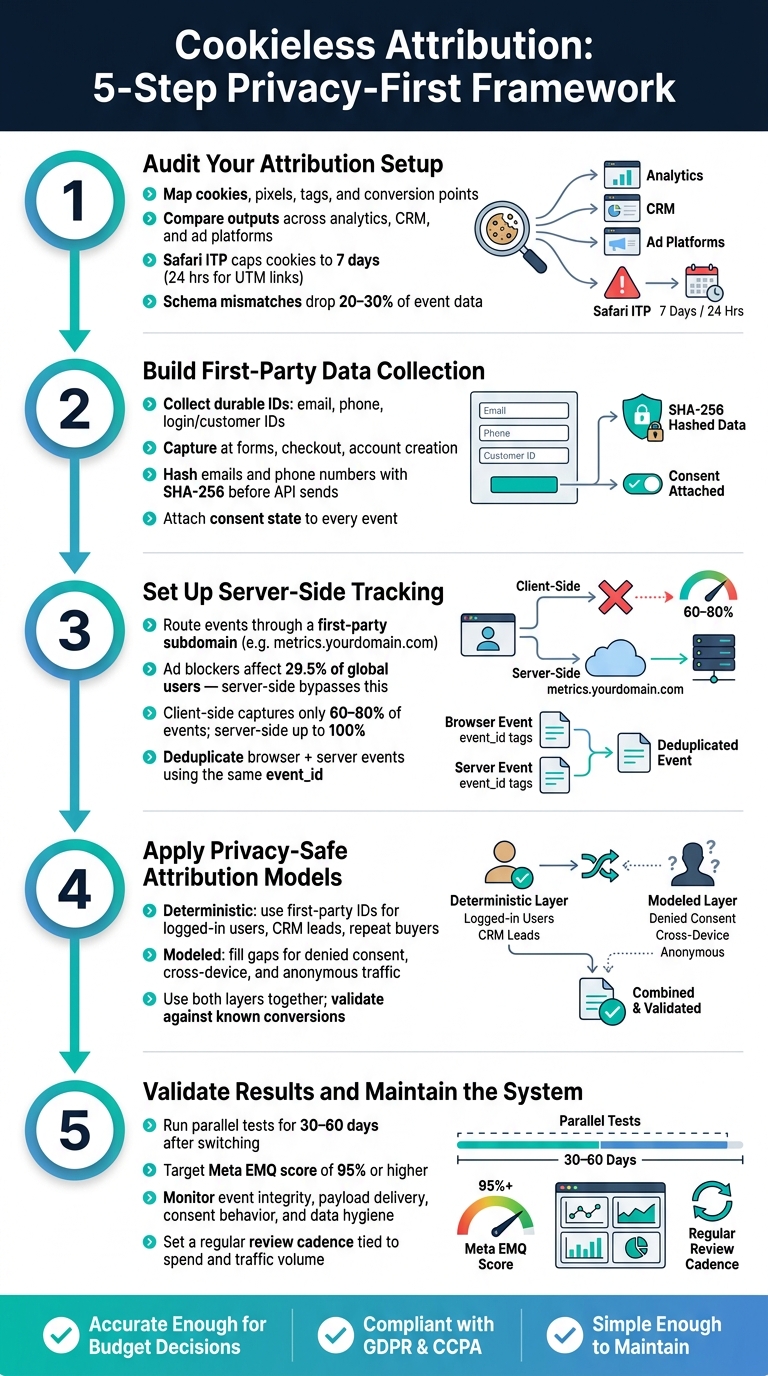
Cookieless Attribution: 5-Step Privacy-First Framework
Future-Proofing Your Marketing in a Cookieless World
sbb-itb-2ec70df
1. Audit Your Current Attribution Setup
Start by mapping where signal gets lost in your stack. This isn’t just a list of tools. It’s a look at how data moves, where it breaks, and what still makes it through.
Map Cookies, Pixels, Tags, and Conversion Points
Write down every part of the setup that touches attribution: analytics tools, ad pixels, conversion events, UTM rules, data layer fields, CRM source fields, and point-of-sale feeds. For each item, note what it depends on:
- browser storage
- client-side scripts
- first-party data
That distinction matters more than it used to.
Safari’s Intelligent Tracking Prevention (ITP) caps JavaScript-set first-party cookies at just 7 days – and drops that window to 24 hours for users arriving via UTM-tagged links. So if your campaigns rely on UTM-tagged URLs, your attribution window may already be far shorter than your team assumes.
Once you’ve mapped the stack, line up what each system records. Don’t guess. Compare the outputs.
Find Where Attribution Loss Is Occurring
Use your inventory to spot mismatches across systems. Put conversion numbers from your website analytics, CRM, e-commerce platform, and ad platforms next to each other. The gaps are where the story starts.
A common pattern looks like this: paid traffic seems fine inside the ad platform, but your site analytics shows far fewer sessions. Or revenue shows up in your backend, yet the attribution path is gone.
Cookie-based analytics now misses a large share of traffic. On top of that, schema mismatches can drop 20% to 30% of event data during migration. That’s not a small leak. That’s a bucket with a hole in it.
Check that required event properties like order_id and currency are present every time, in every system, and in the same format. One missing field or one bad naming rule can throw off reporting across the board.
After you’ve found the tracking gaps, look at whether consent rules control what actually leaves the browser.
Review Consent, Retention, and Data-Sharing Rules
The main test is simple: does consent control collection and forwarding at the event level?
If that consent logic doesn’t travel with the event, data may still be sent to third-party platforms even after a user opts out. That creates two problems at once: a compliance issue and a measurement issue.
In the U.S., California’s CCPA/CPRA sets specific opt-out rules that differ from the opt-in standard under GDPR in Europe, so your consent flows need to reflect where users are located. Beyond consent, spell out your data retention windows. If first-party identifiers are kept for 90 days or 365 days, that should be documented clearly and matched to your privacy policy.
Use this review to find the weakest point in the chain.
| Failure Area | What to Check |
|---|---|
| Event Integrity | Are required events firing with the expected properties on every platform? |
| Payload delivery | Is the payload reaching GA4 and ad platform APIs consistently? |
| Consent handling | Do users who deny consent actually stop sending restricted data? |
| Field hygiene | Are PII values or malformed fields entering the data stream? |
| Traffic Anomalies | Did a drop come from real behavior or broken instrumentation? |
2. Build First-Party Data Collection
Once you know where attribution is falling apart, the next step is to replace what’s missing. In plain English: build a system where you own the data and collect it straight from people who interact with your business. Use the gaps from your audit to decide which identifiers and events matter most.
Collect Durable Identifiers at Owned Touchpoints
For most SMBs, email is the most practical durable identifier. Other durable identifiers include phone numbers, customer IDs, and logged-in account IDs.
Collect them at points that make sense: newsletter signups, account creation, checkout, and lead forms. When someone fills out a form or logs in, you have a clean chance to connect anonymous visits to known contacts by mapping the customer journey.
Before sending sensitive identifiers to ad APIs, hash them. Use SHA-256 for emails and phone numbers before sending them to ad platform APIs like Meta’s Conversions API.
Connect Website, CRM, and Sales Data
Next, connect that data to your CRM and sales records. Join sessions, orders, and customer records so revenue ties back to the original source.
There’s one easy mistake here. If you run both a browser pixel and server-side tracking at the same time, use the same event_id in both places. If you don’t, the same conversion can get counted twice, which inflates your reported numbers.
Those IDs then become your source of truth for later server-side matching.
Add Consent-Aware Collection to Every Form and Event
Consent can’t be an afterthought. It should be part of how each event is set up, not just a banner sitting on top of the site. Attach consent state to every event before it leaves your stack. If a user opts out but that consent state isn’t attached, the data can still be forwarded to third-party platforms. That creates a compliance issue and a measurement issue at the same time.
Under CCPA/CPRA in the U.S., users have the right to opt out of data sharing or selling, and that can cover many standard pixel activities. Keep collection lean. Gather only what you need for reporting and optimization, then build those consent rules into the event flow before launch.
3. Set Up Server-Side Tracking
Once first-party collection is up and running, the next move is to shift event collection off the browser and onto a server you control. That change matters because browser-based pixels are getting less dependable. Ad blockers affect about 29.5% of global users, and Safari’s Intelligent Tracking Prevention (ITP) limits first-party cookies to seven days or less. Server-side tracking helps keep first-party signals that browsers and consent rules now cut off.
Use Server-Side Tagging and Event Forwarding
A simple way to do this is to send one event stream from your site to your server, then pass the needed events to ad platforms. Start with a server-side tag manager on a first-party subdomain like metrics.yourdomain.com. Because the browser sees that as first-party, it can reduce restrictions on your tracking domain.
You’ll also want to deduplicate browser and server events using the same event_id or transaction_id. That gives ad platforms a way to match both signals together. If you skip this step, the same conversion can be counted twice. Set your deduplication rules before you forward any events. It saves headaches later.
Send Conversions Through Secure APIs
Don’t send everything. Track only the events tied to business decisions: purchases, qualified leads, demo requests, and closed-won sales pulled from your CRM. Use the same customer IDs captured at forms, logins, and checkout so records line up across systems.
When data leaves your server, send only hashed identifiers and only the fields each platform needs – nothing extra. Think of it like packing for a short trip: bring what you need, leave the rest behind. Also, write down exactly what leaves your server and where it goes.
Client-Side vs. Server-Side Tracking: A Direct Comparison
Here’s the side-by-side view for cookieless attribution:
| Feature | Client-Side Tracking | Server-Side Tracking |
|---|---|---|
| Privacy | Limited; browser sends data directly to vendors | High; server filters data before forwarding |
| Durability | Low; cookies expire in seven days or less in Safari | High; bypasses browser-level restrictions |
| Effort | Low; simple copy-paste pixels | High; requires server config and API setup |
| Reliability | Fragile; 60–80% capture rate | Strong; up to 100% capture rate |
| Performance | Can slow load times with multiple scripts | Faster; fewer scripts running in the browser |
The setup work is no joke, so don’t rip out client-side tracking all at once. Run server-side and client-side tracking in parallel while you calibrate the system before switching over. Once both paths are stable, you can use the cleaner event stream to calibrate attribution.
With server-side delivery in place, the next step is choosing deterministic or modeled attribution.
4. Apply Privacy-Safe Attribution Models
Next, assign credit using the signals you can trust. The goal here is privacy-compliant credit assignment, not more tracking. Start with deterministic matching when identity is known. Then use modeled attribution for everything else.
Use Deterministic Matching Where First-Party IDs Exist
Use verified first-party IDs to connect touchpoints. Deterministic attribution works when you have a verified identifier linking those touchpoints.
This works well for logged-in users, repeat buyers, and CRM-tracked leads. For B2B SMBs, deterministic matching through Conversion APIs can help preserve attribution across long sales cycles, even when cookies expire. And in B2B, you may need to map conversions to the buying account, not just one person, because the click and the close often come from different people.
When identity drops out, move the rest of that traffic into modeled attribution.
Use Modeled Attribution for Incomplete Journeys
Modeled attribution helps fill gaps when identifiers are missing, consent is denied, or cross-device behavior can’t be observed directly.
Use modeled reporting built into your ad platforms where it’s available.
The key point is simple: use modeled attribution only for gaps you can’t observe directly.
Deterministic vs. Modeled Attribution: Choosing the Right Fit
| Feature | Deterministic Attribution | Modeled Attribution |
|---|---|---|
| Inputs | First-party IDs (emails, logins, CRM data) | Aggregated historical data and behavioral patterns |
| Confidence | High – based on verified 1:1 matches | Medium – based on statistical probability |
| Privacy Fit | Requires explicit consent for PII handling | Excellent – uses aggregated, non-PII data |
| Best Use Case | Logged-in users, repeat buyers, B2B sales pipelines | Top-of-funnel, cross-device gaps, denied consent traffic |
| SMB Suitability | Key for lead-gen and CRM-heavy sales teams | Best for high-volume traffic and multi-channel budget decisions |
Most SMBs need both layers. A good rule of thumb: compare both outputs against actual conversions before you use them in reporting. In plain English, don’t just trust the dashboard because it looks neat. Check both layers against known conversions before you depend on them.
5. Validate Results and Maintain the System
Once your cookieless setup is live, validate it with parallel tests, then monitor it on a set schedule.
Run Parallel Tests Against Existing Reports
After shifting to server-side tracking and modeled attribution, check the new numbers against known conversions before you change budgets. Compare event counts for key flows – landing page visits, signups, checkouts, and purchases – across both systems for 30 to 60 days.
Use your CRM or internal database as the single source of truth. A lift in reported conversions can happen, and that isn’t unusual. But if the gap is large, dig into it before you move budget around. On Meta, use EMQ to confirm deduplication and match quality. A score of 95% or higher is the target.
Check Data Quality and Investigate Gaps
If the numbers split apart, first figure out whether the problem comes from attribution logic or broken instrumentation.
Silent failures are the big danger in cookieless stacks. A broken webhook or a schema mismatch usually won’t blow up your dashboard. It just bends the reporting in the background, which is often worse.
Run regular checks across these five areas:
| Failure Area | What to Check |
|---|---|
| Event Integrity | Are required events firing with all expected properties and parameters? |
| Payload Delivery | Is the payload reaching GA4, ad platform APIs, and your data warehouse consistently? |
| Consent Behavior | Do users who deny consent actually stop sending restricted data? |
| Data Hygiene | Are malformed values or unhashed PII entering the stream? |
| Traffic Anomalies | Did a sudden drop come from real behavior or broken instrumentation? |
Set a review cadence based on spend and traffic volume, then check more often as both go up.
That way, attribution stays tied to real revenue, not just whatever the dashboard happens to show that week.
Conclusion: Keep Attribution Accurate, Compliant, and Useful
The five steps in this guide – audit your current setup, build first-party data collection, shift critical events to server-side tracking, apply privacy-safe attribution models, and validate results on a regular basis – work best as one system, not a simple checklist.
"Modern measurement requires more than one tool. These solutions work best when combined with marketing science-backed methods like MMM and testing to validate impact." – Bryce Hamlin, VP, Data Intelligence, Power Digital
The goal isn’t perfect data. It’s data you can trust – accurate enough to make budget calls with confidence, compliant enough to avoid legal trouble, and maintained well enough that small mistakes don’t snowball into bigger ones.
FAQs
What should I fix first in a cookieless setup?
Start with server-side tracking. It’s the foundation of a cookieless attribution setup. Without it, other methods often fall short.
With server-side tracking, data collection moves from the browser to your own server. That helps cut data loss caused by browser restrictions, ad blockers, and privacy updates. Once that setup is in place, it becomes much easier to support first-party data collection and other privacy-compliant measurement methods.
How much data can server-side tracking recover?
Server-side tracking can recover about 99% of conversion data that might otherwise get lost because of browser restrictions, ad blockers, or cookie limits.
Instead of relying on the browser alone, it sends data through your own server. That shift can increase tracked conversions by 20% to 40% compared with standard pixel-based setups.
When should I use modeled attribution?
Use modeled attribution when direct tracking is missing or only gives you part of the picture, like when users decline consent or browser limits leave holes in your data.
It helps patch those gaps in the customer journey by estimating what likely happened but wasn’t observed. That matters most for channels that are tough to track, such as TV, out-of-home, podcasts, and upper-funnel digital campaigns.