


Engagement tracking is critical for understanding how users interact with your content – but it’s easy to get it wrong. Here’s what you need to know:
- Mistakes like fragmented data, inconsistent metrics, and over-reliance on vanity metrics can cost you money and obscure real insights.
- Tracking errors lead to wasted ad budgets, inaccurate ROI calculations, and missed opportunities for growth.
- Fixes include standardizing naming conventions, focusing on meaningful metrics like retention rates, and automating tracking to reduce errors.
Key takeaway: Avoiding these mistakes ensures your data drives better decisions and real business results. Let’s break down the common pitfalls and how to fix them.
The mobile analytics metrics teams should track to boost app engagement
sbb-itb-2ec70df
Common Engagement Tracking Mistakes and Their Fixes
Tracking engagement effectively can be tricky, especially when common mistakes creep into your process. Let’s break down some frequent errors and how to address them.
Mistake 1: Relying on Fragmented Data Across Platforms
When data is scattered across platforms, it’s tough to see the full picture of your campaigns. Things get even messier when teams use inconsistent naming conventions – for instance, “BlackFriday_Sale” on Facebook versus “Black_Friday_Sale” in Google Ads. Dylan Petersson from CampaignTracker highlights the issue:
"Without a standardized naming system, monitoring variations across multiple campaigns becomes chaotic. This inconsistency can lead to misleading data interpretations or even lost data".
On top of that, incorrect UTM parameters can misclassify traffic, making ROI calculations unreliable. If your team doesn’t follow a unified structure, you’re left guessing instead of making data-driven decisions.
The fix: Create a centralized tracking plan that everyone adheres to. Use a unified dashboard to bring all platform data together. Standardize naming conventions – decide on rules for underscores, dashes, and capitalization – and stick to them. UTM templates and regular audits can help eliminate manual errors.
Once you’ve cleaned up your data, ensure your metrics are defined consistently.
Mistake 2: Using Inconsistent Metric Definitions
Different platforms often define the same metric in different ways. For example, one platform might count a quick interaction as an "engagement", while your team might define it as a meaningful action like a comment or click. Even slight differences, like tracking "Sign Up" in one system and "Signed Up" in another, can fragment your data. This inconsistency inflates conversion counts and skews ROI calculations. Worse yet, minor interactions counted as "conversions" can make your reports look good while hiding the fact that they don’t drive real results.
The fix: Create a "source of truth" document that defines every metric, event, and property required for tracking. Use tools like Google Sheets or Airtable to manage this plan, and enforce rules for things like abbreviations and separators. Assign one person to oversee analytics to avoid uncoordinated changes. Alex Birkett from HubSpot warns:
"If anyone can implement or change event tracking protocols, you’re going to be living in chaos".
Schedule quarterly audits to ensure your metrics align with your goals.
Next, focus on tracking metrics that matter.
Mistake 3: Overdependence on Superficial Metrics
Metrics like pageviews and likes might look impressive, but they don’t guarantee meaningful engagement. These so-called "vanity metrics" can give a false sense of success while masking deeper issues. For example, a high session duration could mean users are confused, not engaged, and a high bounce rate might just mean users found what they needed quickly.
Relying on these shallow metrics can lead to poor decisions. Some businesses even resort to clickbait tactics to boost numbers, attracting users who don’t convert and hurting revenue in the long run. As Benny (Author) puts it:
"Pageviews tell you humans visited. They do not tell you humans cared".
The fix: Redefine "active users" based on meaningful actions, not just logins. Instead of celebrating total registered users, track retention rates to see if users stay engaged. Focus on metrics that reflect long-term value, like the DAU/MAU ratio (Facebook aims for 50%, while Snapchat exceeds 60% among younger users) or time-to-first-value measures. For instance, HubSpot improved a key metric by 400% by removing barriers in the user journey. Also, use a time threshold (e.g., 30 seconds) in bounce rate calculations to avoid misclassifying meaningful interactions.
But don’t fall into the trap of tracking too much.
Mistake 4: Tracking Too Many Irrelevant Metrics
Trying to monitor every metric under the sun can dilute your insights. Ben Yoskovitz explains:
"One of the most common mistakes is using too many metrics at once. All product initiatives need a clear goal, and if you’re focusing on all of your engagement metrics, you won’t truly measure the impact".
Excessive data creates noise. Nassim Taleb warns that too much data can distract you from critical signals, like "missing the big truck" while crossing the street. Many businesses lose 70% of new users within the first week because they focus on irrelevant metrics instead of identifying the pivotal "aha moment".
The fix: Limit your focus to three to five key metrics that match your current goals. For retention, track cohort retention rates and the DAU/MAU ratio. For growth, measure your word-of-mouth coefficient (new organic users divided by active users) to capture referral activity that traditional attribution might miss. For revenue, monitor metrics like expansion revenue and net revenue retention instead of just total revenue. Identify the moment users realize your product’s value and streamline onboarding to help them get there faster. For example, cutting the time to first value from 10 minutes to 2 minutes could double retention.
Finally, make sure you connect your metrics to real business outcomes.
Mistake 5: Ignoring the Attribution Loop
Engagement metrics mean little if you can’t link them to conversions. Without closed-loop reporting, you might see users interacting with emails or social posts but fail to connect these actions to actual sales or signups. Dylan Petersson from CampaignTracker stresses:
"Failure to capture interaction data across all touchpoints means missing out on a holistic view of customer journeys. This leads to inaccurate ROI assessments".
Without this connection, you risk wasting money on campaigns that look good on paper but don’t drive revenue.
The fix: Use closed-loop reporting systems to track users from their first interaction through conversion. Multi-channel analytics tools can integrate data from social media, email, paid ads, and your website to map every touchpoint. Consistently tag campaigns to trace the full customer journey, and set up automated dashboards to reveal how engagement correlates with revenue. This approach helps you identify which channels actually contribute to growth, not just vanity metrics.
Technical Challenges in Engagement Tracking
Even after you’ve standardized your tracking setup, technical hurdles can still sneak in and compromise your data accuracy. These challenges often work quietly in the background, leading to corrupted data and discrepancies that might only become apparent later.
Data Delays and Manual Processes
One major issue is the delay in data updates. Most tracking integrations don’t operate in real time – they rely on polling intervals, which can range from 5 to 15 minutes. This lag disrupts workflows that depend on up-to-the-minute data.
Manual tracking adds another layer of complexity. When teams manually set up event tracking, errors are common. In fact, 37% of tracked events typically have mistakes or missing information, and over 60% of critical user interactions go untracked because teams fail to anticipate them during setup. Sentioflow emphasizes the outdated nature of this approach:
"Manual event tracking was designed for a web that no longer exists. It is a 2005 solution being forced onto a 2026 problem".
For organizations tracking 30 or more events annually, the time spent troubleshooting integration issues can add up to 4–8 hours each week. Additionally, batch processing for high-data volumes often delays engagement data by 18–24 hours before it reaches tools like CRMs, resulting in 28–56 hours of manual labor annually to manage these disruptions.
The fix: Automate wherever possible. Use real-time APIs instead of batch processing to minimize delays. Tools that automatically capture events – like clicks, scrolls, and form submissions – eliminate the need for manual coding. Real-time monitoring solutions can continuously scan your data pipelines, flagging issues like missing values or drops in event volumes. Trackingplan reports that a well-structured analytics setup can catch 70% of tracking problems before they affect your data.
With delays and manual errors under control, the next hurdle involves tackling integration problems that can further degrade data accuracy.
Integration Issues and Errors
Integration errors are another common obstacle in engagement tracking. These errors often stem from the challenges of translating data between platforms, resulting in only 85–95% accuracy. Problems arise when custom fields are lost, data types conflict (e.g., text vs. numbers), or associations fail to map correctly.
Paul Sullivan from ARISE GTM explains the reality of these issues:
"Integration problems aren’t bugs to fix. They are architectural constraints to accept".
Frequent causes of integration breakdowns include expired API tokens, platform updates introducing new API versions, or sudden changes in field names. Modern privacy features like Intelligent Tracking Prevention (ITP) and cookie blocking further complicate matters, especially for tracking users across devices. Additionally, using multiple tracking methods – like combining direct script insertion with Google Tag Manager – can inflate session counts and distort metrics.
The fix: Start by standardizing your data schemas across all platforms. Create a centralized tracking plan that defines every event, property, and naming convention, and enforce it rigorously. Server-side tracking tools, such as Meta’s Conversions API (CAPI), can bypass browser-based cookie restrictions and improve data reliability. Automated monitoring tools can help detect schema mismatches, null values, or unexpected changes in data volume. Always test new tracking tags in a controlled staging environment before deploying them live. Finally, schedule quarterly audits to identify and fix misfiring events, duplicate tags, or broken UTM parameters before they affect your reports.
How Data Analytics Expertise Solves Tracking Problems
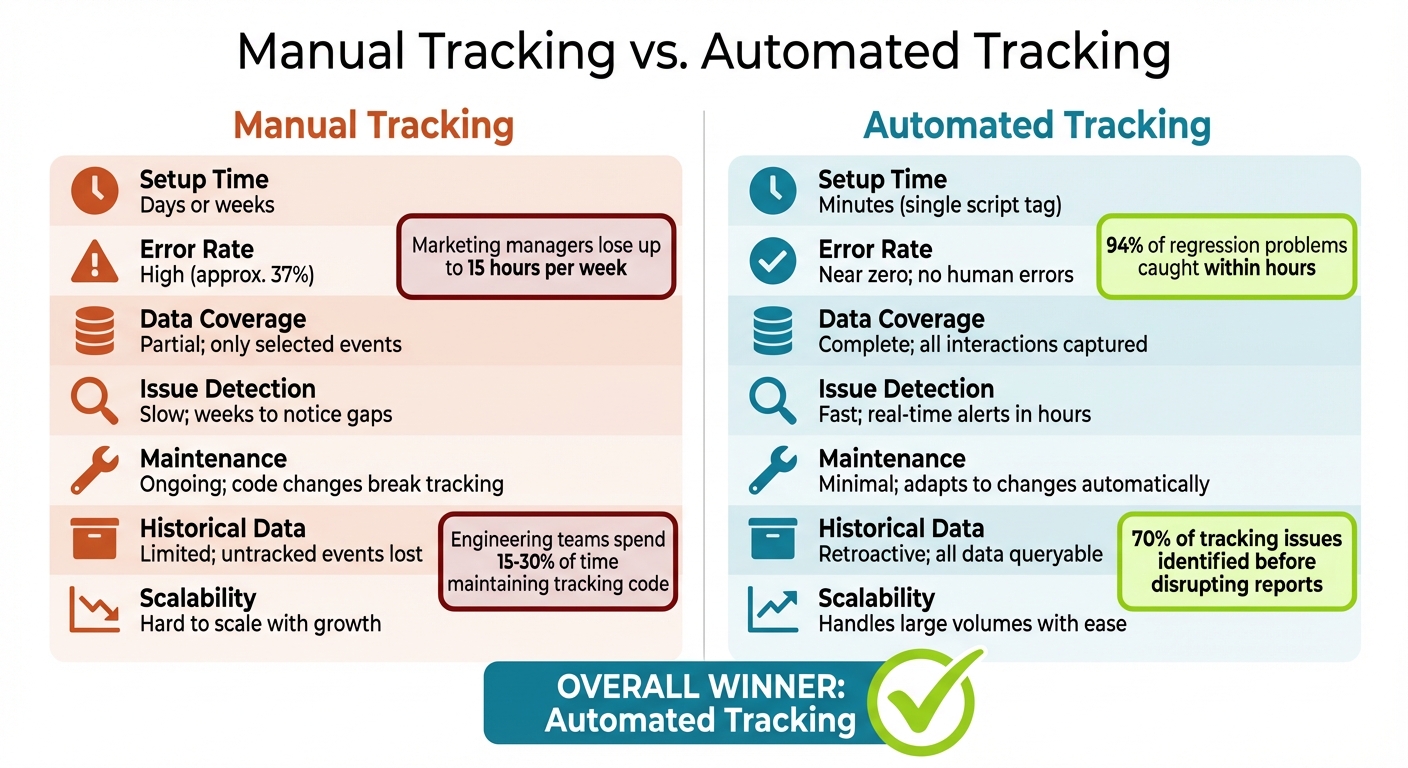
Manual vs Automated Engagement Tracking: Key Differences
Professional data analytics services take tracking reliability to a new level by automating processes and standardizing how data is captured. Manual tracking often leads to ongoing technical debt – each tracking call adds another line of code that requires maintenance. Worse, refactoring components can easily break the connected analytics systems. By addressing these core challenges, expert services eliminate errors and inconsistencies that manual setups struggle to avoid.
Using Professional Data Analytics Services
Services like Growth-onomics shift from reactive troubleshooting to proactive monitoring with automated systems that catch issues before they affect reporting. Did you know that 37% of manually tracked events are riddled with errors or omissions? This flawed data can lead to decisions based on a false sense of confidence.
Growth-onomics tackles these problems with essential safeguards that manual processes often overlook. For starters, they implement standardized governance by creating clear data models and consistent naming conventions across platforms like social media, email, and paid ads. This approach eliminates the "silo effect", where disconnected data makes it impossible for teams to see the full picture. They also assign a single DRI (Directly Responsible Individual) to ensure analytics tracking remains consistent.
Another game-changer is automated systems that capture every user interaction, including micro-behaviors – not just pre-selected events. This means businesses can perform retroactive analysis, diving into past user behavior even if they hadn’t initially planned to track certain metrics. As Alex Birkett, Growth Marketing Manager at HubSpot, explains:
"Data collection is the centerpiece of an analytics strategy and program. Most errors that occur do so at the collection stage".
Beyond improving accuracy, Growth-onomics addresses the time burden of manual tracking. For example, marketing managers lose up to 15 hours per week on manual tracking tasks, while engineering teams spend 15–30% of their time maintaining tracking code for mature products. Automating these processes not only saves time but also allows teams to focus on higher-value strategic work. In fact, focusing on automated metrics can boost marketing ROI by as much as 40%.
Comparison Table: Manual Tracking vs. Automated Tracking
| Aspect | Manual Tracking | Automated Tracking |
|---|---|---|
| Setup Time | Days or weeks | Minutes (single script tag) |
| Error Rate | High (approx. 37%) | Near zero; no human errors |
| Data Coverage | Partial; only selected events | Complete; all interactions captured |
| Issue Detection | Slow; weeks to notice gaps | Fast; real-time alerts in hours |
| Maintenance | Ongoing; code changes break tracking | Minimal; adapts to changes automatically |
| Historical Data | Limited; untracked events lost | Retroactive; all data queryable |
| Scalability | Hard to scale with growth | Handles large volumes with ease |
Automated systems provide a massive advantage in spotting and resolving issues. Teams using automated alerts catch 94% of regression problems within hours, compared to the weeks it takes for manual setups to uncover the same issues. A robust analytics environment can even identify 70% of tracking issues before they have a chance to disrupt reporting.
Conclusion
Engagement tracking errors can drain budgets, mislead decision-making, and obscure your business’s true performance. As Alex Birkett, Growth Marketing Manager at HubSpot, explains:
"Data collection is the centerpiece of an analytics strategy and program. Most errors that occur do so at the collection stage".
These mistakes ripple through every decision that follows, creating a shaky foundation for growth.
To avoid this, shift your focus from vanity metrics to survival metrics like cohort retention, DAU/MAU ratios, and time to first value. Technical accuracy is key – use strict naming conventions and integrate your data effectively. Ameet Khabra, Founder of Hop Skip Media, emphasizes the stakes:
"Incomplete conversion data is a strategic liability. Feeding Google Ads AI the right signals can mean the difference between PPC growth and stagnation".
Regular audits and standardized governance practices are essential to keeping your data clean and actionable over time.
Key Takeaways
- Focus on meaningful, long-term metrics rather than superficial numbers.
- Assign a Directly Responsible Individual (DRI) to oversee tracking consistency.
- Use automated systems to identify and correct errors quickly.
- Conduct regular audits to maintain data accuracy as your business evolves.
For businesses navigating the challenges of modern analytics, working with experts like Growth-onomics can turn tracking headaches into a competitive edge.
Accurate engagement tracking isn’t just a nice-to-have – it’s the difference between basing decisions on reality or operating on flawed assumptions. Strengthen your tracking systems today to build a clear path toward sustainable growth.
FAQs
What engagement metrics should I track instead of pageviews and likes?
When analyzing performance, it’s crucial to track metrics that highlight meaningful user interactions and tie directly to your business objectives. Here are some key metrics to monitor:
- Conversion rate: This shows how effectively your content or campaigns drive desired actions, like purchases or sign-ups.
- Session duration: A longer average session duration often indicates that users find your content engaging.
- Pages per session: This measures how many pages a user visits in one session, reflecting their interest in exploring more of your site.
- Social media engagement: Metrics like comments, shares, and interactions reveal how well your content resonates with your audience on social platforms.
- Customer retention: Understanding how many users keep coming back helps gauge long-term satisfaction and loyalty.
- Net Promoter Score (NPS): This metric measures customer satisfaction and their likelihood of recommending your brand to others.
These metrics go beyond surface-level numbers like pageviews or likes, offering a clearer picture of user behavior and the true impact of your content and campaigns.
How do I create one consistent tracking plan across all platforms?
To streamline event tracking and ensure consistency across platforms, it’s crucial to develop a centralized document that outlines key actions (events) and their naming conventions. This document should act as the single source of truth for your team, reducing confusion and preventing misaligned data.
Steps to Implement:
- Create a Shared Resource: Use a collaborative tool like Google Sheets, Airtable, or another shared platform that allows team members to access and update event tracking details in real time. This ensures everyone is aligned and working from the same guidelines.
- Standardize Naming Conventions: Clearly define how events and properties are named. Use a consistent structure (e.g.,
action_objectorverb_noun) to make tracking intuitive and scalable. Avoid ambiguous or overly generic terms. - Regular Audits and Updates: Schedule periodic reviews of the document to ensure it remains accurate and up to date, especially when introducing new platforms or tools. This practice helps maintain consistency over time.
- Unified Tagging Strategy: Implement a standardized tagging approach, including uniform UTM parameters for campaigns. This step minimizes data fragmentation and provides a complete view of customer interactions across channels.
By centralizing and standardizing these processes, your team will have a clearer, more cohesive approach to event tracking, ensuring better data quality and more actionable insights.
How can I connect engagement to revenue with accurate attribution?
To link customer engagement to revenue effectively, consider using multi-touch attribution models like time decay or position-based methods. These approaches account for all the touchpoints along the customer journey, offering a more comprehensive understanding. Avoid relying on single-touch models, as they often provide incomplete insights into how engagement drives revenue.
For accurate data, make sure to integrate all relevant sources – this includes offline interactions, cross-device activity, and digital channels. Regularly audit your tracking systems to ensure everything is functioning correctly. By consolidating this data, you can create a clear, unified view of customer interactions, making it easier to measure how engagement contributes to revenue growth.
