


Integrating your CMS with social media platforms simplifies content distribution, saves time, and improves engagement tracking. It allows businesses to publish content across platforms simultaneously, access centralized analytics, and maintain consistent branding. This approach benefits marketers by automating repetitive tasks and providing actionable insights into social media performance.
Key takeaways:
- Save Time: Automate content posting and reduce manual tasks by up to 75%.
- Improve Engagement: Track likes, shares, and conversions directly in your CMS.
- Boost Efficiency: Centralize workflows for content creation and team collaboration.
- Enhance Analytics: Use tools like UTM tags and Google Analytics for better performance tracking.
- Strengthen Security: Secure API connections and enforce role-based permissions.
CMS-Social Media Integration Benefits: Time Savings, Engagement & ROI Statistics
2.1 Connecting Convertedin with your Store (CMS) and Social Media Platforms
sbb-itb-2ec70df
Benefits of Connecting Your CMS to Social Media
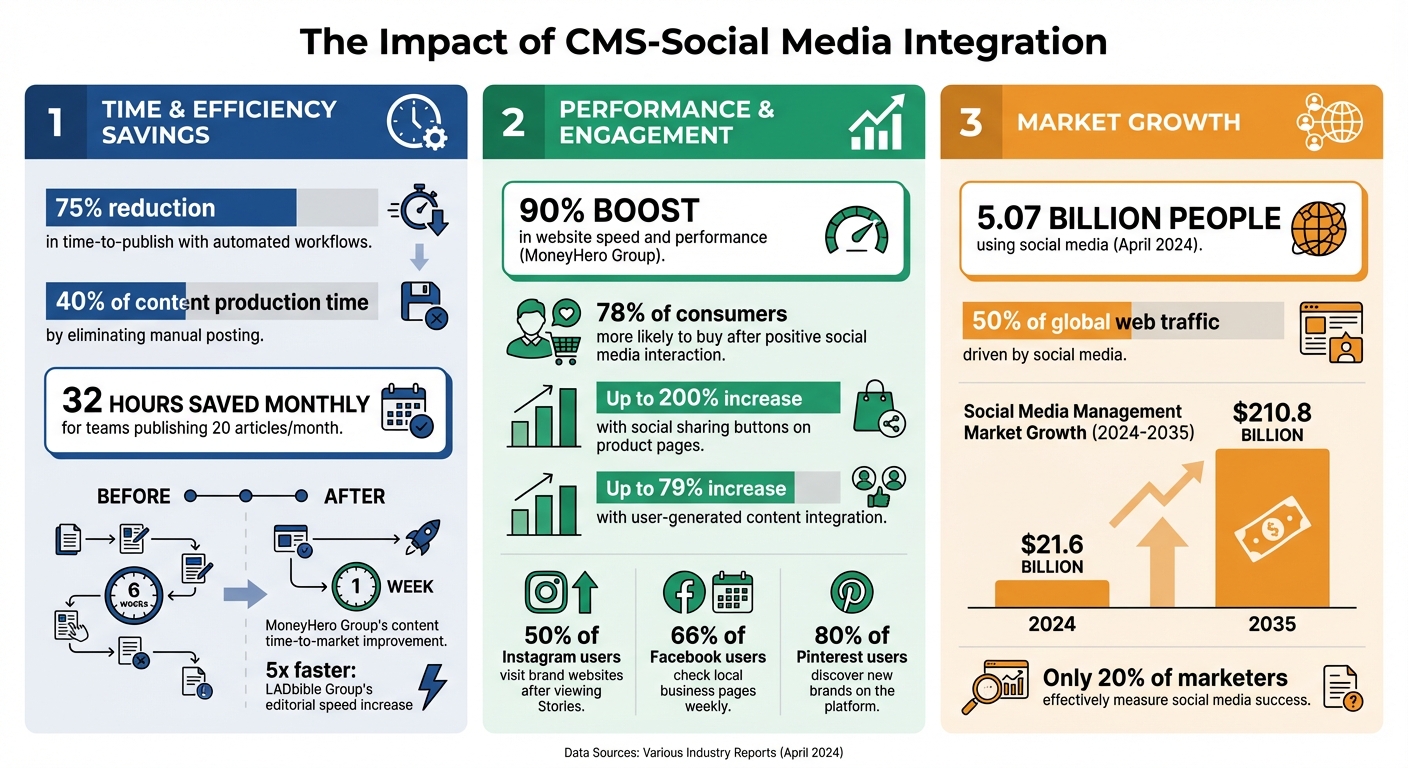
Linking your CMS to social media platforms can be a game-changer. It eliminates the tedious task of manual copy-pasting, saving up to 40% of content production time. For companies that automate their publishing workflows, the results are even better – some report a 75% reduction in time-to-publish. If your team churns out 20 articles a month, that’s about 32 hours of manual work saved every month.
Faster Content Distribution Across Platforms
This integration does more than streamline publishing – it speeds up how quickly your content reaches your audience. By turning your CMS into a central hub, you can publish across platforms like Facebook, Instagram, and LinkedIn simultaneously. Advanced integrations even tailor content formats for platforms like Instagram, X, and LinkedIn – no need to switch between apps.
"CMS integration for automated publishing eliminates this entire bottleneck… human expertise focuses on strategy, analysis, and creation – not on copying and pasting." – Trysight
Another perk? Structured content management lets you group social captions, images, and landing pages into "Content Releases." These releases can launch across platforms and regions at the same time, while automated validation rules ensure everything meets platform standards.
Better Engagement Tracking
Integration doesn’t just save time – it gives you better insights. You’ll have direct access to performance metrics like likes, shares, comments, and click-through rates right in your CMS dashboard. This makes it easier to tweak your strategy in real time based on what’s actually resonating with your audience.
The data speaks volumes: 78% of consumers are more likely to buy from a brand after a positive social media interaction. With engagement data at your fingertips, you can double down on what works. For example, adding social sharing buttons to product pages can boost sales by up to 200%, and integrating user-generated content can increase engagement by up to 79%.
Take MoneyHero Group as an example. In January 2024, they adopted Contentstack’s API-first headless CMS and slashed their content time-to-market from six weeks to just one. Andrew de Ridder, Head of Application Engineering, also reported a 90% boost in website speed and performance while cutting their engineering tools from 97 to 20.
Easier Team Collaboration
Connecting your CMS to social platforms also simplifies teamwork. By centralizing content management, editorial, marketing, and social teams can work from the same repository, avoiding version mix-ups and ensuring brand consistency. Modern headless CMS platforms support real-time co-editing and streamlined approvals, so teams can review and publish posts without hopping between systems.
Single Sign-On (SSO) and role-based permissions make access management a breeze. IT teams can handle credentials through systems like Okta or Gmail instead of juggling separate logins for each platform.
"We can centralize content in Contentstack, so it’s removed the need to go into outside systems to create an article." – Tim Barrett, Head of Product Delivery, LADbible Group
For instance, LADbible Group integrated Contentstack’s headless CMS in January 2024. The result? Their editorial speed increased by five times, and they could generate social media links for monetized videos directly from the CMS interface.
How to Integrate Your CMS with Social Media
Connecting your CMS to social platforms can be done in three main ways: adding sharing buttons, automating posts, and embedding live feeds. Let’s break down each method to simplify your content management.
Add Social Sharing Buttons to Your Website
Social sharing buttons are a simple yet powerful way to encourage visitors to share your content. By adding these buttons, you turn every site visitor into a potential promoter. In fact, social sharing buttons on product pages can increase sales by up to 200%.
If you’re on WordPress, plugins like Social Snap or AddToAny make it easy to add these buttons without needing to code. For other CMS platforms, you can grab API code snippets directly from platforms like Facebook or X and embed them into your site’s template files. Prioritize adding buttons to high-traffic pages like blog posts, product listings, and landing pages, where sharing is most likely to occur.
"Integrating social media tools with your Content Management System (CMS) can streamline your processes, enhance your online presence, and improve engagement with your audience." – Norton Erik
For a streamlined process, use CMS components instead of raw HTML. This approach ensures that if platforms like Facebook update their button designs or API structures, you can make adjustments in one place, and your entire site will update automatically.
Automate Posting with Zapier or Buffer
Automation tools such as Zapier and Buffer can connect your CMS to social platforms, allowing posts to go live automatically. If you’re using WordPress, Jetpack Social is a great choice; it’s built by Automattic and helps share over one million posts daily.
With tools like Zapier, you can create a workflow (or "Zap") that triggers social media posts whenever new content is published on your CMS. For example, when you upload a blog post, the Zap can instantly share it across platforms like Facebook, LinkedIn, X, and Instagram, each with platform-specific captions. RSS by Zapier is another option, pulling updates directly from your site’s RSS feed for automatic distribution.
These tools also allow you to schedule posts for re-sharing, ensuring that evergreen content remains visible. For example, LinkedIn posts can focus on professional takeaways, while Instagram might highlight visuals with casual captions – all generated from the same CMS content. Some platforms, like Jetpack Social, even include AI tools to create tailored captions and generate social media images.
Embed Social Media Feeds on Your Website
Embedding live social feeds on your site can transform it into a dynamic space, showcasing real-time posts, user-generated content, and reviews. This not only keeps your site looking fresh but can also improve your search engine rankings.
There are three ways to embed social feeds:
- Native method: Copy the embed code from platforms like Instagram or X and paste it into your CMS. While free, this option is limited to individual posts and requires manual updates.
- CMS-specific plugins: Tools like Smash Balloon (for WordPress) sync automatically and offer more customization.
- Third-party aggregators: Services like Taggbox, Juicer, or EmbedSocial pull from multiple platforms, provide moderation tools, and let you customize the design to match your site’s branding.
"The brands winning with social media integration aren’t posting more – they’re showcasing their existing content more strategically." – Juicer
To optimize performance, use lazy-loading and moderation filters, ensuring fast load times and appropriate content. Aggregators also help manage API limits. For instance, Instagram allows 200 requests per hour, while X limits free accounts to 1,500 requests per month. These tools use intelligent caching to update content efficiently. Adding live feeds not only engages visitors but also provides valuable insights into your social media performance.
| CMS Platform | Integration Method |
|---|---|
| WordPress | Use plugins like Smash Balloon or add a "Custom HTML" block to paste widget code |
| Shopify | Navigate to ‘Pages’ > ‘Add Page’ and paste the embed code into the ‘Content’ field |
| Wix | Use the ‘+’ icon > ‘Embed & Social’ > ‘Embed Code’ and paste the snippet |
| Squarespace | Add a ‘Code snippet’ block, select ‘Embed data,’ and paste the code |
Measuring Performance and Results
Once you’ve connected your CMS with social media platforms, the next step is to measure how well your content performs. Tracking performance not only helps you understand what’s working but also allows you to refine your strategy. With social media driving about 50% of global web traffic, identifying the platforms that bring the most valuable visitors to your site is critical for maximizing your marketing ROI.
Track Traffic with Google Analytics and UTM Tags
UTM parameters are small snippets of text you can add to URLs to help Google Analytics track where your traffic originates. Without these tags, traffic from social media apps (especially on mobile) might be misclassified as "Direct" traffic.
Focus on the key UTM parameters – source, medium, and campaign – to ensure accurate tracking. Many tools, such as Buffer and Hootsuite, can automatically attach these tags to the links you share.
"When it comes down to it, [leadership] cares the most about ROI. With a Google Analytics dashboard, you can share the success of the conversions you’ve been able to bring to the organization."
– Eileen Kwok, Social and Influencer Strategist, Hootsuite
Be consistent with UTM tags, using lowercase letters to avoid splitting your data into separate categories (e.g., "Social" vs. "social"). Tools like Google’s Campaign URL Builder can help streamline the process and reduce errors.
For WordPress users, plugins like MonsterInsights make it easy to view social media traffic and conversion data directly in your CMS dashboard. Additionally, setting up conversion events in GA4 (formerly called Goals) allows you to track specific actions, such as purchases or newsletter sign-ups, that come from social media links. This gives you a complete picture – not just how many people clicked, but how many completed the desired action.
Monitor Key Metrics
Clicks are important, but they don’t tell the whole story. In fact, only 20% of marketers effectively measure social media success, often because they focus on the wrong metrics. A well-rounded approach balances awareness metrics, engagement metrics, and conversion metrics.
- Awareness Metrics: These include Reach (the number of unique viewers) and Impressions (total views), which help you gauge how many people see your content on social platforms.
- Engagement Metrics: Metrics like Engagement Rate (interactions divided by reach), Shares, and Saves reveal how your audience interacts with your content. A high number of saves, for instance, often indicates content that users find useful enough to revisit later.
- Conversion Metrics: These are the numbers that matter most to your bottom line. Metrics like Click-Through Rate (CTR) and Social Referral Traffic measure how effectively your social posts drive users to your CMS-hosted site. Track Social Conversions to see how many of those visitors take meaningful actions, like making a purchase or becoming a lead.
For paid campaigns, calculate Return on Ad Spend (ROAS). For example, Meta (Facebook) ads have an average cost-per-click of $0.72, making it essential to measure ROI carefully.
"When it comes down to it, [leadership] cares the most about ROI. With a Google Analytics dashboard, you can share the success of the conversions you’ve been able to bring to the organization."
– Eileen Kwok, Social and Influencer Strategist, Hootsuite
Platform-specific insights can also guide your strategy. For example, 50% of Instagram users visit a brand’s website after viewing Stories, 66% of Facebook users check out local business pages weekly, and 80% of active Pinterest users discover new brands or products on the platform. These stats underscore the importance of tracking the entire customer journey – from seeing a post to completing a conversion.
| Metric Category | Key KPIs to Monitor | Primary Goal |
|---|---|---|
| Awareness | Reach, Impressions, Video Views | Brand Visibility |
| Engagement | Engagement Rate, Shares, Saves, Watch Time | Audience Interaction |
| Conversion | Conversion Rate, Social Conversions, ROAS | Business Growth |
| Brand Health | Sentiment, Mentions, Share of Voice | Reputation Management |
GA4’s Assisted Conversions report is especially useful for identifying which social channels contribute to sales, even if they weren’t the final click. This data helps you showcase the long-term value of your social content and justify continued investment in CMS-social media integration. If you’re collaborating with a performance marketing agency like Growth-onomics, they can help you create dashboards using tools like Looker Studio or Databox to combine data from GA4, your CMS, and social platforms into one clear view.
Security and Privacy Considerations
Integrating your CMS with social media platforms can enhance productivity, but it also introduces potential security risks. These connections open up new pathways for attackers, making robust security measures essential. For instance, API vulnerabilities can lead to data breaches if authentication is weak. Storing API keys in publicly accessible code or logs creates a direct route for unauthorized access. Additionally, if data transmission isn’t encrypted, attackers could exploit it through man-in-the-middle attacks. Below are practical steps to secure these connections and manage access effectively.
Secure Your API Connections
Avoid embedding client secrets or API keys directly in your code. Instead, use tools like AWS Secrets Manager or HashiCorp Vault to securely store these credentials. Public code repositories should never include such sensitive information. Ensure all network connections between your CMS and social platforms utilize TLS 1.3, as it offers stronger security than TLS 1.2, which has known vulnerabilities.
"If you use Platform as a developer, you are responsible for securing Platform Data in a way that meets or exceeds industry standards given the data’s sensitivity."
– Meta Developer Data Security Principles
Rotate your API keys every 90 days to limit potential damage if they become compromised. Use an appsecret_proof, a SHA256 hash of your access token, to verify that API requests originate from your server, not a malicious source. Restrict API calls to trusted IP addresses through allow-lists. Lastly, sanitize all data retrieved from social media APIs before displaying it on your website to prevent cross-site scripting (XSS) attacks.
Control Access with Role-Based Permissions
Implement Role-Based Access Control (RBAC) to ensure users and automated tools only have the permissions necessary for their specific tasks. For instance, when using Instagram Shopping, limit permissions to ['CREATE_CONTENT'] instead of granting full management rights, which could lead to accidental or malicious changes.
Separate administrative accounts from regular user accounts to reduce exposure risks. Enforce Multi-Factor Authentication (MFA) for all production and integration accounts. If your organization uses Single Sign-On (SSO) with providers like Okta or Azure AD, you can centralize access management, ensuring that when an employee leaves, their access to both the CMS and social integrations is revoked simultaneously. Keep detailed audit logs of authentication events and permission changes, but ensure sensitive data like secrets and tokens are excluded from these logs.
| Security Principle | Best Practice Implementation |
|---|---|
| Secure Communication | Use TLS 1.3 with trusted certificate authorities; enforce encryption for all connections |
| Key Management | Use secure vaults; rotate keys every 90 days; avoid storing passwords in plain text or code |
| Access Control | Separate roles and permissions; implement role-based restrictions |
| Input Validation | Sanitize data inputs to prevent SQL injection, XSS, or command injection |
| Monitoring | Log authentication and permission changes with consistent timestamps |
Conclusion
Bringing your CMS and social media platforms together can deliver measurable growth for your business. By centralizing content management, automating distribution, and securing your API connections with role-based permissions, you can turn scattered social efforts into a powerful, cohesive strategy. Companies that have embraced headless CMS integration often report faster workflows and greater efficiency.
Beyond these operational advantages, integrated systems help unify your content strategy. When your CMS serves as the single source of truth, you ensure consistent branding, reduce manual workloads, and allow your team to focus on strategic initiatives instead of repetitive tasks.
"When your web and social content spring from the same CMS well, you can rest assured that your branding and language is always consistent" – Brightspot
With 5.07 billion people using social media as of April 2024, the potential to engage your audience is immense – but only if your systems are seamlessly connected.
Start by applying the practices outlined here: add social sharing buttons, automate posting workflows, embed social feeds thoughtfully, and track performance using UTM tags and analytics. Ensure secure API connections and implement role-based permissions to protect your data. As Juicer highlights:
"The brands winning with social media integration aren’t posting more – they’re showcasing their existing content more strategically"
For businesses aiming to maximize ROI from these integrations, data-driven strategies are the key. Companies like Growth-onomics offer performance marketing frameworks that connect SEO, UX, customer journey mapping, and analytics to turn social media into a revenue-generating tool. Their methods focus on tying social media performance directly to outcomes like sales and leads, rather than superficial metrics.
With the social media management market forecasted to grow from $21.6 billion in 2024 to $210.8 billion by 2035, integrating your CMS with social platforms isn’t just a smart move – it’s a necessity. Businesses that act now will position themselves for growth, leaving competitors grappling with disconnected systems and manual inefficiencies.
FAQs
Which CMS-social media integration method should I start with?
The ideal CMS-social media integration varies based on your goals and skill level. If you’re just starting out, simple features like social sharing buttons or embedded posts are a great way to begin. For those with advanced technical knowledge, headless CMS solutions with APIs can provide more flexibility and automation options. If you’re not tech-savvy, CMS-compatible plugins or tools like social media schedulers can make the process easier. Begin with straightforward solutions and expand as your technical capabilities and resources increase.
How do I track social ROI in GA4 without messy attribution?
To get the most out of tracking social ROI in GA4, start by ensuring your cross-channel data collection is well-organized and consistent. Use attribution models that accurately represent your customers’ journey, so you can better understand how different touchpoints contribute to conversions. Regularly check and fine-tune your tracking setup to keep your data reliable and free from attribution errors. These steps are key to gaining dependable insights.
What security steps matter most when connecting social APIs?
When working with social APIs, prioritizing security is non-negotiable. Start by adhering to OAuth 2.0 best practices, which include using secure authorization flows to minimize vulnerabilities and ensuring access tokens are well-protected.
Another critical step is managing API keys and tokens responsibly. Regularly regenerate these keys to reduce the risk of unauthorized access and store them securely to prevent exposure. By implementing these measures, you can maintain a secure and dependable connection to social APIs.
