


Open your highest-value page.
Right-click, view source, and search for your main headline.
If it is not there, you have found the reason a page that looks perfect in a browser is invisible to half the systems in question. Google will probably render it eventually. Every other crawler reading your site, the ones feeding AI answers, the ones building link graphs, the ones a prospect’s procurement tool use, mostly will not.
SaaS companies face this problem frequently. Marketing sites get built on the same frameworks as the product, by the same engineers, with the same client-side rendering defaults. The result is a category-wide pattern: beautifully engineered sites where the pricing table, the integration list, and the feature descriptions all arrive after JavaScript executes, on exactly the pages buyers ask assistants about.
The fixes are known and mostly unglamorous. What follows is 11 of them, ordered by how much visibility they typically recover, with how to diagnose each one and what it costs to fix. Most require an engineer for an afternoon. A few require a framework decision. All of them are cheaper than continuing to publish content that machines cannot read.
How Rendering Breaks Visibility
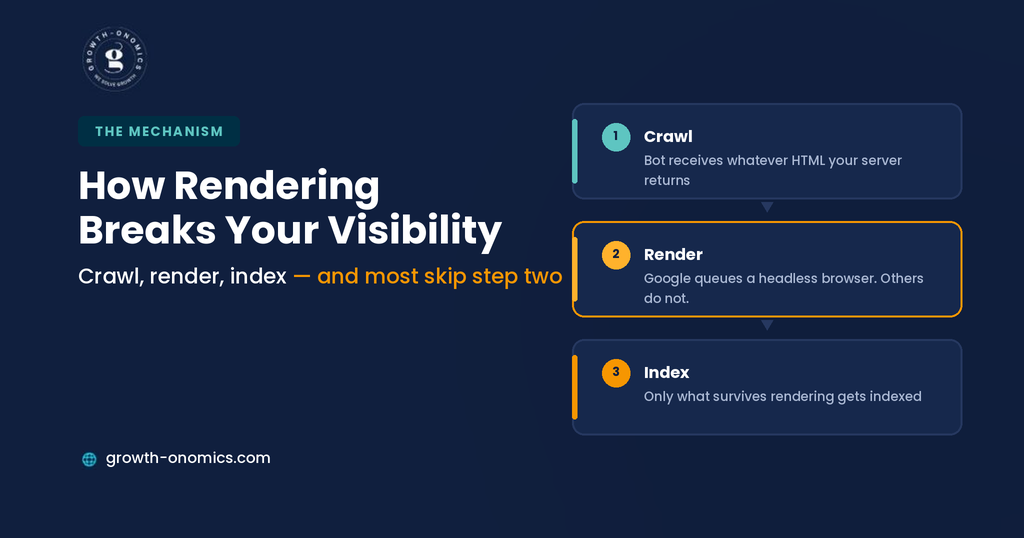
Understanding the mechanism makes the fixes obvious rather than arbitrary. Three things happen between your code and a search result.
Crawling. A bot requests the URL and receives whatever HTML your server returns. For a client-rendered app, that is often an empty container and a script tag.
Rendering. Google queues the page for a headless browser that executes JavaScript and produces the final DOM. This works, but it is deferred sometimes by days, and it is not guaranteed to complete.
Indexing. Only what survives rendering gets indexed.
Two consequences influence SaaS. First, anything appearing only after execution is subject to a delay you do not control, which is painful when you ship pricing or feature changes. Second, and more important in 2026, most non-Google crawlers do not render at all. The bots feeding AI answers, the ones building citation graphs, and the ones a buyer’s research tool might use largely read raw HTML and move on. Content that requires JavaScript is invisible to them permanently.
That’s the shift that turned rendering from an SEO optimization into a visibility prerequisite. Growth-onomics checks rendered HTML before anything else in a technical audit; for this reason, a page that fails this test cannot be helped by content work, schema, or authority building, because none of those signals reach a system that never saw the content.
There is a second-order effect worth naming. Because these problems are invisible in a browser, they survive redesigns, migrations, and audits that focus on content. A team can spend two quarters improving pages that no non-rendering crawler has ever read, and nothing in the reporting will indicate why the work did not land.
Quick Comparison
| # | Fix | Symptom | Effort |
| 1 | Server-render key pages | Empty view-source | High, highest payoff |
| 2 | Content out of tabs | Features invisible in HTML | Low |
| 3 | Proper link structure | Pages not discovered | Low |
| 4 | Unblock JS and CSS | Rendering fails silently | Low |
| 5 | Server-side metadata | Wrong titles in results | Medium |
| 6 | Paginate listings | Deep pages never crawled | Medium |
| 7 | Fix soft 404s | Dead URLs indexed | Medium |
| 8 | Structured data in HTML | Schema not detected | Low |
| 9 | Fix lazy loading | Images and text missing | Low |
| 10 | Consistent user-agent output | Cloaking risk | Medium |
| 11 | Reduce rendering cost | Slow or partial indexing | Medium |
1. Server-Render Your Critical Marketing Pages
Symptom: View-source shows an empty div and a bundle. The page renders perfectly in a browser.
The Fix
Server-side rendering or static generation for the pages that are vital commercially: homepage, pricing, product, integrations, comparisons, security, and documentation. Modern frameworks support this natively, and you do not need to convert the entire application; the marketing surface is what needs to be readable.
How to Diagnose
Fetch the page with JavaScript disabled, or run curl against the URL and read what comes back. If your value proposition, feature descriptions, and pricing explanation are absent, so is your visibility to every non-rendering crawler.
The Trade-off
This is the highest-effort item here and the one that requires an engineering decision rather than an afternoon. It is also the fix that makes the other 10 meaningful, which is why it sits first. Scope it to the marketing surface rather than the whole application, and it becomes a project rather than a rewrite.
2. Get Content Out of Tabs and Accordions
Symptom: Feature details, FAQs, and specifications exist in the UI but not in the initial HTML.
The Fix
Render tabbed and accordion content in the DOM and hide it with CSS rather than injecting it on click. The user experience is identical; the difference is whether the content exists before interaction.
How to Diagnose
Search the raw HTML for text that only appears when you click a tab. This single check finds problems on a large share of SaaS sites, because tabs are the standard pattern for feature and pricing detail.
The Content You Hide Is the Content They Ask About
Think about what actually lives behind tabs on a SaaS site. Plan comparisons. Technical specifications. Integration details. Security certifications. It is never the hero copy; it is the specifics, because specifics are what tabs were invented to organize.
Those specifics are also the answers to every commercial question a buyer puts to an assistant. Hiding them behind a click does not just cost you a page. It costs you the passage.
3. Fix Client-Side Routing and Link Structure
Symptom: Pages exist but are never discovered, or the site has few internal links in the HTML.
The Fix
Use real anchor tags with href attributes for internal navigation. Router links that rely on click handlers and onClick navigation are not links to a crawler, and a page reachable only through them is effectively orphaned.
How to Diagnose
Extract all href values from the raw HTML of a key page and compare them against what the navigation shows a user. Gaps are pages nobody will find.
The Common Variant
Framework link components usually render proper anchors. Custom navigation, JavaScript-driven mega menus, and “load more” patterns frequently do not, and those are where the gaps concentrate.
4. Stop Blocking JavaScript and CSS Resources
Symptom: Rendered output looks broken or incomplete in testing tools.
The Fix
Allow crawlers to fetch the JavaScript and CSS your pages need. Blocking these in robots.txt is a legacy practice that now prevents Google from rendering your page correctly, producing a rendered DOM that resembles nothing your users see.
How to Diagnose
Check robots.txt for disallow rules covering /static/, /assets/, /_next/, or similar bundle paths. Then run a rendering test and compare the rendered output with the live page.
Why It Persists
These rules are usually inherited, copied from an old configuration, or added to conserve crawl budget years ago. Nobody removes them because nothing visibly breaks, and the cost only shows up as pages that render incompletely in testing tools.
5. Render Metadata and Canonicals Server-Side
Symptom: Search results show the wrong title, or a generic one shared across many pages.
The Fix
Generate title tags, meta descriptions, canonical tags, and Open Graph data on the server. Client-side metadata injection works inconsistently, and when it fails, you get the default template title on every page.
How to Diagnose
Compare the <title> in raw HTML against what the browser tab shows. If they differ, metadata is being injected client-side.
The Canonical Risk
Client-side canonical tags are the more dangerous half. A canonical that is missing at crawl time and injected later can cause Google to select a different canonical, quietly removing your preferred URL from results.
6. Eliminate Infinite Scroll on Indexable Listings
Symptom: Only the first page of a blog, resource library, or integration directory ever gets indexed.
The Fix
Paginated URLs with actual links, either replacing infinite scroll or backing it. Each page in the sequence needs its own crawlable URL.
How to Diagnose
Scroll a listing page, note an item near the bottom, then check whether it appears in the raw HTML of the initial load. If it does not, and there is no paginated URL containing it, it is undiscoverable.
The SaaS Version
Integration directories are the most common casualty. A company with 200 integrations often has 15 crawlable and 185 that exist only after scroll events, losing exactly the “does it work with X” queries that qualify buyers.
7. Handle Soft 404s and Client-Side Error States
Symptom: Deleted or invalid URLs return a 200 status with a “not found” message rendered by JavaScript.
The Fix
Return proper HTTP status codes from the server. A missing page must return 404 or 410 in the response header, not a 200 with an error message in the DOM.
How to Diagnose
Request a deliberately invalid URL on your domain and check the status code in the response headers rather than looking at the page.
Nothing Reports an Error, So Nobody Fixes It
A valid 404 shows up in your coverage report, in your crawler, in your monitoring. A soft 404 shows up as a healthy page returning 200, so every system that would have flagged it stays quiet.
They accumulate from there. Google keeps crawling URLs with nothing on them, coverage reports fill with pages you deleted 18 months ago, and a genuinely broken internal link sits undetected among them because it looks exactly like everything else.
8. Get Structured Data Into the Initial HTML
Symptom: Schema validates in a browser test but does not appear in rendered output or Search Console.
The Fix
Output JSON-LD server-side alongside the content it describes. Schema injected by a tag manager or client-side script depends on rendering completing, and it is invisible to every crawler that does not render.
How to Diagnose
Search the raw HTML for application/ld+json. If it is absent but present in the browser, your structured data is client-side.
The Honest Caveat
Structured data helps machines interpret content accurately; it does not produce citations by itself. Getting it into the initial HTML is worth doing because it costs little, not because it is a visibility lever.
9. Fix Lazy Loading That Never Triggers
Symptom: Images and below-the-fold content missing from rendered output.
The Fix
Use native loading=”lazy” on images rather than JavaScript-driven intersection observers for content that must be indexed. For text content, do not lazy load it at all.
How to Diagnose
Compare the rendered DOM from a testing tool against the live page. Crawlers do not scroll, so anything requiring a scroll event to load may never appear.
The Text Version
Lazy-loaded images cost you image search. Lazy-loaded text costs you the page. The second is common on long-form documentation and pricing pages built for performance rather than readability by machines.
10. Serve Consistent Content to Every User Agent
Symptom: Different HTML returned to bots and browsers, often via dynamic rendering or bot detection.
The Fix
Serve the same content to everyone. Dynamic rendering like pre-rendering for bots while serving the app to users was a legitimate workaround years ago and is now a deprecated pattern that risks being treated as cloaking, particularly when the two versions drift apart.
How to Diagnose
Request a page with a bot user agent and with a normal browser user agent, and compare the HTML. Differences beyond trivial formatting are a problem.
The Modern Alternative
Server-side rendering or static generation gives every requester the same complete HTML, which is simpler to maintain and carries no risk. Some teams also block AI crawlers while allowing Googlebot, which is a legitimate choice but should be a deliberate one; check what your robots.txt actually blocks before assuming it reflects a decision anyone made.
11. Reduce the Rendering Cost of Every Page
Symptom: Slow indexing of new pages, or partial rendering where some content appears and some does not.
The Fix
Reduce the JavaScript required to display core content: code splitting, deferring non-essential scripts, removing unused dependencies, and keeping third-party tags off critical paths. Every megabyte of bundle is time and compute a renderer may not spend.
How to Diagnose
Measure the JavaScript weight on your key marketing pages and compare against a fast competitor. Then check how long new pages take to appear in the index.
The Growing Benefit
This is the one fix on the list that also improves conversion rates, since the same weight slowing renderers is slowing your buyers on mobile.
Diagnosing Your Own Site in 30 Minutes

Run these in order on your 5 most commercially important pages. It is a half-hour job that identifies which of the 11 fixes you need.
1. Fetch the raw HTML. Use curl or disable JavaScript. Look for your headline, value proposition, feature descriptions, and pricing explanation. Absence here is finding number one.
2. Search for tab and accordion content. Pick text visible only after clicking, and check whether it exists in the source.
3. Extract the links. Pull every href from the raw HTML and compare against the navigation. Missing links mean orphaned pages.
4. Check the title tag. Compare raw HTML against the browser tab.
5. Request an invalid URL. Confirm it returns 404 rather than 200.
6. Read robots.txt. Look for blocked bundle paths and note which crawlers are disallowed.
7. Compare rendered against raw. Anything present in the rendered DOM but absent from the source is at risk.
Document what you find as a prioritized list rather than a bug report, because these fixes compete for engineering time against product work.
Growth-onomics audits this diagnostic runs before any content or authority recommendation, since a page failing the first test cannot benefit from either.
Conclusion
The uncomfortable thing about JavaScript rendering problems is that nothing looks wrong. The site loads fast, the design is clean, the product team is proud of it, and the analytics show traffic. Meanwhile, the pages that answer buying questions are unreadable to a growing share of the systems buyers now use to build shortlists.
That growing share is what changed the calculus. When Google was the only audience, deferred rendering was an inconvenience, slower indexing, occasional gaps. Now the crawlers feeding AI answers mostly do not render at all, which means client-side content is not delayed for them; it is absent. No amount of content quality or authority building reaches a system that never received the text.
Start with the raw HTML on your 5 most important pages. If your pricing, features, and integrations are not in there, that is the finding, and everything else on this list is secondary to fixing it. If they are, work down the remaining ten in the order given; most are an afternoon each, and together they recover more visibility than a quarter of content production.
If you want a technical audit that checks what machines actually receive before recommending content work, Growth-onomics can run it and prioritize the findings against your engineering capacity.
FAQs
Does Google render JavaScript, and if so why does this matter?
Google does render JavaScript, through a 2-phase process where pages are crawled first and rendered later in a queue. That deferral means content can take days to be indexed, and rendering occasionally fails or completes partially. The larger issue in 2026 is that Google is no longer the only audience. Most crawlers feeding AI answer engines read raw HTML without executing JavaScript, so client-side content is not merely delayed for them; it is permanently invisible. That asymmetry is why server-side rendering shifted from optimization to prerequisite.
How do I test what crawlers actually see on my site?
3 checks cover most of it. Fetch the page with curl and read the raw HTML, which is what non-rendering crawlers receive. Load the page with JavaScript disabled in your browser for a visual version of the same test. Then use a rendering tool to see the post-execution DOM and compare the two; anything present in the rendered version but missing from the raw HTML is at risk. Do this on your five most commercially important pages rather than the homepage alone, since problems concentrate in pricing, product, and integration templates.
Is dynamic rendering still an acceptable solution?
It is a deprecated workaround rather than a recommended pattern. Serving pre-rendered HTML to bots while serving the application to users creates 2 versions that inevitably drift apart, and significant divergence risks being treated as cloaking. It also adds infrastructure to maintain for no user benefit. Server-side rendering or static generation solves the same problem by giving every requester the same complete HTML, which is simpler, safer, and faster for users. If you are running dynamic rendering today, treat replacing it as a planned migration rather than an emergency.
Do I need to server-render the whole application?
No, and attempting it is usually the reason the project stalls. The application behind a login does not need indexing; nobody is searching for your dashboard. What needs to be readable is the marketing and documentation surface: homepage, pricing, product pages, integrations, comparisons, security, and docs. Many SaaS companies run a statically generated marketing site alongside a client-rendered application, which gives crawlers complete HTML where it matters and keeps the app architecture unchanged. Scope the work to the commercial pages, and the return arrives much faster.
How often should we re-check this after fixing it?
After every significant release, and quarterly regardless. Rendering regressions are among the easiest problems to reintroduce: a new component ships with client-side data fetching, a tag manager script gets added to a critical path, or a framework upgrade changes default behavior. None of it is visible in a browser, so nobody notices until traffic moves months later. The cheapest safeguard is adding a raw-HTML check to your release process for a handful of key pages, so the diagnostic runs automatically rather than depending on someone remembering.
Which of these fixes should I do first?
Check the raw HTML on your key pages, and let the answer decide. If your core content is missing entirely, server-side rendering for those pages is the only fix that’s valuable, because the other 10 operate on content a crawler can already see. If the content is present, start with the cheap high-impact items: content out of tabs, proper anchor links, unblocked resources, and server-side metadata. Those are typically an afternoon each and recover meaningful visibility. Save the rendering-cost work for last, since it improves an already-functioning situation.
