


Most clickstream deals fail for a simple reason: teams buy data before they define what the data must answer. If I were choosing a provider today, I’d screen each one on five points: use-case fit, data quality, privacy and security, integration, and total contract cost.
Here’s the short version:
- Start with the questions. If you can’t tie the data to conversion rate, CPA, ROAS, lead quality, or cart completion, the deal can drift fast.
- Check what the provider actually collects. Ask how much of the U.S. dataset is observed vs. modeled, how bot traffic is removed, and whether the vendor is the data source or just a reseller.
- Get legal and security involved early. For U.S. buyers, that means checking CCPA/CPRA, opt-out and deletion handling, the DPA, and controls like TLS 1.2+, AES-256, and a recent SOC 2 Type II or ISO 27001 report.
- Test delivery before you sign. Make sure the data works with your stack through API, batch files, warehouse delivery, cloud storage, or BI exports, and get latency and schema rules in writing.
- Model full cost, not just license cost. A provider that starts at $5,000/month can still cost far more after backfill, support, setup, overages, and spend minimums. Also check lock-in terms like 12–24 month contracts, 30–90 day renewal notices, and data deletion rules after the contract ends.
A few numbers matter right away. The article suggests a pilot pass mark like ≤5% duplicates and ≥90% field completeness. It also points out that 99.9% uptime still allows about 8.7 hours of downtime per year, while 99.99% cuts that to about 52.6 minutes. And for ROI, the benchmark shown is 3x–5x expected return before purchase.
If I had to boil the whole checklist down into one line, it would be this: don’t buy the biggest dataset – buy the one your team can trust, use, and justify in dollars.
Quick Comparison
| Check area | What I’d confirm first | Simple pass mark |
|---|---|---|
| Fit | U.S. coverage, channels, device types, session detail, refresh rate | Matches my exact use case |
| Data quality | Observed share, bot filtering, completeness, duplicate rate | Pilot clears agreed thresholds |
| Privacy & security | CCPA/CPRA process, DPA, deletion support, SOC 2/ISO | Legal and security approve |
| Delivery | API/files/warehouse fit, latency, schema docs, support hours | Works in staging with my stack |
| Commercial terms | Full 12–36 month cost, pilot terms, auto-renewal, retention rights | ROI clears target and risk is acceptable |
That’s the lens I’d use before moving into vendor demos, pilots, and contract review.
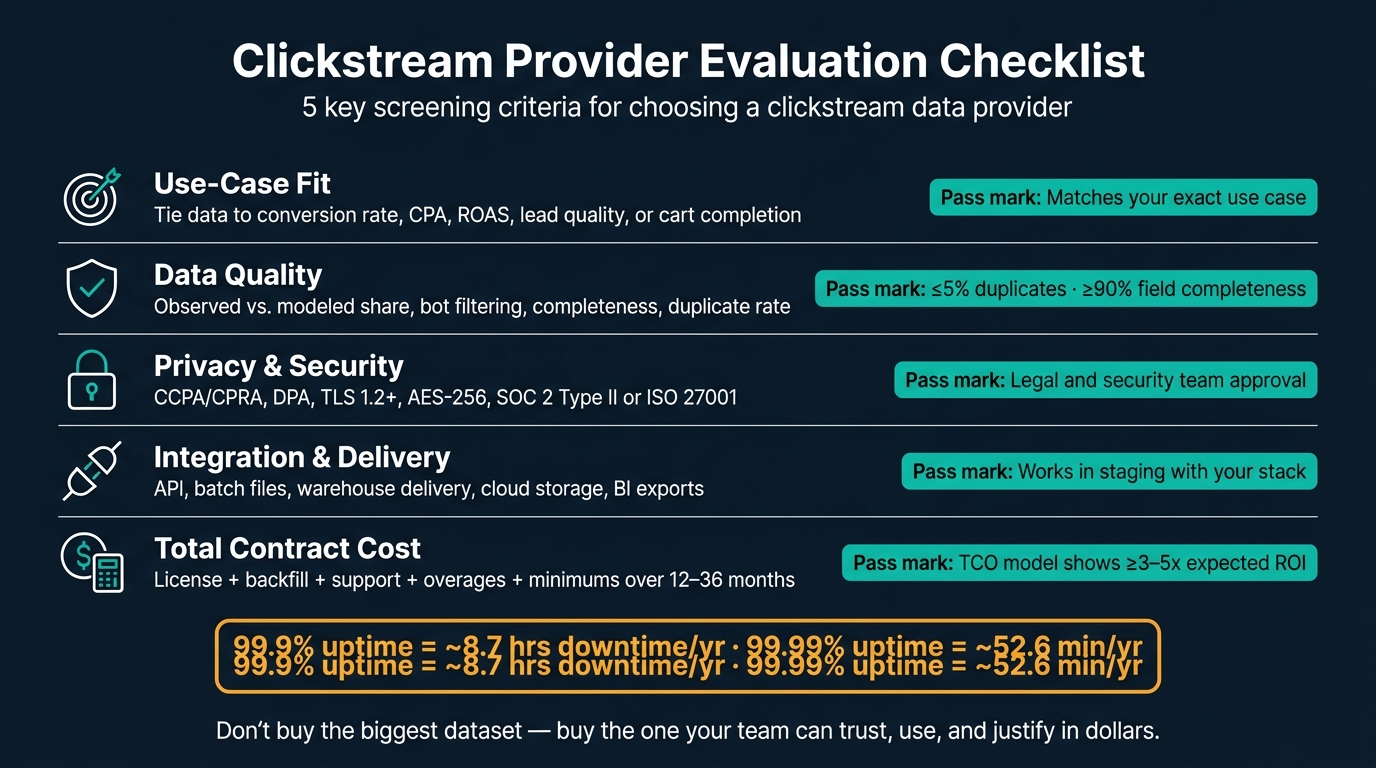
Clickstream Provider Evaluation Checklist: 5 Key Criteria
1. Define Your Use Case and Minimum Data Requirements
Before you compare vendors, get clear on what the data needs to do. If the goal is fuzzy, the purchase usually goes sideways. Teams end up paying for data they don’t use, and adoption slips fast. Bring analytics, marketing, and data engineering into the same conversation before any review starts. Then set the scope before you look at data quality or pricing.
List the Business Questions the Data Must Answer
Start with specific questions, not vague themes. “We want to understand our customers better” doesn’t give you much to work with. A stronger example is: Where do U.S. visitors abandon our checkout flow, and what pages precede that drop-off? The sharper the question, the easier it is to tell whether a provider can answer it.
Tie each question to a growth metric your team already watches. If you’re trying to improve ROAS, you may need clickstream data that shows which referral paths or content sequences come before high-value conversions. If the goal is lead quality, look for signals that show early research interest, not just pageview totals.
Before you get on a vendor call, align on a few basics:
- Which customer journeys matter most for conversion rate, lead quality, or cart completion?
- Do we need competitive traffic trends, audience intent signals, or path analysis – or some mix?
- Are we trying to improve conversion rate, lead-to-opportunity rate, cart completion, or something else?
Set Scope for Channels, Geography, Granularity, and Refresh Rate
Once the business questions are set, define the technical scope. This is where a lot of teams leave gaps, and those gaps tend to come back later.
Lock down these four dimensions before you compare providers:
| Dimension | What to Decide | Example |
|---|---|---|
| Channels | Web, mobile web, native apps (iOS/Android) | A consumer brand with mobile checkout needs app and mobile web behavior, not just desktop |
| Geography | U.S.-only, regional, or multi-country | U.S.-focused growth teams should set U.S. users and U.S. domains as the minimum |
| Granularity | Session-level, page-level, or aggregated summaries | A product team looking into funnel abandonment needs session-level paths; an executive dashboard may only need weekly aggregates |
| Refresh rate | Daily, weekly, or near real-time | Paid media optimization usually needs daily updates; long-range planning can work with weekly data |
Use session-level data for path analysis and segmentation. Use aggregated data for trend monitoring or market sizing. Daily refresh fits performance marketing. Weekly refresh fits planning.
With the scope in place, the next step is to check data quality and compliance.
sbb-itb-2ec70df
2. Check Data Quality, Source Transparency, and Privacy Compliance
Before you buy any dataset, make sure you trust it. That’s the whole game here.
The main question is simple: Is this provider’s data reliable enough to answer the business questions from Section 1? Start with source transparency. Then look at cleaning, privacy, and security.
Verify Where the Data Comes From and How It Is Cleaned
Start by finding out whether the data is observed, modeled, or a mix of both. This matters a lot for session-level path analysis, where modeled data can change what you think users did. You should also ask what share of U.S. events is directly observed.
Ask the vendor this exact question: "What percentage of your U.S. events are directly observed vs. modeled?"
Then dig into traffic cleaning. Ask how the vendor detects bots, how those bots are filtered, and what share of U.S. traffic is removed each month. Don’t settle for a vague answer. Request a sample QA dashboard that shows event distributions and before-and-after cleaning.
You’ll also want to confirm whether the vendor is a data originator or a reseller. A data originator usually has more direct visibility into consent and collection quality.[3]
If a vendor can’t clearly explain how the data is collected and cleaned, that’s your sign to move on.
Confirm U.S. Privacy, Consent, and Security Standards
In the U.S., clickstream providers may count as data brokers. If they do, they need to follow laws such as the California Consumer Privacy Act (CCPA/CPRA), Colorado’s CPA, and Virginia’s VCDPA.[4][5] That means they need processes for consumer opt-outs and deletion requests.
Before you sign anything, have your legal team review the vendor’s data processing agreement (DPA). The agreement should spell out responsibilities and data-processing roles in plain terms. Ask the vendor how consent is collected, how it is documented, and how it moves through opt-out flows.
Security needs the same level of scrutiny. Ask for proof of:
- Encryption in transit (TLS 1.2+)
- Encryption at rest (AES-256)
- Role-based access controls
- A recent SOC 2 Type II or ISO 27001 audit report
Also ask a few practical questions that people often skip:
- How long is raw U.S. event data retained?
- Can you configure field minimization, such as truncating URLs or removing search queries?
- What is the breach notification timeline?
Those details matter. A provider may sound polished on a sales call, but the paperwork tells you what will happen when things get messy.
Use a Provider Scorecard to Compare Quality and Compliance
Once you’ve collected documents from each vendor, put them into a 1–5 scorecard. Have teams from analytics, legal, and security score each provider so the decision doesn’t rest on one group’s view.
| Criterion | Provider A | Provider B | Provider C |
|---|---|---|---|
| Accuracy | 4 | 5 | 3 |
| Recency / Latency | 5 | 3 | 4 |
| U.S. Coverage | 4 | 4 | 2 |
| Methodology Transparency | 3 | 5 | 2 |
| Consent Handling (CCPA+) | 5 | 4 | 3 |
| Security Controls | 4 | 5 | 3 |
| Deletion & Opt-Out Support | 5 | 4 | 2 |
Add a short note next to each score that shows the evidence behind it. For instance, a 5 in accuracy might mean the provider lined up well with your own first-party analytics during a pilot. A 2 in deletion support might point to slow propagation, vague SLAs, and weak auditability.
After any proof-of-concept, update the scorecard before you make the final pick.
Use the top-scoring providers from this step for delivery and workflow testing in the next stage.
3. Review Integration Needs, Reporting Access, and Workflow Fit
Once quality and compliance are cleared, the next step is simple: can this data plug into your stack without a pile of custom work? That’s the line between a smooth rollout and a slow, expensive project.
Match Delivery Methods to Your Internal Stack
Start with your own setup before you talk to any provider. Get clear on what you need: API access, daily batch files (CSV or Parquet), direct warehouse delivery into Snowflake, BigQuery, or Redshift, or scheduled exports into BI tools like Looker, Tableau, or Power BI.
Then ask a direct question: which of those delivery options are native, and which ones come with paid services or custom builds?
Also check whether the provider has no-code or low-code connectors for the tools your marketing and analytics teams already use. That can save a lot of back-and-forth. Ask for:
- Implementation timelines
- A sample statement of work
- References from similar-sized companies using the same delivery setup
| Delivery Mode | Best Fit | Watch Out For |
|---|---|---|
| API access | Custom apps and real-time lookups | Needs strong retry logic, pagination, and schema handling |
| Batch files (CSV/Parquet) | Teams with existing ETL workflows | Confirm file formats, file sizes, and delivery schedules upfront |
| Warehouse delivery | SQL-based analytics teams | Verify platform compatibility and warehouse location requirements |
| Cloud storage delivery | Flexible downstream processing | Useful when you want to transform data before analytics use |
| Scheduled exports | Recurring BI reports | Confirm exports are automated, not just manual UI downloads |
Check Latency, Schema Flexibility, and Support Coverage
Latency needs depend on the use case, so define yours before you start comparing vendors.
If your performance marketing team is adjusting bids in near real time, you may need data in 5 minutes or less. For weekly SEO and UX work, same-day or next-morning delivery is often enough. For customer journey mapping over a longer window, 24–72 hours can work fine, but in that case, data completeness matters more than speed.
Whatever your threshold is, get it in writing. Ask for a written SLA, and ask how the provider reports delays and fixes them when they happen.
Schema flexibility is another place where deals fall apart quietly. On paper, everything can look fine. Then your team tries to join page-level, event-level, and user-level data, and the whole thing gets messy.
Ask for full schema docs, versioning rules, and a pilot query using data that looks like your actual workload. For cross-channel analysis, the schema needs to support joins across page, event, and user records, along with key metadata. If the provider won’t show a sample schema or let your analysts run test queries during a pilot, treat that as a red flag.
Support coverage matters too, and this part should be spelled out in writing. Make sure support hours line up with U.S. business hours. If your team depends on this data every day, ask whether emergency help is available outside those hours for critical incidents.
At a minimum, define SLAs for:
- Full outages
- Partial data delivery
- Schema-breaking changes
And if your team is making daily cross-channel calls from this data, push for a named support contact who already knows your stack. That kind of detail can save hours when something breaks.
If integration and support check out, the next step is total cost and contract terms.
4. Compare Pricing, Contract Terms, and Vendor Reliability
With integration and support sorted out, the next step is simple: compare total cost and contract risk.
Break Down Total Cost in USD, Not Just the Starting Price
The list price almost never tells you what you’ll actually pay. For most U.S. buyers, annual spend has a few extra layers—often requiring guidance from a top marketing agency that don’t show up in the first sales call.
Break cost into the items that shape the real yearly number:
- Base license + usage-based charges – monthly or annual fees, often tied to volume, seats, or feature access, plus overages for events, API calls, or GB used
- Historical backfill fees – access to 12–24 months of old data is often sold separately and can add tens of thousands of dollars for large datasets [9]
- Implementation, onboarding, and premium support – integration work, required services, and dedicated account help often cost from a few thousand dollars to more than $50,000 in complex setups [9]
- Minimum annual commitments (MACs) – some contracts set a spend floor even if your actual usage comes in lower
Here’s what that looks like in practice. Say your site generates 200 million events per month and you need 24 months of historical backfill. Provider A charges $5,000/month as a base fee, plus $0.20 per million events, and a $25,000 one-time backfill fee. That puts planned annual cost at about $72,980. Provider B charges $90,000/year flat, plus a $10,000 premium support add-on and $15,000 for extended backfill history, which brings the annual total closer to $107,500.
A good rule of thumb: the subscription fee often makes up only 60%–75% of total spend. The rest comes from onboarding, overages, integrations, and renewals. [12][9] Build a 12–36 month TCO model in USD before you compare vendors side by side.
Review License Terms, Pilot Options, and Support Commitments
Price is only half the story. The other half is what the contract lets you do.
Most standard licenses limit usage to internal business purposes. Sharing raw or derived data with third parties, including agencies and partners, is often blocked unless you negotiate it up front or the data is anonymized. Check whether your agency can log in directly under your license. Also confirm whether permitted use covers activation – like ad targeting, lookalike modeling, and personalization – not just analytics. Some agreements limit activation or put it behind a separate license. [6][7][8]
Data retention rights matter too. Check how long you can keep the data and whether you can hold onto historical exports after the contract ends. Some providers require deletion of all data at termination, which can create a mess for long-term reporting. Auto-renewal clauses deserve a close look as well. A 60–90 day notice window can sneak up on you, and missing it may lock you in for another full year before you’ve finished judging the tool’s value. [14][15]
For pilots, ask for a 60–90 day structured POC with full, representative data, clear success criteria, and enough implementation help to make the test fair. Success criteria can include data coverage against your baseline, latency targets, or impact on a specific KPI. Also ask whether pilot fees are credited toward the first-year license if you move ahead. For full contracts, try to get termination for convenience terms with 30–60 days’ notice after the initial commitment period, plus clear termination-for-cause rights if SLAs are missed.
Use a Commercial Comparison Table Before Final Selection
Put each vendor’s commercial terms into a single side-by-side sheet. That gives procurement, legal, and business teams a fast way to compare cost and risk.
| Dimension | Provider A | Provider B |
|---|---|---|
| Pricing model | Tiered + usage-based | Flat annual |
| Min. annual spend (USD) | $75,000 | $50,000 |
| Contract length | 12 months | 24 months |
| Permitted use | Internal analytics + activation | Internal analytics only |
| Pilot available | Yes, 90 days | Limited |
| Auto-renewal notice window | 30 days | 90 days |
| Data retention after termination | 60-day export window | Immediate deletion required |
| Termination rights | Convenience + cause | Cause only |
One SLA number is easy to overlook but matters a lot. 99.9% uptime allows about 8.7 hours of downtime per year. 99.99% cuts that to roughly 52.6 minutes. [10][11] If your team depends on daily cross-channel analytics or performance marketing decisions, that gap isn’t just a small decimal change. It can affect day-to-day operations.
Multi-year commitments can lead to 15%–30% discounts, but they also increase lock-in risk if service quality slips or your data needs change. [13]
Conclusion: Key Checks Before Making Your Final Choice
After you score providers on fit, quality, compliance, integration, and cost, run a last round of checks before you buy.
Final Go/No-Go Criteria Before Purchase
Keep it simple. Boil the decision down to four non-negotiable checks.
First, use-case fit. The provider needs to cover your required geographies, devices, and channels at the level of detail your models need. If coverage isn’t steady across your top domains and markets, it’s a no-go.
Second, data quality and methodology. Set clear acceptance thresholds before testing starts. That way, you’re not moving the goalposts halfway through the review.
Third, legal and security sign-off. Your legal and security teams need to approve the data processing agreement, consent documentation, and security posture, including SOC 2, ISO 27001, or an equivalent standard. For U.S. buyers, that also means confirmed alignment with CCPA/CPRA rules, including opt-out and deletion handling.[2][16]
Fourth, commercial fit. Your 12–24 month TCO model in USD should show a clear, conservative ROI. If any one of these checks fails, stop.
Turn this into a plain pass/fail memo for stakeholders.
| Go/No-Go Check | Minimum Threshold | Pass/Fail |
|---|---|---|
| Use-case and coverage fit | Required geographies, devices, and channels confirmed | Pass / Fail |
| Data quality (pilot test) | ≤5% duplicates; ≥90% field completeness [1] | Pass / Fail |
| Legal and security sign-off | DPA executed; CCPA/CPRA confirmed; SOC 2 reviewed | Pass / Fail |
| Integration and workflow fit | Delivery method tested in staging environment | Pass / Fail |
| Commercial ROI | TCO model shows ≥3–5x expected return [2] | Pass / Fail |
Any fail means stop.
FAQs
How do I know if I need session-level data?
You need session-level data when you want to turn isolated clicks and page views into a fuller view of the user journey. By grouping events into sessions, often with a 30-minute inactivity threshold, you can measure things like session duration, bounce rates, and conversion paths.
That gives you a clearer picture of how people move through your site instead of looking at each action on its own. It’s especially useful for spotting where users drop off, how they move across pages, and where the path to conversion starts to break down. With that view, it becomes much easier to understand behavior and refine your digital strategy.
What should I ask during a clickstream data pilot?
Ask how the provider defines and measures key events, how they handle sessionization, and which time zone rules they use. You’ll also want to know which user and session IDs they rely on, plus how they remove bot traffic and other noise that can skew the numbers.
Then confirm how the data pipeline works from collection to storage, how timestamps are recorded, and how device and browser details are added. On top of that, check their privacy practices and ask for a data quality report that covers:
- completeness
- uniqueness
- validation checks
- edge cases
- documented transformations for reproducibility
Which contract terms create the most risk?
The biggest risks usually come down to vague contract language and missing detail around data privacy and security. Broad phrases like "for business purposes" are risky because they don’t clearly limit how consumer data can be used.
To cut risk, contracts should clearly ban unauthorized selling, retention, or disclosure of data. They should also require immediate breach notification, audit rights, and a Data Processing Addendum for GDPR and CPRA accountability.