


If your data lives in more than one cloud, the safest path is simple: pick the right consistency model, limit who can write, use sync methods that fit the workload, and monitor lag before users spot bad data.
I’d boil the article down to this:
- Use the right consistency level for each dataset
- Strong consistency for payments, inventory, and login data
- Eventual consistency for catalogs, analytics, and contact lists
- Read-your-writes when users must see their own updates at once
- Match your cloud setup to your risk tolerance
- Active-passive if one writer and fewer conflicts matter more than failover speed
- Active-active if near-zero downtime matters, but you can handle conflict rules
- Hub-and-spoke if you want one write location and local reads in other clouds
- Keep write ownership clear
- One writer is simpler
- Many writers need conflict rules like source-wins, vector clocks, or app-level merges
- Regional ownership can cut cross-cloud write clashes
- Choose sync based on speed and data type
- Replication for same-engine systems
- CDC and event streams for low-latency change flow
- Scheduled checks for SaaS tools that do not push updates
- Cross-cloud lag often sits around 100 ms to 2 seconds, but burst traffic can push async lag to 30 seconds
- Make retries safe
- Use event IDs
- Handle duplicate delivery
- Keep delete markers so removed records do not come back
- Watch the right signals
- Lag by pipeline
- Failed sync jobs
- Missing events
- Record mismatches
- Schema drift
- In many setups, alerts above 1 second for sync paths and 5 seconds for async paths are a good starting point
- Test recovery on a schedule
- Set RPO and RTO with business owners
- Run failover drills
- Restore backups, not just store them
- Keep runbooks and cloud setup in version control
Multi-Cloud Database Strategies: A Beginner’s Guide 🚀
Quick Comparison
| Area | Best fit | Main risk if ignored |
|---|---|---|
| Consistency model | Match data to business impact | Stale reads or blocked transactions |
| Architecture | Pick based on failover and conflict risk | Split-brain writes or slow recovery |
| Write ownership | Use one writer when possible | Hard-to-fix record conflicts |
| Sync method | Match transport to change rate | Missing deletes, lag, duplicate updates |
| Monitoring | Track lag, drift, and failures | Bad data spreads before alerting |
| Recovery | Test backups and failover often | Long outages and data loss |
The core idea is not more tools. It’s more discipline. I’d treat multi-cloud consistency as a day-to-day data control problem: clear ownership, strict sync rules, and tested recovery.
Choose a Multi-Cloud Architecture That Fits Your Consistency Needs
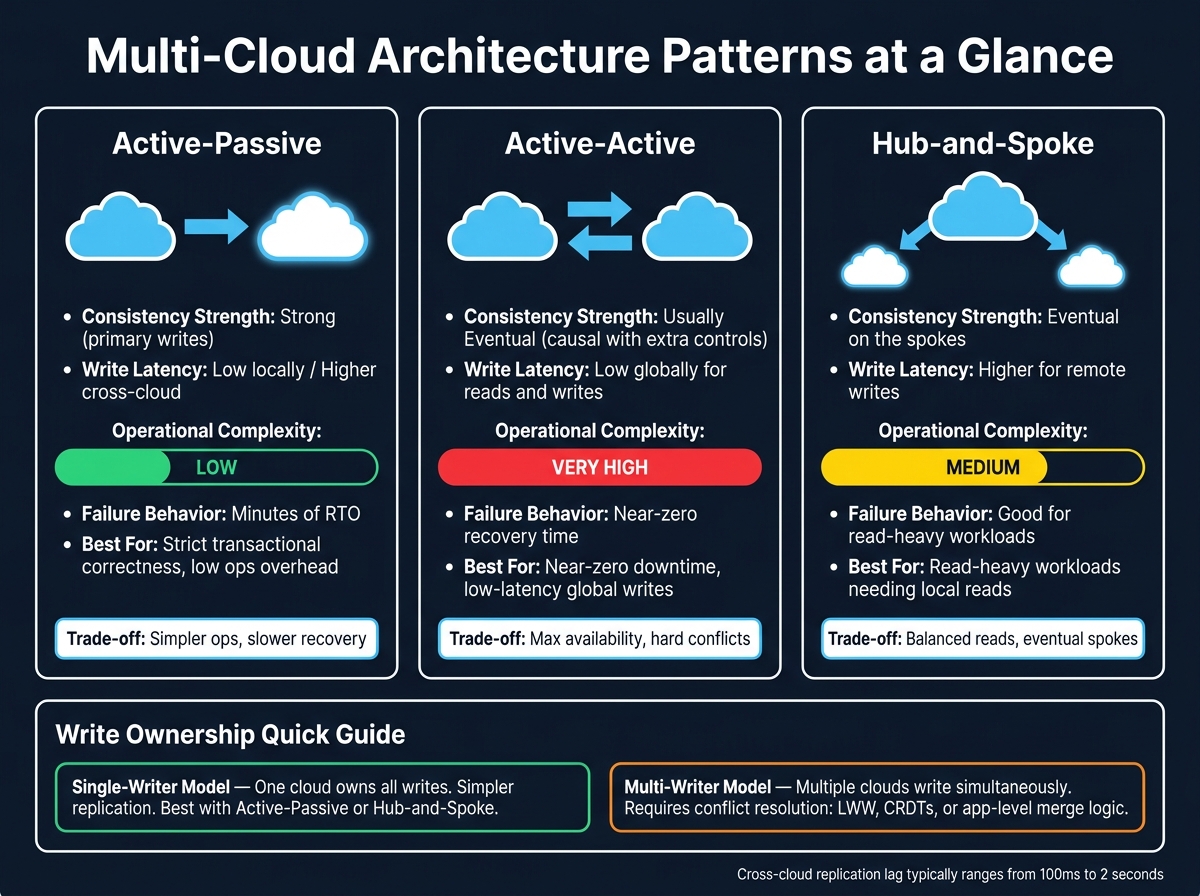
Multi-Cloud Architecture Patterns: Consistency, Latency & Complexity Compared
Pick an architecture based on your consistency, latency, and recovery goals. This is where the consistency model from the previous section meets the failover behavior and conflict risk your team can live with. Get this choice right, and you stop many write conflicts before replication has to sort them out.
Active-Active, Active-Passive, and Hub-and-Spoke Patterns
These three common patterns each make a different tradeoff between uptime, simplicity, and read speed.
| Architecture Pattern | Consistency Strength | Write Latency | Operational Complexity | Failure Behavior |
|---|---|---|---|---|
| Active-Passive | Strong for primary writes | Low locally; higher cross-cloud | Low | Minutes of RTO |
| Active-Active | Usually eventual; causal only with extra controls | Low globally for reads and writes | Very high | Near-zero recovery time; complex conflict resolution |
| Hub-and-Spoke | Eventual on the spokes | Higher for remote writes | Medium | Good for read-heavy workloads |
Active-Passive works well when strict transactional correctness matters and you want to keep ops work low. One cloud handles all writes, and the other waits on standby. The downside is recovery time – usually minutes – and an RPO of seconds to minutes because replication is asynchronous.
Active-Active makes sense when near-zero recovery time and low-latency global writes are non-negotiable. But there’s no free lunch here. You get more write availability, and in exchange you take on hard consistency problems.
Hub-and-Spoke lands somewhere in between. A primary database in one cloud handles writes, while read replicas in other clouds serve local traffic. This pattern fits read-heavy workloads that need local reads and can live with eventual consistency.
Single-Writer vs. Multi-Writer Data Ownership
After you pick the pattern, the next step is deciding who can write. That choice often matters more than the tooling itself when it comes to conflict risk.
A single-writer model gives one cloud ownership of all writes for a dataset. Other clouds get copies. This removes concurrent writes and makes replication much simpler. It fits naturally with Active-Passive and Hub-and-Spoke setups that use one-way replication.
A multi-writer model lets multiple clouds write to the same dataset at the same time. That can help with write availability, but it also opens the door to concurrent updates on the same record. At that point, you need a plan for conflict resolution, such as last-writer-wins (LWW), Conflict-Free Replicated Data Types (CRDTs), or merge logic in the application layer.
A useful middle ground is regional partitioning. For example, route U.S. users to one cloud and EU users to another, so the same record is less likely to be updated in two places at once. It cuts conflict risk without pulling in full CRDT machinery. You can define ownership by region, tenant, or dataset to keep write boundaries clear.
That ownership choice sets the stage for how much replication work and conflict handling comes next.
Set Up Reliable Synchronization and Replication Controls
Next, pick a sync method that moves data cleanly and keeps retries idempotent.
Replication, CDC, Event Streaming, and Scheduled Reconciliation
Not every dataset needs the same sync setup. The right choice depends on two things: how often the data changes, and how fast the other cloud needs to see those changes.
Database replication works well when you have a single writer. A common example is PostgreSQL logical replication with wal_level = logical. It fits same-engine deployments, but it usually needs VPN or private connectivity to keep latency down.
Change Data Capture (CDC) reads row-level changes from the database transaction log and streams them to a broker like Kafka. In multi-writer systems, tools like Debezium make this much easier for low-latency cross-cloud sync because CDC captures deletes too. That matters, since polling does a poor job of handling deletes cleanly.
Event streaming through Kafka or Pulsar puts a buffer between clouds. If one provider goes down, the broker keeps the events. Then the secondary cloud can catch up after connectivity comes back.
Scheduled reconciliation is the fallback when a system doesn’t offer a push mechanism. Think SaaS APIs like Salesforce or HubSpot. Use a cursor based on updatedAt plus id, and only persist that cursor after each batch finishes successfully. This approach adds minutes of lag, so it fits workloads that can live with slower updates.
Cross-cloud replication lag often falls between 100 ms and 2 seconds, depending on network connectivity and data volume.
Once the sync path is set, the next problem is conflicting writes and duplicate delivery.
Conflict Detection, Resolution Rules, and Idempotent Writes
In multi-writer systems, conflicts aren’t abstract. They show up as late writes, duplicate events, and mismatched records.
The most common resolution methods are last-writer-wins (LWW), first-committer-wins, and application-level merge logic. LWW is simple, but it can backfire. If clocks drift across cloud regions, an older write can win by mistake. A safer option is vector clocks, which track causality instead of leaning on timestamps alone.
Sometimes the cleanest rule is even simpler. If one system clearly owns a field – like a payment status managed by your billing service – use a source-wins rule instead of trying to merge values.
Idempotency matters just as much. In distributed systems, at-least-once delivery is normal. That means a network partition can send the same event more than once. To deal with that, use:
- Unique event IDs
- Idempotent broker settings
- Duplicate detection at the subscriber
- Re-runnable handlers
Use tombstones or soft deletes too, so deleted records don’t pop back up in later sync cycles.
After you choose the transport, match the replication mode to the data’s tolerance for delay and loss.
When to Use Synchronous or Asynchronous Replication
| Replication Mode | Best Use Case |
|---|---|
| Synchronous | Financial transactions, inventory, authentication |
| Asynchronous | User profiles, product catalogs, analytics |
| Snapshot | Static reference data, infrequently updated catalogs |
| Transactional | E-commerce order flows, CRM systems |
For payment data or authentication, synchronous replication makes sense. Stronger consistency adds write latency, especially across distant regions. London to Sydney can add hundreds of milliseconds per transaction. So this mode should be reserved for workloads where data loss is not acceptable. In these cases, the RPO target should stay under 1 minute, with an RTO under 5 minutes.
For internal analytics, asynchronous replication is usually the better default. A few seconds – or even a few minutes – of lag is often fine, and you avoid adding latency to every write. During high-throughput bursts, async lag can stretch from 1 second to 30 seconds. That’s fine for reporting, but not for a checkout flow.
With sync controls in place, governance and monitoring become the last line of defense against drift.
Apply Governance, Security, Monitoring, and Recovery Practices
Once replication is live, governance and monitoring are what keep data copies in sync over time. Without clear owners and day-to-day discipline, even a solid sync setup starts to drift.
Governance Controls That Reduce Drift and Bad Data
Start with ownership, not tools. When nobody clearly owns the data, each cloud starts to wander into its own field names, formats, and validation rules. That’s how teams end up arguing over what a field means instead of using it.
Set one system of record for each entity. Your CRM owns customer records. Your billing service owns payment status. Then define every shared field in a business glossary or metadata catalog. That gives teams one reference point across clouds and cuts down on expensive interpretation mistakes.
The table below shows the main governance controls and the risks they help reduce:
| Governance Control | Risk Reduced | Ownership |
|---|---|---|
| Data Lineage | Lack of trust in data origin; difficulty troubleshooting | Data Steward |
| Shared Schema Standards | Integration errors; mismatched formats across clouds | Data Architect / Steward |
| Validation Rules | Corrupt or invalid records propagating downstream | Data Owner |
| Access Controls (RBAC) | Unauthorized changes; compliance gaps | Data Owner / IT Security |
| Change Approval Process | Uncoordinated schema drift; broken pipelines | Governance Group |
| Metadata Cataloging | Inconsistent definitions; unreliable reporting | Data Steward |
Enforce format checks, required fields, and value ranges at every entry point and handoff. If bad data slips through the first checkpoint, it won’t stay small for long. It will spread to every cloud that receives it.
Once ownership and validation are set, the next job is keeping an eye on lag and schema drift.
Monitor Replication Lag, Sync Failures, and Data Quality Issues
Monitoring is how you catch trouble before users feel it. Track replication lag, checksum mismatches, and stale-read incidents.
Set clear lag thresholds. In synchronous setups, flag anything above 1 second. In asynchronous setups, flag anything above 5 seconds. On the infra side, watch replica CPU usage too. If it goes above 60%, the replica is having a hard time keeping up with write volume.
One practical move is to inject canary records through the full pipeline on a set schedule. If a canary record doesn’t reach the target inside the expected window, the alert fires before real data takes a hit.
Your dashboard should cover:
- Lag by pipeline
- Failed sync jobs
- Missing events
- Record mismatches
- Schema changes
Pair that dashboard with SLO-based alerts so the team gets notified as soon as thresholds are crossed, instead of finding out from user complaints.
If those alerts start going off, recovery needs to follow a runbook your team has already tested.
Plan Backups, Failover, and Repeatable Recovery
RPO (Recovery Point Objective) is the maximum acceptable amount of data loss measured in time. RTO (Recovery Time Objective) is the maximum acceptable downtime for a system after a failure. Set both with business owners, not in isolation.
Tier workloads by criticality. Customer-facing transactions usually need near-zero RPO and RTO. Internal batch jobs can often live with hours of RTO and RPO measured in hours or even days. Applying the same recovery target to every workload sounds neat on paper, but in practice it burns money and adds complexity where it doesn’t help.
The part many teams skip is testing. A backup that has never been restored is a backup you can’t trust. Run quarterly full failovers and monthly partial failovers. Use Infrastructure as Code tools like Terraform or Pulumi to keep backup storage, IAM policies, and encryption settings the same across clouds. Drift in configuration between providers is a common reason recovery fails when the pressure is on. Store failover runbooks in version control so on-call staff can execute them without extra help.
Conclusion: Key Practices to Keep Multi-Cloud Data Consistent
After architecture, sync, governance, and recovery, the last step is disciplined execution. Multi-cloud consistency doesn’t come from tools alone. It comes from clear ownership, tight sync controls, and steady monitoring across every layer of your stack.
Keep ownership clear and definitions standardized so replication always points to one source of truth. And these controls can’t run only when someone remembers to check them. They need a set schedule. Review integrations, metadata, and security on a fixed cadence, then support that work with automated monitoring and audits. When data stays consistent, dashboards, attribution, and day-to-day decisions stay dependable across clouds.
In multi-cloud environments, consistency is an operating discipline, not a one-time project. Clear ownership, validated sync, and continuous monitoring keep every cloud aligned.
FAQs
How do I choose the right consistency model?
Match each data entity to its business criticality and time sensitivity, then weigh your workload against the CAP theorem: during network partitions, you have to choose between availability and consistency.
Use strong consistency for mission-critical, time-sensitive workloads like financial transactions. If short delays are okay, use eventual consistency to get lower latency and higher availability. Choose causal consistency when the order of related events needs to stay intact.
When should I use single-writer vs. multi-writer?
Choose single-writer when your system has lots of reads and you can live with eventual consistency. In this setup, all writes go to one primary database. That cuts down on conflicts and keeps the setup simpler, while users can still read from local replicas for lower latency.
Choose multi-writer for write-heavy workloads that need high availability across regions or providers. It gives you more resilience, but it also brings more moving parts. You’ll need stronger conflict resolution, idempotent transactions, and careful request routing.
What lag is acceptable in a multi-cloud setup?
Acceptable lag depends on your use case, how critical the workload is, and the replication method you use.
With synchronous replication, lag above 50 ms often starts to hurt performance. That’s why many teams aim for 20–30 ms to keep the user experience smoother.
With asynchronous replication, the right lag threshold depends more on business needs. A reporting system may be fine with short delays. But financial transactions usually need near-zero lag, with strong consistency taking priority over speed.