


I’d choose a webinar tool by what reaches your email platform and CRM – not just how it hosts an event. GetResponse is a starting point for email-first teams; ON24 belongs on the shortlist for B2B engagement reporting. Before buying, test 2 registrations: one new contact and one existing CRM contact.
I compare 7 platforms across email and CRM sync, ad audiences, event triggers, reporting, and total cost. Here’s how I’d narrow the list. These are fit checks, not confirmed feature promises.
Quick Comparison
| Platform | Where I’d start | What I’d verify |
|---|---|---|
| Livestorm | Connected marketing workflows | Connector plans, field mapping, triggers, and attendee credits |
| GoTo Webinar | Recurring webinar series | CRM data coverage, attendance triggers, and connector fees |
| Zoom Webinars | Teams already using Zoom | CRM sync, webinar licensing, and any required base subscription |
| ON24 | B2B engagement and account reporting | Engagement fields, CRM revenue links, and setup costs |
| Airmeet | Multi-session events | Session-level CRM data, audience updates, and reporting |
| WebinarNinja | Small, email-first teams | Native connections versus Zapier, follow-up triggers, and exports |
| GetResponse | Email and webinars in one suite | CRM field mapping, audience sync, workflow limits, and attendee capacity |
My buying rule: <u>test the full follow-up path</u>. Check whether attendance and no-show data trigger the right emails, update CRM records without duplicates, and support ad audience exclusions. Then compare reporting and the full bill – including connectors, setup, and manual cleanup.
I’d pick the smallest setup that passes those checks and fits your team’s budget.
Automate Webinar Confirmation and Follow-up in HubSpot
1. Livestorm
Livestorm fits SMB teams that want flexible integrations without tying every workflow to one suite. Check how it connects email, CRM data, ad audiences, and attribution.
Email and CRM Sync
Check whether email and CRM connections are native, API-based, or handled through middleware. Review which registration and attendance data syncs, whether your plan includes those connections, and whether the sync updates existing contacts or creates duplicates.
Ad Audience Support
Check whether the setup can add attendees to – and remove them from – Google Ads, Meta, and LinkedIn audiences. Account for consent rules, sync delays, and integration fees.
Event Triggers and Automation
Review how attendee and no-show follow-ups reach your email platform or CRM. Check which triggers fire, when they fire, and whether they require middleware.
Reporting and Attribution
Treat attendance and engagement reporting separately from revenue attribution. For B2B revenue tracking, use the CRM as the source of truth rather than ad-platform conversion totals [2]. Also check whether source data and click IDs pass through registration into the CRM.
2. GoTo Webinar
Email and CRM Sync
Vendor documentation doesn’t confirm whether GoTo Webinar’s email and CRM sync is native, third-party, or API-based. Verify the sync before buying, especially if your SMB team needs more than basic contact transfers. Request a demo that shows registration and attendance data moving into your system. Also ask for a written breakdown of eligible plans, connector fees, and setup costs.
Ad Audience Support
Ad audience updates aren’t documented either. Confirm whether registration, attendance, and engagement events can add contacts to – or remove them from – ad audiences, and whether those updates need external automation.
Event Triggers and Automation
Ask the vendor to demonstrate each workflow trigger separately: registration, attendance, no-show, and engagement. Have them explain which steps run in the connector and which need external automation.
Reporting and Attribution
Confirm that registration source, attendance, engagement, click IDs, and lead-to-account matching carry over into your CRM. Ask how the sync handles naming conventions, identifiers, and lead-to-account matching [2].
3. Zoom Webinars
Email and CRM Sync
Zoom works for this setup only if your CRM and automation tools receive clean webinar data. The native sync path hasn’t been confirmed here. Check whether registration data, attendance, and click IDs reach your CRM through a native connector, API, or middleware. Also confirm how the CRM stores those fields at registration and after the session[2].
Ad Audience Support
Attendance data needs to reach your CRM before your ad tools can use it to build audiences. Check whether Zoom can send attendee and no-show data to your CRM, letting your ad tools build audiences from CRM events. The setup should follow your consent rules and meet your reporting needs[2].
Event Triggers and Automation
Check which webinar events Zoom makes available for automation: registration, attendance, no-show, and engagement. Then verify whether those events trigger CRM workflows directly or need middleware[2].
Reporting and Attribution
Set your reporting window before building the dashboard. For Zoom webinars, attribution gaps often stem from mismatched windows, view-through credit, identity loss caused by privacy tools, and lead-to-account matching that splits one company across multiple conversions[2]. Use the same reporting window in your CRM and ad platforms to keep webinar results comparable.
4. ON24
ON24 is most relevant when you need webinar engagement data to drive CRM follow-up and account-level reporting.
Email and CRM Sync
Check which connectors or APIs ON24 supports and whether registration and engagement data sync one way or both ways. Confirm which connections need a paid tier or add-on.
Ad Audience Support
For ad audience updates, collect click IDs at registration and map CRM outcomes to Google, Meta, and LinkedIn. This lets ad platforms optimize based on CRM results – not just webinar activity. Ask ON24 to walk you through the field mapping.
Event Triggers and Automation
Ask whether registration, attendance, and engagement events can trigger nurture emails or CRM sales tasks. Check whether you’ll need external marketing automation software to make this work.
Reporting and Attribution
Use the CRM as your primary source for revenue and closed-deal reporting[2]. Ask whether ON24 rolls up webinar credit at the account level, and confirm which reporting features and add-ons your plan includes.
5. Airmeet
Airmeet belongs on an SMB shortlist only if webinar data flows cleanly into email and CRM workflows.
Email and CRM Sync
Before buying, check Airmeet’s native integrations, sync direction, and plan limits. Request a field map that shows which registration fields and engagement updates reach your CRM for nurture and sales follow-up.
Check whether the connection uses a native integration, middleware, or an API – and whether the same data can feed audience updates.
Ad Audience Support
Verify whether Airmeet updates ad audiences directly or needs middleware.
Event Triggers and Automation
Check whether registration, attendance, no-show, and engagement events can trigger CRM updates, nurture emails, or audience changes. Ask which steps, if any, need external tools, and verify that these events appear in reporting.
Reporting and Attribution
Check whether Airmeet offers account-level reporting and contact-level exports into your CRM. Verify that it collects click IDs at registration and passes them to the CRM [2].
6. WebinarNinja
WebinarNinja suits teams that want simpler webinar-to-email workflows. But sync depth matters more than ease of use. For SMBs, the tradeoff is less setup work versus deeper sync.
Email and CRM Sync
Check which email and CRM lead-capture integrations are native, which need Zapier or exports, and which each plan includes. Confirm field mapping and whether data syncs in one direction or both.
Ad Audience Support
Check whether retargeting audiences sync directly or through your CRM or Zapier. If another tool is needed, factor in its cost.
Event Triggers and Automation
Verify that registration, attendance, no-show, and replay events can trigger follow-up automation in your automation platform or CRM.
Reporting and Attribution
Request a sample contact-level export to check whether it retains UTM data for attribution. Test for reporting gaps, integration costs, and plan restrictions – all part of deciding whether WebinarNinja fits your SMB.
7. GetResponse
GetResponse is the all-in-one option on this list. The key is checking how much its built-in tools can handle before you need other software.
Email and CRM Sync
GetResponse suits SMB teams that want webinars, email, and contact management in one place. Webinar registrants enter the email database for invitations, reminders, confirmations, and post-event follow-up.[8][12]
Native integrations connect selected CRM and business tools. Zapier and API access offer more connection options.[5][9][10] Check that webinar attendance and field mappings sync to your CRM as expected.[5][7] That same contact data should also support audience syncs and suppression rules.
Ad Audience Support
The documented Ads Workbench integration can create and automatically maintain custom audiences from GetResponse contacts on Facebook, Google Ads, and X.[13] Check whether webinar attendance, tags, or segments can update those audiences and suppress contacts – and whether audience updates stay in sync.
Event Triggers and Automation
GetResponse supports webinar reminders and follow-ups, but workflow limits depend on your tier. Starter includes one custom workflow, while Marketer includes unlimited workflows.[6][17] Webinar access comes with Marketer and Creator; Starter offers it as a paid add-on.[16]
Automation supports sign-ups, purchases, and abandoned carts. Vendor documentation doesn’t confirm triggers for no-shows, poll responses, or watch duration.[17]
Attendee limits also need a closer look. Creator documentation lists webinars for up to 100 attendees, while customer material says 1,000 live attendees. Confirm the current limit for your plan.[14][15]
Those triggers are only part of the picture. Reporting also needs to show which webinar actions led to revenue.
Reporting and Attribution
Email reports track opens and clicks, and Marketer adds newsletter revenue stats.[6][11] Check whether you can connect webinar source, attendance, and CRM opportunity revenue without exports.
Available evidence doesn’t fully verify webinar-to-pipeline attribution. For SMBs, GetResponse is therefore a better fit when follow-up automation matters more than deep attribution.
Pros and Cons for SMB Teams
Treat each profile as a fit check, not a ranking. This summary turns the platform-by-platform review into SMB buying criteria. Compare each platform by campaign type, integration work, and the workload your team will take on.
| Platform | Campaign strengths | Integration trade-offs | Admin load | Best-fit team profile |
|---|---|---|---|---|
| Livestorm | Connected campaign workflows.[18][19] | Plan eligibility, field mapping, and attendee-credit forecasting.[22][25] | CRM setup and webhook configuration. | Marketing-led SMB. |
| GoTo Webinar | Recurring webinar programs.[20][24] | CRM field coverage and attendance triggers. | Templates, speakers, and attendance exports. | Regular webinar-series team. |
| Zoom Webinars | Best for teams already standardized on Zoom. | Webinar licensing, base-plan requirements, and CRM mapping.[26][28] | Webinar controls and administrator ownership. | Existing Zoom organization. |
| ON24 | Advanced B2B engagement workflows.[24][28] | Implementation work, data mapping, and custom contract costs. | Training, permissions, and reporting setup. | B2B team with dedicated marketing operations. |
| Airmeet | Multi-session engagement.[20][21] | Usable session-level CRM signals. | Agenda, speakers, moderation, and sponsor areas. | Multi-session or community-event team. |
| WebinarNinja | Straightforward webinar publishing.[27][28] | Native versus external connections, trigger detail, and exports. | Reminders and post-event cleanup. | Small email-first team. |
| GetResponse | All-in-one email and webinar follow-up. | CRM support as sales workflows get more complex. | Fewer tools versus continued maintenance. | Small team seeking fewer tools. |
A connector badge doesn’t guarantee end-to-end coverage across email sync, CRM sync, ad audiences, triggers, and reporting. Check whether each connection is native, connector-based, webhook-based, or CSV-only. Then verify sync direction, duplicate prevention, consent fields, and CRM ownership rules.
Also check whether attendance or CRM qualification can update Google, Meta, or LinkedIn audiences – including suppression. Keep campaign names, UTMs, and click IDs consistent so reporting connects registrations to outcomes.[2]
Match reporting depth to decisions your team can act on. Attendance reports may be enough for recurring customer programs. B2B qualification may require session engagement data alongside CRM opportunity data. When narrowing the shortlist by campaign, team size, and budget, compare total operating cost: licenses, connectors, setup hours, manual exports, and continued cleanup.
Choose by Campaign, Team Size, and Budget
After the platform-by-platform review, use this matrix to shortlist tools for the campaigns you run. Treat every trigger and audience connection as something to verify – not a promised feature. For audience activation, label each route as native, connector-based, custom, or unverified.
| Campaign need | Candidate platforms | Email/CRM sync | Audience activation | Triggers to test | Reporting to verify | Setup complexity | Team resources |
|---|---|---|---|---|---|---|---|
| Registration reminders and post-event follow-up | Livestorm, GoTo Webinar, Zoom Webinars, WebinarNinja, GetResponse | Strong support for standard registration, reminder, attendance, and replay emails; CRM depth depends on the native integration and plan | Usually needs email or CRM audience sync; check whether registrants, attendees, no-shows, and replay viewers can be separated | Registration, attendance, no-show, and replay viewing | Basic-to-moderate funnel and engagement reporting | Low–moderate | One marketer or event owner |
| CRM nurture and lead scoring | Livestorm, GoTo Webinar, Zoom Webinars, ON24 | Best when registration, attendance, engagement, and replay data pass into HubSpot or Salesforce | CRM lifecycle stages and lists | Attended live, watched replay, asked a question, or reached an engagement threshold | Moderate-to-deep; check field mapping and attribution | Moderate | Marketing operations support |
| HubSpot or Salesforce workflows | Livestorm, GoTo Webinar, Zoom Webinars, ON24 | Favor native integrations or documented connector support | CRM lifecycle stages and lists; check ad activation separately | Contact updates and workflow enrollment | Sync accuracy and campaign attribution | Moderate–high | CRM administrator |
| Ad audiences | ON24, Livestorm, GoTo Webinar, Zoom Webinars, Airmeet | Strong CRM or marketing-automation connections matter more than registration email features | Direct export, CRM connector, or custom route | Registration, attendance status, no-show, and post-event engagement | Audience delivery and match rates | Moderate–high | Paid-media and operations owners |
| Custom automation | ON24, Livestorm, Zoom Webinars, GoTo Webinar | Check APIs, webhooks, native connectors, field mapping, and error handling | Custom CRM, CDP, or warehouse route | Session, poll, score, and buying-intent signals | Delivery errors and usable timestamps | High | Technical marketing operations or developer |
| Engagement and revenue analysis | ON24, GoTo Webinar, Zoom Webinars, Livestorm | Choose a system that sends behavioral data to the CRM – not just names and email addresses | High-intent segments downstream | Polls, questions, downloads, CTA clicks, booth visits, and session attendance | Exact reports, CRM fields, attribution rules, and plan restrictions | Moderate–high | Revenue operations, marketing operations, and sales alignment |
| Multi-session events | Airmeet, ON24, Livestorm, GoTo Webinar | Compare session-level registration, attendance, and replay data; one event record may not be enough for nurture | Session and track attendance can support more precise retargeting and follow-up | Session joins, exits, networking activity, questions, and track selection | Cross-session, attendee-journey, and event-level reporting | Moderate–high | An event team, moderator group, and technical producer |
| Email-first programs | GetResponse, WebinarNinja, Livestorm, GoTo Webinar | GetResponse is a natural candidate when email automation is the primary system; also test WebinarNinja and Livestorm for automated or on-demand programs | Email segments or a confirmed CRM route | Registration, attendance, replay viewing, and email engagement | Usually strongest for email-funnel reporting; check revenue attribution | Low–moderate | One marketer; occasional CRM support |
Match setup complexity to your team’s capacity. A solo marketer should favor native connections. A small team can use middleware, but someone must own failed syncs. Custom lead routing and revenue attribution need a CRM or marketing-operations owner. Native contact sync alone doesn’t prove that all engagement fields transfer.
Keep capacity limits separate from billable usage. Count live, replay, and on-demand usage separately; no-shows should not consume credits.[25][26] Livestorm’s free plan includes 30 attendee credits per year and a 30-minute duration limit. Applicable paid plans support up to 3,000 live attendees per event.[30][26] The official GoTo Webinar pricing information lists a plan with one organizer seat and 500 participants, plus another that supports 1,000 participants.[29] Record live capacity, registrant/contact limits, session allowances, and paid host or administrator seats as separate items.
Build your budget from a written quote. Include the subscription, implementation, connector or middleware fees, required base subscriptions, extra administrators, and capacity upgrades. For Zoom Webinars, check whether you also need a separate Zoom Workplace subscription.[19][26] ON24 and Airmeet’s Events and Managed Events offerings use custom quotes.[23][26] Before comparing tools, request the exact plan name, billing term, integration tier, overage rules, and U.S. price in writing.
Use your shortlist to prepare the live sync test in the next section.
Conclusion: Test Before You Buy
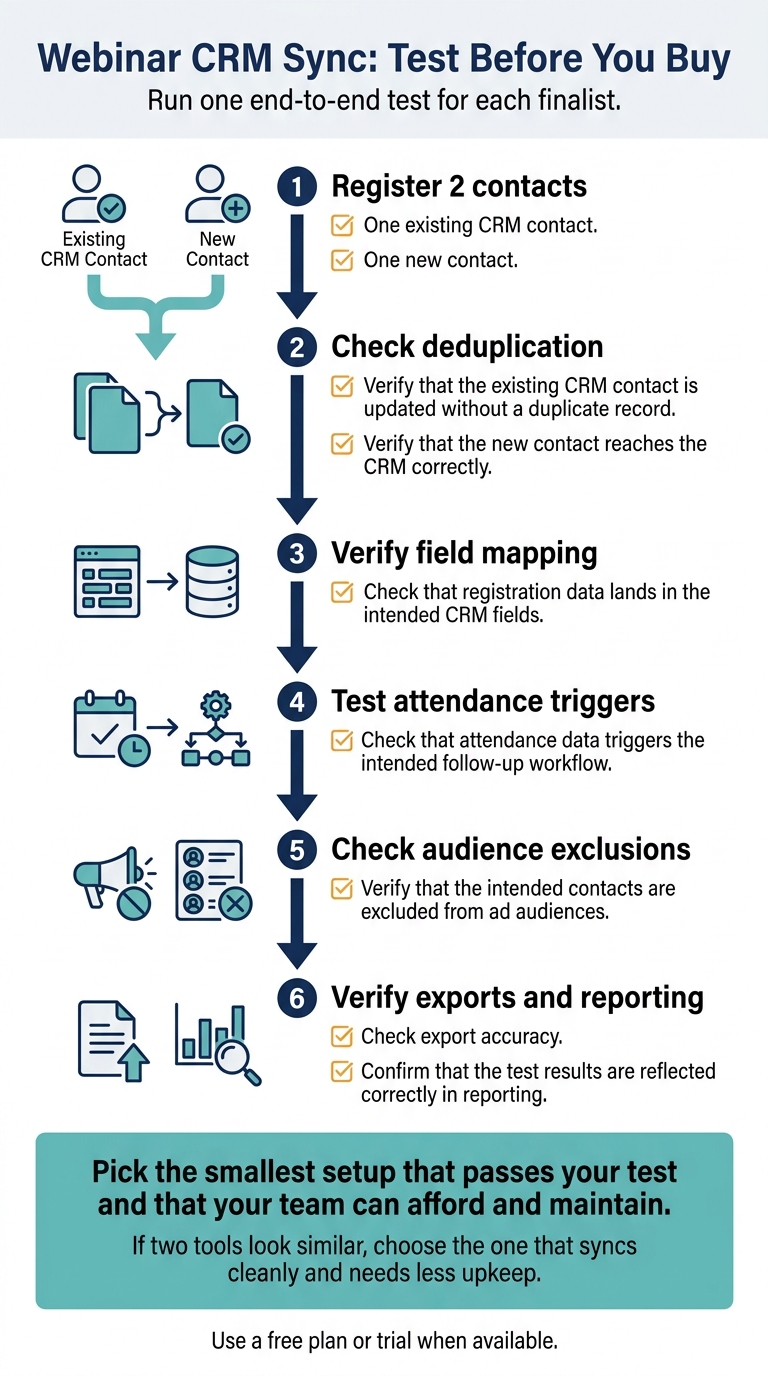
Webinar CRM Sync: Test Before You Buy
Choose for the campaign, not the feature count. GetResponse suits email-first teams because it combines email marketing and webinars [3][1]. For deeper CRM automation, focus on stronger native sync and event data. Multi-session events need session-level engagement tracking. B2B reporting needs links between engagement, CRM records, and pipeline outcomes.
Before you decide, run one end-to-end test for each finalist to check sync, triggers, audiences, and reporting. Register both an existing CRM contact and a new contact. Then check deduplication, field mapping, attendance triggers, audience exclusions, and export accuracy. Use a free plan or trial when available [1].
Pick the smallest setup that passes your test and that your team can afford and maintain. If two tools look similar, choose the one that syncs cleanly and needs less upkeep.
FAQs
How can I recover failed webinar-to-CRM syncs?
Check your integration setup for technical mismatches and data conflicts [1]. Verify that API authentication is secure and that webinar metrics map to the right CRM fields [2][3]. If webhooks trigger your syncs, check connection stability and pipeline delays. Monitor performance regularly, targeting an error rate below 0.1% [4].
Growth-onomics uses data-driven strategies to fix integration issues, ensure compatibility, and prevent data silos that can lead to sync failures [1].
Which webinar signals should drive lead scoring?
Your webinar platform should send behavioral signals directly to your CRM: registration status, how long someone actually attended, and whether they took part in polls or Q&A sessions or downloaded resources. These actions help show a prospect’s interest and readiness for sales follow-up.
Use those event-based triggers to automate lead qualification and help sales focus on prospects who actively engaged with your webinar, improving conversion rates and campaign ROI.
How do I measure webinar ROI for long sales cycles?
Measure webinar ROI by connecting attendance and engagement to CRM deal outcomes, not just lead counts. Sync webinar data with your CRM, and map webinar events to sales stages.
Track leading and lagging indicators, including conversion rates, sales cycle length, and close rates. Also check sync accuracy, duplicate records, missing fields, and how promptly data arrives. Align your reporting window with your sales cycle to accurately attribute pipeline and closed-won revenue [1][2][3].